

P

Open-source alternatives to PandaDoc

DocuSeal is a free, open-source PandaDoc alternative for the signing side: send PDFs for e-signature and get them back signed, with an audit log. PandaDoc charges per seat for its proposal, quote and signing tools; DocuSeal does signing only, with no per-user fee.

2 alternatives Free apps Our pick: DocuSeal

At a glance

App Good for Code Ease of use
DocuSeal Small teams that send contracts and forms for signature without a per-user fee Code Open source Some setup
Documenso Small businesses and developers who want e-signatures with a free API and embedded signing on their own server Code Open source Some setup

Why look for an alternative to PandaDoc?

PandaDoc is a document platform for sales teams. It builds proposals, quotes and contracts from templates and a content library, adds pricing tables, tracks when clients open a document, collects e-signatures and payments, and connects to CRMs.

Teams look for an alternative because PandaDoc is charged per seat, and many only use it to send documents for signature. If your proposals are already written in a word processor, you are paying for an editor you don't need. Self-hosted signing apps such as DocuSeal and Documenso cover sending, signing and storing those documents with no per-user fee, and keeps them on your own server.

The alternatives, compared

DocuSeal

Our pick

Send contracts and forms for e-signature from your own server.

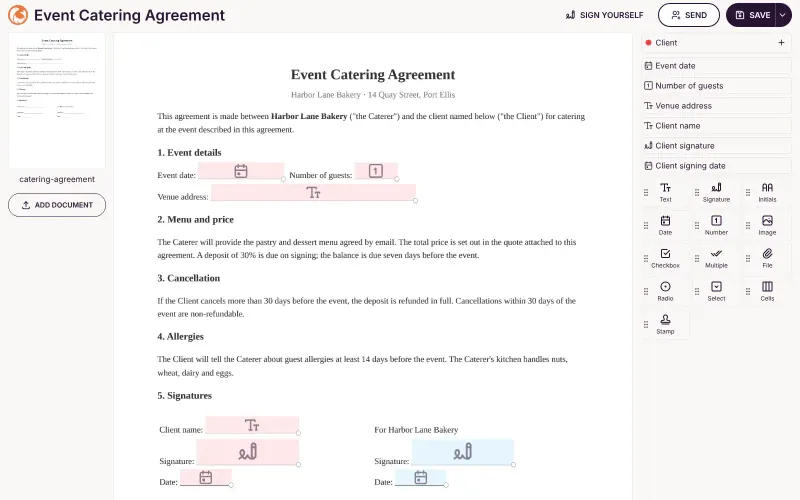
Does the signing half of PandaDoc well: place fields on a PDF, send it to several people, and get it back signed with an audit log. It has no proposal or quote editor, content library, CRM pipeline or document analytics, so it suits teams that already write their documents elsewhere and save them as PDFs.
Some setup Open source

Send documents for e-signature, like DocuSign.

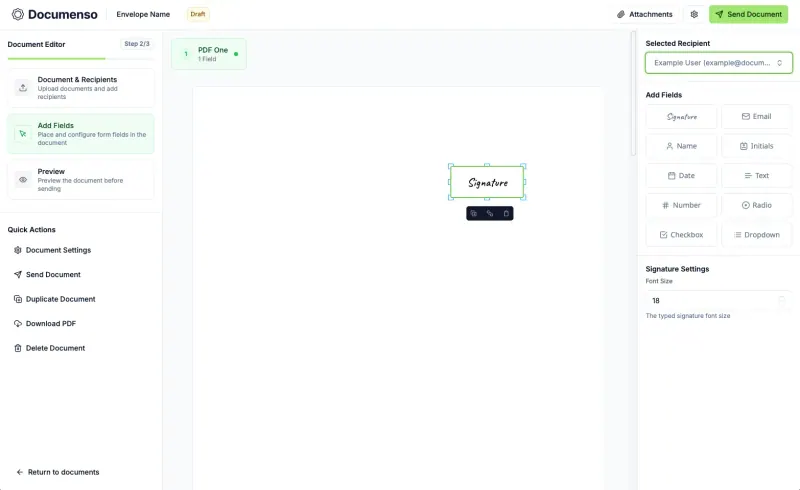
Also does the signing half: send PDFs to several people in order, with templates, reminders, bulk sending and a public signing link free. Like DocuSeal it has no proposal or quote editor, pricing tables, CRM links, document analytics or payments.

Some setup Open source

Moving from PandaDoc

There is no import from PandaDoc. Download your signed documents from PandaDoc first, as they will not move across. Export your proposal and contract templates as PDFs, upload each one to DocuSeal and place the signature, date and text fields once; after that the template is ready to send again. Keep writing proposals and quotes in your word processor or CRM, save them as PDF, and send them through DocuSeal for signing. Add your email server in DocuSeal's settings before you start, so signing requests go out by email. Documenso works the same way: save each PDF as a template once its fields are placed, and enter your email service's details when you set it up.

Questions

What is the best open-source alternative to PandaDoc?

Start with DocuSeal. Both are free and open source.

Can DocuSeal make proposals and quotes like PandaDoc?

No. DocuSeal does not build proposals, price tables or quotes. You write the document elsewhere, upload it as a PDF, and DocuSeal handles filling in and signing.

Can clients pay when they sign in DocuSeal?

Not in DocuSeal's free edition. Accepting payments is part of DocuSeal's paid Pro edition, and Documenso has no payments, while PandaDoc collects payments with the signature.

Do DocuSeal and Documenso track when clients open a document like PandaDoc?

No. PandaDoc tracks when clients open a document, but neither DocuSeal nor Documenso has document analytics. Both record who signed and when: DocuSeal keeps an audit log, and Documenso adds a page to each signed PDF showing who signed.

Are these PandaDoc alternatives really free?

Yes, DocuSeal and Documenso are free. To run them you need Cloudgate and a server. Use hosted Cloudgate, which can also provide the server, or install Cloudgate on a server of your own for free. Cloudgate's plans and prices are at cloudgate.octabyte.io/pricing. One server can run several apps.

Do I need a developer to replace PandaDoc?

No. Cloudgate installs the app you choose on your server and gives it a secure web address, and you use it in your browser instead of PandaDoc.