
DocuSeal
Send contracts and forms for e-signature from your own server.
No server needed to start: Cloudgate can provide one. What happens when you click Deploy
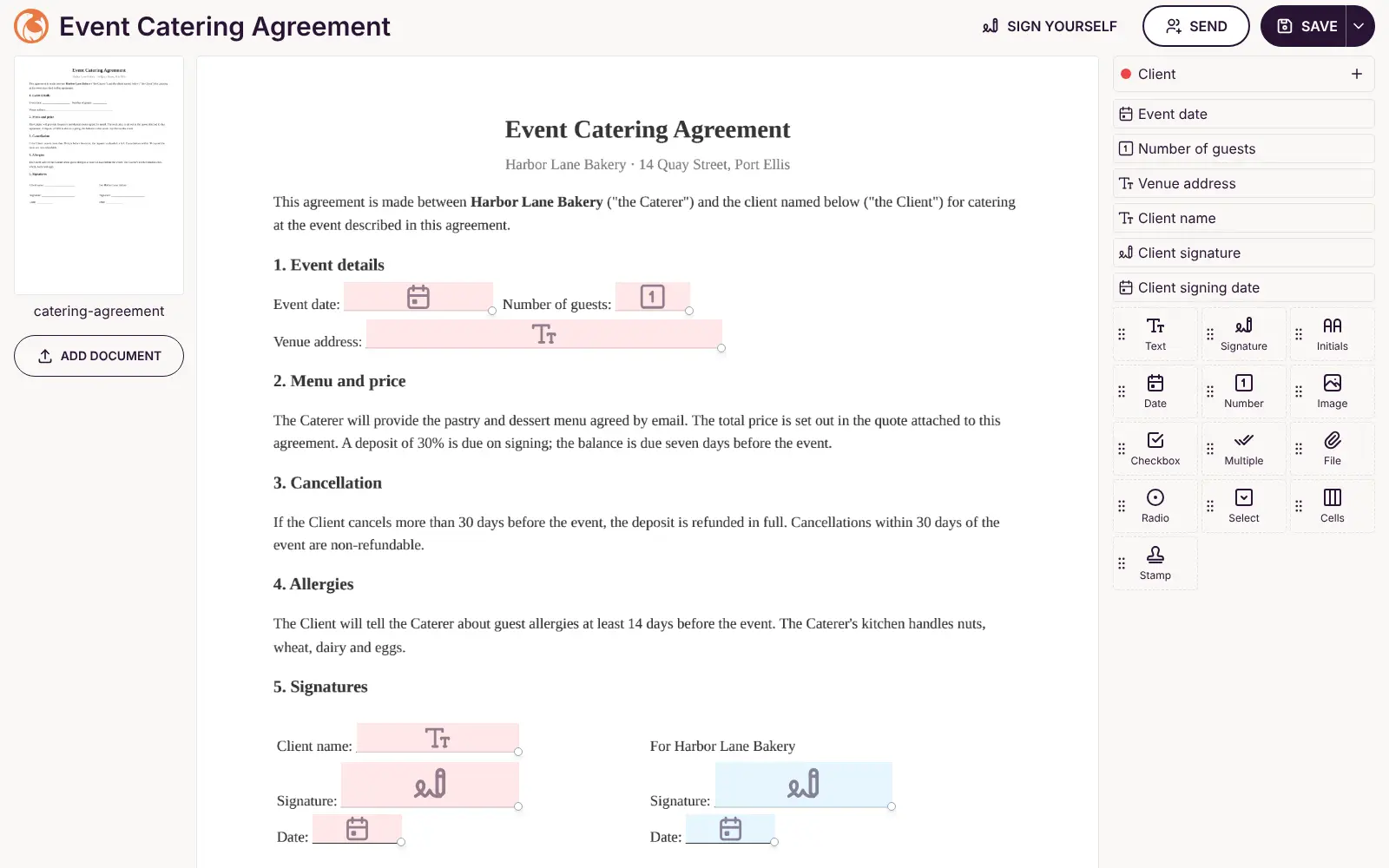
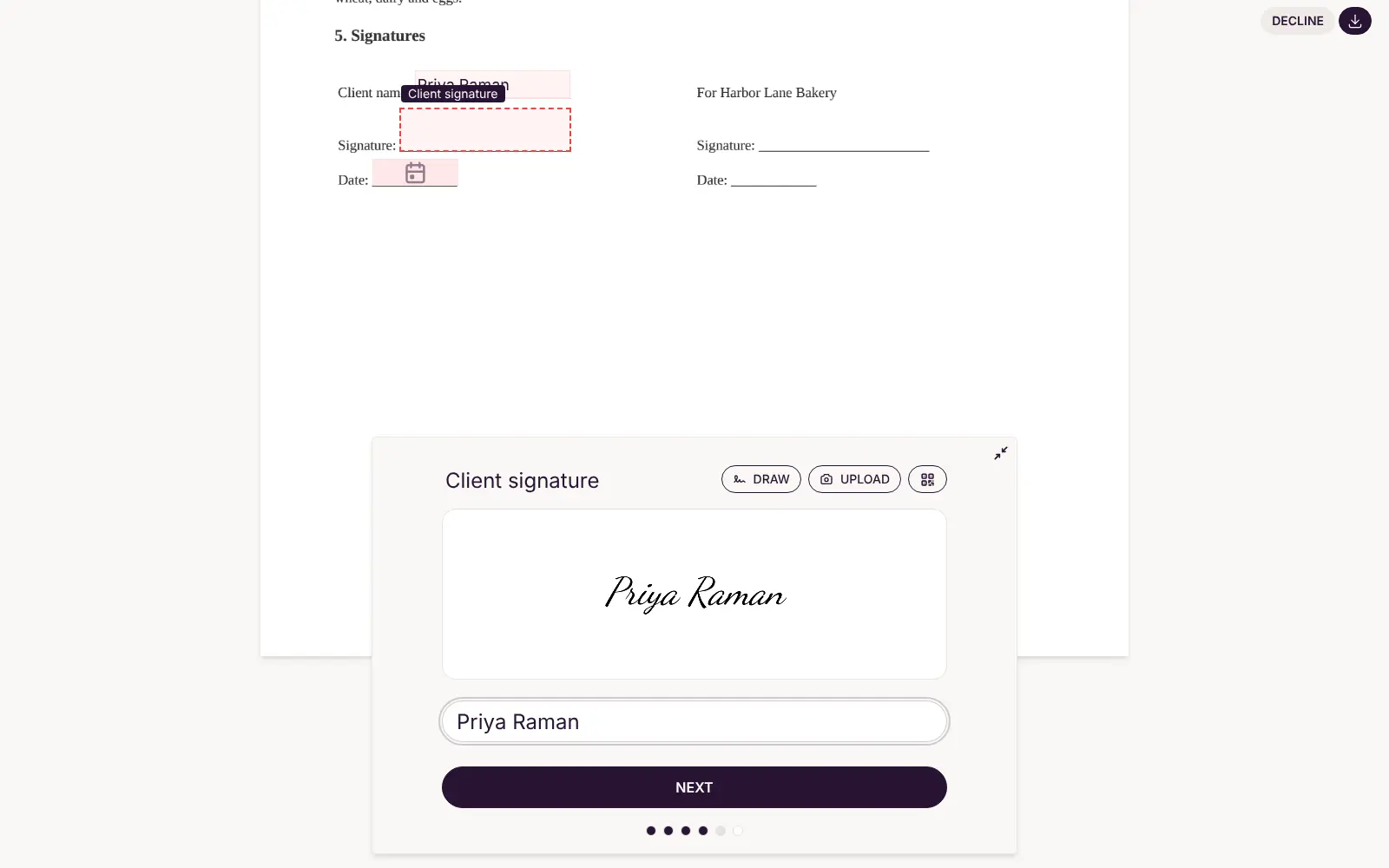
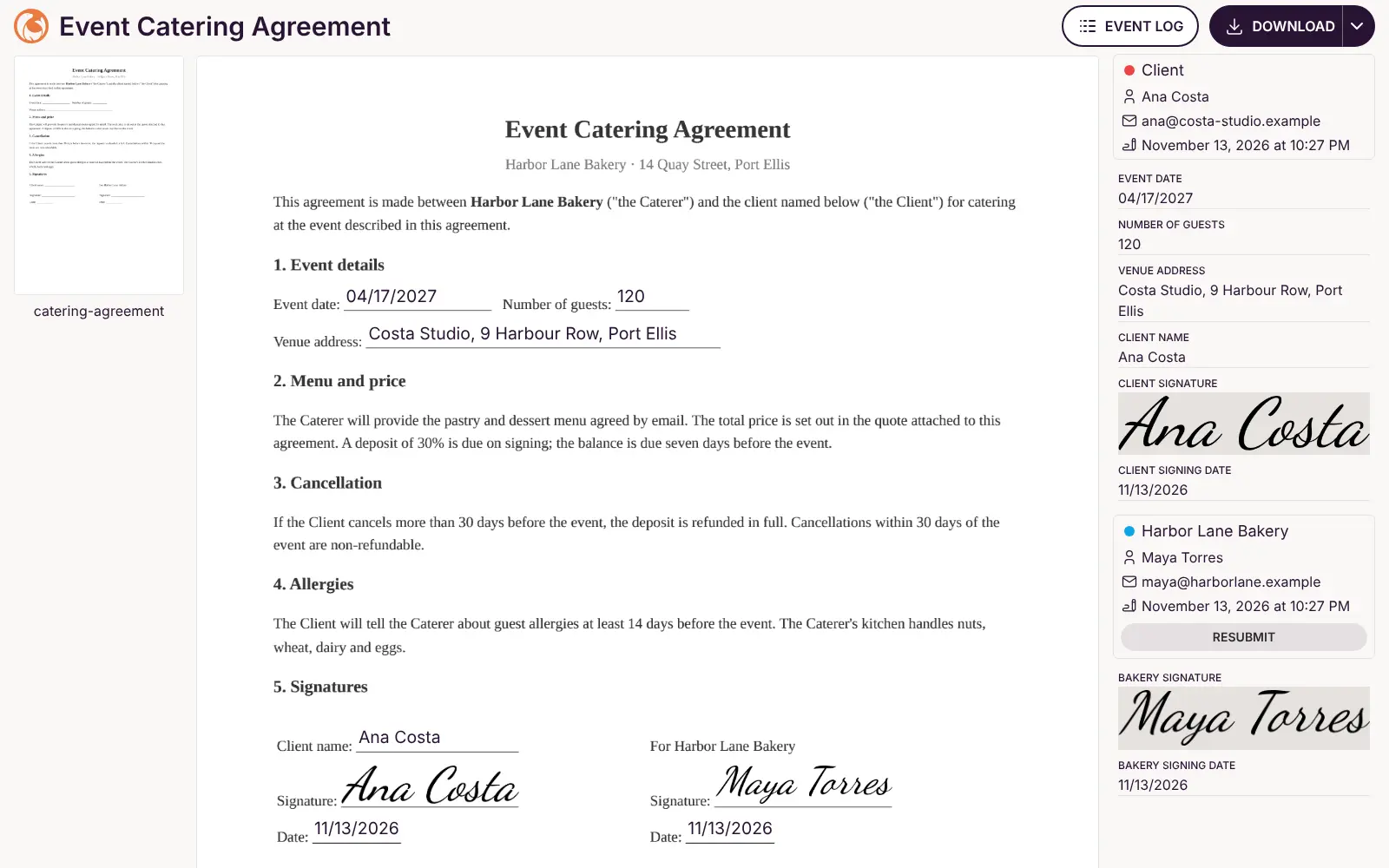
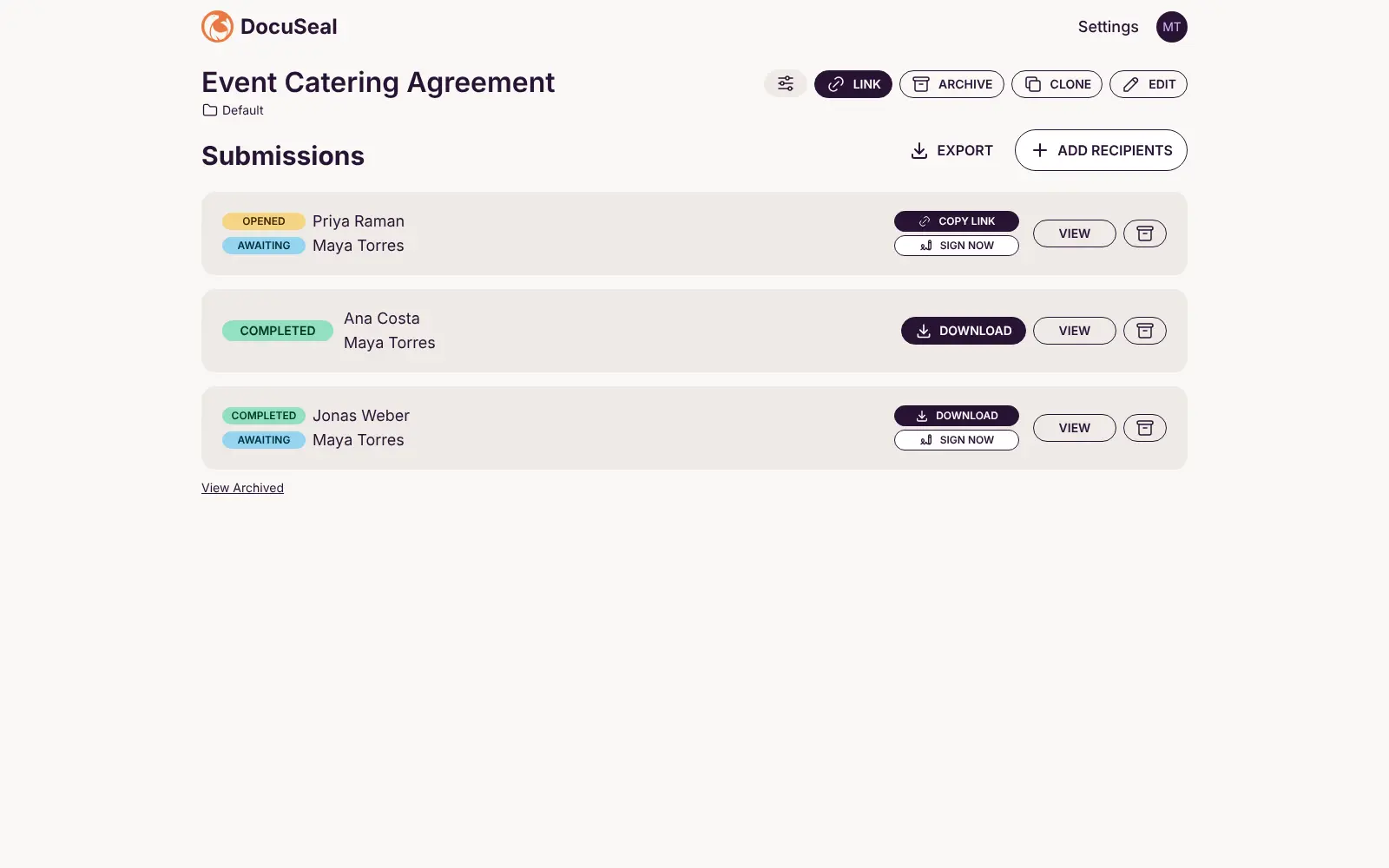
What is DocuSeal?
Self-hosted DocuSeal: an open-source DocuSign alternative. Send PDFs for e-signature, sign on any device, and keep a signed copy with an audit log.
DocuSeal is an open-source, self-hosted e-signature app that replaces DocuSign for sending contracts and forms to be filled in and signed online. You upload a PDF, place signature, date and text fields on it, and send it to one or more people, who sign in their browser on a phone or a computer. When everyone has signed, DocuSeal makes the signed PDF with an audit log of who signed and when.
A bakery, for example, could turn its catering agreement into a template once, then send it to each new client, see who has opened it and download the signed copy for its records. Landlords, agencies and HR teams can use it the same way for leases, client contracts and onboarding forms.
The free edition covers several signers, signing order, user accounts and checking signed PDFs, and developers can use its API and webhooks. Reminders, your own logo, bulk send and SSO are paid Pro extras, and signing pages keep a "Powered by DocuSeal" line.
Cloudgate installs DocuSeal on a server Cloudgate provides or one you connect, together with its database, and gives it a secure web address. The first person to open that address creates the admin account. Add your email server in Settings to email signing requests, or copy each signing link and share it yourself.
What you can do with DocuSeal
- Turn any PDF into a form to sign Upload a PDF and drag signature, initials, date, text, checkbox and other fields onto the page.
- Send to several people Add each signer with their own fields, and set the order they sign in if it matters.
- Sign on any device Signers open a link in their browser, on a phone or a computer, and draw, type or upload their signature.
- Get a signed PDF with an audit log When everyone has signed, DocuSeal makes the finished PDF and an event log of who signed, when and from where.
- Track every agreement See which documents are waiting, opened or completed, copy signing links and download the results.
- Check a signed PDF Upload a signed document to confirm it has not been changed since it was signed.
- Invite your team Add colleagues as users, and turn on two-step sign-in with an authenticator app.
- Connect your own software An API and webhooks let developers send documents for signature from another app.
Replaces DocuSign, PandaDoc and Dropbox Sign
DocuSeal does the same job as DocuSign, PandaDoc and Dropbox Sign. Here is what changes when you switch.
- No fee per user or per envelope; you pay only for your server
- Your contracts and signed copies stay on your own server
- Free features include several signers, user accounts and the audit log
- The source code is open, so you can see how signing works
- Reminders, your logo, teams and roles, bulk send and SSO are in the paid Pro edition, not the free one
- Signing pages keep a "Powered by DocuSeal" line in the free edition
- No proposal editor, CRM or payment collection, unlike PandaDoc
- Signing emails go out only after you connect your own email server
What happens when you click Deploy?
You do not need a server or any technical knowledge. Four steps, and DocuSeal is running at its own web address.
- Step 1 Click Deploy and create your account
Deploy takes you to Cloudgate. Create an account, or log in if you have one. DocuSeal itself is free.
- Step 2 Choose a server
No server? Get one from Cloudgate: pick a size and a country, and Cloudgate gets it ready. Already have one? Connect it instead.
- Step 3 Cloudgate sets up DocuSeal
It prepares the server, makes the passwords the app needs and starts it. There is nothing to install and nothing to write down.
- Step 4 Open your app and sign in
Your app gets a free web address to start, without https. Add your own domain, like app.yourshop.com, and Cloudgate secures it with https for you.
New to Cloudgate? See what Cloudgate is
Run Cloudgate yourself? Deploy from your own console
In your Cloudgate console, open Templates and choose DocuSeal.
Questions
Is DocuSeal free?
Yes, DocuSeal is free and open source under the AGPL-3.0 licence, and you pay only for your server. Its makers sell a separate Pro edition with extras such as reminders, your own logo, bulk send and SSO; the free edition keeps a "Powered by DocuSeal" line on signing pages.
Is DocuSeal a good alternative to DocuSign?
Yes, DocuSeal handles the everyday DocuSign job of sending a PDF to one or more people, getting it signed online and keeping a signed copy with an audit log. It has fewer integrations and, in the free edition, no automatic reminders, bulk send or SSO.
Are DocuSeal signatures legally binding?
DocuSeal says its e-signatures meet the US ESIGN Act and UETA and count as basic electronic signatures under the EU's eIDAS rules. Each signed document comes with an audit log of who signed and when. For contracts with special legal requirements, check with a lawyer.
Why is DocuSeal not sending emails?
DocuSeal sends no email until you add your email server's details in Settings, then Email. Until then you can still copy each signer's link and send it yourself by email or chat, and they can sign as normal.
How do I sign in to DocuSeal the first time?
The first person to open DocuSeal's web address sees a setup page and creates the admin account with a name, email and password. There is no default login, so do this right after setup.
Can I import my DocuSign templates into DocuSeal?
Partly. DocuSeal documents an import for DocuSign template exports, but its pricing page lists it as a Pro feature, not part of the free edition installed here, and only templates come across, not your past envelopes. Otherwise, upload your PDFs again and place the fields.
What server size do I need for DocuSeal?
A small server is enough, because DocuSeal recommends 1 CPU and 1 GB of memory for typical documents. Cloudgate sets it up on a small server with its database, and you can move to a bigger one if you sign very large files.
Do I need technical skills to run DocuSeal?
No. Click Deploy, create your Cloudgate account and choose a server, and Cloudgate sets up DocuSeal and gives it a web address. You use it in your browser like any other online tool.
Do I need my own server for DocuSeal?
No. When you deploy DocuSeal, hosted Cloudgate can provide a server. If you already rent one, you can connect it instead.
Related apps

Send documents for e-signature, like DocuSign.

PDF tools that run in your browser, so files never upload.

Online office for Word, Excel and PowerPoint files.
Convert images, video, documents and e-books on your own server.