Super Productivity
A self-hosted to-do list, time tracker and day planner in one.
No server needed to start: Cloudgate can provide one. What happens when you click Deploy
What is Super Productivity?
Self-hosted Super Productivity is a free to-do list, time tracker and day planner with focus timers, replacing Todoist and Sunsama.
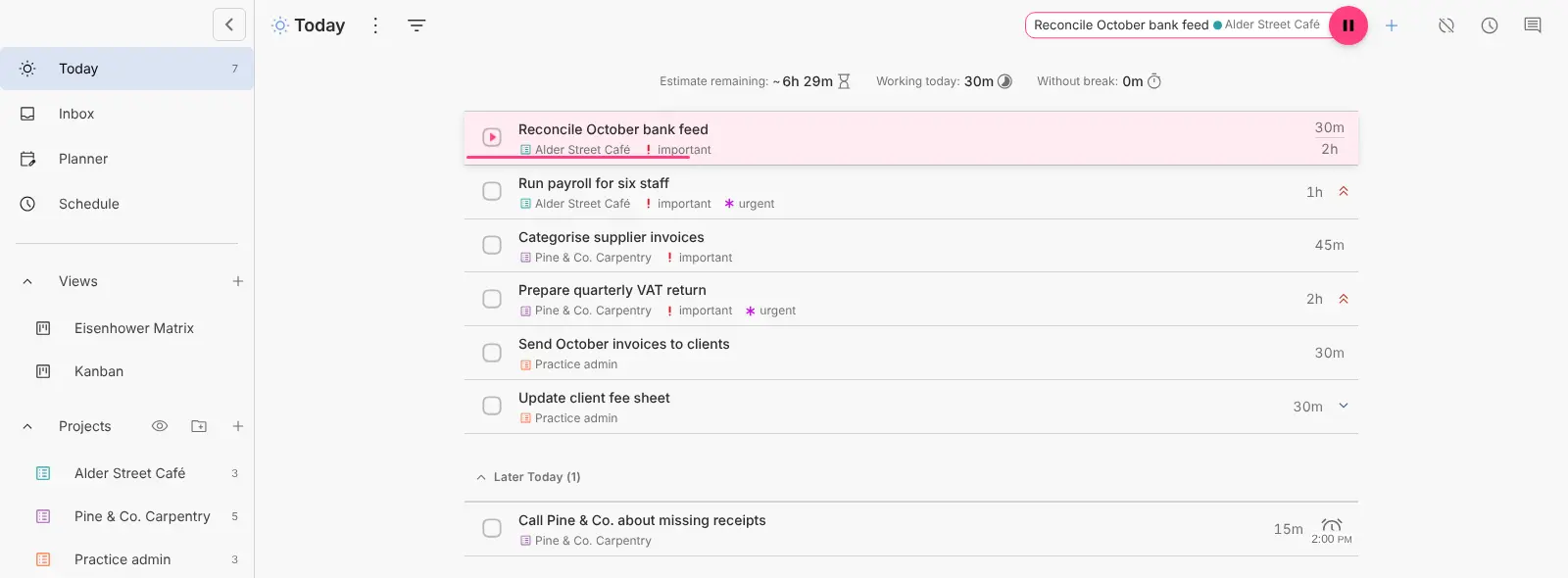
Super Productivity is a free, open-source to-do list, time tracker and daily planner that you can self-host, an alternative to Todoist, Sunsama, Toggl Track and TickTick for people who plan and track their own work. You keep tasks in projects with tags, sub-tasks and notes, plan them onto days, and start a timer on the task you are working on.
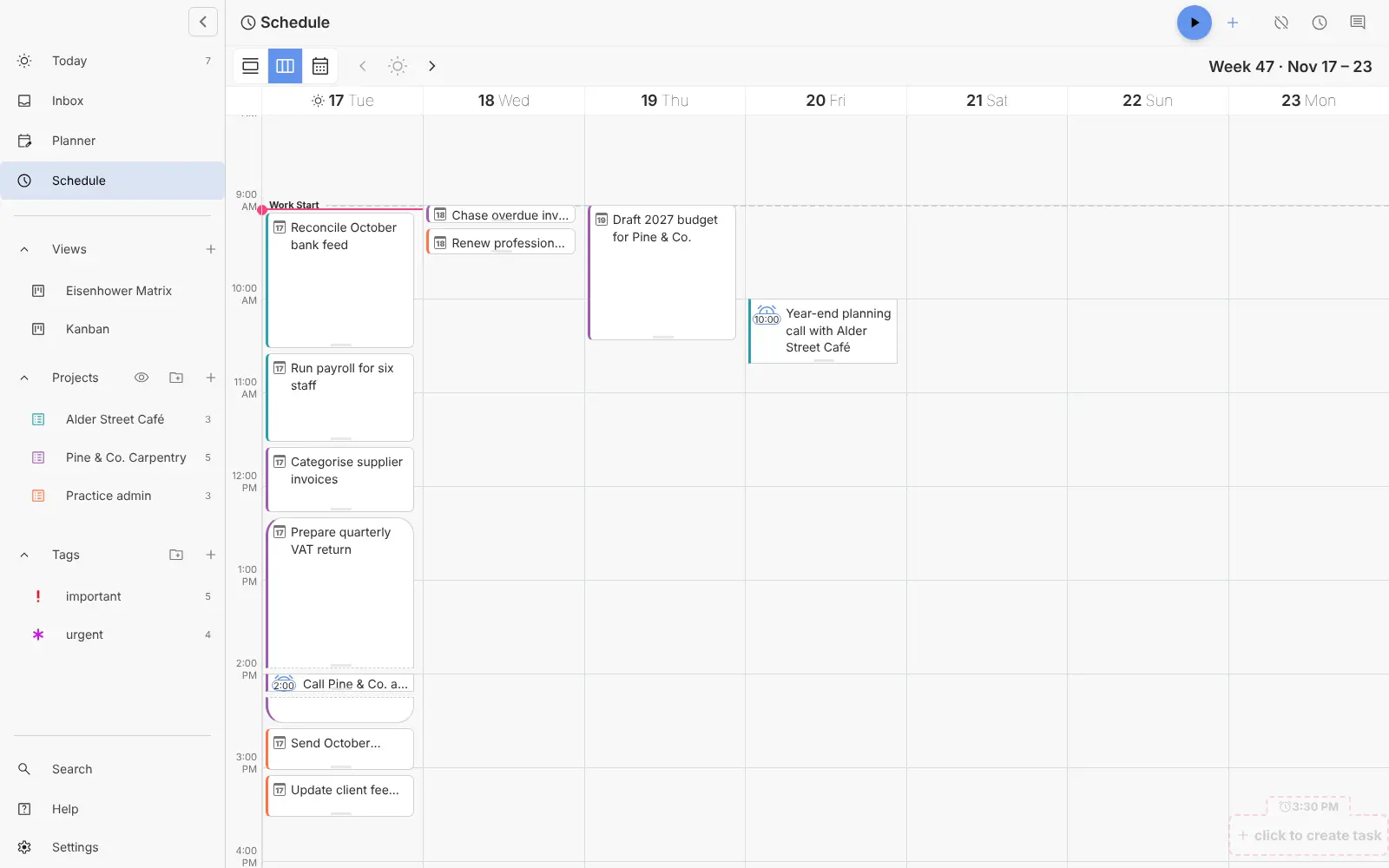
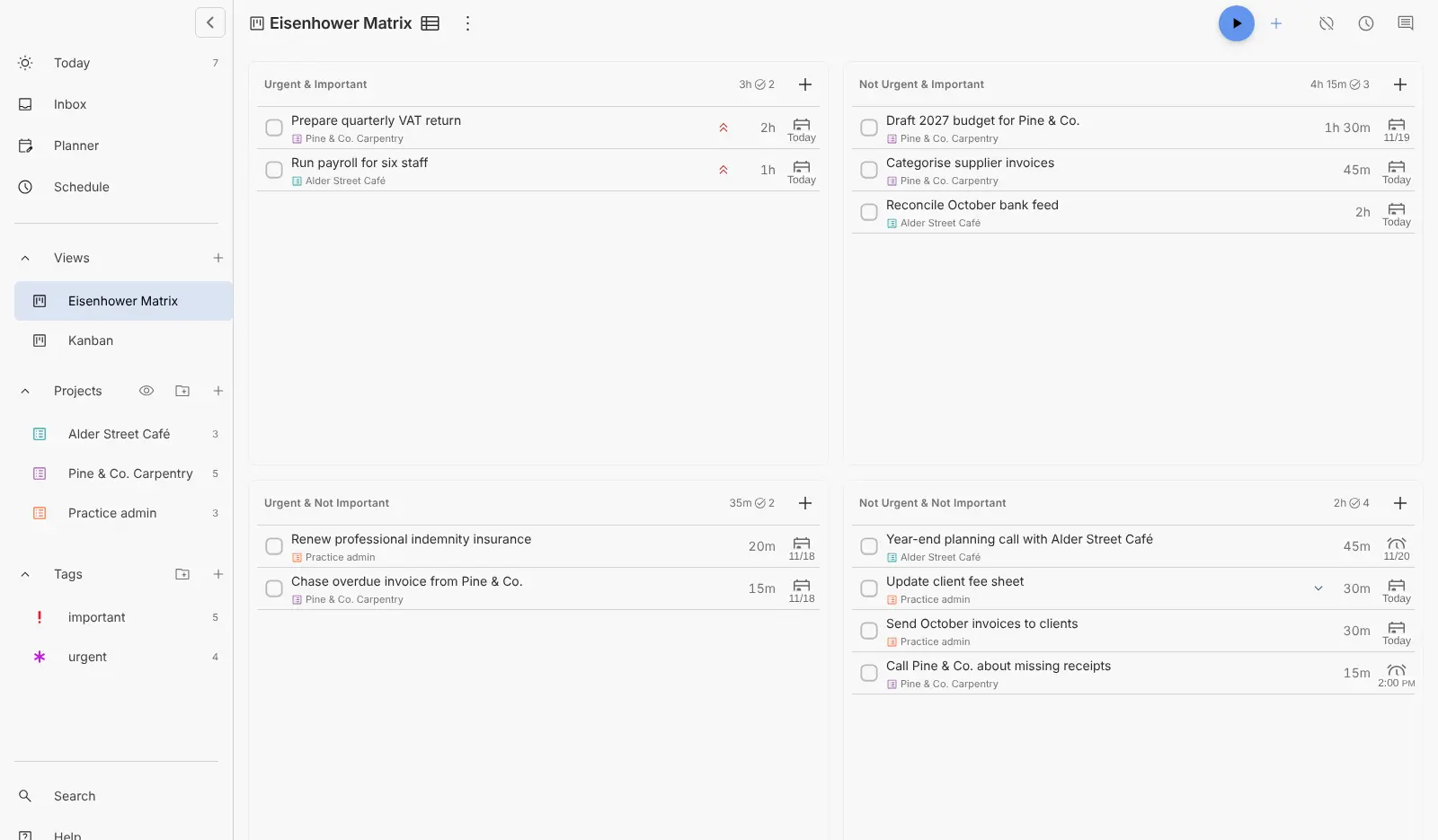
A freelance bookkeeper, for example, could keep one project per client, plan the week's payroll and tax returns on the Schedule, track the time spent on each client's bank reconciliation, and export a time sheet at the end of the month. The Eisenhower Matrix and focus timers help decide what comes first and keep at it.
Super Productivity works in any web browser and has apps for Android, iPhone, Windows, macOS and Linux. It can import from Todoist and TickTick and pull in tasks from Jira, GitHub, GitLab and Trello. It is made for one person, not a shared team workspace.
Cloudgate installs Super Productivity with a private sync server on a server Cloudgate provides or one you connect, and gives it a secure web address. There is no account to create: open the address, then turn on sync with the password Cloudgate shows you so your tasks are kept on your server.
What you can do with Super Productivity
- Plan your day and week Drag tasks onto days in the Planner, then see them laid out hour by hour on the Schedule.
- Track time on every task Start a timer on the task you are working on and see how long each task, project and day took.
- Export timesheets Turn your tracked hours into time sheets and work summaries to send to a client or copy into another system.
- Sort by priority Switch on Views in the settings to get a Kanban board and an Eisenhower Matrix, or build your own board from tags, projects and dates.
- Add tasks in one line Type "Call the printer +Shop 15m @friday" and the task gets its project, time estimate and date.
- Stay focused Work in Pomodoro, Flowtime or countdown sessions, with break reminders when it is time to step away.
- Pull in work from other tools Import tasks assigned to you from Jira, GitHub, GitLab, Trello, ClickUp, Linear, OpenProject and others.
Replaces Todoist, Sunsama, Toggl Track and TickTick
Super Productivity does the same job as Todoist, Sunsama, Toggl Track and TickTick. Here is what changes when you switch.
- Every feature is free, with no premium tier
- Time tracking, a day schedule and focus timers in the same app as your to-do list
- Tasks and tracked hours sync through your own server, not a vendor's cloud
- No account or sign-up, and the app collects no data about you
- It is a personal tool, with no shared projects or team accounts
- In the browser, tasks are kept on each device until you turn sync on
- Sync to your server uses the app's WebDAV option, which upstream marks as experimental
- The browser version tracks time only while its tab is open; the desktop app does more
- No invoicing, billing rates or team reports, unlike Toggl Track
What happens when you click Deploy?
You do not need a server or any technical knowledge. Four steps, and Super Productivity is running at its own web address.
- Step 1 Click Deploy and create your account
Deploy takes you to Cloudgate. Create an account, or log in if you have one. Super Productivity itself is free.
- Step 2 Choose a server
No server? Get one from Cloudgate: pick a size and a country, and Cloudgate gets it ready. Already have one? Connect it instead.
- Step 3 Cloudgate sets up Super Productivity
It prepares the server, makes the passwords the app needs and starts it. There is nothing to install and nothing to write down.
- Step 4 Open your app and sign in
Your app gets a free web address to start, without https. Add your own domain, like app.yourshop.com, and Cloudgate secures it with https for you.
New to Cloudgate? See what Cloudgate is
Run Cloudgate yourself? Deploy from your own console
In your Cloudgate console, open Templates and choose Super Productivity.
Questions
Is Super Productivity free?
Yes, Super Productivity is free and open source under the MIT licence, with every feature on every platform and no premium tier. You pay only for your server.
Is Super Productivity a good alternative to Todoist?
Yes, for one person who also wants time tracking, a day schedule and focus timers next to their to-do list. Todoist is better if you share projects with other people, because Super Productivity has no team accounts. You can bring your Todoist projects, tasks, labels and due dates across with its built-in importer.
Can Super Productivity replace Sunsama or Toggl Track?
Partly. Super Productivity covers daily planning, timeboxing and tracking time per task for one person, and exports time sheets. It has no guided planning routine like Sunsama and no invoicing, billing rates or team reports like Toggl Track.
How do I sign in to Super Productivity the first time?
There is no sign-in. Super Productivity has no accounts, so opening your web address shows the app straight away. To save your tasks on your server, enter the sync password shown in Cloudgate in the app's sync settings and turn sync on.
Does Super Productivity save my tasks on my server?
Only once sync is on. The browser version of Super Productivity keeps tasks in that browser's own storage, so clearing it or switching browsers starts empty. With sync on, each browser, desktop app and phone app keeps a copy on your server and stays up to date. Sync uses the app's WebDAV option, which upstream marks as experimental because WebDAV servers behave differently.
Can Super Productivity import my tasks from Todoist or TickTick?
Yes. Super Productivity imports active projects, tasks, sub-tasks, labels and due dates from Todoist, and lists, tasks, checklists and tags from a TickTick backup file. Completed tasks are not imported.
Is there a Super Productivity phone or desktop app?
Yes, Super Productivity has free apps for Android, iPhone, Windows, macOS and Linux, and they can sync with the same server as the web app.
Do I need technical skills to run Super Productivity?
No. Click Deploy, create your Cloudgate account and choose a server, and Cloudgate sets up Super Productivity and gives it a web address. You use it in your browser like any other online tool.
Do I need my own server for Super Productivity?
No. When you deploy Super Productivity, hosted Cloudgate can provide a server. If you already rent one, you can connect it instead.
Related apps

A self-hosted to-do list that plans your day, alone or as a family.

An offline-first, self-hosted Todoist alternative with time blocking.

A self-hosted to-do list with Kanban boards and Gantt charts.

Project boards with a time tracker on every task.