Open-source alternatives to TickTick

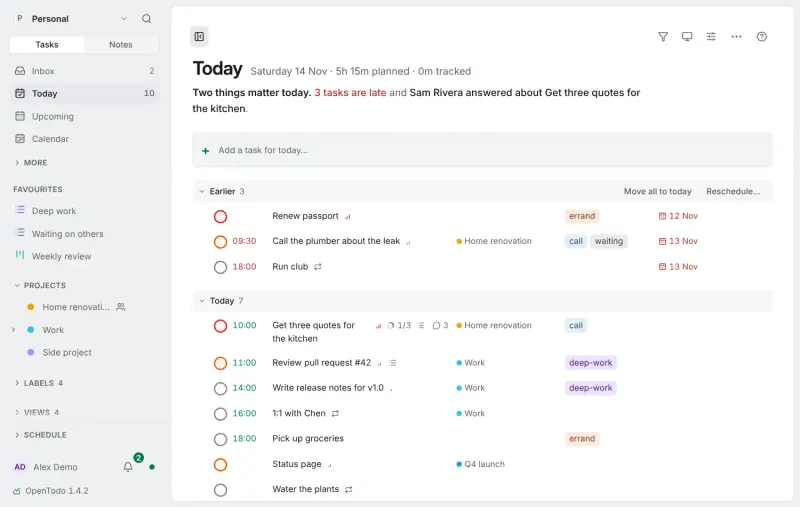
OpenTodo is the free, open-source TickTick alternative we recommend: tasks with quick add in plain words, a day and week calendar for time blocking, a Pomodoro focus timer, habits and shared lists that work offline on every device, and it imports your TickTick backup. TickTick keeps features such as its calendar views for its paid Premium plan; self-hosted OpenTodo holds nothing back for a paid plan, though it is a young project and its iPhone app is a first release.

3 alternatives Free apps Our pick: OpenTodo

At a glance

App Good for Code Import from TickTick Ease of use
OpenTodo People, families and small teams who want a Todoist-style to-do list that works offline on every device Code Open source Import from TickTick Yes Easy
tududi People and families who want a private to-do list with projects, recurring tasks and a daily plan Code Open source Import from TickTick No Easy
Super Productivity Freelancers and individuals who plan their day and track time per task or client Code Open source Import from TickTick Yes Some setup

Why look for an alternative to TickTick?

TickTick is a popular to-do list and planner for phones, computers and the web, with lists, reminders, calendar views, a habit tracker, a Pomodoro focus timer and an Eisenhower Matrix. Some features, such as its calendar views, are part of its paid Premium plan.

People look for an alternative because its free plan stops at 9 lists and 99 tasks per list, and calendar views, the timeline and higher limits need Premium. Others want their tasks and habits on a server of their own. A self-hosted OpenTodo covers TickTick's calendar, focus timer and habits with nothing held back for a paid plan, and imports your TickTick backup. tududi keeps tasks, projects, habits and a daily plan on your server, free for everyone in the household. Super Productivity is a free, open-source to-do list and time tracker with focus timers and an Eisenhower Matrix, all features free, and the self-hosted version keeps your data in sync through your own server.

The alternatives, compared

OpenTodo

Our pick

An offline-first, self-hosted Todoist alternative with time blocking.

Covers TickTick's main jobs: tasks with priorities, labels and recurring dates, quick add that understands phrases such as "next Wed 3pm", a day and week calendar for time blocking, a Pomodoro, Flowtime or countdown focus timer, and habits. Projects can be shared with family or a team, and it imports TickTick's backup file with folders, lists, checklists and reminders. It works offline on every device, but the project is only months old, its iPhone app is a first release and its Android app is downloaded from GitHub.

Easy Open source

A self-hosted to-do list that plans your day, alone or as a family.

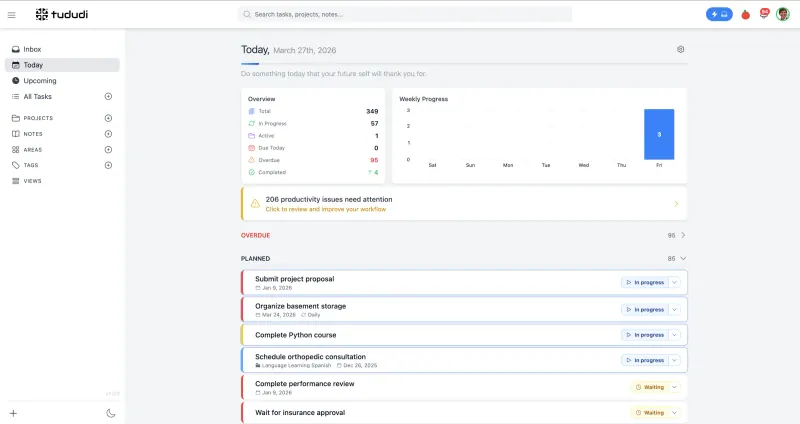
Covers a TickTick user's day: tasks with subtasks, priorities and due dates, recurring tasks, a quick-add box that understands dates such as "next fri", habits with streaks, and a plan for the day around your meetings. Projects can be shared with family or a small team. It has no native phone apps, so you use it as a web app on the home screen or sync tasks to apps such as Apple Reminders or tasks.org over CalDAV, and there is no TickTick importer.

Easy Open source

A self-hosted to-do list, time tracker and day planner in one.

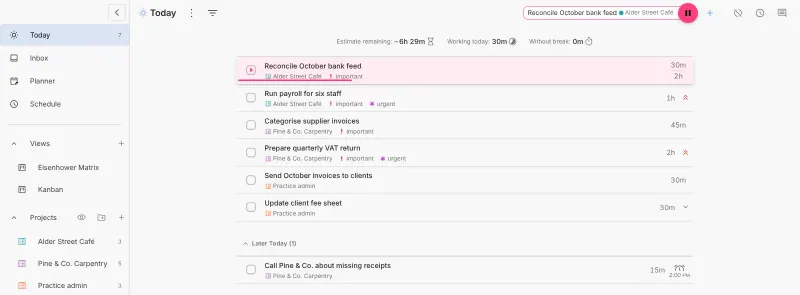
Covers TickTick's personal side: tasks with sub-tasks, projects, tags and repeat rules, a Pomodoro focus timer, an Eisenhower Matrix board and a planner, plus time tracking per task, with every feature free. It imports a TickTick backup file. It has no shared lists, and calendar sync usually does not work in its web version, unlike the desktop app.

Some setup Open source

Moving from TickTick

OpenTodo imports TickTick's backup: create it as a CSV file in TickTick's settings, then in OpenTodo open Settings, then Data, then Import data, and choose the file. Folders become parent projects, lists become projects, checklists become subtasks, and tags, priorities, due dates, reminders and most repeat rules come across; check the preview before importing, and set up your habits again. Then install the iPhone or Android app, or add the web app to your home screen, and invite your family with invitation links.

tududi has no TickTick importer, but it imports spreadsheets: export your tasks from TickTick as a CSV file, then import it in tududi, match the columns, and review the tasks before saving; an import can be undone for 7 days. Check recurring tasks and habits afterwards, since they may need setting up again. Sign in with your admin email and the password Cloudgate created, add tududi to your phone's home screen, and connect a CalDAV app if you want tasks in your phone's reminders.

For Super Productivity, download a backup of your tasks as a CSV file from TickTick's web app settings, then import that file in Super Productivity. Check your projects and tags afterwards, and set up repeating tasks again where needed. Switch on the Eisenhower Matrix and Kanban views in Settings, then App Features, as they are off on a new install. To use the same tasks on your phone or another computer, enter the sync password from Cloudgate in each app and turn sync on.


Questions

What is the best open-source alternative to TickTick?

Start with OpenTodo. All 3 are free and open source.

Should I choose OpenTodo, tududi or Super Productivity?

OpenTodo if you want TickTick's calendar, focus timer and habits with shared lists that work offline on every device, and an import of your TickTick backup. tududi if you want habits with streaks, a plan for the day and projects shared with family or a small team. Super Productivity if the list is only yours and you want focus timers, an Eisenhower Matrix, time tracking per task and an import of your TickTick backup.

Can I import my TickTick tasks?

Yes. OpenTodo and Super Productivity both read TickTick's backup CSV file, so your tasks come across without retyping them. tududi has no TickTick importer, but it imports the same CSV file as a spreadsheet, where you match the columns.

Does tududi have habits like TickTick?

Yes. tududi tracks habits you want to build or quit, with check-ins, streaks and reminders, next to your tasks.

Does Super Productivity have a Pomodoro timer like TickTick?

Yes. Its focus mode has Pomodoro, Flowtime and countdown timers, with break reminders.

Is there an OpenTodo phone app?

Yes. OpenTodo has an iPhone and iPad app in the App Store, still a first release, and an Android app downloaded from GitHub, and the web app installs on any phone. All of them work offline and sync through your own server.

Is there a tududi phone app?

Not in the app stores. tududi installs from the browser as a web app that works offline for reading, and syncs tasks over CalDAV with apps such as tasks.org and Apple Reminders.

Can I share a list with someone?

Yes, with OpenTodo, which shares projects as viewer, editor or admin, or with tududi, which shares projects with family or a small team. Super Productivity is a personal tool with no shared lists or user accounts.

Are these TickTick alternatives really free?

Yes, OpenTodo, tududi and Super Productivity are free. To run them you need Cloudgate and a server. Use hosted Cloudgate, which can also provide the server, or install Cloudgate on a server of your own for free. Cloudgate's plans and prices are at cloudgate.octabyte.io/pricing. One server can run several apps.

Do I need a developer to replace TickTick?

No. Cloudgate installs the app you choose on your server and gives it a secure web address, and you use it in your browser instead of TickTick.