
S

Open-source alternative to Sunsama

Super Productivity is a free, open-source Sunsama alternative for planning your day: drag tasks onto days, lay them out hour by hour on a schedule, timebox them and track the time you spend. Sunsama has no free plan and charges a monthly subscription; Super Productivity is free with no premium tier, though it has no guided planning rituals and does not pull in email or Slack messages.

Free app Code: Open source Import from Sunsama: No Some setup

Why look for an alternative to Sunsama?

Sunsama is a daily planner: each morning it walks you through choosing the day's tasks, pulls them in from email, Slack and work tools, and lays them out on your calendar as time blocks.

People look for an alternative because Sunsama has no free plan; after a 14-day trial it costs a monthly subscription. Some also want their task list and work history kept privately. Super Productivity is a free, open-source planner with a day and week schedule, timeboxing and time tracking, and the self-hosted version syncs your data through your own server.

How Super Productivity compares

A self-hosted to-do list, time tracker and day planner in one.

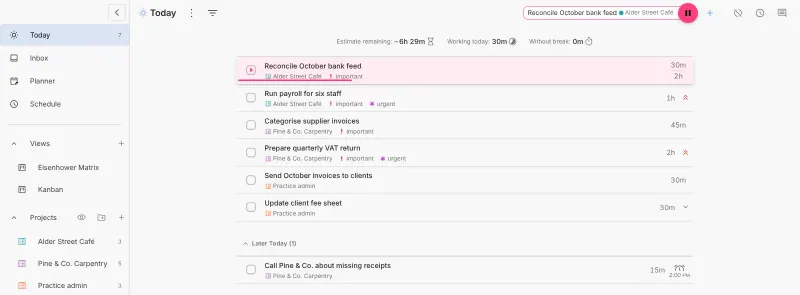
Covers Sunsama's daily planning for one person: drag tasks onto days in the Planner, see them hour by hour on the Schedule, set time estimates and track the time each task takes, with Pomodoro and focus timers. It also pulls in tasks from Jira, GitHub, GitLab, Linear and other tools. It has no guided planning rituals, does not bring in email or Slack messages, and is a personal tool with no shared team workspace.
Some setup Open source

Moving from Sunsama

There is no Sunsama importer, so list your open tasks in Super Productivity, or connect it to the issue tracker they come from, such as GitHub or Jira. Turn on the Schedule and Views in Settings, then App Features, since they are off on a new install. Each morning, drag the day's tasks into Today, add time estimates and check the Schedule to see whether the day fits. To keep your tasks on your server and on other devices, enter the sync password from Cloudgate in each browser or app and turn sync on.

Questions

What is the best open-source alternative to Sunsama?

Super Productivity is the free, open-source alternative to Sunsama for daily planning and timeboxing in the catalogue today. Covers Sunsama's daily planning for one person: drag tasks onto days in the Planner, see them hour by hour on the Schedule, set time estimates and track the time each task takes, with Pomodoro and focus timers. It also pulls in tasks from Jira, GitHub, GitLab, Linear and other tools. It has no guided planning rituals, does not bring in email or Slack messages, and is a personal tool with no shared team workspace.

Is Super Productivity really free?

Yes. Every Super Productivity feature is free on every platform, with no premium tier, while Sunsama has no free plan. It has apps for Windows, macOS, Linux, Android and iOS as well as the web.

Can a team share tasks in Super Productivity?

No. Super Productivity is built for one person's work, with no user accounts or shared projects. For a shared team task list, see the Todoist alternatives.

Does Super Productivity pull in tasks from email and Slack like Sunsama?

No. Super Productivity brings in tasks from Jira, GitHub, GitLab, Linear and other work tools, but not from email or Slack messages as Sunsama does, and it has no guided daily planning ritual.

Is Super Productivity really free compared with Sunsama?

Yes, Super Productivity is free. To run them you need Cloudgate and a server. Use hosted Cloudgate, which can also provide the server, or install Cloudgate on a server of your own for free. Cloudgate's plans and prices are at cloudgate.octabyte.io/pricing. One server can run several apps.

Do I need a developer to replace Sunsama?

No. Cloudgate installs Super Productivity on your server and gives it a secure web address, and you use it in your browser instead of Sunsama.