
Eigenfocus
Project boards with a time tracker on every task.
No server needed to start: Cloudgate can provide one. What happens when you click Deploy
What is Eigenfocus?
Self-hosted Eigenfocus gives one person project boards with a timer on every task and time reports, in place of Trello.
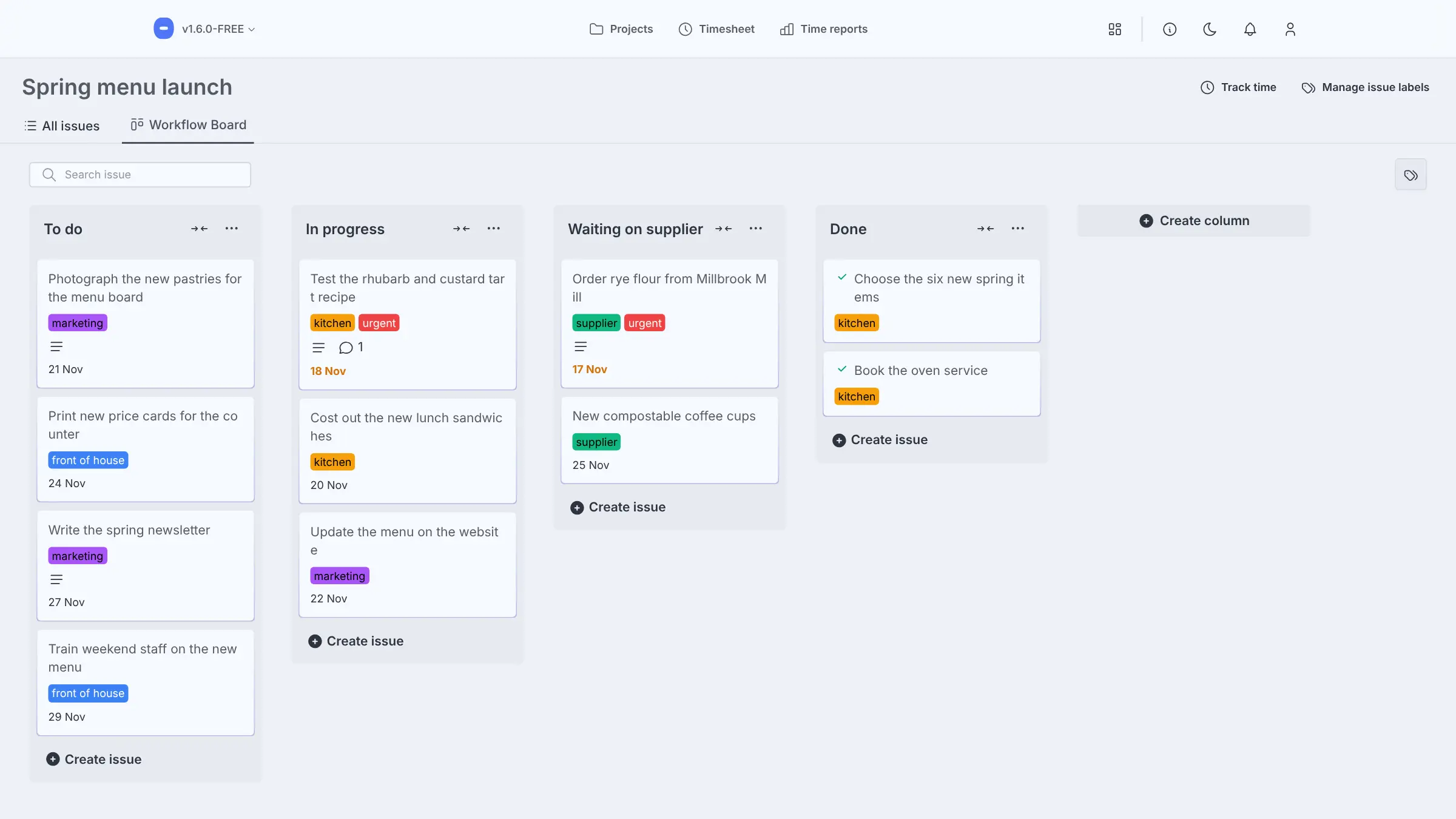
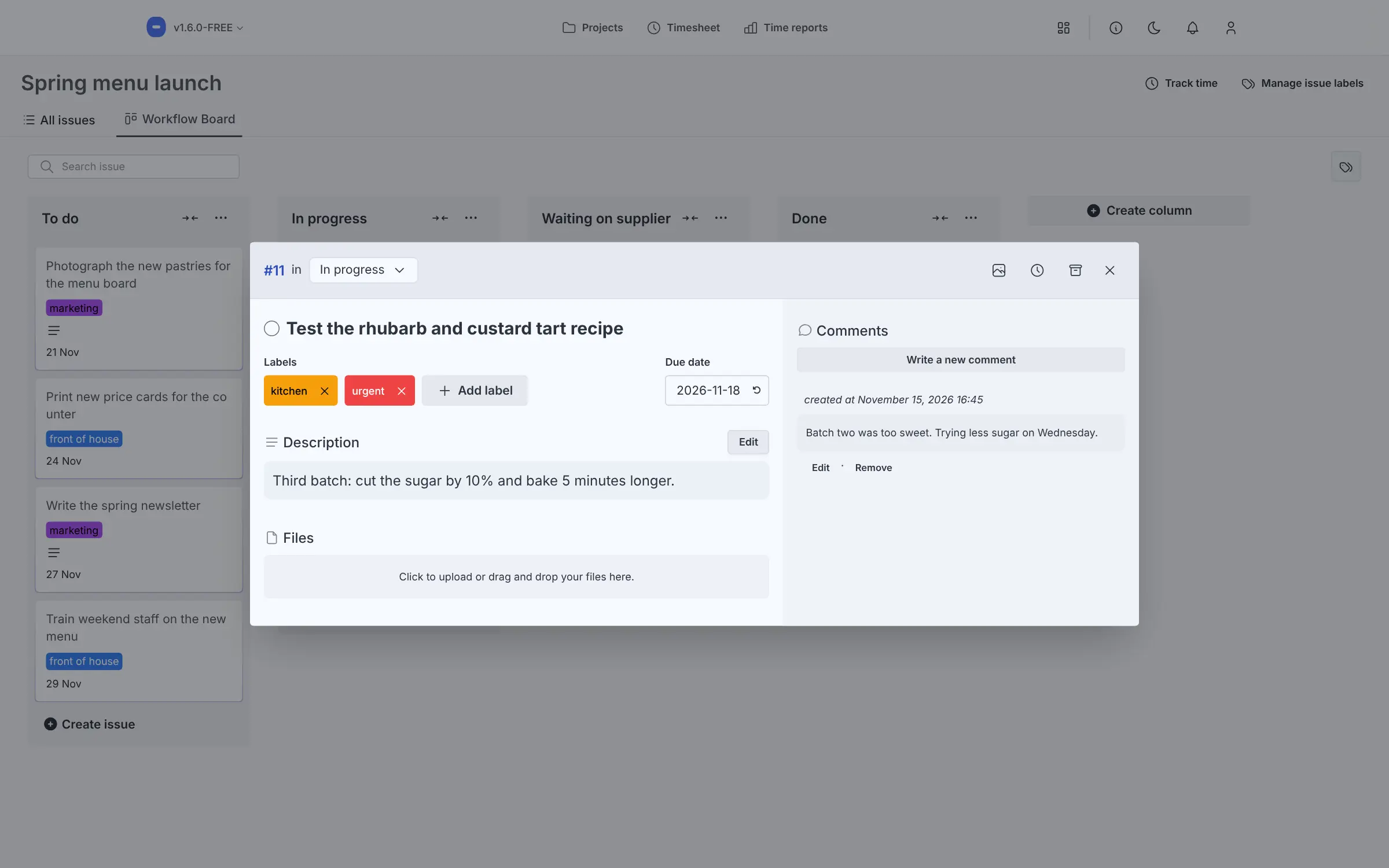
Self-hosted Eigenfocus is a free project board with a time tracker built in, a simple alternative to Trello for one person who wants to plan tasks and record the hours they take in one app. Each project is a board of tasks that you drag from column to column, with notes, checklists, files, labels, due dates and comments.
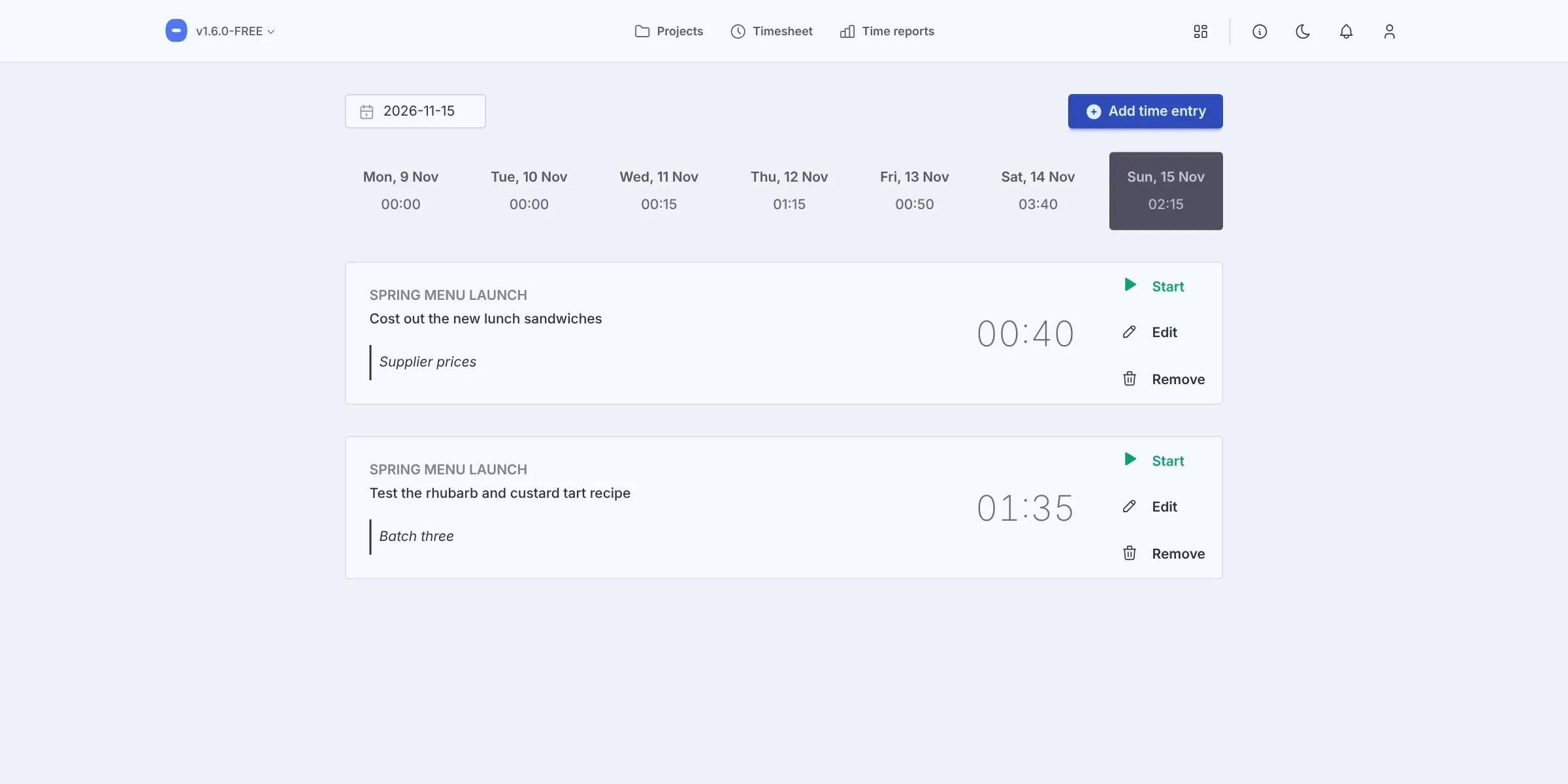
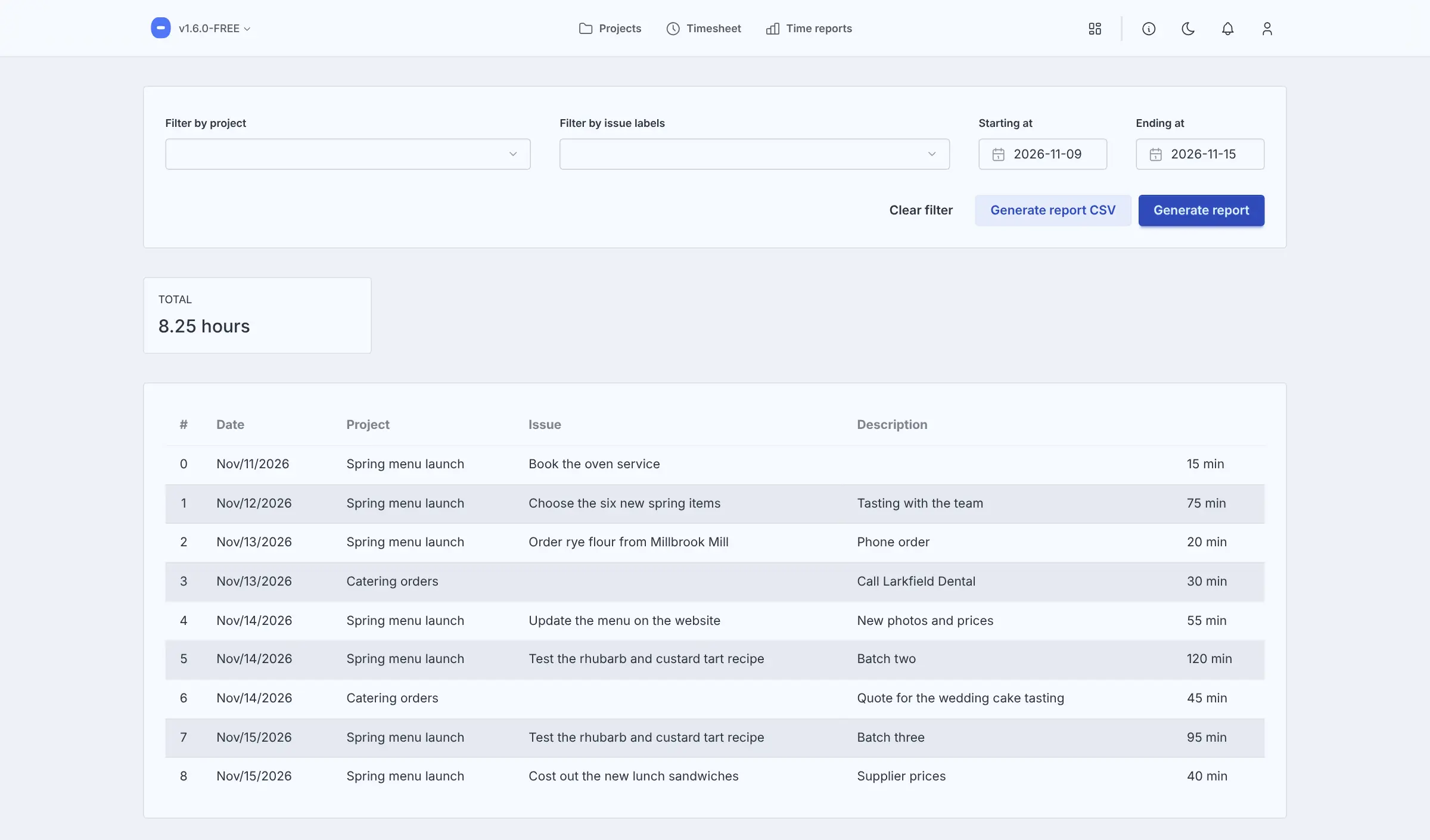
You start a timer from the task you are working on, see your week on a timesheet, and download time reports by project or date as a spreadsheet file. A freelance baker, for example, could keep one board for a new seasonal menu and another for catering orders, then pull up exactly how long the recipe testing took.
The free edition is for one person: it has no user accounts, and it cannot import boards from Trello. Several users, roles, timeline views and custom fields come with the paid Essential and PRO editions. Eigenfocus is source-available, not open source, and runs in your web browser, including on a phone, with no separate apps.
Cloudgate installs Eigenfocus on your server, protects it with a password and gives it a secure web address. Your projects, files and hours stay on your server.
What you can do with Eigenfocus
- Plan each project on a board Make your own columns and drag tasks from one stage to the next, with unlimited projects and tasks.
- Keep the details on the task Add notes with checklists, files, a cover picture, coloured labels, a due date and comments.
- Track time on the task itself Start a timer from the task you are working on, or add time by hand, and see your week on a timesheet.
- Report your hours Total your time by project, label and date range, and download the report as a spreadsheet file.
- See every task in a list Search, filter, sort and archive all of a project's tasks from one table.
- Start from a ready-made project Pick a starter layout for a simple to-do board, bug tracking, software work, customer support or a sales pipeline.
- Focus on one thing The Focus Space shows one task with a work-and-break timer and calming background sounds.
Replaces Trello
Eigenfocus does the same job as Trello. Here is what changes when you switch.
- Time tracking built in, with no add-on to buy
- Unlimited projects and tasks, with no monthly fee
- Your projects, files and hours stay on your own server
- The free edition has one user; a team needs a paid edition
- No import from Trello, so you start fresh
- No phone apps, automations or calendar view
- Timeline views and custom fields are only in the paid editions
What happens when you click Deploy?
You do not need a server or any technical knowledge. Four steps, and Eigenfocus is running at its own web address.
- Step 1 Click Deploy and create your account
Deploy takes you to Cloudgate. Create an account, or log in if you have one. Eigenfocus itself is free.
- Step 2 Choose a server
No server? Get one from Cloudgate: pick a size and a country, and Cloudgate gets it ready. Already have one? Connect it instead.
- Step 3 Cloudgate sets up Eigenfocus
It prepares the server, makes the passwords the app needs and starts it. There is nothing to install and nothing to write down.
- Step 4 Open your app and sign in
Your app gets a free web address to start, without https. Add your own domain, like app.yourshop.com, and Cloudgate secures it with https for you.
New to Cloudgate? See what Cloudgate is
Run Cloudgate yourself? Deploy from your own console
In your Cloudgate console, open Templates and choose Eigenfocus.
Questions
Is Eigenfocus free?
Yes, the Eigenfocus free edition costs nothing, with no time limit and no limit on projects or tasks, but it is for one person. Teams need the paid Essential or PRO edition, which you pay for once, or the paid Eigenfocus Cloud.
Is Eigenfocus open source?
No, Eigenfocus is source-available. Its code is public on GitHub under its own licence, which lets you install, use and change it inside your business but not share or sell it.
Can my team share the free edition of Eigenfocus?
Not really, because the free edition of Eigenfocus has no user accounts. Everyone who signs in with the shared password works as the same person, so there are no roles, assignments or private projects; those come with the paid editions.
Is Eigenfocus a good alternative to Trello?
Yes, Eigenfocus suits one person who wants Trello-style boards plus a time tracker on every task. It cannot import your Trello boards and has no phone apps or Power-Ups, and the free edition has one user.
How do I sign in to Eigenfocus the first time?
Your browser asks for a username and password; enter admin and the password Cloudgate shows in the app's settings. Eigenfocus then asks for your time zone and language, and an optional survey and newsletter you can skip.
Can I import my Trello boards into Eigenfocus?
No, Eigenfocus has no import from Trello. You set up your projects again and start fresh.
Is there an Eigenfocus phone app?
No, Eigenfocus is a web app with no phone or desktop apps. It opens in your web browser.
Do I need technical skills to run Eigenfocus?
No. Click Deploy, create your Cloudgate account and choose a server, and Cloudgate sets up Eigenfocus and gives it a web address. You use it in your browser like any other online tool.
Do I need my own server for Eigenfocus?
No. When you deploy Eigenfocus, hosted Cloudgate can provide a server. If you already rent one, you can connect it instead.
Related apps

Simple Trello-style kanban boards for your team, on your own server.
Kanban boards with swimlanes, calendars and rules.

Trello-style kanban boards that update in real time.

A simple self-hosted Kanban board with limits on work in progress.