
Vikunja
A self-hosted to-do list with Kanban boards and Gantt charts.
No server needed to start: Cloudgate can provide one. What happens when you click Deploy
What is Vikunja?
Vikunja is a self-hosted to-do list and task manager: plan tasks in lists, Kanban boards, Gantt charts and tables, alone or with your team.
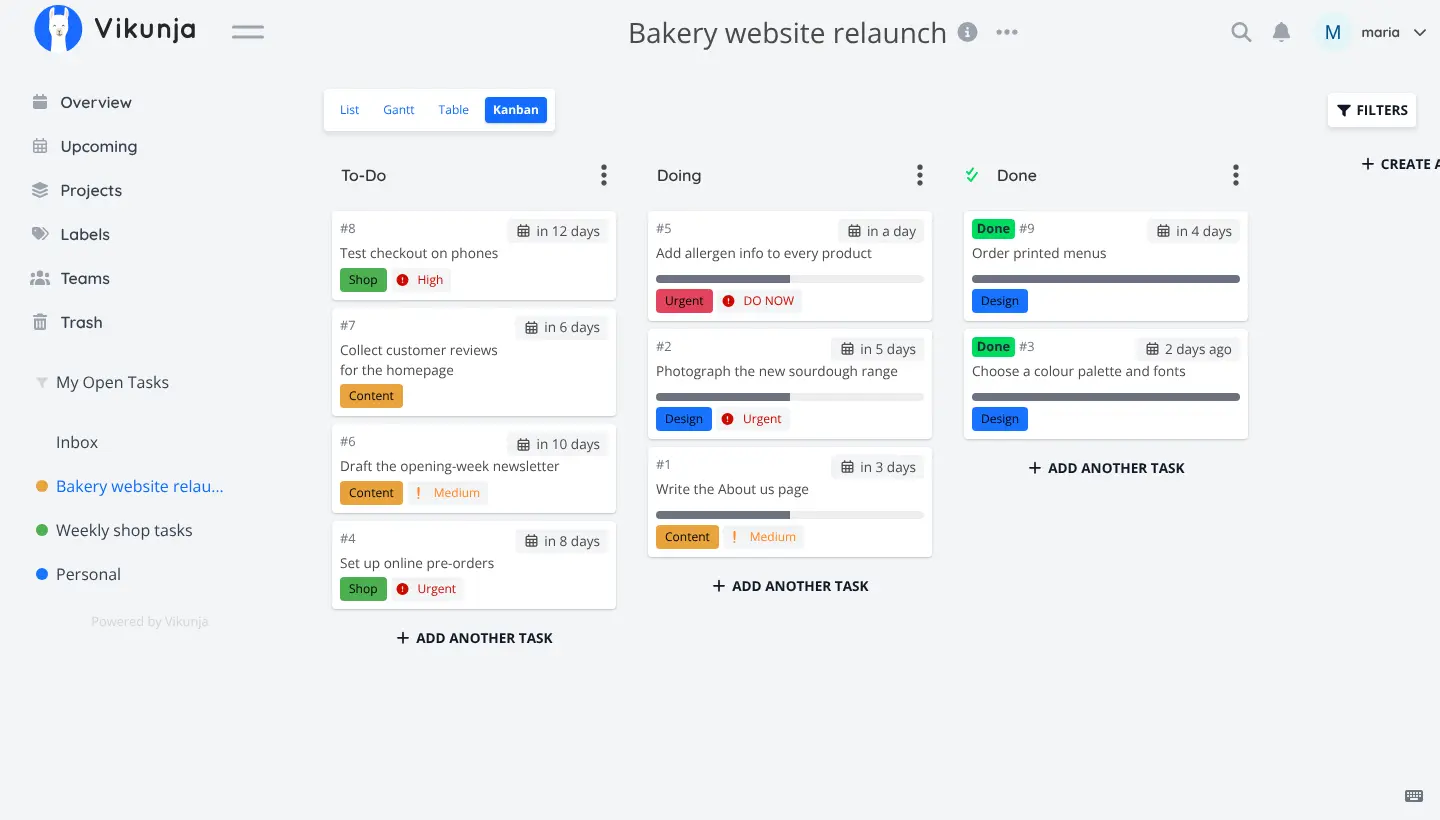
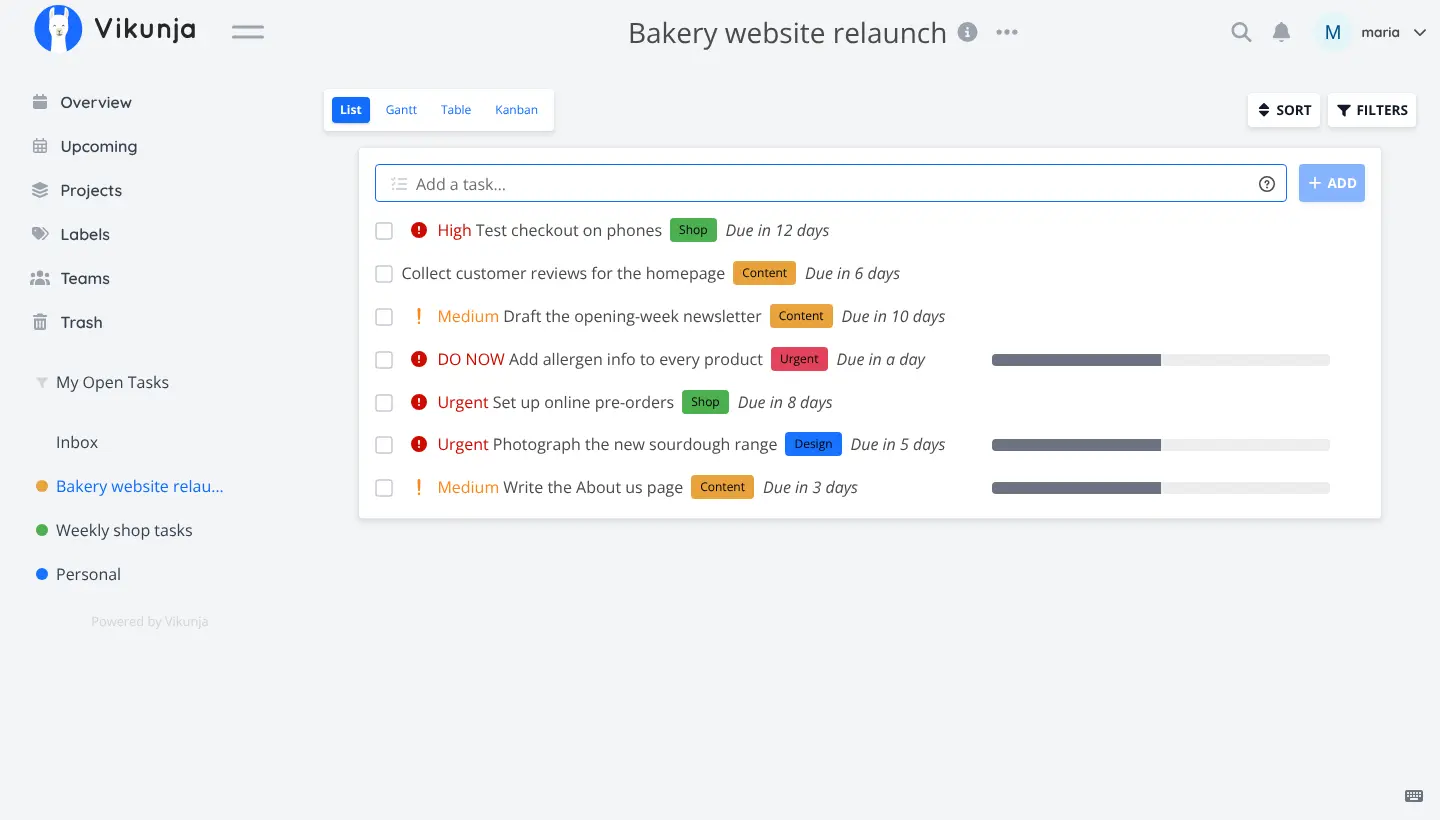
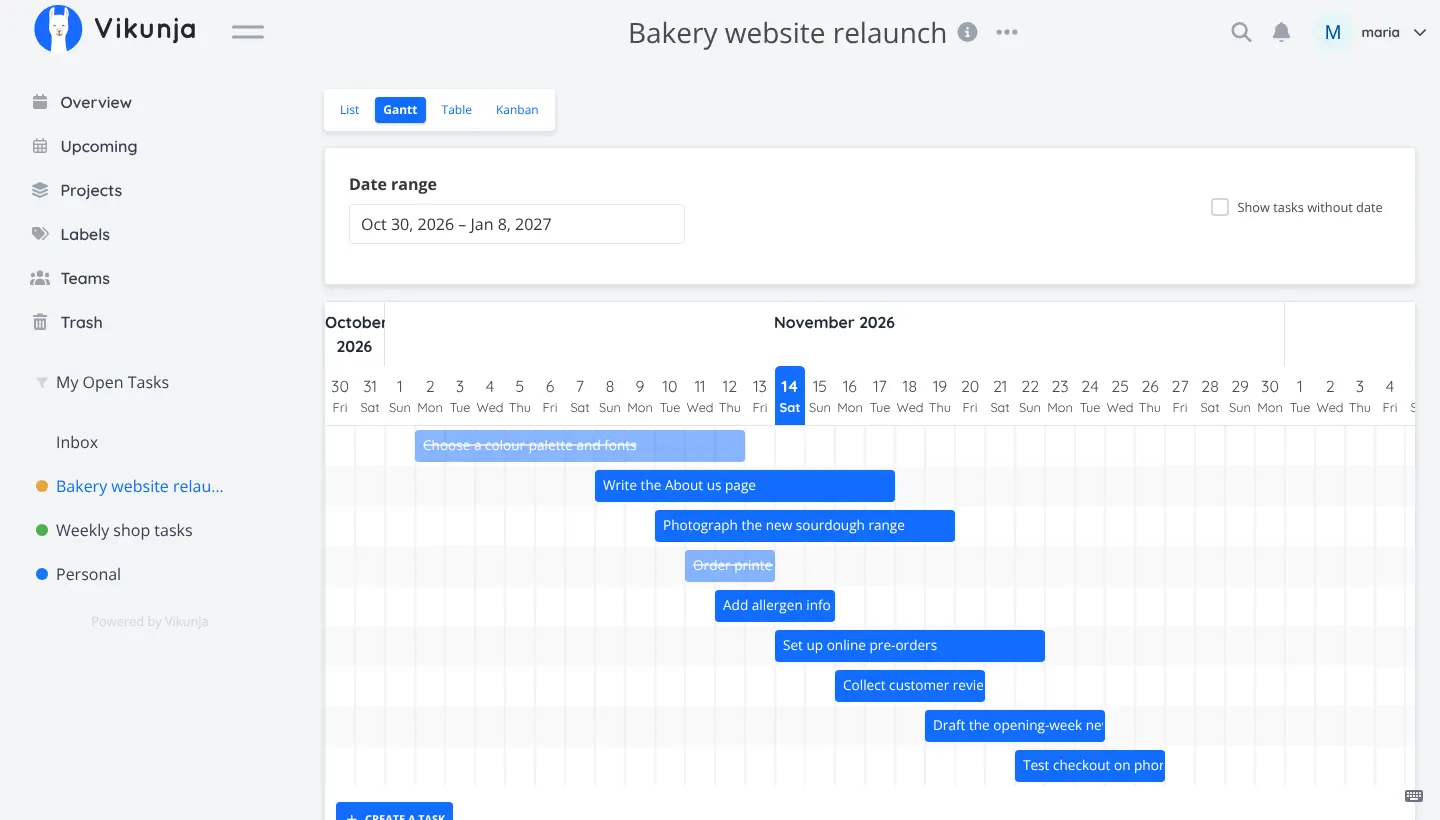
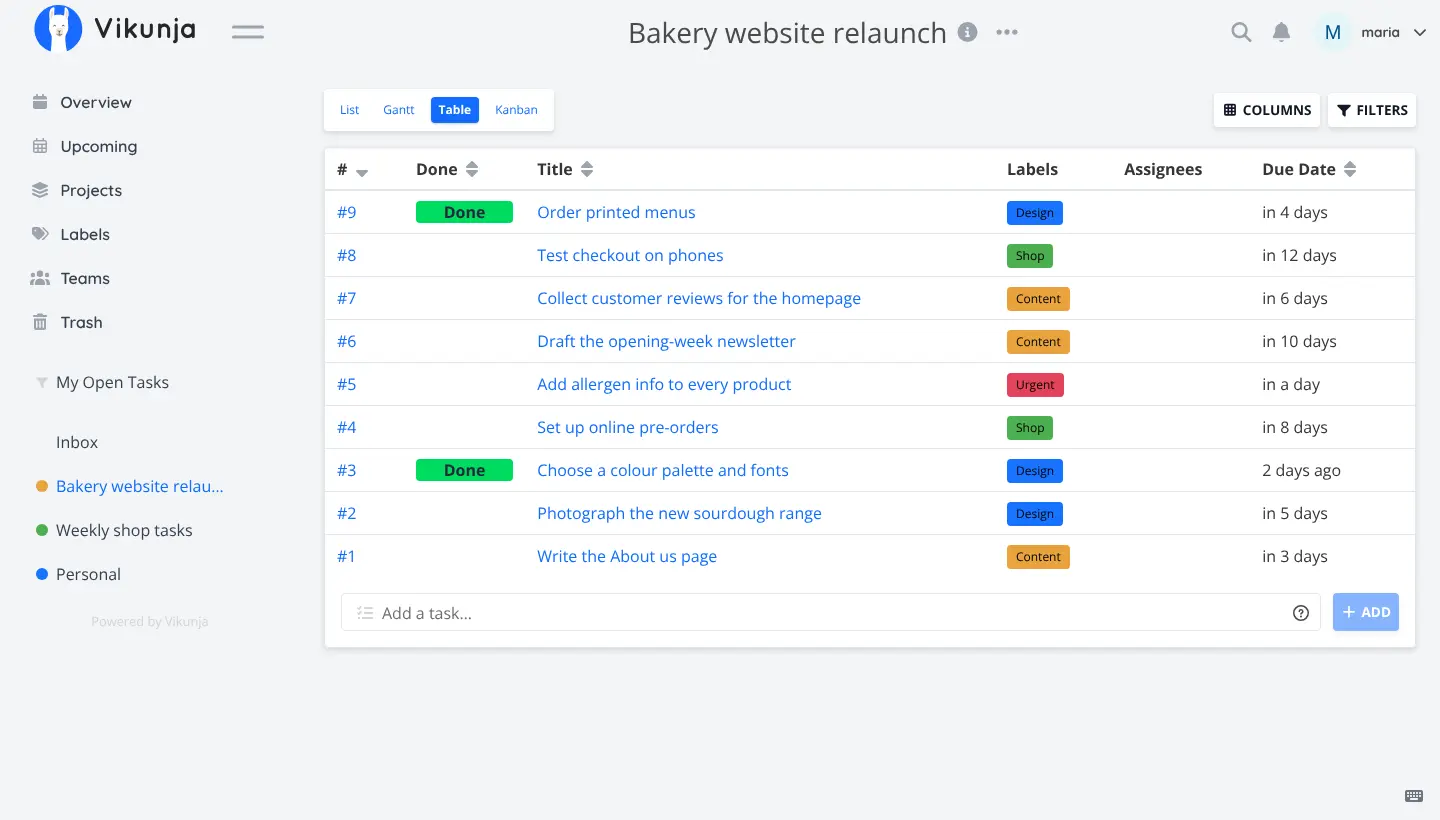
Vikunja is a free, open-source, self-hosted to-do list and task manager, an alternative to Todoist, Trello and Microsoft To Do that keeps your tasks on your own server. You organise tasks into projects and can see each project as a list, a Kanban board, a Gantt chart or a table.
Tasks get due dates, reminders, repeats, labels, priorities, subtasks, assignees and attachments, and you can add one in a single line with its date and label typed in. A bakery, for example, could plan a website relaunch on a Kanban board, check the timeline on the Gantt chart before launch day, and keep a repeating "order flour every Monday" task in the same app. Share a project with your team, or send a public link to someone without an account.
Vikunja works in any web browser. Its phone app covers only the basics, but calendar apps can show your tasks through CalDAV. You can bring tasks in from TickTick or a CSV file straight away, and from Todoist, Trello or Microsoft To Do after some extra setup.
Cloudgate installs Vikunja and its database on a server Cloudgate provides or one you connect, and gives it a secure web address. There is no default account: open the address and create yours, and once your team has joined, turn off open sign-up.
What you can do with Vikunja
- See tasks your way Switch any project between a list, a Kanban board, a Gantt chart and a table.
- Never miss a date Give tasks due dates, reminders and repeats, such as every Monday or once a month.
- Add tasks in one line Type "Order flour tomorrow" with a label or a person's name, and Vikunja fills in the date, label and assignee.
- Keep projects in order Group work into projects and subprojects, with coloured labels, priorities, subtasks and saved filters.
- Work together Share a project with people or teams, assign tasks, or send a public link that needs no account.
- Attach files Keep the quote, photo or document a task needs right on the task.
- See tasks in your calendar Connect a calendar app through CalDAV to see your tasks there.
Replaces Todoist, Trello and Asana
Vikunja does the same job as Todoist, Trello and Asana. Here is what changes when you switch.
- No subscription or per-user price; the whole app is free
- Kanban, Gantt and table views come with every project
- Your tasks stay on your own server
- Share a project with anyone through a public link
- The phone app covers only the basics, so most people use the web app
- Fewer integrations than Todoist or Trello, and no Power-Ups or automations
- Importing from Todoist, Trello or Microsoft To Do needs extra setup first
- Time tracking, audit logs and an admin panel are only in the paid Vikunja Pro
What happens when you click Deploy?
You do not need a server or any technical knowledge. Four steps, and Vikunja is running at its own web address.
- Step 1 Click Deploy and create your account
Deploy takes you to Cloudgate. Create an account, or log in if you have one. Vikunja itself is free.
- Step 2 Choose a server
No server? Get one from Cloudgate: pick a size and a country, and Cloudgate gets it ready. Already have one? Connect it instead.
- Step 3 Cloudgate sets up Vikunja
It prepares the server, makes the passwords the app needs and starts it. There is nothing to install and nothing to write down.
- Step 4 Open your app and sign in
Your app gets a free web address to start, without https. Add your own domain, like app.yourshop.com, and Cloudgate secures it with https for you.
New to Cloudgate? See what Cloudgate is
Run Cloudgate yourself? Deploy from your own console
In your Cloudgate console, open Templates and choose Vikunja.
Questions
Is Vikunja free?
Yes, Vikunja is free and open source under the AGPL-3.0 licence, and you pay only for your server. Its makers also sell Vikunja Pro, a paid add-on in beta with an admin panel, audit logs and time tracking; nothing in the free app is being moved behind it.
Is Vikunja a good alternative to Todoist?
Yes, if you want a free, private task list with due dates, reminders, recurring tasks, labels and shared projects, plus Kanban, Gantt and table views. The trade-offs are that Vikunja's phone app covers only the basics and it has fewer integrations than Todoist.
Can Vikunja replace Trello?
Yes, for Kanban boards Vikunja covers the basics, with cards, labels, due dates, assignees and attachments, and every board can also be seen as a list, a Gantt chart or a table. It has no Power-Up marketplace.
How do I sign in to Vikunja the first time?
Vikunja has no default account, so you open its web address and click "Create account" to register. Sign-up is open to anyone who can reach that address, so once your team has its accounts, set the "Allow new sign-ups" setting to false.
Can Vikunja import my tasks from Todoist, Trello or Microsoft To Do?
Yes, but each of those imports needs extra setup first, and the Todoist import also needs Vikunja to be reachable from the internet. Imports from TickTick, CSV files, WeKan and Planka work straight away.
Does Vikunja have a phone app?
Vikunja's mobile app supports only the very basic features, so most people use the web app in their phone's browser. You can also see your tasks in a calendar or task app that supports CalDAV.
Does Vikunja send email reminders?
Yes, Vikunja emails reminders once you connect an email account for it to send from. Cloudgate does not set this up for you, and until you do, reminders and password resets are not emailed.
Do I need technical skills to run Vikunja?
No. Click Deploy, create your Cloudgate account and choose a server, and Cloudgate sets up Vikunja and gives it a web address. You use it in your browser like any other online tool.
Do I need my own server for Vikunja?
No. When you deploy Vikunja, hosted Cloudgate can provide a server. If you already rent one, you can connect it instead.
Related apps

Simple project management with boards, timelines, goals and time.

Simple self-hosted project boards, lists and Gantt charts for teams.

An offline-first, self-hosted Todoist alternative with time blocking.

Trello-style kanban boards that update in real time.