
Kaneo
Simple self-hosted project boards, lists and Gantt charts for teams.
No server needed to start: Cloudgate can provide one. What happens when you click Deploy
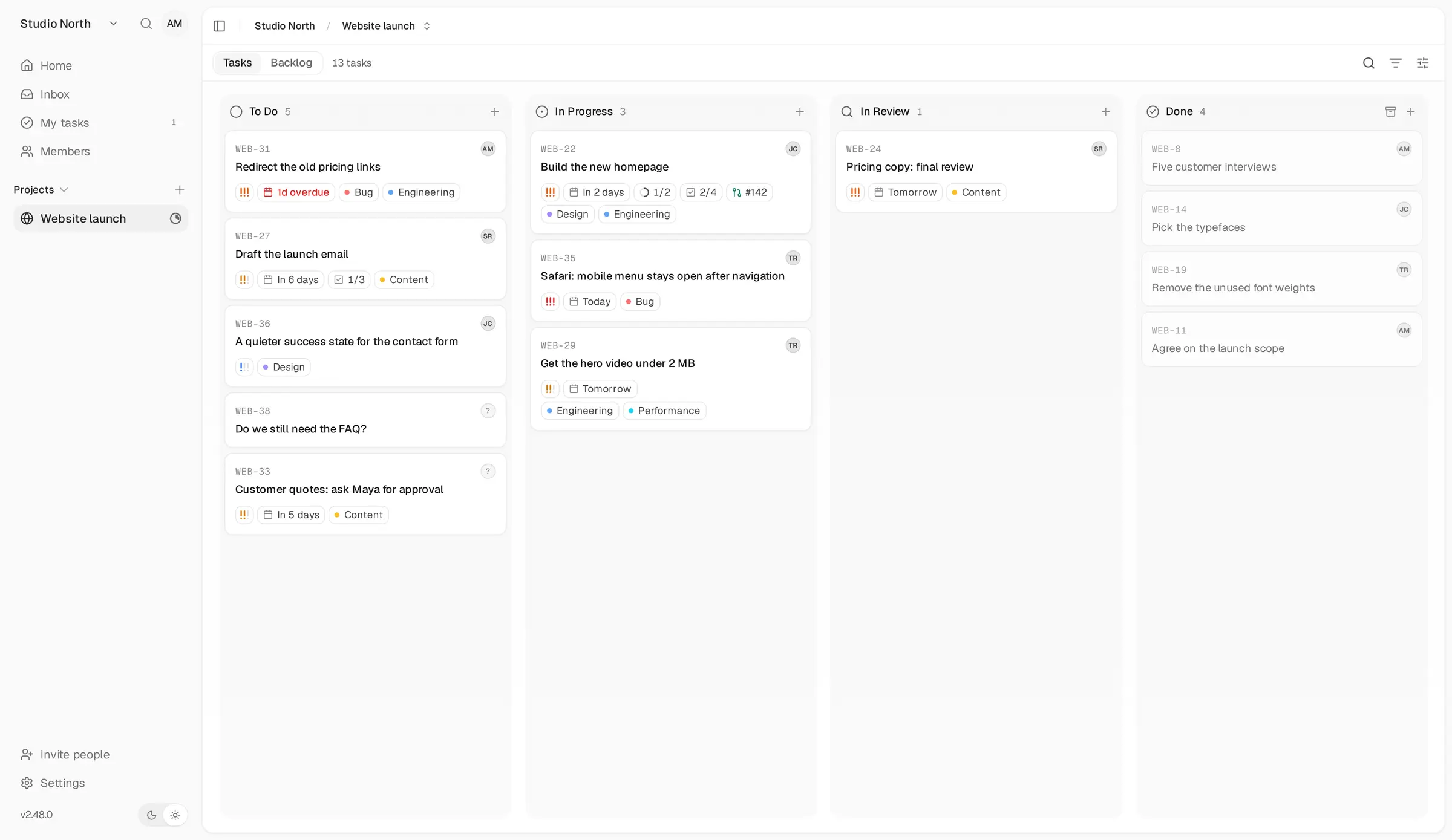
What is Kaneo?
Self-hosted Kaneo: simple, open-source project management with boards, lists, calendars and Gantt charts, and an importer for Linear, Jira and Trello.
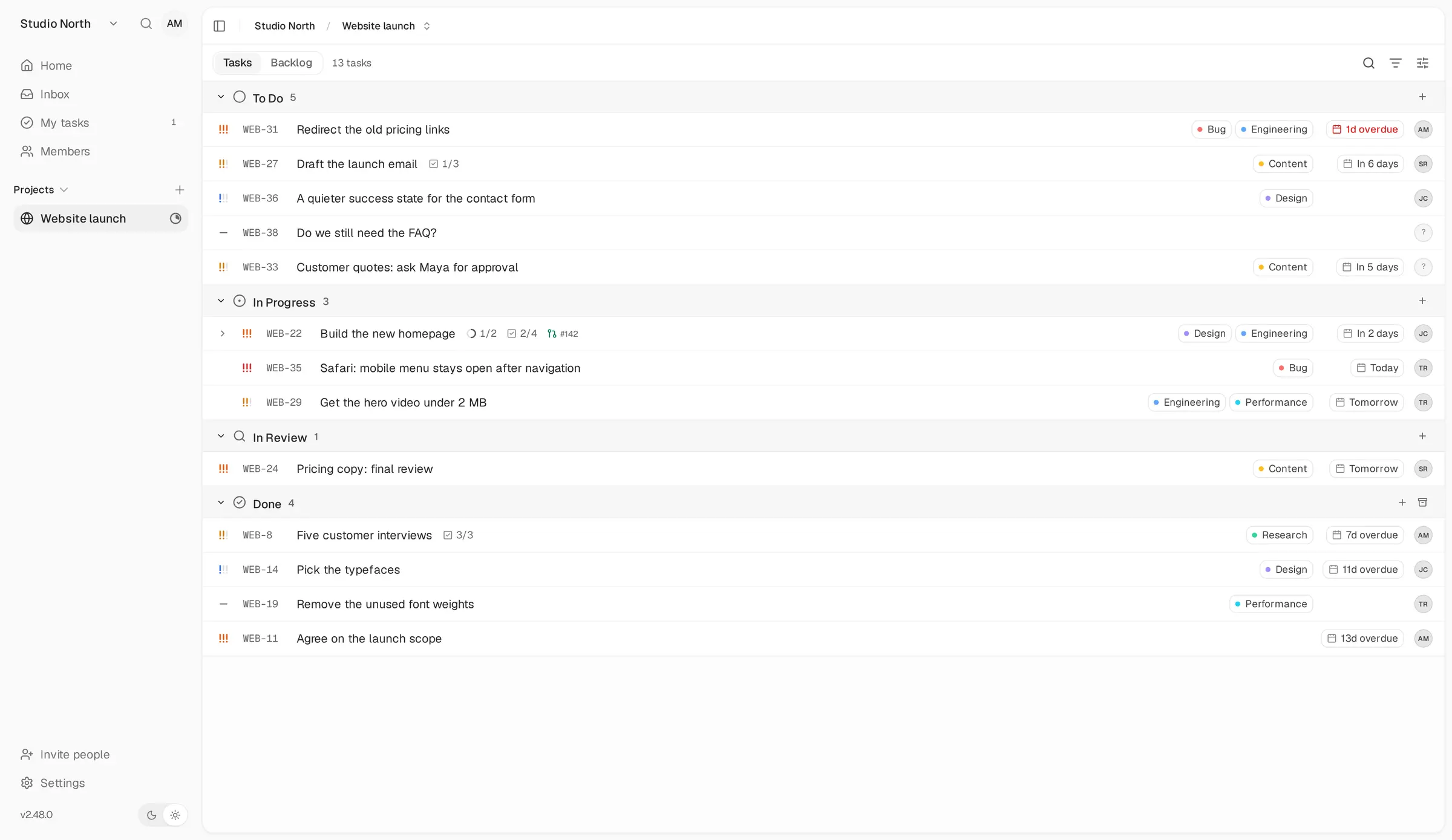
Self-hosted Kaneo is a free, open-source project management app that gives your team boards, lists, calendars and Gantt charts on your own server, in place of paid tools such as Linear, Trello and Jira. It aims to stay simple: projects, tasks and a few clear views, without a long list of settings to learn first.
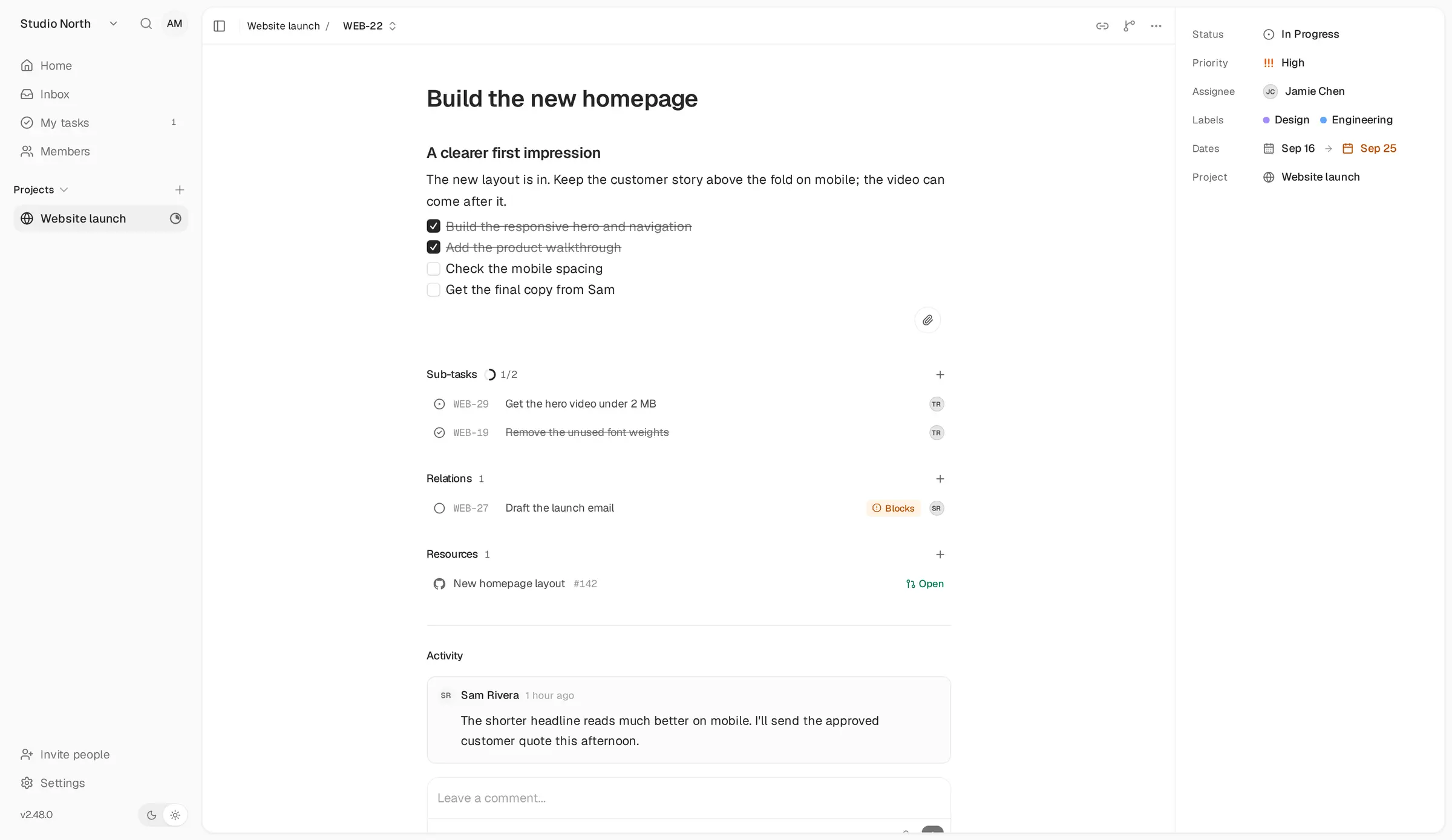
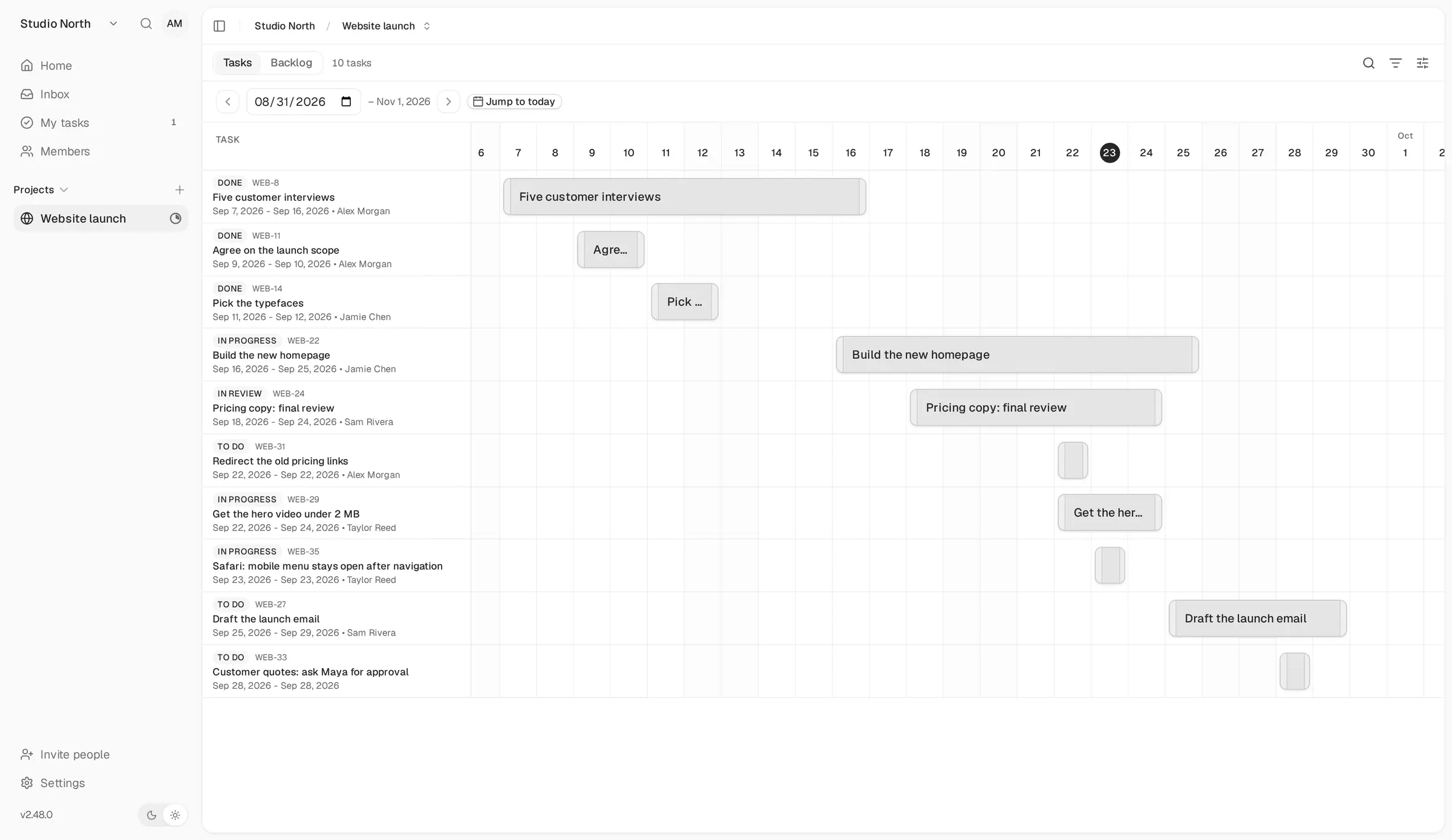
Each task keeps its details together: a description and checklist, subtasks, labels, due dates, time spent, comments and the tasks it is waiting on. A small web design studio, for example, could plan a client's website launch on a board, check the Gantt chart to see whether the copy will be ready before the launch date, and let a merged pull request in GitHub move the matching task to done.
Kaneo links to GitHub, GitLab and Gitea, sends updates to Slack, Discord, Telegram or Mattermost, and can import your projects from Linear, Jira, Trello, Plane or PLANKA. There is an iPhone app, a paid one-time unlock for your own server, and Kaneo works in any phone's browser.
Cloudgate installs Kaneo on a server Cloudgate provides or one you connect, together with the database it needs, and gives it a secure web address. Sign up first to become the admin, then invite your team.
What you can do with Kaneo
- See work four ways Switch a project between a board, a list, a calendar and a Gantt chart, with a backlog for ideas that are not scheduled yet.
- Keep everything on the task Each task holds its description, checklist, subtasks, labels, due dates, comments and the tasks it blocks.
- Track time Start a timer on a task or log the hours by hand.
- Shape your own workflow Add your own columns and custom fields, and choose who sees which projects with roles and project access.
- Link your code Connect GitHub, GitLab or Gitea so issues sync and merged pull requests move tasks to done.
- Stay in the loop Get notified in the app, by email, or in Slack, Discord, Telegram or Mattermost.
- Bring your projects with you Import projects from Linear, Jira, Trello, Plane or PLANKA, including their tasks, labels and comments.
- Sign in with the accounts you have Let people sign in with Google, GitHub, Discord or your company's single sign-on, at no extra cost.
Replaces Linear, Trello and Jira
Kaneo does the same job as Linear, Trello and Jira. Here is what changes when you switch.
- No per-user fee and no paid tiers, however many people join
- Your projects and comments stay on your own server
- A built-in importer for Linear, Jira and Trello
- A calmer, simpler tool with fewer settings to learn
- No sprints (cycles), burn-down charts or budgets
- Each task has one assignee, so cards with several members keep only the first
- Attaching files to tasks needs extra file storage that this setup does not include
- The iPhone app costs a one-time $9.99 per person to connect to your own server, and there is no Android app yet
What happens when you click Deploy?
You do not need a server or any technical knowledge. Four steps, and Kaneo is running at its own web address.
- Step 1 Click Deploy and create your account
Deploy takes you to Cloudgate. Create an account, or log in if you have one. Kaneo itself is free.
- Step 2 Choose a server
No server? Get one from Cloudgate: pick a size and a country, and Cloudgate gets it ready. Already have one? Connect it instead.
- Step 3 Cloudgate sets up Kaneo
It prepares the server, makes the passwords the app needs and starts it. There is nothing to install and nothing to write down.
- Step 4 Open your app and sign in
Your app gets a free web address to start, without https. Add your own domain, like app.yourshop.com, and Cloudgate secures it with https for you.
New to Cloudgate? See what Cloudgate is
Run Cloudgate yourself? Deploy from your own console
In your Cloudgate console, open Templates and choose Kaneo.
Questions
Is Kaneo free?
Yes, Kaneo is free and open source under the MIT licence. The self-hosted version has every feature, including single sign-on, with no limit on users or projects; you pay only for your server. Kaneo also sells a hosted Kaneo Cloud, which this template does not use.
Is Kaneo a good alternative to Linear?
Yes, for small teams that want Linear's clean look and GitHub links on their own server without a per-user fee. Kaneo has no cycles (sprints), roadmaps or burn-down charts, so teams that plan in sprints may miss them.
Can I import my projects from Linear, Jira or Trello?
Yes, Kaneo has a built-in importer for Linear, Jira, Trello, Plane and PLANKA. Tasks, columns, labels, due dates and comments come across; attachments, sprints and custom fields do not, and you need an API key or token from the old tool.
How do I sign in to Kaneo the first time?
There is no default password. Open your Kaneo web address and sign up; the first account becomes the administrator. Create it before you share the address, then invite your team or close sign-ups in the administration settings.
Does Kaneo have a phone app?
Yes, there is an iPhone and iPad app, but connecting it to your own server is a one-time $9.99 unlock per person. An Android app is not out yet, and Kaneo works in a phone's web browser either way.
Does Kaneo need email to work?
No, Kaneo works without email; people sign in with an email address and password, and you share invitation links yourself. Add an email sending service to send invitations, password resets and notifications by email.
What server size do I need for Kaneo?
Kaneo asks for at least 2 GB of memory for a small team, so Cloudgate asks for a medium server. That covers the app and its database, and you can move to a bigger server as your projects grow.
Do I need technical skills to run Kaneo?
No. Click Deploy, create your Cloudgate account and choose a server, and Cloudgate sets up Kaneo and gives it a web address. You use it in your browser like any other online tool.
Do I need my own server for Kaneo?
No. When you deploy Kaneo, hosted Cloudgate can provide a server. If you already rent one, you can connect it instead.
Related apps

Linear-style issue tracking, with AI agents as teammates.

Project tracking with sprints, boards and timelines.

A free, self-hosted task manager with issues, sprints and docs.

Trello-style kanban boards that update in real time.