
4ga Boards
Trello-style kanban boards that update in real time.
No server needed to start: Cloudgate can provide one. What happens when you click Deploy
What is 4ga Boards?
Self-hosted 4ga Boards is an open-source kanban board for teams: Trello-style boards, lists and cards that update in real time, with Trello import.
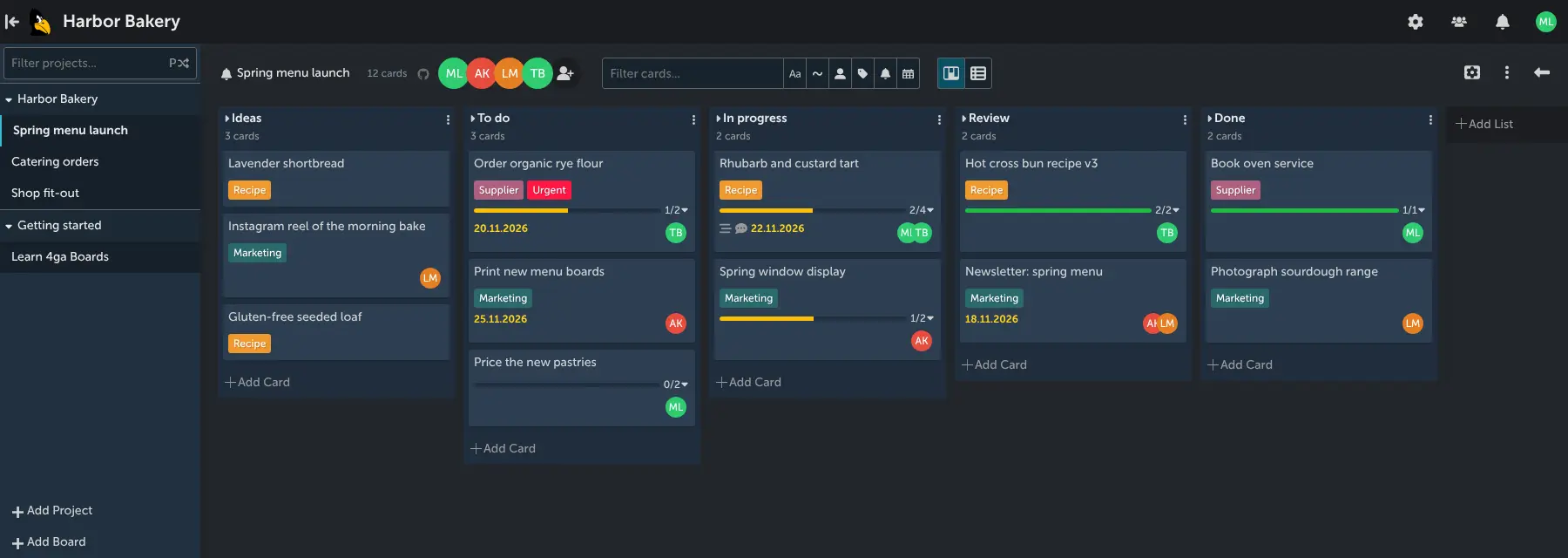
4ga Boards is a free, open-source, self-hosted kanban board and a simple alternative to Trello for planning work with your team. You organise each project into boards, lists and cards, drag cards from stage to stage, and everyone sees changes as they happen, without reloading the page.
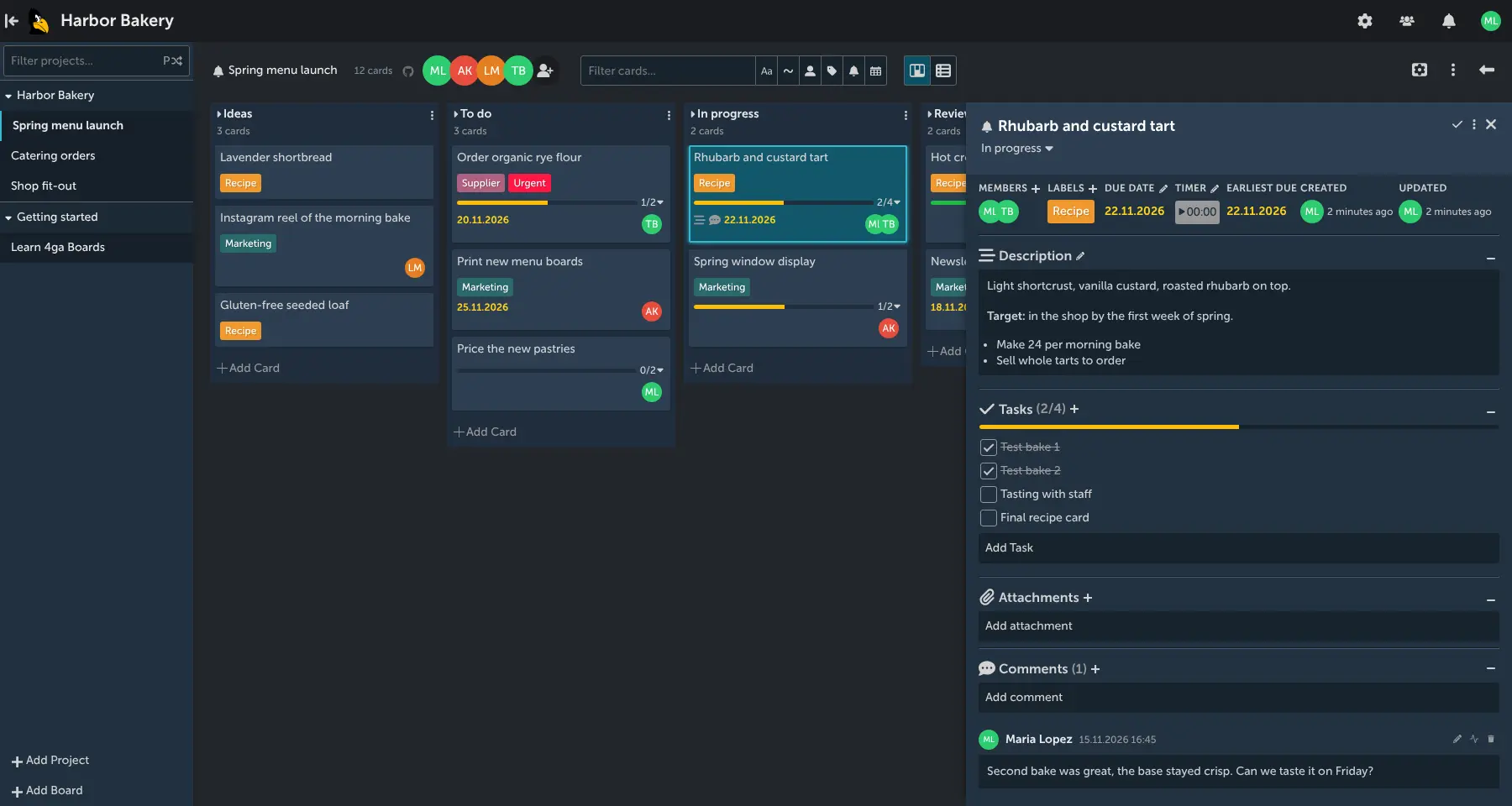
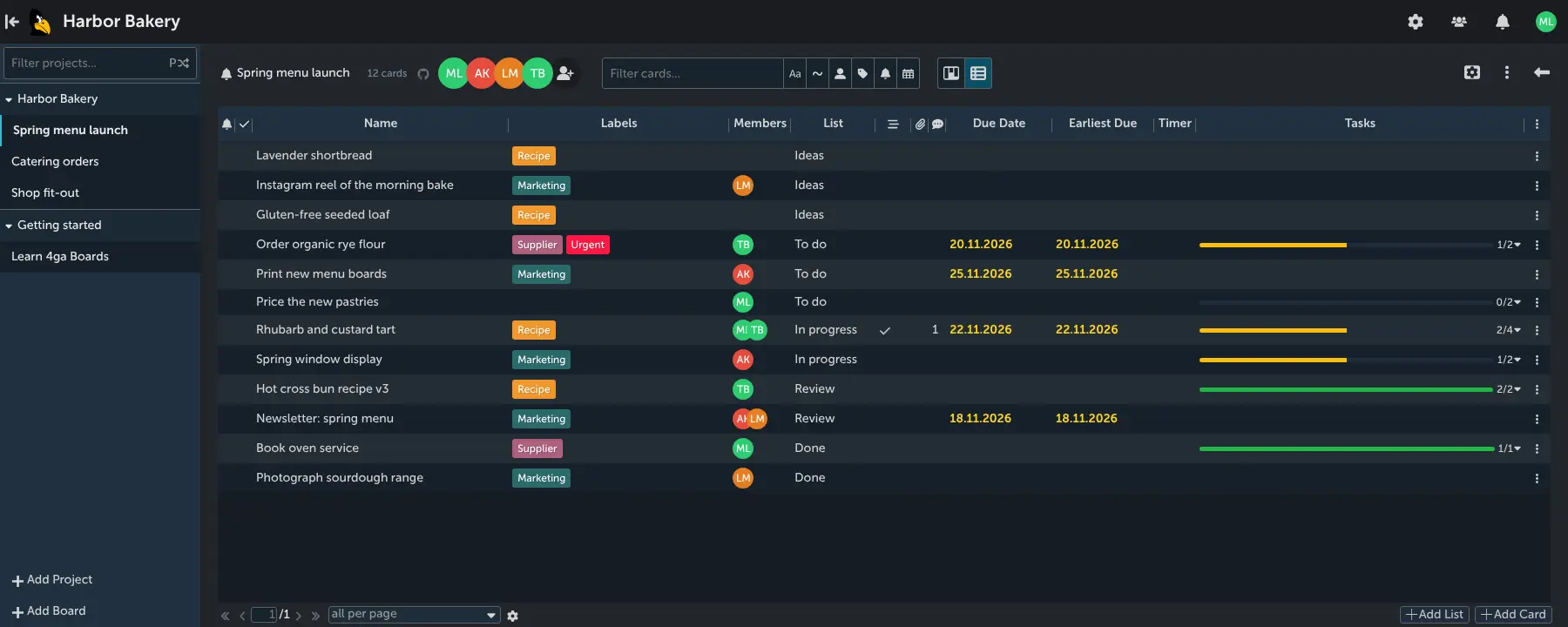
Every card can hold labels, members, due dates, a checklist of tasks, files, comments and a formatted description, and a timer shows how long a job takes. Switch a board to list view to see all its cards as one table, or filter by person, label or due date. A small bakery, for example, could keep a board for its spring menu with lists for Ideas, To do, In progress, Review and Done, and give each new recipe a card with its test bakes as tasks.
If you are leaving Trello, 4ga Boards imports a board from Trello's export file, with its lists, cards, labels, checklists and comments. It runs in the web browser, with no phone apps, and has no automation or Power-Ups. It began as a fork of Planka and is MIT licensed.
Cloudgate installs 4ga Boards and its database on your server and gives it a secure web address. Sign in with the admin email you chose, then add your team.
What you can do with 4ga Boards
- Plan work on boards Organise projects into boards, lists and cards, and drag cards from one stage to the next.
- See changes as they happen Everyone on a board sees cards move and change straight away, without reloading the page.
- Keep the details on the card Add labels, members, due dates, checklists, files, comments and a formatted description to every card.
- Switch to a list view See every card on a board as one table with its labels, members, list, due date and progress.
- Find cards fast Filter a board by text, member, label or due date, and collapse the lists you are not using.
- Track time on a card Start a timer on a card to see how long a job takes.
- Choose who sees each board Invite people to a board as editors or viewers, and decide whether anyone may sign up.
- Bring your Trello boards Import a board from Trello's export file, with its lists, cards, labels, checklists and comments.
Replaces Trello
4ga Boards does the same job as Trello. Here is what changes when you switch.
- Free to self-host under the MIT licence, with no limit on boards or members
- Your boards, cards and files stay on your own server
- The same boards, lists and cards your team already knows from Trello, plus a list view
- Trello boards come in from an export file, with no Trello app key to set up
- No automation, Power-Ups, calendar or timeline view
- Web only, with no phone or desktop apps
- A smaller project with a smaller community than Trello's
- File attachments from Trello don't come across in the import
What happens when you click Deploy?
You do not need a server or any technical knowledge. Four steps, and 4ga Boards is running at its own web address.
- Step 1 Click Deploy and create your account
Deploy takes you to Cloudgate. Create an account, or log in if you have one. 4ga Boards itself is free.
- Step 2 Choose a server
No server? Get one from Cloudgate: pick a size and a country, and Cloudgate gets it ready. Already have one? Connect it instead.
- Step 3 Cloudgate sets up 4ga Boards
It prepares the server, makes the passwords the app needs and starts it. There is nothing to install and nothing to write down.
- Step 4 Open your app and sign in
Your app gets a free web address to start, without https. Add your own domain, like app.yourshop.com, and Cloudgate secures it with https for you.
New to Cloudgate? See what Cloudgate is
Run Cloudgate yourself? Deploy from your own console
In your Cloudgate console, open Templates and choose 4ga Boards.
Questions
Is 4ga Boards free?
Yes, 4ga Boards is free and open source under the MIT licence. When you run it yourself it has every feature and no limit on boards or members; its makers also sell hosted plans, which you don't need here.
Is 4ga Boards a good alternative to Trello?
Yes, if your team mainly uses Trello for boards, lists and cards. 4ga Boards has labels, members, due dates, checklists, attachments, comments and live updates, and it imports Trello boards, but it has no automation, Power-Ups, calendar view or phone apps.
Can I import my Trello boards into 4ga Boards?
Yes, one board at a time. Export the board from Trello as a JSON file, then choose Import from Trello when you create a board in 4ga Boards; lists, cards, labels, checklists and comments come across, but attachments do not.
How do I sign in to 4ga Boards the first time?
Sign in to 4ga Boards with the admin email you gave Cloudgate (or the username admin) and the password shown on the app's variables page in Cloudgate. Public sign-up starts switched off, so you add teammates in the settings or turn sign-up on there.
How is 4ga Boards related to Planka?
4ga Boards began as a fork of Planka, another self-hosted kanban app, and is developed separately by its own team. 4ga Boards is MIT licensed, while Planka uses its own licence.
Is there a 4ga Boards phone app?
No, 4ga Boards is a web app with no phone or desktop apps. You use it in a web browser.
Does 4ga Boards send my data anywhere?
No, your boards, cards and files stay on your own server. When it starts, the app registers your server's web address and public IP address with the 4ga Boards project so it can receive release and security notices. This template asks for security notices only.
Do I need technical skills to run 4ga Boards?
No. Click Deploy, create your Cloudgate account and choose a server, and Cloudgate sets up 4ga Boards and gives it a web address. You use it in your browser like any other online tool.
Do I need my own server for 4ga Boards?
No. When you deploy 4ga Boards, hosted Cloudgate can provide a server. If you already rent one, you can connect it instead.
Related apps

A simple self-hosted Kanban board with limits on work in progress.
Kanban boards with swimlanes, calendars and rules.

Project boards with a time tracker on every task.

Simple Trello-style kanban boards for your team, on your own server.