
Orbit
A free, self-hosted task manager with issues, sprints and docs.
No server needed to start: Cloudgate can provide one. What happens when you click Deploy
What is Orbit?
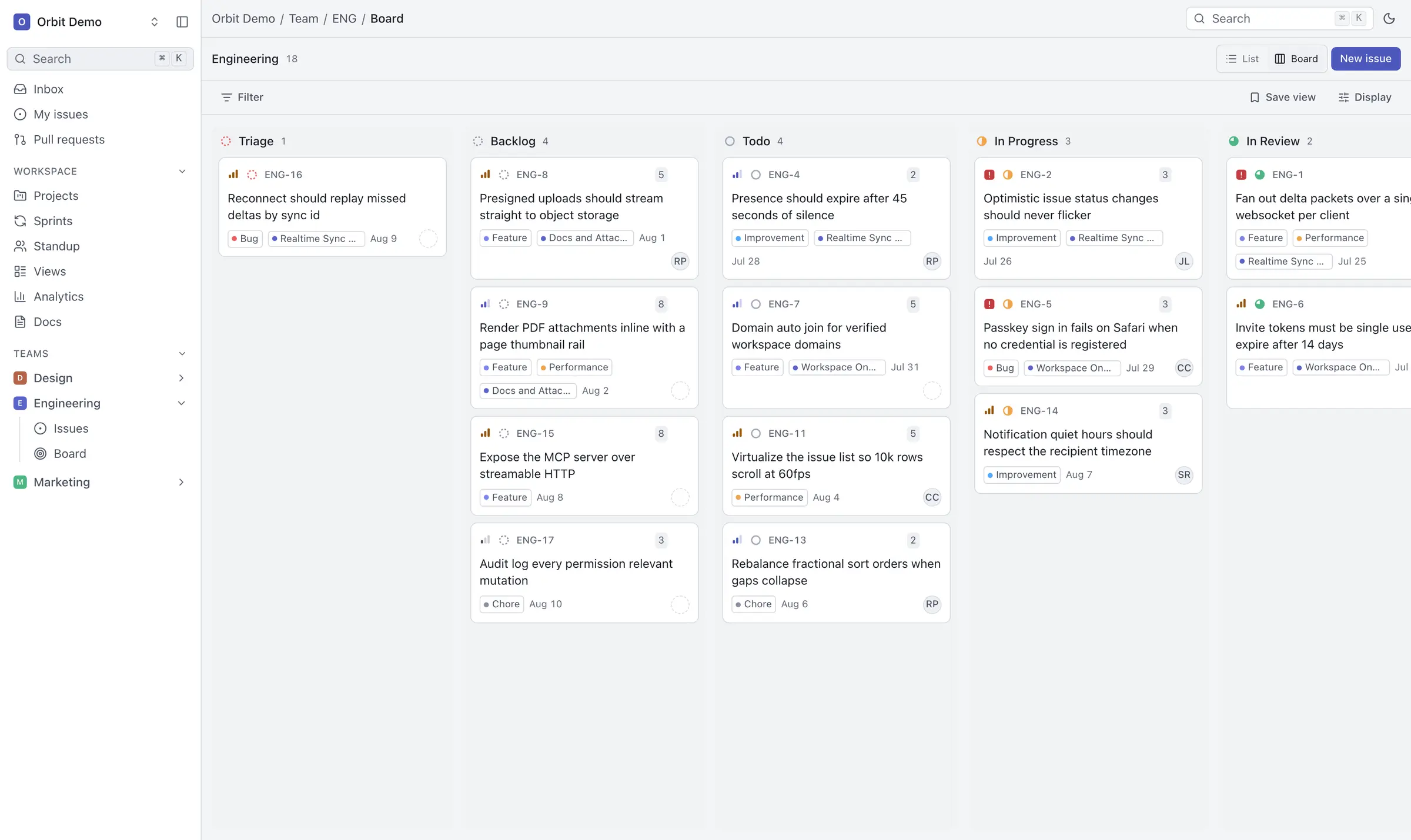
Self-hosted Orbit by Noveum is a free, keyboard-first task manager with issues, sprints, projects and docs, in the style of Linear, with no paid tier.
Self-hosted Orbit by Noveum is a free, open-source task manager, an alternative to Linear and Jira for tracking issues, planning sprints and writing project docs. It has no paid tiers at all: every feature is free for any number of people.
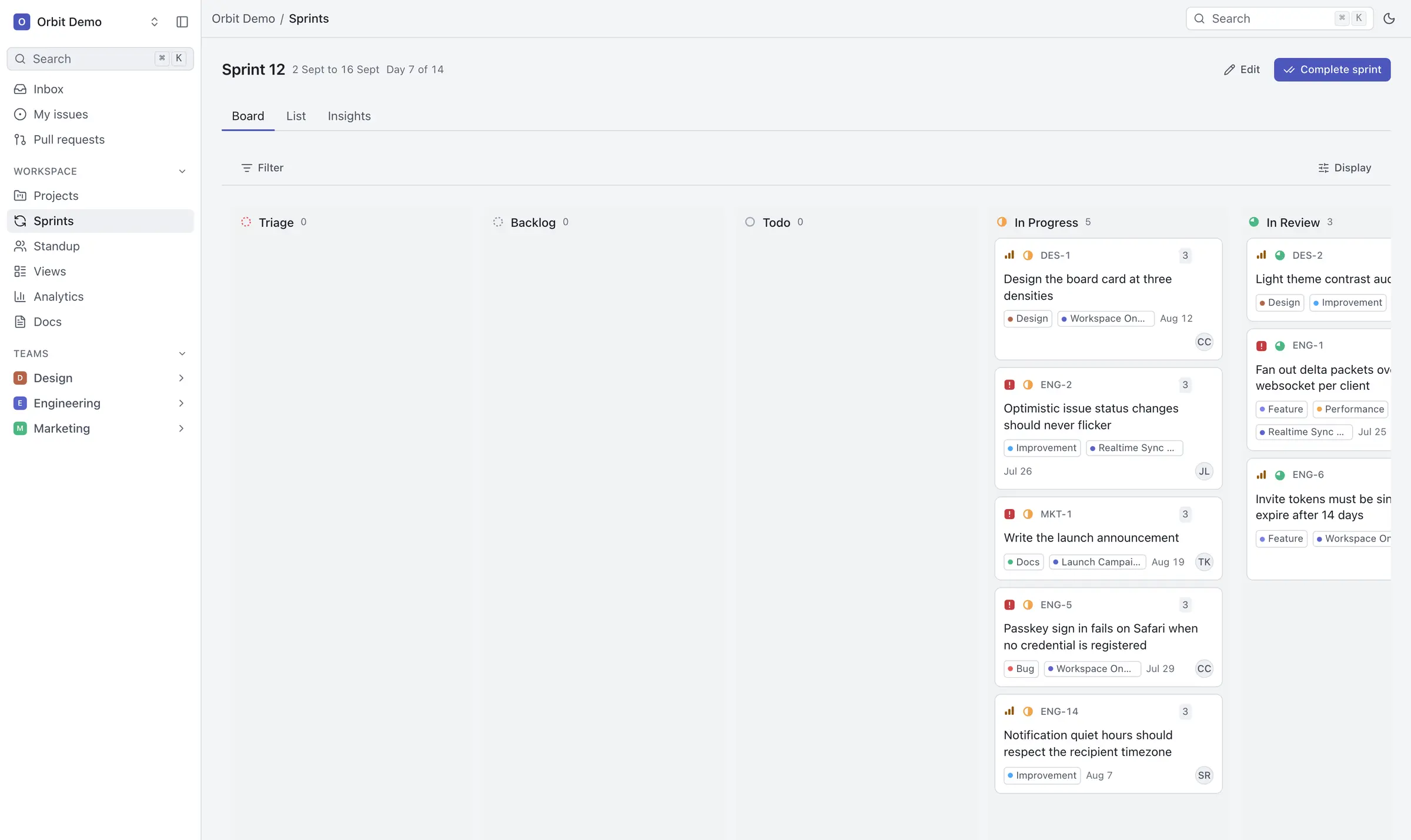
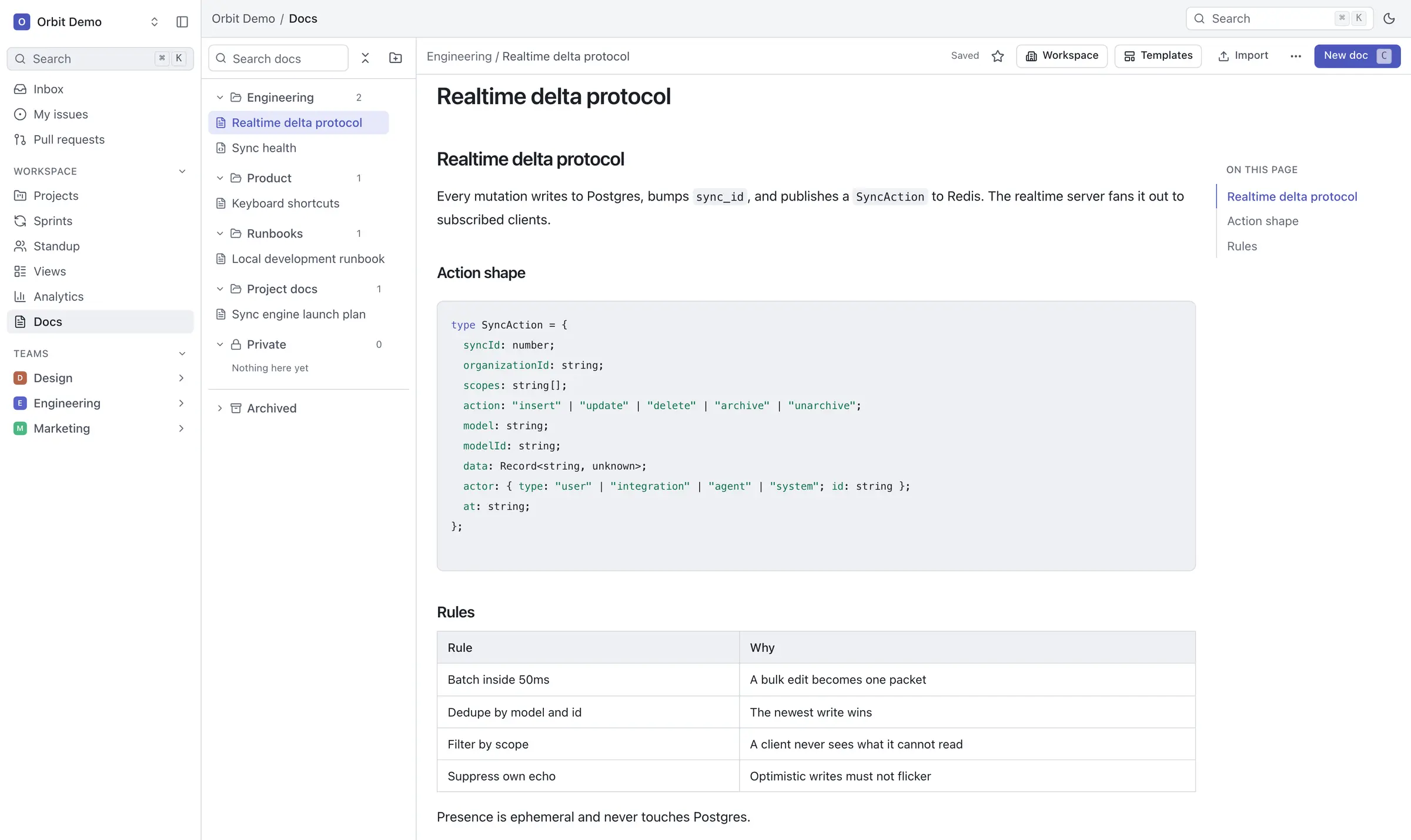
Orbit is built for speed at the keyboard. Press Cmd K to jump anywhere, change an issue's status or owner with one key, and see every change appear for your teammates without reloading. Next to issues and sprints you get projects with milestones, docs, a standup board and analytics. A small app studio, for example, could plan each two-week sprint on a board, walk through the standup board each morning person by person, and keep the release plan in a doc beside the issues it covers.
Orbit is younger than most trackers here. Its makers label self-hosting as a preview, there is no importer from Linear or Jira yet, and it works best on a computer rather than a phone. Email for invitations and password resets uses Resend, a separate email service you sign up for.
Cloudgate installs Orbit on a server Cloudgate provides or one you connect, with its database and file storage, and gives it a secure web address. Sign up first to create your workspace.
What you can do with Orbit
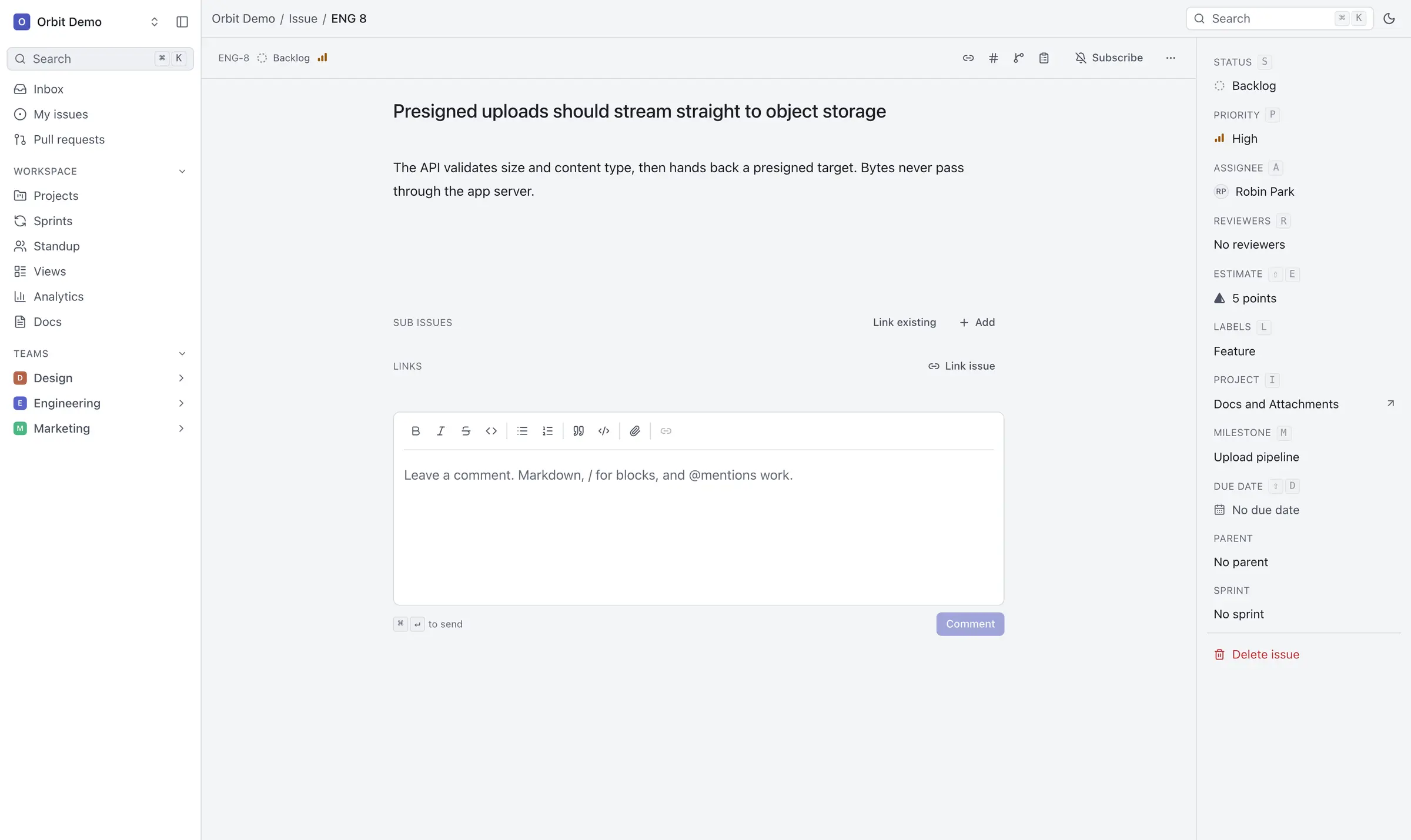
- Track issues on a list or a board Each issue has a priority, labels, an estimate, an assignee, reviewers, sub-issues and links to related work, and Orbit suggests similar issues before you file a duplicate.
- Plan sprints Set a sprint's scope and points, follow its burndown, and carry unfinished work into the next one.
- Group work into projects Projects and milestones span teams, and project updates collect each project's health in one feed.
- Write docs beside the work A rich editor with collections, comments and public share links, and you can import Markdown or HTML files.
- Run the daily standup The standup board shows the whole workspace as columns, filtered to one person's work with a click.
- See where time goes Analytics show scope, throughput and churn, split by person, project, label or estimate.
- Do everything from the keyboard Press Cmd K to go anywhere or change anything, and every change shows up for your teammates straight away.
- Let your AI assistant help Connect Claude, Cursor or another assistant to read the board and file issues, with no more access than the person who approved it.
Replaces Linear and Jira
Orbit does the same job as Linear and Jira. Here is what changes when you switch.
- No per-seat fee and no paid tier, however many people join
- Your issues, docs and files stay on your own server
- Sprints, docs, a standup board and analytics in one app
- Changes appear live for everyone, without reloading
- Its makers call self-hosting a preview, not yet a supported production release
- No importer yet, so Linear or Jira work does not come across
- No custom fields, automation rules, timeline view or time tracking yet
- Built for a big screen and a keyboard; there are no phone apps and the phone layout is rough
What happens when you click Deploy?
You do not need a server or any technical knowledge. Four steps, and Orbit is running at its own web address.
- Step 1 Click Deploy and create your account
Deploy takes you to Cloudgate. Create an account, or log in if you have one. Orbit itself is free.
- Step 2 Choose a server
No server? Get one from Cloudgate: pick a size and a country, and Cloudgate gets it ready. Already have one? Connect it instead.
- Step 3 Cloudgate sets up Orbit
It prepares the server, makes the passwords the app needs and starts it. There is nothing to install and nothing to write down.
- Step 4 Open your app and sign in
Your app gets a free web address to start, without https. Add your own domain, like app.yourshop.com, and Cloudgate secures it with https for you.
New to Cloudgate? See what Cloudgate is
Run Cloudgate yourself? Deploy from your own console
In your Cloudgate console, open Templates and choose Orbit.
Questions
Is Orbit free?
Yes, Orbit is free and open source under the Apache-2.0 licence, with no paid tiers, seat limits or billing, and its makers say they will not add any. Noveum AI, which sponsors it, also runs a free hosted copy; this template installs your own. You pay only for your server.
Is Orbit ready for everyday use?
Not officially. Orbit's makers label self-hosting as a preview, not yet a supported production release, and keep a public list of the work still open. You can use it today, but keep backups and expect changes between versions.
Is Orbit a good alternative to Linear?
Yes, for teams that like Linear's way of working, with issues, sprints, a command palette and keyboard shortcuts, and want it on their own server for free. Linear is more mature and has phone apps and an importer; Orbit has neither yet.
Can I import my issues from Linear or Jira?
No, not yet. Orbit can read Linear and Plane exports internally, but there is no supported import command, and a Jira importer is on its wish list. You can import Markdown and HTML files as docs.
How do I sign in to Orbit the first time?
There is no default password. Open your Orbit web address, sign up with an email and password, then create a workspace, which makes you its admin, and its first team. Anyone who can reach the address can sign up, so do this right after setup.
Does Orbit need email to work?
Partly. You can sign up and work in Orbit without email, but invitations, sign-in codes, password resets and email notifications need an API key from Resend, a separate email sending service, and a sender address on your own domain.
Does Orbit have a phone app?
No. Orbit runs in a web browser and is built for a keyboard and a large screen; a better phone layout is on its roadmap.
Do I need technical skills to run Orbit?
No. Click Deploy, create your Cloudgate account and choose a server, and Cloudgate sets up Orbit and gives it a web address. You use it in your browser like any other online tool.
Do I need my own server for Orbit?
No. When you deploy Orbit, hosted Cloudgate can provide a server. If you already rent one, you can connect it instead.
Related apps

Project tracking with sprints, boards and timelines.

Linear-style issue tracking, with AI agents as teammates.

Simple self-hosted project boards, lists and Gantt charts for teams.

Gantt charts, agile boards and time tracking for projects.