R

Open-source alternatives to Relevance AI

Sim is a free, open-source Relevance AI alternative for building AI agents and AI workflows on a visual canvas, connected to your business apps and the AI model you choose. Relevance AI is a hosted platform; self-hosted Sim keeps your agents, knowledge bases and run logs on your own server with no usage fee of its own, though you bring your own AI provider keys.

2 alternatives Free apps Our pick: Sim

At a glance

App Good for Code Ease of use
Sim Operations and marketing teams building AI agents that work across their business apps Code Open source Some setup
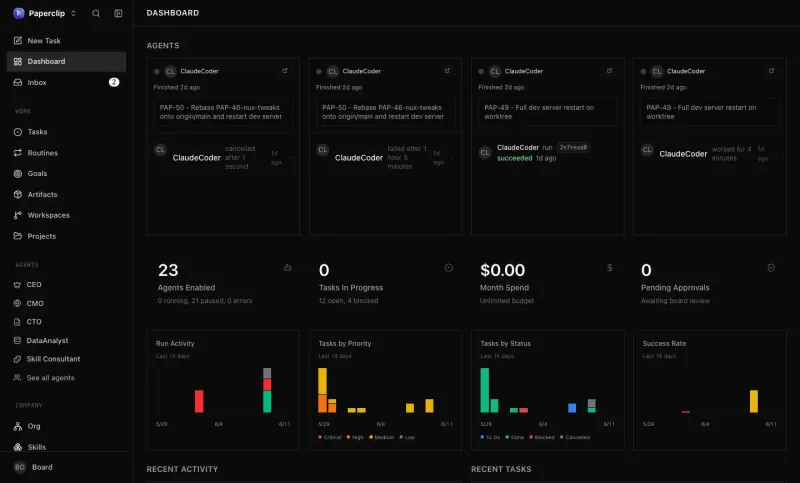
Paperclip Founders and small teams running several AI agents who want one task board with budgets and approvals Code Open source Some setup

Why look for an alternative to Relevance AI?

Relevance AI is a hosted platform for building AI agents, which its maker calls an AI workforce, that carry out tasks such as research, sales outreach and support with tools and your company's knowledge.

People look for an alternative because the agents, the knowledge they use and the data they handle all live on someone else's platform. A self-hosted Sim builds agents on your own server, with the AI provider you choose billed directly for what you use, and no usage fee from Sim. Paperclip takes a different approach: it organizes a team of existing AI agents, such as Claude Code or Codex, with goals, tasks, budgets and approvals.

The alternatives, compared

Sim

Our pick

Build AI agents that work in your business apps, self-hosted.

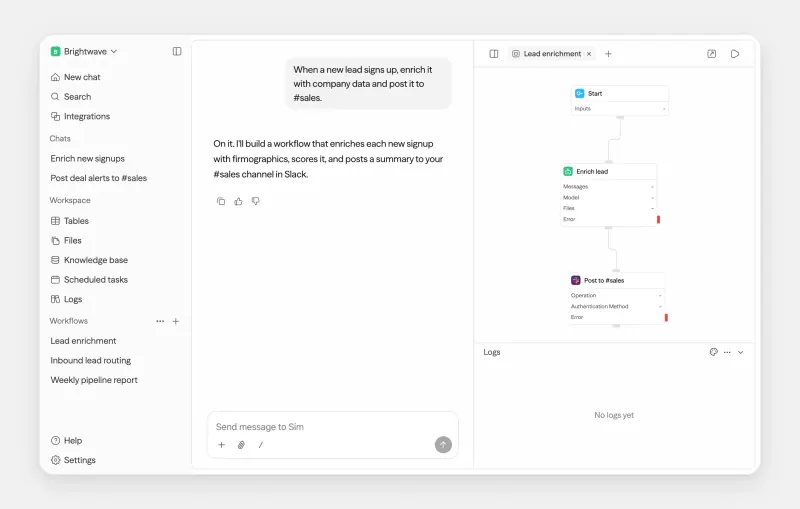
Builds AI agents and AI workflows on a visual canvas from agent, logic and app blocks, with knowledge bases of your documents, built-in tables and a log of every run. It connects to over 270 apps and works with any major AI provider or a local model, and finished workflows run as an API, a chat page, an MCP server or on a schedule. It takes more setup than Relevance AI: you add your own AI provider keys, and Chat, the assistant that builds workflows from a description, needs a key from Sim's hosted service.

What you gain
  • No per-task or per-credit bill from Sim, only what your AI provider charges
  • Your workflows, documents, tables and app logins stay on your own server
  • Any AI provider, including local models that keep data in-house
What is different
  • You bring and pay for your own AI provider keys, and set up your own login apps for services like Google or Microsoft
  • The chat assistant that builds workflows for you runs on Sim's own service and needs a key from sim.ai
  • It needs a larger server than most apps, about 12 GB of memory to start
Some setup Open source

Run a team of AI agents with goals, tasks and budgets, self-hosted.

Runs a team of AI agents rather than building them: you give agents such as Claude Code, Codex or OpenCode roles in an org chart, assign them tasks linked to company goals, set budgets and approve their work, with routines on a schedule. It has no visual builder and no ready-made business agents like Relevance AI's, and its agents are coding and command-line tools, so it suits technical teams more than sales or support teams.

What you gain
  • No subscription for Paperclip itself; you pay for your server and the AI you use
  • Tasks, documents, approvals and run history stay on your own server
  • Mix agents and AI providers in one team and change them whenever you like
What is different
  • It brings no AI of its own, so you need an AI provider key or a supported subscription
  • You hire and set up each agent yourself; there are no ready-made business assistants
  • Agents can run commands and change code on the server, so review what each one may do
Some setup Open source

Moving from Relevance AI

Sim cannot import Relevance AI agents, so rebuild them one at a time. Add your AI provider's API key, then for each agent create a workflow with an Agent block, paste in the same instructions, and add the app blocks for the tools it uses. Upload the documents it answers from into a knowledge base, which needs an embedding key or a local model. Test each workflow with Run, read its block outputs in the log, then deploy it as an API, chat page or schedule and switch the old agent off.

In Paperclip, create your account, claim the instance and set up your company, then hire an agent such as Claude Code or Codex with your AI provider's key and give it a role and a budget. Turn each recurring Relevance AI task into a routine, connect the tools the agents need, such as GitHub, Notion or Asana, and choose which actions need your approval.

Questions

What is the best open-source alternative to Relevance AI?

Start with Sim. Both are free and open source.

Can Sim use local AI models?

Yes. Besides providers such as OpenAI, Anthropic and Google, Sim works with local models through Ollama or vLLM, so prompts need not leave your server.

How big a server does Sim need?

A large one. Sim suggests 12 GB of memory even to try it out, because it runs several services together.

Should I choose Sim or Paperclip?

Choose Sim to build your own agents and workflows on a visual canvas, connected to over 270 apps. Choose Paperclip if you already use agents such as Claude Code or Codex and want them on one task board with roles, budgets and approvals.

Which Sim features are paid when self-hosted?

Single sign-on, SCIM, audit logs and permission groups need Sim's paid Enterprise licence. The workflow builder, integrations, tables, knowledge bases and logs are free.

Are these Relevance AI alternatives really free?

Yes, Sim and Paperclip are free. To run them you need Cloudgate and a server. Use hosted Cloudgate, which can also provide the server, or install Cloudgate on a server of your own for free. Cloudgate's plans and prices are at cloudgate.octabyte.io/pricing. One server can run several apps.

Do I need a developer to replace Relevance AI?

No. Cloudgate installs the app you choose on your server and gives it a secure web address, and you use it in your browser instead of Relevance AI.