C

Open-source alternatives to Copilot Studio

Langflow is a free, open-source Microsoft Copilot Studio alternative for building AI agents and document chatbots on a visual canvas, with the AI model you choose. Copilot Studio is billed by usage in Copilot Credits and needs an Azure subscription; self-hosted Langflow has no usage fee of its own, though it is made for technical users and does not publish to Microsoft Teams.

3 alternatives Free apps Our pick: Langflow

At a glance

App Good for Code Ease of use
Langflow Developers and technical teams building AI agents and document chatbots with any AI model Code Open source Some setup
Coze Studio Teams building Coze-style AI agents, chatbots and workflows with their own AI model keys Code Open source Some setup
Sim Operations and marketing teams building AI agents that work across their business apps Code Open source Some setup

Why look for an alternative to Copilot Studio?

Microsoft Copilot Studio is Microsoft's tool for building AI agents with natural language or a visual designer, then publishing them to websites, Microsoft Teams, SharePoint and Microsoft 365 Copilot.

Teams look for an alternative because of how it is billed and where it runs. When we checked Microsoft's Copilot Studio page in November 2026, use was billed in Copilot Credits, either in prepaid credit packs or pay-as-you-go through an Azure subscription, so the cost grows with use. Agents also live in Microsoft's cloud. A self-hosted app such as Langflow or Sim builds agents with no usage fee of its own, works with the AI model you choose, and keeps your agents and API keys on your own server.

The alternatives, compared

Langflow

Our pick

Build AI agents and workflows by connecting blocks on a canvas.

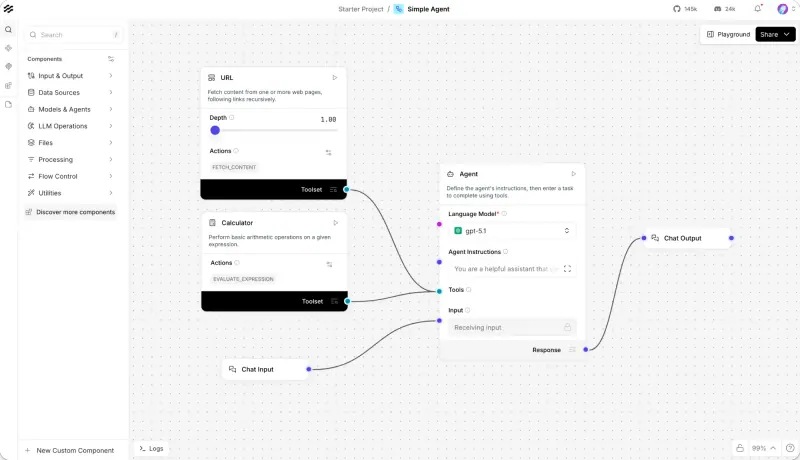
Builds AI agents and document chatbots on a visual canvas: connect models, prompts, tools and your data, test the result in a chat window, then call each flow as an API or use it as a tool from other AI apps. It works with any AI provider, including local models. It is made for technical users, has no built-in publishing to Microsoft Teams or Microsoft 365, and has fewer ready-made connectors for business apps.

What you gain
  • No usage credits to buy, only what your AI provider charges
  • Your flows, chats and API keys stay on your own server
  • Any AI provider, including local models that keep data in-house
What is different
  • No built-in publishing to Microsoft Teams or Microsoft 365
  • You bring and pay for your own AI provider keys
  • It is made for technical users, and building custom parts means some Python
Some setup Open source

Build Coze-style AI agents, chatbots and workflows on your server.

The open-source edition of ByteDance's Coze: a no-code builder for agents with prompts, knowledge bases, plugins, memory and workflows drawn on a canvas, with the AI model you choose. It publishes through an API and a Chat SDK for your website, not to Teams or Microsoft 365, needs a large server, and much of its documentation and plugin store is written for users in China.

Some setup Open source

Sim

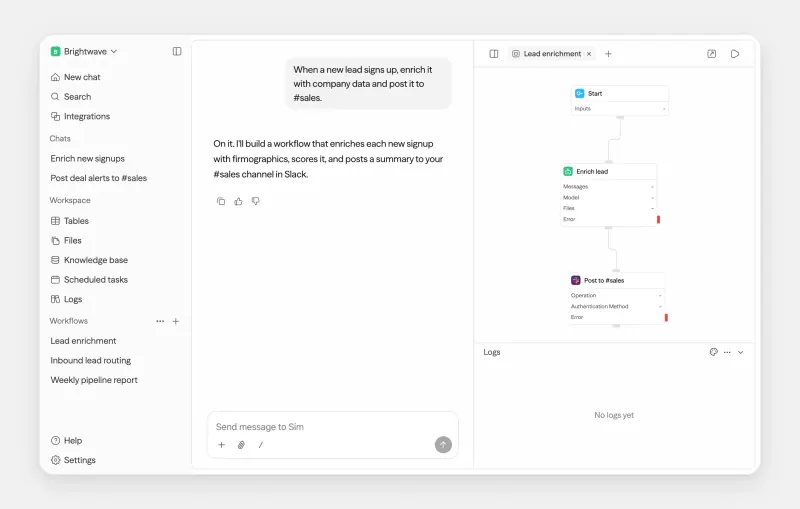
Build AI agents that work in your business apps, self-hosted.

Closer to how business teams work in Copilot Studio: agent, logic and app blocks on a canvas, over 270 app integrations, built-in tables and knowledge bases, and Chat, which builds a workflow from a description but needs a key from Sim's hosted service. Agents run as an API, a chat page, an MCP server or on a schedule, with any major AI provider or a local model. There is no Teams or Microsoft 365 publishing, it needs a large server, and single sign-on is paid.

Some setup Open source

Moving from Copilot Studio

Copilot Studio agents cannot be exported to Langflow, so rebuild them. Sign in to Langflow with the admin account Cloudgate created, add your AI provider's API key, and start from one of the starter projects closest to your agent, such as a simple agent or a chatbot over documents. Copy each agent's instructions into the prompt, add the tools and data it needs, and test it in the Playground until the answers match. Then call the flow from your website or app through its API, since Langflow has no Teams publishing.

Sim cannot import Copilot Studio agents either. Add your AI provider's key, then build each agent as a workflow: a trigger, an Agent block with the same instructions, the app blocks for its actions and a knowledge base for its documents. Test it with Run, check each block's output in the log, and deploy it as a chat page for your colleagues or as an API.

Coze Studio cannot import Copilot Studio agents either. Register your account, add your email under Admin Emails in the admin area and turn off open registration, then add your AI provider's key and an embedding model. Create an agent with the same instructions, upload its documents into a knowledge base, rebuild its actions as workflows, and embed it in your website with the Chat SDK.

Questions

What is the best open-source alternative to Copilot Studio?

Start with Langflow. All 3 are free and open source.

Should I choose Langflow, Sim or Coze Studio?

Choose Langflow if a developer is building agents and document chatbots to call from your own apps; it runs on a smaller server. Choose Sim if business teams want agents that act in apps such as Slack, HubSpot or Salesforce, with tables and knowledge bases built in, and you have a large server for it. Choose Coze Studio if you want a no-code agent builder in the style of Coze, with agents you embed in your own website.

Do Langflow, Sim and Coze Studio work with Microsoft Teams?

Not out of the box. None of them publishes to Teams or Microsoft 365. All three run agents through an API, so a developer can connect them to Teams or another chat tool.

Do I need to code to use Langflow?

Not for most flows, which you build by connecting blocks on a canvas. Langflow is still made for technical users, and building your own components means writing Python.

What does Langflow cost to run?

Langflow itself is free and open source under the MIT licence. You pay for your server and for your AI provider's usage, unless you run local models.

Are these Copilot Studio alternatives really free?

Yes, Langflow, Coze Studio and Sim are free. To run them you need Cloudgate and a server. Use hosted Cloudgate, which can also provide the server, or install Cloudgate on a server of your own for free. Cloudgate's plans and prices are at cloudgate.octabyte.io/pricing. One server can run several apps.

Do I need a developer to replace Copilot Studio?

No. Cloudgate installs the app you choose on your server and gives it a secure web address, and you use it in your browser instead of Copilot Studio.