Open-source alternatives to Miro

WBO is a free, open-source Miro alternative for a quick shared whiteboard: several people draw on one board at once in the browser, and every board is saved on your own server. Miro keeps only three boards editable on its free plan and charges per member after that; WBO has no board limit or per-person fee, though it has only drawing tools, with no sticky notes, templates or images.

2 alternatives Free apps Our pick: WBO

At a glance

App Good for Code Ease of use
WBO Teachers, tutors and small teams who want a quick shared whiteboard to sketch and explain ideas together Code Open source Easy
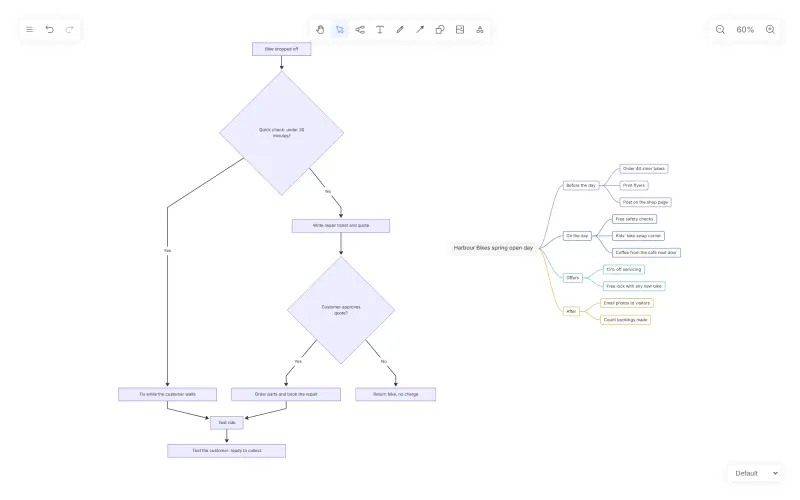
Drawnix Teachers, planners and small-business owners who want mind maps, flowcharts and sketches on one free board, working on their own Code Open source Easy

Why look for an alternative to Miro?

Miro is a hosted online whiteboard where teams brainstorm with sticky notes, run workshops from templates, map ideas and plan projects together on an endless canvas.

People look for an alternative because of its limits and price. When we checked its pricing page in November 2026, the free plan kept only the three most recent boards editable, and paid plans were priced per member, from $8 a month on Starter billed yearly. A teacher, tutor or small team that mainly needs to sketch and explain ideas together does not need all of that. A self-hosted WBO gives everyone a shared board in the browser with no board limit and no fee per person; in return, it is far simpler than Miro, with drawing tools only. Drawnix suits someone who plans alone, with mind maps and flowcharts on one free board.

The alternatives, compared

WBO

Our pick

A self-hosted whiteboard your team can draw on together, live.

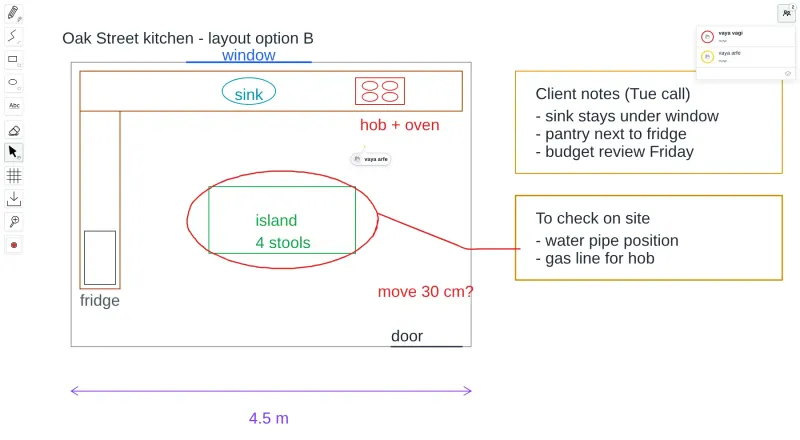
A simple shared whiteboard: several people draw on one large board at once with a pen, lines, rectangles, ellipses, text and an eraser, see each other's cursors, and every board is saved on your server automatically. It has none of Miro's sticky notes, templates, images, comments, frames or integrations, and boards download only as SVG images.

What you gain
  • No board limit and no fee per person
  • No Microsoft or Miro account needed; one shared login opens the boards
  • Boards are kept on your own server, not in someone else's cloud
What is different
  • Drawing tools only; no sticky notes, templates, images, comments or integrations
  • No personal accounts; everyone with the login can open any board whose name they know
  • Boards download only as SVG images, not PDF or PNG
Easy Open source

A free whiteboard for mind maps, flowcharts and sketches.

An endless board for one person, with mind maps, flowcharts, shapes, freehand drawing and images, and it builds mind maps from Markdown and flowcharts from Mermaid text. It has no live collaboration, comments, share links, sticky-note workflows or templates, and each browser keeps one board unless you save it as a file, so it replaces Miro only for working on your own.

Easy Open source

Moving from Miro

WBO cannot import Miro boards, so export the boards you want to keep from Miro as images or PDFs for reference, and start new work in WBO. Open your WBO address, sign in with the login Cloudgate shows, and type a name for each board, such as a class, project or meeting; the board's address is its name, so send that link and the login to the people who should draw on it. Boards save themselves as people draw. Use the download button to keep a copy of a finished board as an SVG image. Drawnix has no Miro import either: rebuild a mind map by pasting its branches as a Markdown list, or a flowchart as Mermaid code, then save each board with Save File, since a browser keeps one board at a time.

Questions

What is the best open-source alternative to Miro?

Start with WBO. Both are free and open source.

Can several people draw on a WBO board at the same time?

Yes. Everyone with the board's link and the login sees each other's drawing live, and a panel shows who is on the board.

Does WBO have sticky notes and templates like Miro?

No. WBO has drawing tools only: pen, lines, shapes, text, eraser and a selection tool. For sticky-note workshops, templates or images on the board, it is not a full Miro replacement.

Should I choose WBO or Drawnix?

Choose WBO when several people need to draw on one board at the same time. Choose Drawnix when you work alone and want mind maps and flowcharts on the same board.

Are WBO boards saved?

Yes, automatically, on your server, as people draw. You can also download any board as an SVG image.

Are these Miro alternatives really free?

Yes, WBO and Drawnix are free. To run them you need Cloudgate and a server. Use hosted Cloudgate, which can also provide the server, or install Cloudgate on a server of your own for free. Cloudgate's plans and prices are at cloudgate.octabyte.io/pricing. One server can run several apps.

Do I need a developer to replace Miro?

No. Cloudgate installs the app you choose on your server and gives it a secure web address, and you use it in your browser instead of Miro.