
Open-source alternative to Adobe XD

Penpot is a free, open-source Adobe XD alternative for interface design and clickable prototypes that the whole team can work on at once. Adobe put XD in maintenance mode in 2023 and no longer adds features; Penpot is still actively developed and runs on your own server.

Free app Code: Open source Import from Adobe XD: No Easy

Why look for an alternative to Adobe XD?

Adobe XD is Adobe's tool for designing and prototyping websites and apps. Designers drew screens on artboards, linked them into clickable prototypes and shared them with developers and clients for review.

People look for an alternative because Adobe put XD in maintenance mode in 2023: it gets bug and security fixes but no new features, and it is no longer sold on its own. Teams that still have XD work want a tool that is actively developed. A self-hosted, open-source design tool such as Penpot does the same job in the browser, with no seat price, and keeps your files on your own server.

How Penpot compares

Design and prototype together in your browser, like Figma.

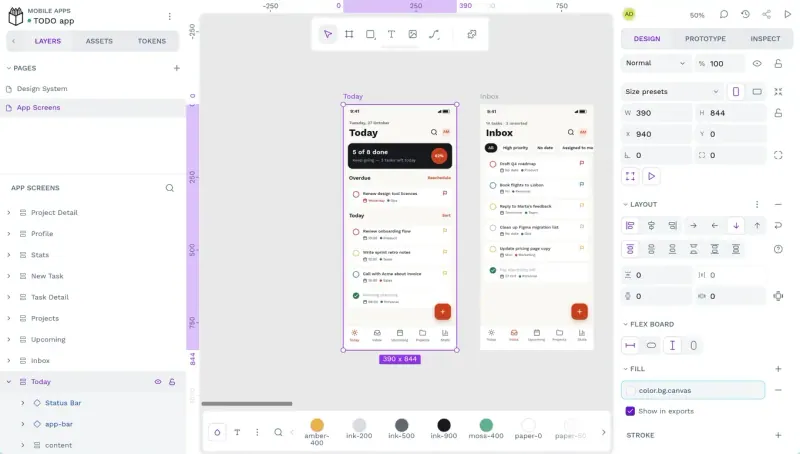
Covers what most teams used XD for, interface design, components and clickable prototypes shared by link, and adds real-time collaboration, design tokens and an Inspect tab with CSS and SVG for developers. Unlike XD it runs in the browser, not as a desktop app, and it is still adding features.
Easy Open source

Moving from Adobe XD

There is no Adobe XD importer, and no Adobe XD export that Penpot reads as a design file. Export the artboards and assets you need from XD as SVG, which keeps them as editable shapes when you bring them into Penpot, and PNG for anything else. Rebuild your components and colour and text styles in a Penpot library first, then recreate the screens you still work on; keep old XD files as exported images for reference. Interactions in XD prototypes need to be set up again in Penpot.

Questions

What is the best open-source alternative to Adobe XD?

Penpot is the free, open-source alternative to Adobe XD for interface design and prototyping in the catalogue today. Covers what most teams used XD for, interface design, components and clickable prototypes shared by link, and adds real-time collaboration, design tokens and an Inspect tab with CSS and SVG for developers. Unlike XD it runs in the browser, not as a desktop app, and it is still adding features.

Has Adobe XD been discontinued?

Not formally. In 2023 Adobe put XD in maintenance mode: it fixes bugs and security issues but adds no new features, and it is no longer sold on its own. It stays available in Creative Cloud All Apps. Penpot, an open-source alternative, is still adding features.

Can Penpot import Adobe XD files?

No. Penpot cannot open Adobe XD files. Export your artboards from Adobe XD as SVG, which Penpot keeps as editable shapes, or PNG, then rebuild components and prototype interactions in Penpot.

Does Penpot work like Adobe XD?

Mostly, for interface design. Penpot covers what most teams used Adobe XD for: screens, components and clickable prototypes shared by link. Unlike Adobe XD, Penpot runs in the browser rather than as a desktop app, and it adds real-time collaboration, design tokens and an Inspect tab with CSS and SVG for developers.

Is Penpot really free compared with Adobe XD?

Yes, Penpot is free. To run them you need Cloudgate and a server. Use hosted Cloudgate, which can also provide the server, or install Cloudgate on a server of your own for free. Cloudgate's plans and prices are at cloudgate.octabyte.io/pricing. One server can run several apps.

Do I need a developer to replace Adobe XD?

No. Cloudgate installs Penpot on your server and gives it a secure web address, and you use it in your browser instead of Adobe XD.