Open-source alternatives to Figma

Penpot is a free, open-source Figma alternative for designing screens, building prototypes and keeping a design system, all in the browser. Figma charges per editor seat and keeps every file on its servers; self-hosted Penpot has no seat price and keeps files on yours.

2 alternatives Free apps Our pick: Penpot

At a glance

App Good for Code Import from Figma Ease of use
Penpot Product teams of designers and developers who want Figma-style design with no per-seat fee Code Open source Import from Figma Partly Easy
Quant-UX Small product and design teams who want to test app and website ideas with real users before building them Code Open source Import from Figma Partly Easy

Why look for an alternative to Figma?

Figma is the most widely used tool for designing apps and websites. Designers draw screens in the browser or its desktop app, build clickable prototypes, keep design systems of shared components, and developers read measurements and code from the same files in its dev mode.

Teams look for an alternative because Figma is charged per editor seat, with dev mode and higher plans charged on top, and every file lives on Figma's servers, which some companies cannot accept for unreleased products. A self-hosted design tool such as Penpot works in a similar way, with no seat price and with your design files on your own server. Teams that use Figma mainly to build prototypes for user tests can use Quant-UX, which builds clickable prototypes and tests them with real people in one place.

The alternatives, compared

Penpot

Our pick

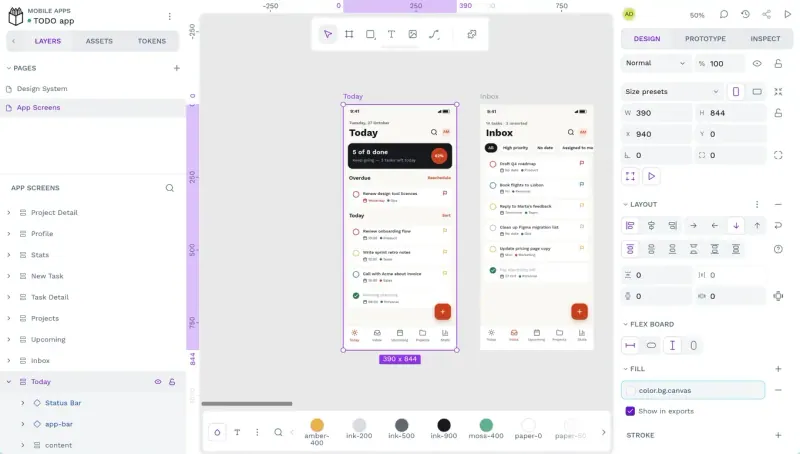
Design and prototype together in your browser, like Figma.

A very similar way of working: boards, components and variants, shared libraries, design tokens, Flex and Grid layout in place of auto layout, and an Inspect tab with CSS, SVG and HTML for developers at no extra cost. Figma has a bigger plugin and community ecosystem, desktop apps and more mature prototyping. Organisation-level SSO, the admin console and audit logs are part of Penpot's paid Enterprise plan.

What you gain
  • No per-seat fee, with unlimited users, teams and files
  • Developers inspect CSS, SVG and HTML at no extra cost
  • Your design files stay on your own server
What is different
  • Prototyping and the plugin choice are less mature than Figma's
  • Figma files come across through a plugin, and prototype links do not
  • Browser only, with no desktop or phone apps, and it works best in a recent Chrome
Easy Open source

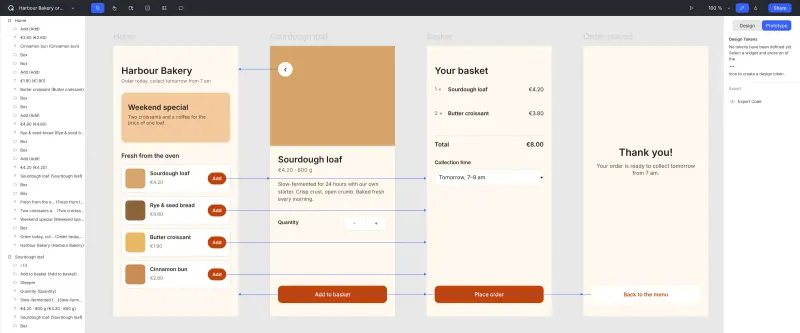
Prototype designs and test them with real users, in one tool.

For clickable prototypes and testing them, rather than visual design: build screens from ready-made widgets with links, logic and form validation, share a test link, and get recordings, heatmaps, user journeys and task success, which Figma does not have. It can import Figma frames with an access token. Its design tools are much simpler than Figma's, there is no live co-editing in this template, and the self-hosted version trails the hosted quant-ux.com.

Easy Open source

Moving from Figma

Penpot cannot open .fig files directly. Instead, run the official Penpot Exporter plugin inside Figma: it turns a file into a .zip that Penpot imports, with shapes, frames, text, components, variants, auto layout and colour and type libraries. Prototype interactions are not exported, very large files can hit Figma's limits, and some layouts need tidying afterwards, so move your shared library first, check it, then move the files that use it. The exporter is for a one-off move, not ongoing sync. Design tokens can also come across as JSON, for example from Tokens Studio.

Quant-UX imports frames from a Figma file: give it a Figma access token and the file's address, then add the links and interactions between screens in Quant-UX, since there is no source on how well Figma's own prototype settings come across. Then write your test tasks and share the test link.

Questions

What is the best open-source alternative to Figma?

Start with Penpot. Both are free and open source.

Can Penpot open Figma files?

Not directly. The official Penpot Exporter plugin, run inside Figma, converts a file into a .zip that Penpot imports. Prototype interactions are not included.

Does Penpot have a dev mode like Figma?

Yes, and it is free. Penpot's Inspect tab shows ready-to-use CSS, SVG and HTML for any element, for everyone on the team.

Should I choose Penpot or Quant-UX?

Choose Penpot to design screens and keep a design system, as you do in Figma. Choose Quant-UX if you mainly build clickable prototypes to test with real people and want heatmaps and task results without a separate testing tool.

Is there a Penpot desktop app?

No official one for self-hosting. Penpot runs in the browser, and it recommends the latest Chrome.

Are these Figma alternatives really free?

Yes, Penpot and Quant-UX are free. To run them you need Cloudgate and a server. Use hosted Cloudgate, which can also provide the server, or install Cloudgate on a server of your own for free. Cloudgate's plans and prices are at cloudgate.octabyte.io/pricing. One server can run several apps.

Do I need a developer to replace Figma?

No. Cloudgate installs the app you choose on your server and gives it a secure web address, and you use it in your browser instead of Figma.