M

Open-source alternatives to Microsoft 365 Copilot

Eneo is a free, open-source Microsoft 365 Copilot alternative that gives staff an AI assistant on your own server: personal chat, shared assistants that answer from your own documents, team spaces and an audit log of AI use, with the AI model you choose. Microsoft 365 Copilot is a paid add-on per user each month that works inside Word, Excel, Outlook and Teams; Eneo is a separate web app instead, and you pay an AI provider such as OpenAI for what staff use, unless you run your own model server.

2 alternatives Free apps Our pick: Eneo

At a glance

App Good for Code Ease of use
Eneo Councils and public bodies wanting a shared AI assistant that keeps data in-house Code Open source Some setup
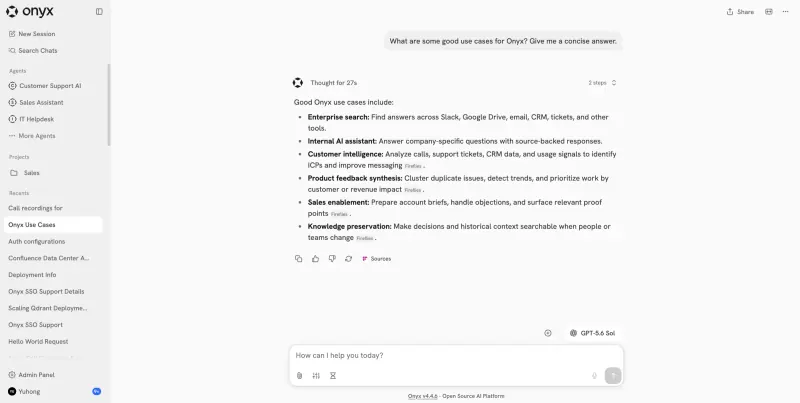
Onyx Teams that want answers from their Slack, Drive, wiki and tickets, with a large server to spare Code Open source Some setup

Why look for an alternative to Microsoft 365 Copilot?

Microsoft 365 Copilot is Microsoft's AI assistant inside its Office apps: it drafts and summarises in Word, Excel, PowerPoint and Outlook, works in Teams, and answers from your organisation's files and email. It is sold as a paid add-on per user on top of a Microsoft 365 plan, while the simpler Copilot Chat is included with eligible plans at no extra cost.

Organisations look for an alternative because of the price per user and because their data and AI use go through Microsoft's cloud. When we checked Microsoft's pricing page in November 2026, the add-on for business cost $21 per user a month on a yearly commitment, offered at $18 for the first year until the end of 2026. A self-hosted Eneo or Onyx gives every member of staff an AI assistant over your own documents with no price per user: you choose the AI model, pay the provider for what is used, and keep chats and documents on your own server. Eneo is built for organisations that need spaces, roles and an audit log; Onyx is built for searching across many connected apps.

The alternatives, compared

Eneo

Our pick

An open-source AI assistant for your organisation, on your server.

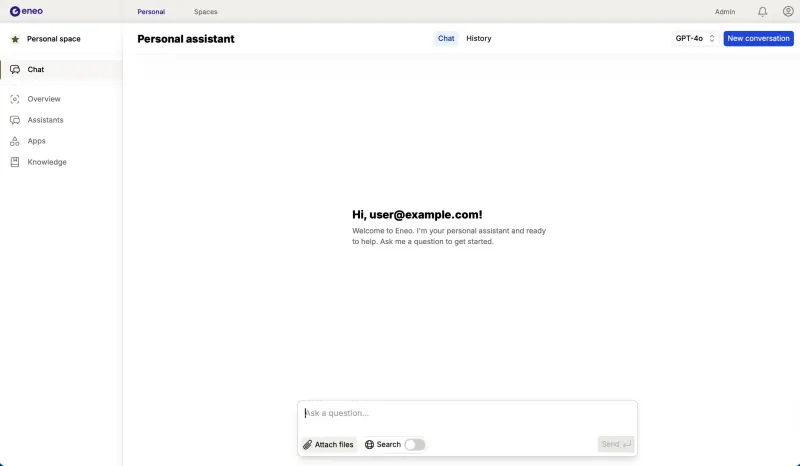
Gives staff an AI chat and shared assistants that answer from your own documents, websites, SharePoint and OneDrive files or Confluence pages, with team spaces, roles, sign-in through your identity provider and an audit log of AI use, all on your own server. It is a separate web app, not built into Word, Excel, Outlook or Teams like Copilot, and it holds no AI model itself: you connect a provider such as OpenAI, Anthropic or Mistral with a paid API key, or your own model server.

What you gain
  • Chats, assistants and documents stay on your own server
  • Choose the AI provider and model, or run your own model
  • No price per seat; you pay for the server and the AI you use
What is different
  • You need an AI provider's API key, which is paid, or your own model server
  • It is a separate web app, not built into Word, Outlook or Teams
  • Built for the Swedish public sector, so some admin screens and guides are in Swedish
Some setup Open source

AI search and chat that answers from your company's own apps.

Gives staff an AI chat that answers from company knowledge with links to its sources, through more than 50 connectors, including SharePoint and OneDrive, Microsoft Teams and Outlook as well as Slack, Google Drive and Confluence, and lets you build an agent with its own instructions for each team. It is MIT-licensed and needs a large server and your own AI provider key. Its free edition does not copy each file's sharing settings, so connect only what everyone using it may see, and like Eneo it is a separate web app, not built into Word, Excel or Outlook.

Some setup Open source

Moving from Microsoft 365 Copilot

There is nothing to import from Microsoft 365 Copilot; you set up Eneo next to your Microsoft 365 apps. Sign in with the admin email you gave during setup and the password Cloudgate created for it, shown on the app's variables page. Under Admin, Models, add your AI provider with its API key and choose which models staff may use. Turn on sign-in through your identity provider, such as Microsoft Entra ID, so staff use their work accounts, and set up roles. Then create a space for each team, add the documents, websites or SharePoint libraries each team's assistant should answer from, and build the assistants people asked Copilot for, with their own instructions. Try it with one team before you change any Copilot licences.

Questions

What is the best open-source alternative to Microsoft 365 Copilot?

Start with Eneo. Both are free and open source.

Does Eneo work inside Word, Outlook or Teams?

No. Eneo is a separate web app that staff open in the browser. It can answer from documents kept in SharePoint and OneDrive, but it does not write inside Word, summarise Outlook mail or join Teams meetings the way Microsoft 365 Copilot does.

Do I need an OpenAI key to use Eneo?

Not necessarily, but you need an AI model. Most organisations add a paid API key from a provider such as OpenAI, Anthropic, Google Gemini, Azure OpenAI or Mistral, which bills them for what staff use. You can instead connect a model server you run yourself, such as vLLM or Ollama, which needs a server with a GPU.

Who makes Eneo?

Eneo was first built by the Swedish municipalities of Sundsvall and Ånge for the public sector, and a user association of public organisations now governs it. It is open source under the AGPL-3.0 licence and has no paid edition, and its interface is in Swedish and English.

Are these Microsoft 365 Copilot alternatives really free?

Eneo is free and open source under the AGPL-3.0 licence, with no paid edition. You pay your AI provider for what staff use, unless you run your own model server. To run it you need Cloudgate and a server: use hosted Cloudgate, which can also provide the server, or install Cloudgate on a server of your own for free. Cloudgate's plans and prices are at cloudgate.octabyte.io/pricing.

Do I need a developer to replace Microsoft 365 Copilot?

No. Cloudgate installs the app you choose on your server and gives it a secure web address, and you use it in your browser instead of Microsoft 365 Copilot.