
Onyx
AI search and chat that answers from your company's own apps.
No server needed to start: Cloudgate can provide one. What happens when you click Deploy
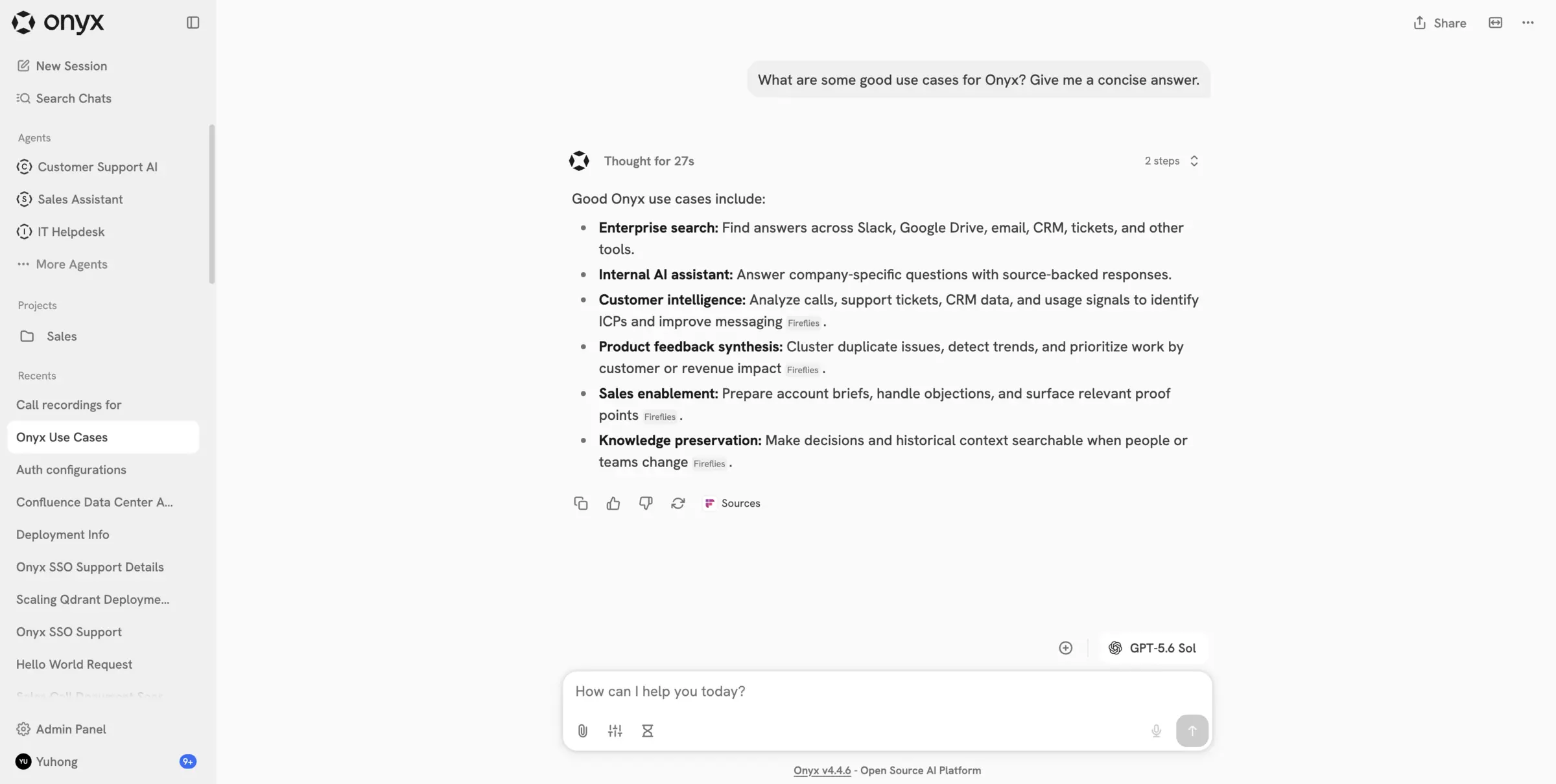
What is Onyx?
Onyx is a self-hosted AI search and chat assistant that answers questions from your company's Slack, Drive, wiki and tickets, with sources.
Onyx is a self-hosted AI search and chat assistant that answers questions from your company's own apps, an open source alternative to Glean and to ChatGPT for company knowledge. It connects to tools such as Slack, Google Drive, Confluence, Jira, GitHub and Notion, indexes what they hold, and answers in a ChatGPT-style chat with links to the sources.
A 30-person IT services firm, for example, could connect its Slack, Google Drive and Confluence, so a new hire who asks "how do we set up VPN access for a client?" gets the steps from the right runbook, with a link to check it.
Onyx works with the AI model you choose: OpenAI, Anthropic, Gemini or one you run yourself, with your own API key. Each connector needs access set up in that app first. Cloudgate installs the MIT-licensed Community Edition, so paid features such as permission sync, user groups, analytics and branding are not included, and the template leaves out the code interpreter.
Cloudgate installs Onyx on a server Cloudgate provides or one you connect and gives it a secure web address. It needs a very large server, with 16 GB of memory and plenty of disk, and the first start takes several minutes. Sign up right away: the first account becomes the admin.
What you can do with Onyx
- Ask your company's knowledge Chat in plain language and get answers drawn from your own documents and messages, with links to the sources.
- Connect the apps you already use More than 50 connectors, including Slack, Google Drive, Confluence, Jira, GitHub, Notion, Gmail, Salesforce and Zendesk, plus websites and file uploads.
- Build agents for each team Give an agent its own instructions, knowledge and actions, such as an IT helpdesk or a sales assistant.
- Run deep research Ask a bigger question and get a multi-step research report built from your documents and, if you want, the web.
- Choose your AI model Use OpenAI, Anthropic, Gemini or a model you run yourself, and change it later.
- Ask from Slack or the browser Answer questions in Slack or Discord with the Onyx bot, or use the Chrome extension and desktop app.
Replaces Glean, ChatGPT Business and Microsoft 365 Copilot
Onyx does the same job as Glean, ChatGPT Business and Microsoft 365 Copilot. Here is what changes when you switch.
- Your indexed documents and chat history stay on your own server
- Any AI model you choose, billed by that provider for what you use
- The open source Community Edition has no per-seat price
- Chat, agents, connectors and deep research are all in the free edition
- It needs a very large server, with 16 GB of memory and plenty of disk
- Permission sync from your apps, user groups, usage analytics and branding are paid Onyx features, not included
- You set up access in each app you connect, and the first indexing of big sources takes time
- Answer quality depends on the AI model you connect
What happens when you click Deploy?
You do not need a server or any technical knowledge. Four steps, and Onyx is running at its own web address.
- Step 1 Click Deploy and create your account
Deploy takes you to Cloudgate. Create an account, or log in if you have one. Onyx itself is free.
- Step 2 Choose a server
No server? Get one from Cloudgate: pick a size and a country, and Cloudgate gets it ready. Already have one? Connect it instead.
- Step 3 Cloudgate sets up Onyx
It prepares the server, makes the passwords the app needs and starts it. There is nothing to install and nothing to write down.
- Step 4 Open your app and sign in
Your app gets a free web address to start, without https. Add your own domain, like app.yourshop.com, and Cloudgate secures it with https for you.
New to Cloudgate? See what Cloudgate is
Run Cloudgate yourself? Deploy from your own console
In your Cloudgate console, open Templates and choose Onyx.
Questions
Is Onyx free?
Yes, the Onyx Community Edition that Cloudgate installs is free and open source under the MIT licence. Onyx's paid Business and Enterprise features, such as group permissions, permission sync, usage analytics, branding, several sign-in providers, encrypted secrets, the LLM gateway, SCIM, custom roles and white-labelling, are not included. You also pay your AI provider for what you use.
Is Onyx a good alternative to Glean?
Yes, Onyx is an open source alternative to Glean for AI search and chat across your company's apps, on your own server and with the AI model you choose. Glean is fully managed and has more connectors, and copying each document's sharing settings from your apps is a paid Onyx feature, so in the free edition connect only what everyone using Onyx may see.
Is Onyx the same as Danswer?
Yes, Onyx is the new name of Danswer, the same project and the same code.
Does Onyx come with an AI model?
No, Onyx needs an AI provider. After signing up, the admin connects one, such as OpenAI, Anthropic or Azure with your own API key, or a model you run yourself, and that provider bills its own usage. Your documents and chats are stored on your server, but questions and the passages used to answer them are sent to the provider you connect.
How do I sign in to Onyx the first time?
The first person to sign up to Onyx with an email and password becomes the admin, so do it right after install. Until then anyone who reaches the address could take admin. After that, anyone with the address can still create an account, so the admin turns on invite-only sign-up in the admin panel.
What server size do I need for Onyx?
Onyx needs a very large server. Cloudgate uses its 2xlarge size, with 8 CPUs and 16 GB of memory, and the server needs 50 GB of disk or more, plus room for your documents. The first start takes several minutes.
Is Onyx still open source after Zoom bought it?
Yes, Zoom, which bought Onyx in October 2026, says Onyx will stay open source, model-agnostic and self-hostable. The version Cloudgate installs is the MIT-licensed Community Edition.
Do I need technical skills to run Onyx?
No. Click Deploy, create your Cloudgate account and choose a server, and Cloudgate sets up Onyx and gives it a web address. You use it in your browser like any other online tool.
Do I need my own server for Onyx?
No. When you deploy Onyx, hosted Cloudgate can provide a server. If you already rent one, you can connect it instead.
Can I move my data from Glean to Onyx?
Most people export from Glean and import into Onyx. The official guides at docs.onyx.app walk through it.
Related apps

An open-source AI assistant for your organisation, on your server.

Ask questions of your team's documents, in a chat you can reshape.

An AI assistant that reads your hardest documents and cites them.

Ask your company's documents questions and get answers with sources.