Open-source alternative to Maze

Quant-UX is a free, open-source Maze alternative for testing app and website prototypes with real people: share a link, and it records each session and shows heatmaps, user journeys, task success and drop-off. Maze is a paid hosted service that tests prototypes made in tools such as Figma and can recruit testers for you; self-hosted Quant-UX has its own prototype editor and keeps results on your server, but you find the testers yourself.

Free app Code: Open source Import from Maze: No Easy

Why look for an alternative to Maze?

Maze is a hosted user research service: teams run unmoderated tests on prototypes, often made in Figma, and get heatmaps, task success rates and survey answers, with options to recruit testers and run other kinds of studies.

Teams look for an alternative because Maze is a paid service and their prototypes and test results sit on its servers. A self-hosted Quant-UX does the core of the job, clickable prototypes, test links, recordings, heatmaps and task analytics, with no fee and with the results on your own server. It suits teams that can bring their own testers and don't need Maze's wider range of study types.

How Quant-UX compares

Prototype designs and test them with real users, in one tool.

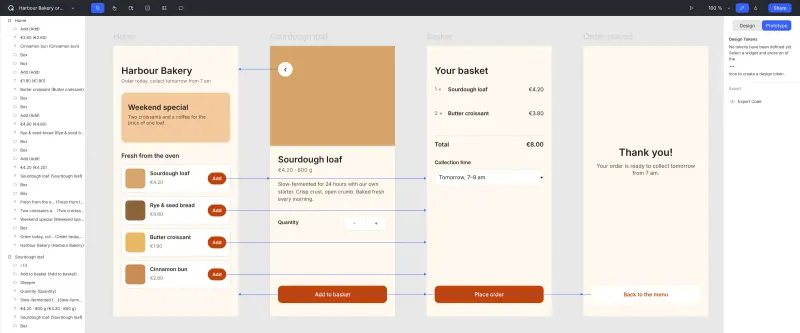
Covers Maze's core loop on your own server: share a prototype by link or QR code, testers need no account, every session is recorded for replay, and you get click heatmaps, user journeys, task success, duration and drop-off, plus surveys inside the prototype. You build the prototype in its own editor or import Figma frames. It has no tester recruitment panel, no interview or card-sorting studies and fewer report templates, and the self-hosted version trails the hosted quant-ux.com.

What you gain
  • Prototypes, user tests and their results in one tool, with no per-seat or per-test fee
  • Testers need only a link, with no account or app
  • Recordings and click data stay on your own server
What is different
  • No panel of paid testers, so you recruit your own
  • Drawing tools are simpler than Figma's, and Figma imports bring screens across, not every interaction
  • This version has no live co-editing, so plan for one person to edit a prototype at a time
Easy Open source

Moving from Maze

There is nothing to import from Maze, so set up your next test in Quant-UX. Sign up as the first user, then build the prototype in its editor, or import the screens from Figma with a Figma access token and the file's address and add the links between screens. In the Test tab, write a welcome message and the tasks testers should complete, then share the test link or QR code with your testers, whom you find yourself. Results appear in the analytics view as testers finish. Past Maze results don't come across.

Questions

What is the best open-source alternative to Maze?

Quant-UX is the free, open-source alternative to Maze for testing prototypes with users in the catalogue today. Covers Maze's core loop on your own server: share a prototype by link or QR code, testers need no account, every session is recorded for replay, and you get click heatmaps, user journeys, task success, duration and drop-off, plus surveys inside the prototype. You build the prototype in its own editor or import Figma frames. It has no tester recruitment panel, no interview or card-sorting studies and fewer report templates, and the self-hosted version trails the hosted quant-ux.com.

Can Quant-UX test my Figma prototypes like Maze?

Partly. Quant-UX imports frames from a Figma file with a Figma access token, but you add the links and interactions between screens in Quant-UX before testing.

Does Quant-UX find testers for me?

No. Unlike Maze, Quant-UX has no tester panel, so you send the test link to your own customers, users or colleagues. They need no account to take part.

What does Maze do that Quant-UX doesn't?

Maze recruits testers from its own panel, runs more kinds of studies, such as interviews and card sorting, and has more report templates. Quant-UX covers unmoderated prototype tests with recordings, heatmaps, task success and surveys, and you find the testers yourself.

Is Quant-UX really free compared with Maze?

Yes, Quant-UX is free. To run them you need Cloudgate and a server. Use hosted Cloudgate, which can also provide the server, or install Cloudgate on a server of your own for free. Cloudgate's plans and prices are at cloudgate.octabyte.io/pricing. One server can run several apps.

Do I need a developer to replace Maze?

No. Cloudgate installs Quant-UX on your server and gives it a secure web address, and you use it in your browser instead of Maze.