
Quant-UX
Prototype designs and test them with real users, in one tool.
No server needed to start: Cloudgate can provide one. What happens when you click Deploy
What is Quant-UX?
Self-hosted Quant-UX builds clickable prototypes, tests them with real users by link and shows heatmaps and task results, like Maze.
Quant-UX is an open-source prototyping and usability testing tool, and self-hosted Quant-UX lets you build clickable app and website prototypes, test them with real people and see where they click, all on your own server. It puts the prototype, the tests and the results in one place, as an alternative to paying for Maze on top of Figma.
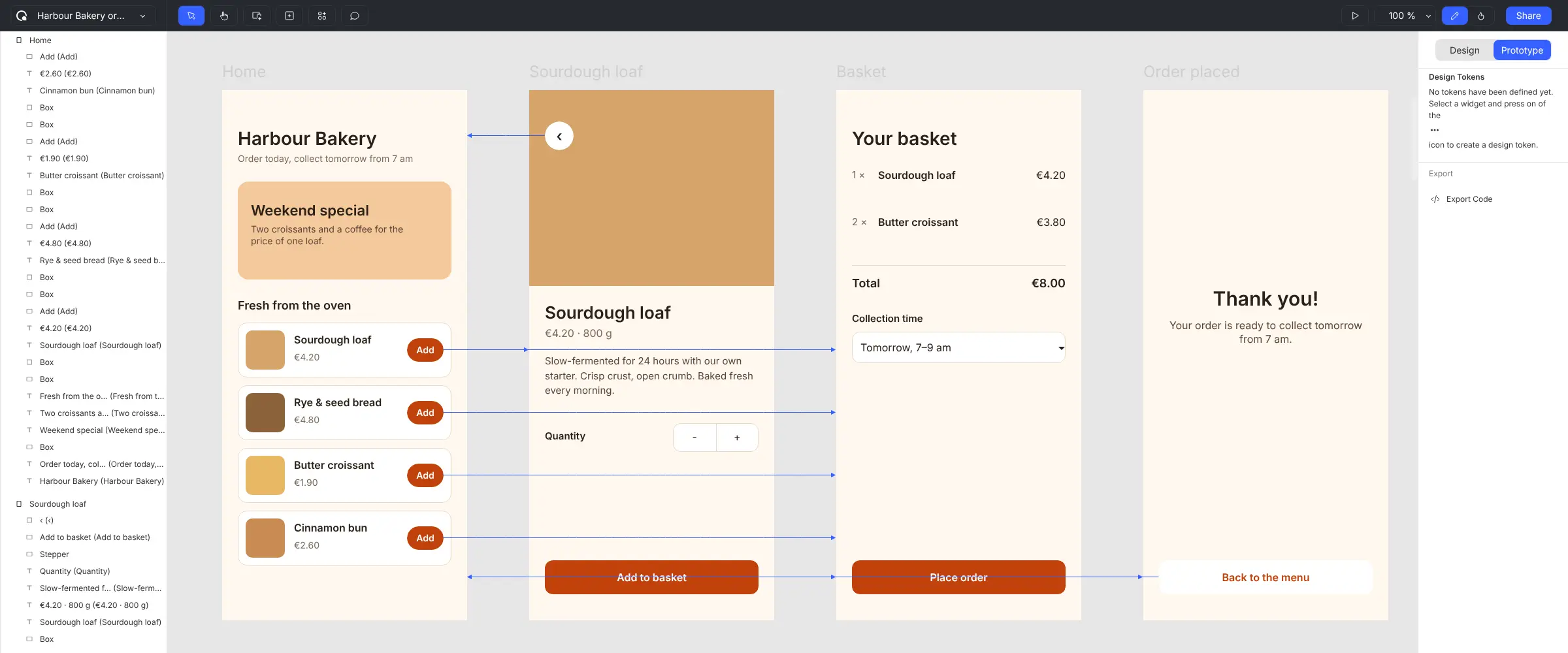
You lay out screens from ready-made parts, link them together and add simple logic, so the prototype behaves like a real app. Then you share a link. Testers open it in their browser or scan a QR code on their phone, with no account to create, and every session is recorded. Quant-UX turns the sessions into heatmaps, user journeys, task success rates and drop-off points, and you can add survey questions to the prototype itself.
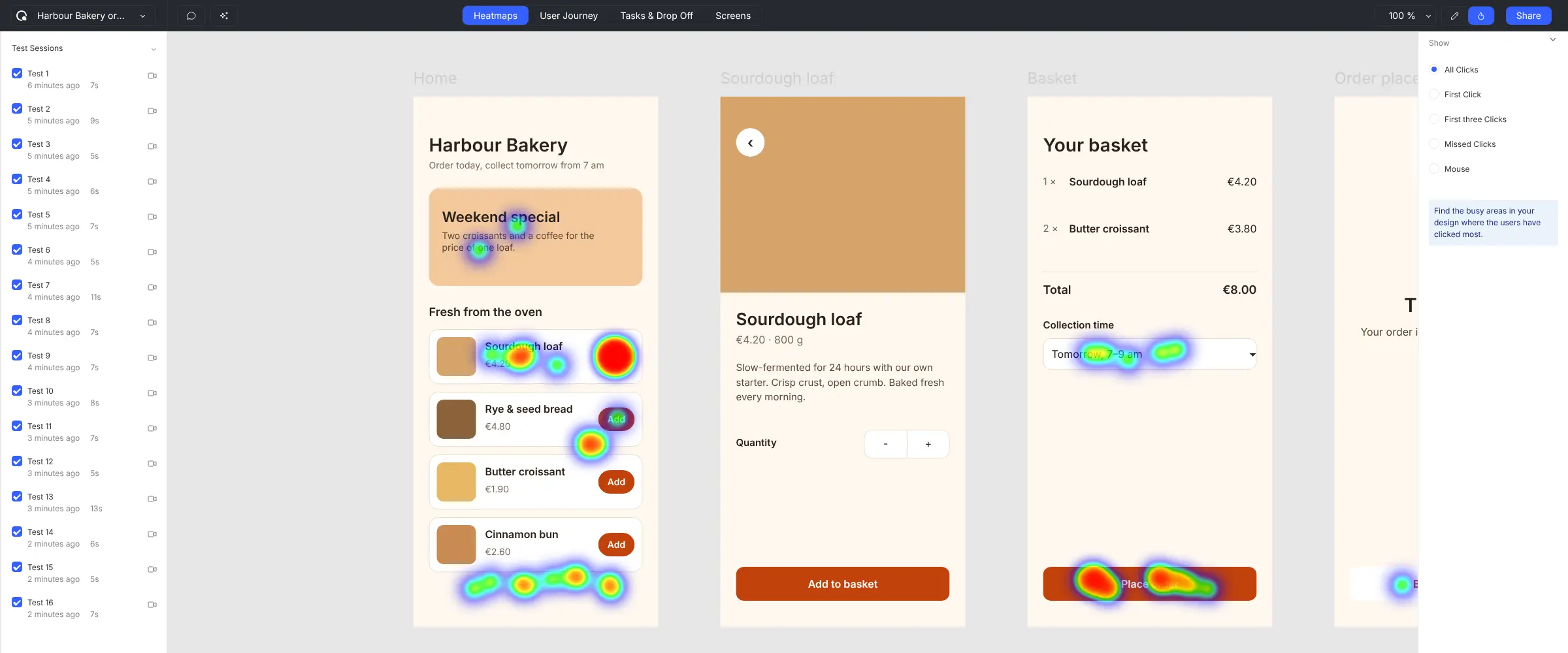
A bakery planning an order app, for example, could mock up the menu, basket and checkout, send the link to twenty regular customers and see which buttons they missed before paying anyone to build it.
You can import screens from Figma or from images. Cloudgate installs Quant-UX 3.0.1, from the community-built images the project's README recommends for self-hosting, on a server Cloudgate provides or one you connect, and gives it a secure web address. There is no default login: you sign up with your email and a password, then turn off open sign-up once your team has joined.
What you can do with Quant-UX
- Build clickable prototypes Lay out app or website screens from ready-made buttons, inputs, menus and ratings, then link them so they click like the real thing.
- Add logic and form checks Make prototypes react to what people type and choose, with rules, data and form validation, so tests feel realistic.
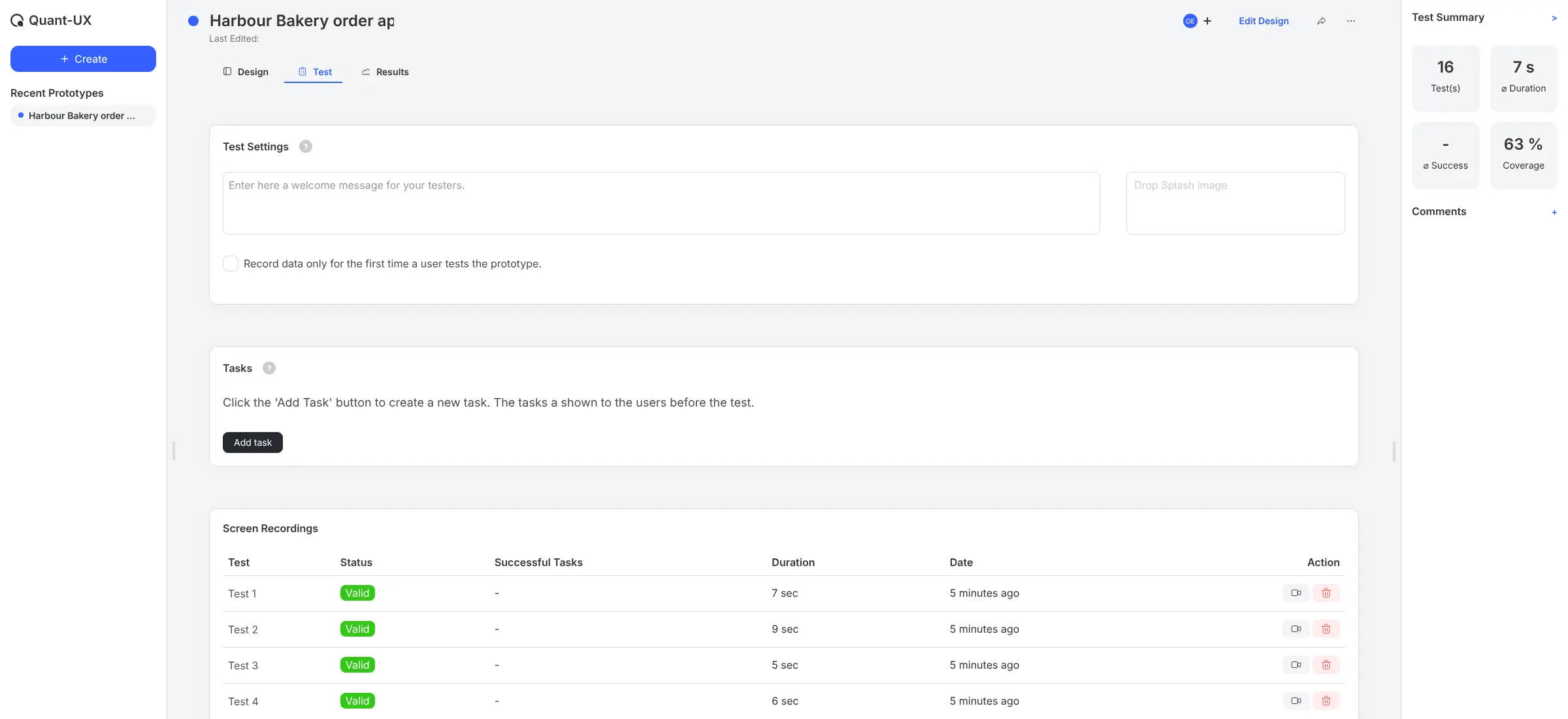
- Test with a shared link Send testers a link, or a QR code for their phone, and they try the prototype in their browser with no account to create.
- Watch every test again Each test session is recorded, so you can replay exactly where a tester tapped, hesitated or got lost.
- See heatmaps and user journeys Heatmaps show where people clicked, including missed clicks, and a journey map shows the paths they took between screens.
- Measure tasks and drop-off Set tasks such as "order a loaf" and Quant-UX works out how many testers finished, how long they took and where they gave up.
- Ask questions inside the prototype Turn star ratings, scales and other widgets into survey questions that testers answer as part of the test.
- Bring in existing designs Import screens from Figma with a Figma access key, or from images, and export your work as a file or as code.
Replaces Maze, Figma and Axure RP
Quant-UX does the same job as Maze, Figma and Axure RP. Here is what changes when you switch.
- Prototypes, user tests and their results in one tool, with no per-seat or per-test fee
- Testers need only a link, with no account or app
- Recordings and click data stay on your own server
- Open source under the GPL-3.0 licence
- No panel of paid testers, so you recruit your own
- Drawing tools are simpler than Figma's, and Figma imports bring screens across, not every interaction
- This version has no live co-editing, so plan for one person to edit a prototype at a time
- Cloudgate installs community-built images of version 3.0.1 (July 2025), which trail the hosted quant-ux.com, and AI features need your own OpenAI key
What happens when you click Deploy?
You do not need a server or any technical knowledge. Four steps, and Quant-UX is running at its own web address.
- Step 1 Click Deploy and create your account
Deploy takes you to Cloudgate. Create an account, or log in if you have one. Quant-UX itself is free.
- Step 2 Choose a server
No server? Get one from Cloudgate: pick a size and a country, and Cloudgate gets it ready. Already have one? Connect it instead.
- Step 3 Cloudgate sets up Quant-UX
It prepares the server, makes the passwords the app needs and starts it. There is nothing to install and nothing to write down.
- Step 4 Open your app and sign in
Your app gets a free web address to start, without https. Add your own domain, like app.yourshop.com, and Cloudgate secures it with https for you.
New to Cloudgate? See what Cloudgate is
Run Cloudgate yourself? Deploy from your own console
In your Cloudgate console, open Templates and choose Quant-UX.
Questions
Is Quant-UX free?
Yes, Quant-UX is free and open source under the GPL-3.0 licence, with no paid edition. Self-hosted, you pay only for your server. The optional AI assistant needs an OpenAI API key, which OpenAI charges for.
Is Quant-UX a good alternative to Maze?
Yes, for testing prototypes with your own users. Like Maze, Quant-UX gives testers a link and shows heatmaps, task success, drop-off and survey answers, and it adds its own prototype editor, so you don't need Figma. It has no tester recruitment panel and fewer study types than Maze, such as interviews or card sorting.
Can I import my Figma designs into Quant-UX?
Partly. Quant-UX imports pages and screens from a Figma file when you paste the file's link and a Figma access key. You then add the links and logic in Quant-UX, so plan to check each screen after the import.
How do I sign in to Quant-UX the first time?
There is no default login. Open your Quant-UX web address, choose Sign Up, enter your email and a password and accept the terms; no confirmation email is needed. Anyone who can reach the address can sign up until you turn sign-up off.
Do Quant-UX testers need an account or an app?
No. Testers open the Quant-UX test link in any web browser, read a short privacy note and start. On a phone they can scan a QR code to open the same test.
What server size do I need for Quant-UX?
Quant-UX needs a medium server with about 2 GB of memory, because it runs the app, a Java back end and a MongoDB database. The first install is slow because the download is large.
Can Quant-UX send emails?
Yes, if you add your email server's details to Quant-UX. Sign-up and testing work without email, but password resets and team invitations need it.
Do I need technical skills to run Quant-UX?
No. Click Deploy, create your Cloudgate account and choose a server, and Cloudgate sets up Quant-UX and gives it a web address. You use it in your browser like any other online tool.
Do I need my own server for Quant-UX?
No. When you deploy Quant-UX, hosted Cloudgate can provide a server. If you already rent one, you can connect it instead.
Related apps

Design and prototype together in your browser, like Figma.

Draw flowcharts, org charts and diagrams in your browser.

A free whiteboard for mind maps, flowcharts and sketches.

AI design studio for web pages, prototypes and decks.