
Langflow
Build AI agents and workflows by connecting blocks on a canvas.
No server needed to start: Cloudgate can provide one. What happens when you click Deploy



What is Langflow?
Self-hosted Langflow: build AI agents and document chatbots on a visual canvas with any AI model, then use them through an API or as MCP tools.
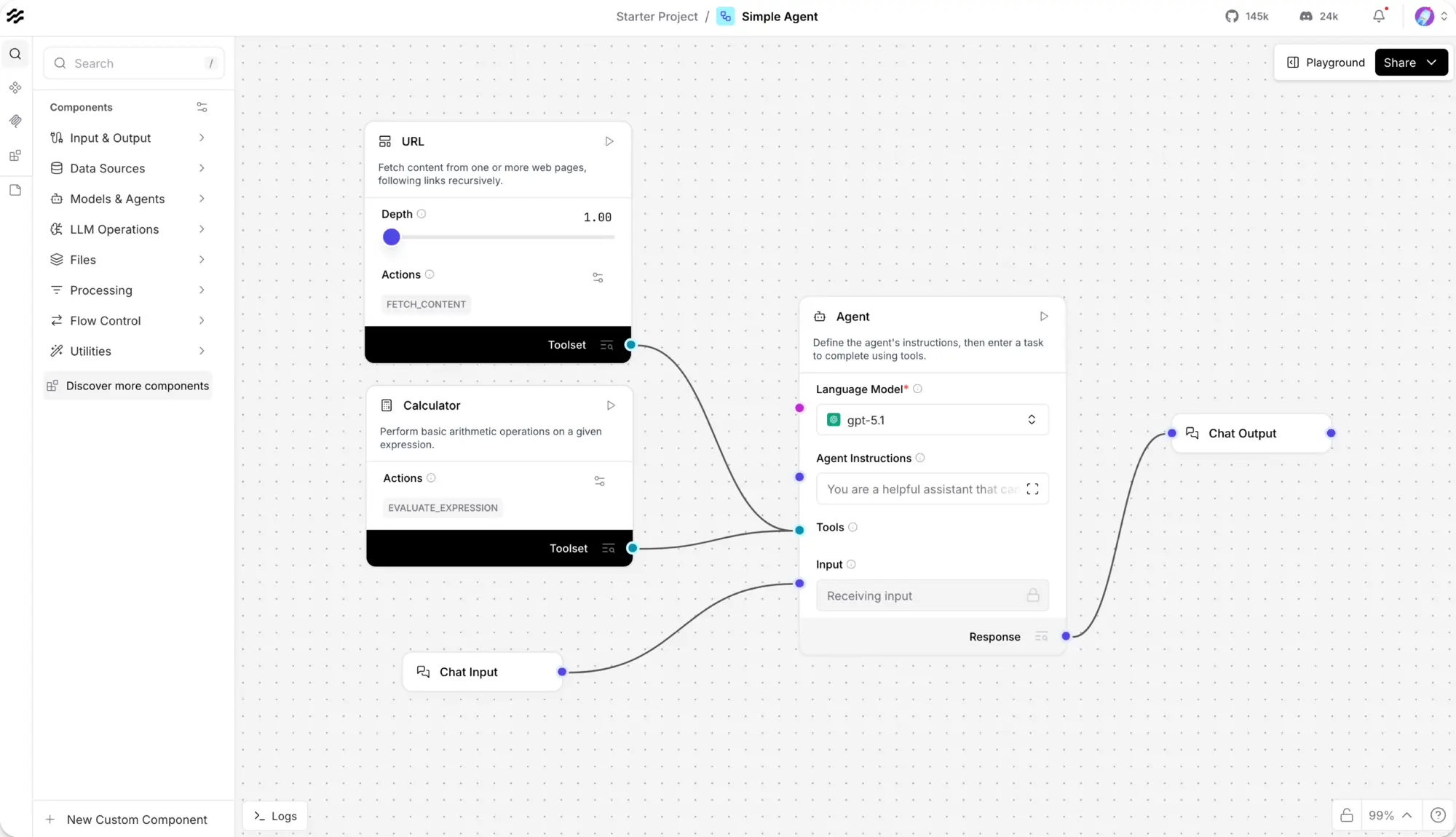
Langflow is a self-hosted, open-source visual builder for AI agents and AI workflows, an alternative to Microsoft Copilot Studio that works with the AI model you choose. You drag blocks for models, prompts, tools and data onto a canvas, connect them, and test the result in a chat window.
It suits developers and technical teams who want more control than a ready-made AI chat gives them. A small software company, for example, could build an agent that searches its product manuals and support notes, test its answers in the Playground, then call it from the help page on its website through the API.
Langflow works with OpenAI, Anthropic, Mistral, Groq and other providers, and with local models through Ollama. Every flow becomes an API, and a project's flows can be offered as tools to AI apps such as Claude Desktop or Cursor through MCP. You pay your AI provider for what you use; Langflow itself is free under the MIT licence.
Cloudgate installs Langflow and its database on a server Cloudgate provides or one you connect, and gives it a secure web address. Sign in with your admin username and the password Cloudgate shows you, then add your AI provider's key and start your first flow.
What you can do with Langflow
- Build AI flows on a canvas Drag models, prompts, agents, tools and data sources onto a canvas and connect them, or start from a ready-made project.
- Make agents that use tools Give an agent tools such as a web page reader or a calculator, and let one agent or flow act as a tool for another.
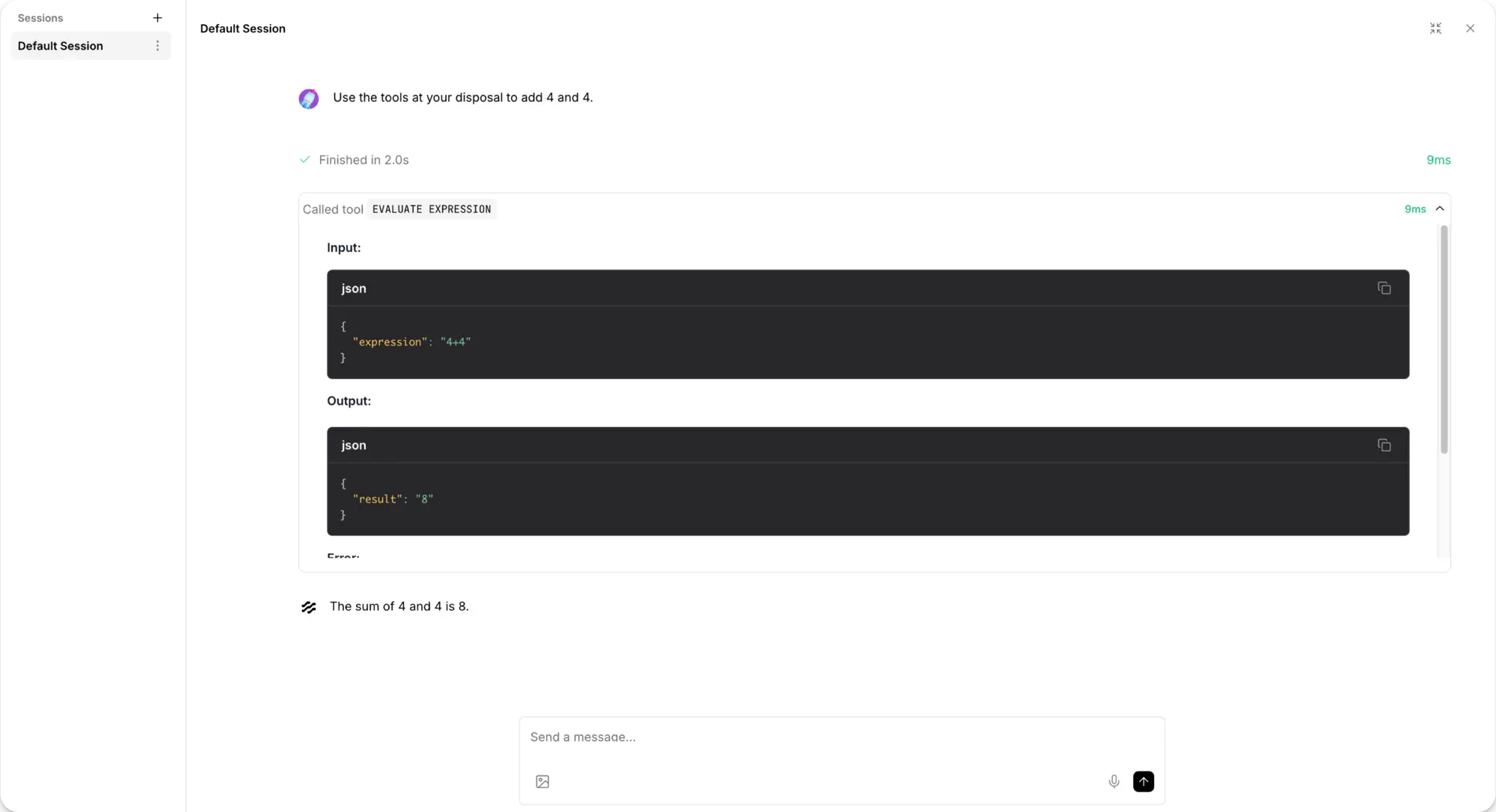
- Test it in the Playground Chat with your flow and see each step and tool call the agent made before it answered.
- Answer questions from your documents Load your files into a vector database and build a chatbot that answers from them.
- Use the AI model you choose Connect OpenAI, Anthropic, Azure, Mistral, Groq or local models through Ollama, and switch between them.
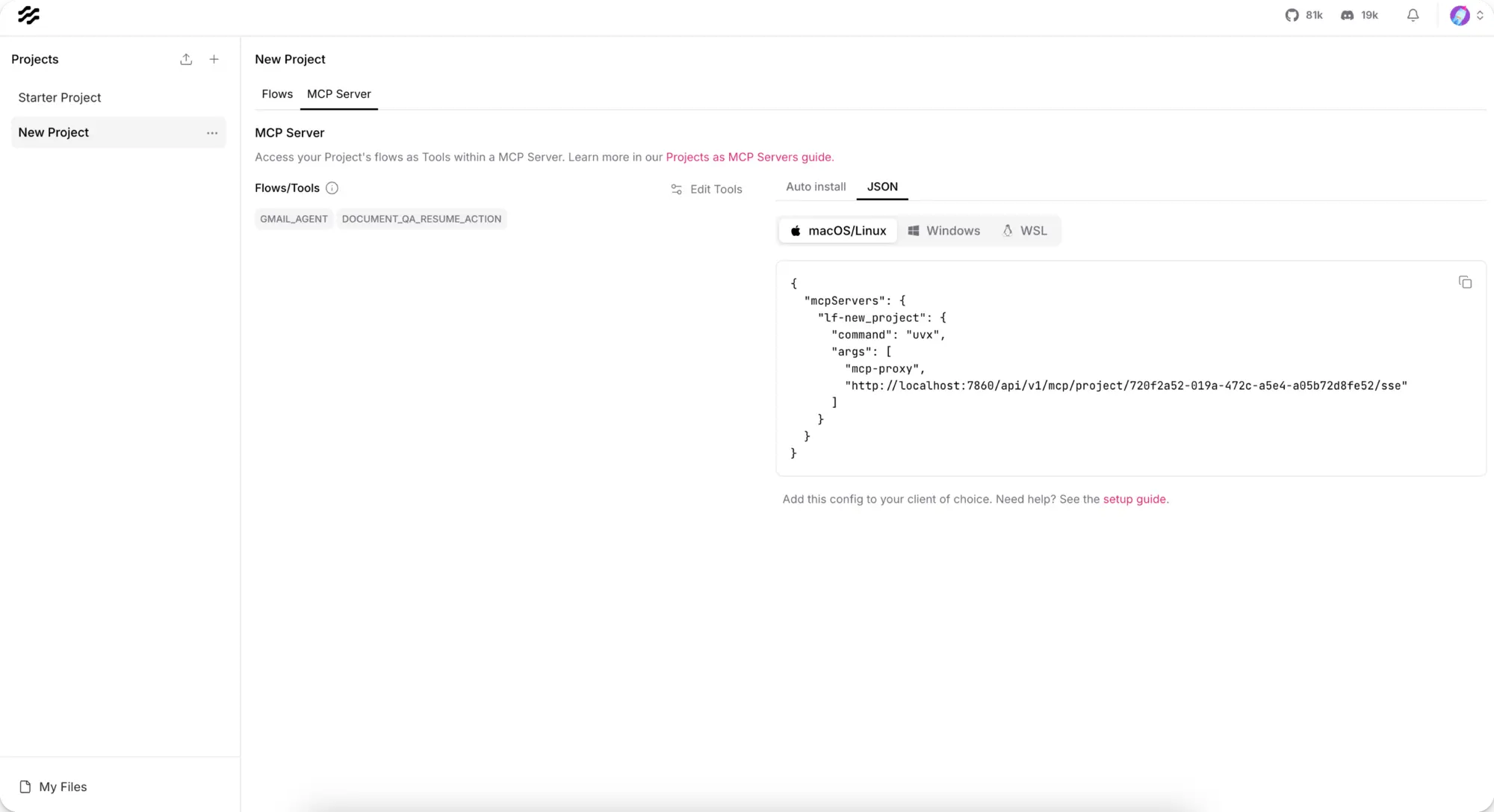
- Use your flows anywhere Every flow is an API your website or app can call, and a project's flows can be used as tools from MCP clients such as Claude Desktop or Cursor.
- Write your own components Change any block or write a new one in Python when the built-in components are not enough.
- Share it with your team Colleagues can sign up, and the admin turns each new account on from the admin page.
Replaces Copilot Studio
Langflow does the same job as Copilot Studio. Here is what changes when you switch.
- No usage credits to buy, only what your AI provider charges
- Your flows, chats and API keys stay on your own server
- Any AI provider, including local models that keep data in-house
- Every flow can be called as an API or used as a tool by other AI apps
- No built-in publishing to Microsoft Teams or Microsoft 365
- You bring and pay for your own AI provider keys
- It is made for technical users, and building custom parts means some Python
- Few ready-made connectors for everyday business apps compared with automation tools
What happens when you click Deploy?
You do not need a server or any technical knowledge. Four steps, and Langflow is running at its own web address.
- Step 1 Click Deploy and create your account
Deploy takes you to Cloudgate. Create an account, or log in if you have one. Langflow itself is free.
- Step 2 Choose a server
No server? Get one from Cloudgate: pick a size and a country, and Cloudgate gets it ready. Already have one? Connect it instead.
- Step 3 Cloudgate sets up Langflow
It prepares the server, makes the passwords the app needs and starts it. There is nothing to install and nothing to write down.
- Step 4 Open your app and sign in
Your app gets a free web address to start, without https. Add your own domain, like app.yourshop.com, and Cloudgate secures it with https for you.
New to Cloudgate? See what Cloudgate is
Run Cloudgate yourself? Deploy from your own console
In your Cloudgate console, open Templates and choose Langflow.
Questions
Is Langflow free?
Yes, Langflow is free and open source under the MIT licence, with no paid self-hosted edition and no features held back. You pay only for your server and for the AI provider you connect, such as OpenAI or Anthropic, unless you run local models through Ollama on a server of your own.
Should I use Langflow or n8n?
It depends on the job. n8n and Activepieces automate work between your business apps, such as Gmail, Sheets and your CRM, and have AI steps. Langflow is for building the AI itself, such as agents that use tools and chatbots that answer from your documents, and it has far fewer business-app connectors. You can also call a Langflow flow from n8n through its API.
Is Langflow a good alternative to Microsoft Copilot Studio?
Yes, if you want to build AI agents on your own server with any AI provider. Copilot Studio is billed by usage in Copilot Credits and needs an Azure subscription; self-hosted Langflow has no usage fee beyond your AI provider's. It does not publish agents to Microsoft Teams or Microsoft 365 for you.
How do I sign in to Langflow the first time?
Open your Langflow web address and sign in with the admin username you chose during setup, admin unless you changed it, and the password Cloudgate generated, which is shown on the app's page in Cloudgate. There is no setup wizard.
Can other people sign up to my Langflow?
Yes, anyone can fill in the Langflow sign-up form, but new accounts stay inactive until the admin turns them on in the admin page. To remove the sign-up form, set "Allow new sign-ups" to false in Cloudgate; the admin can still create accounts.
Which AI models can I use with Langflow?
Langflow works with the major AI providers, including OpenAI, Anthropic, Azure, Mistral and Groq, and with local models through Ollama. Add your API keys under Settings, Global Variables, or in each component.
Do I need to know how to code to use Langflow?
No, not for most flows, because you connect ready-made blocks on a canvas. Langflow is still made for technical users, and writing your own components needs Python; from version 1.13.2 only the admin can add custom code by default.
Do I need my own server for Langflow?
No. When you deploy Langflow, hosted Cloudgate can provide a server. If you already rent one, you can connect it instead.
Can I move my data from Copilot Studio to Langflow?
Most people export from Copilot Studio and import into Langflow. The official guides at docs.langflow.org walk through it.
Related apps

Build Coze-style AI agents, chatbots and workflows on your server.
Build AI agents that work in your business apps, self-hosted.
Build AI chatbots that answer from your documents, on your website.

A self-hosted AI agent with its own computer that does tasks for you.