
Pascal Editor
Design 3D floor plans in your browser.
No server needed to start: Cloudgate can provide one. What happens when you click Deploy
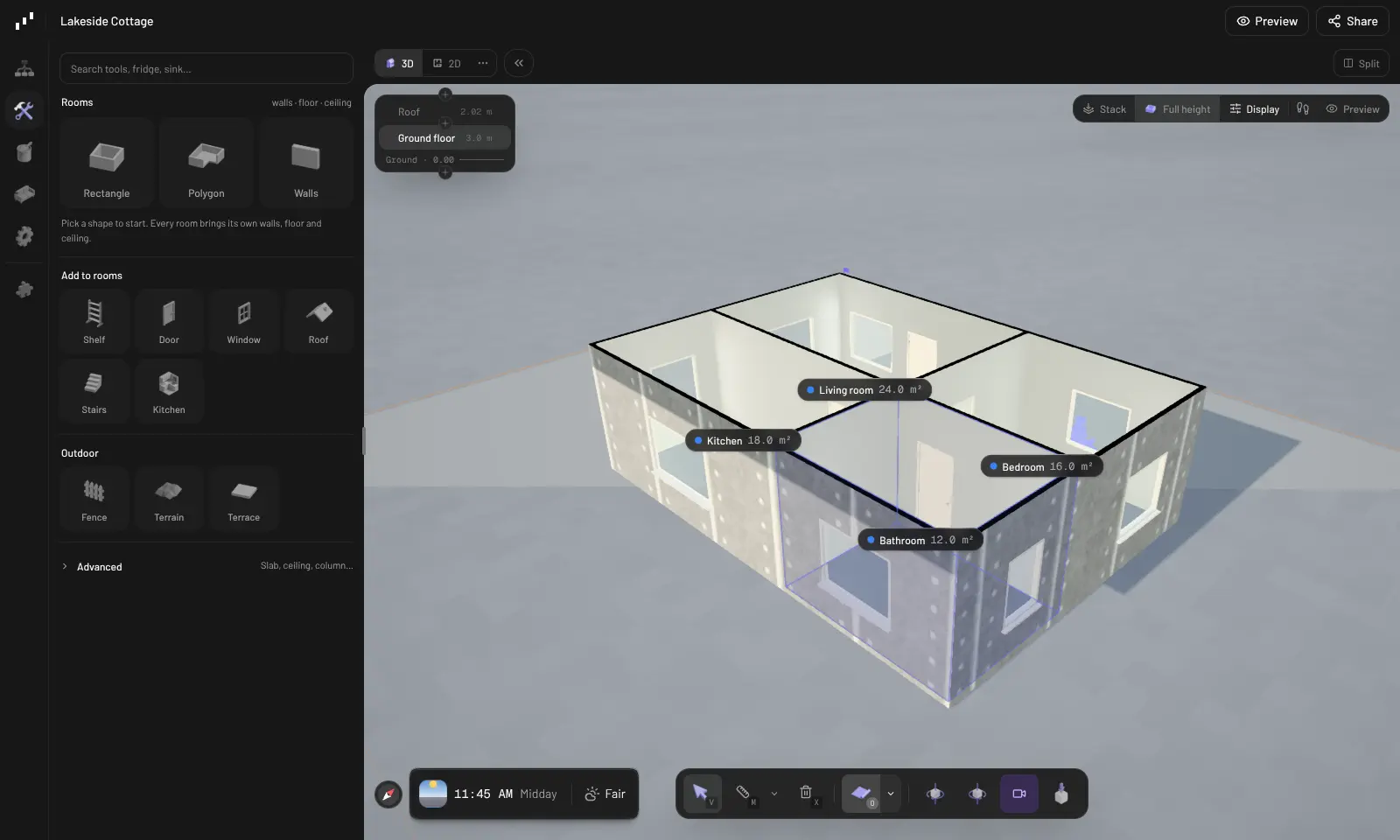
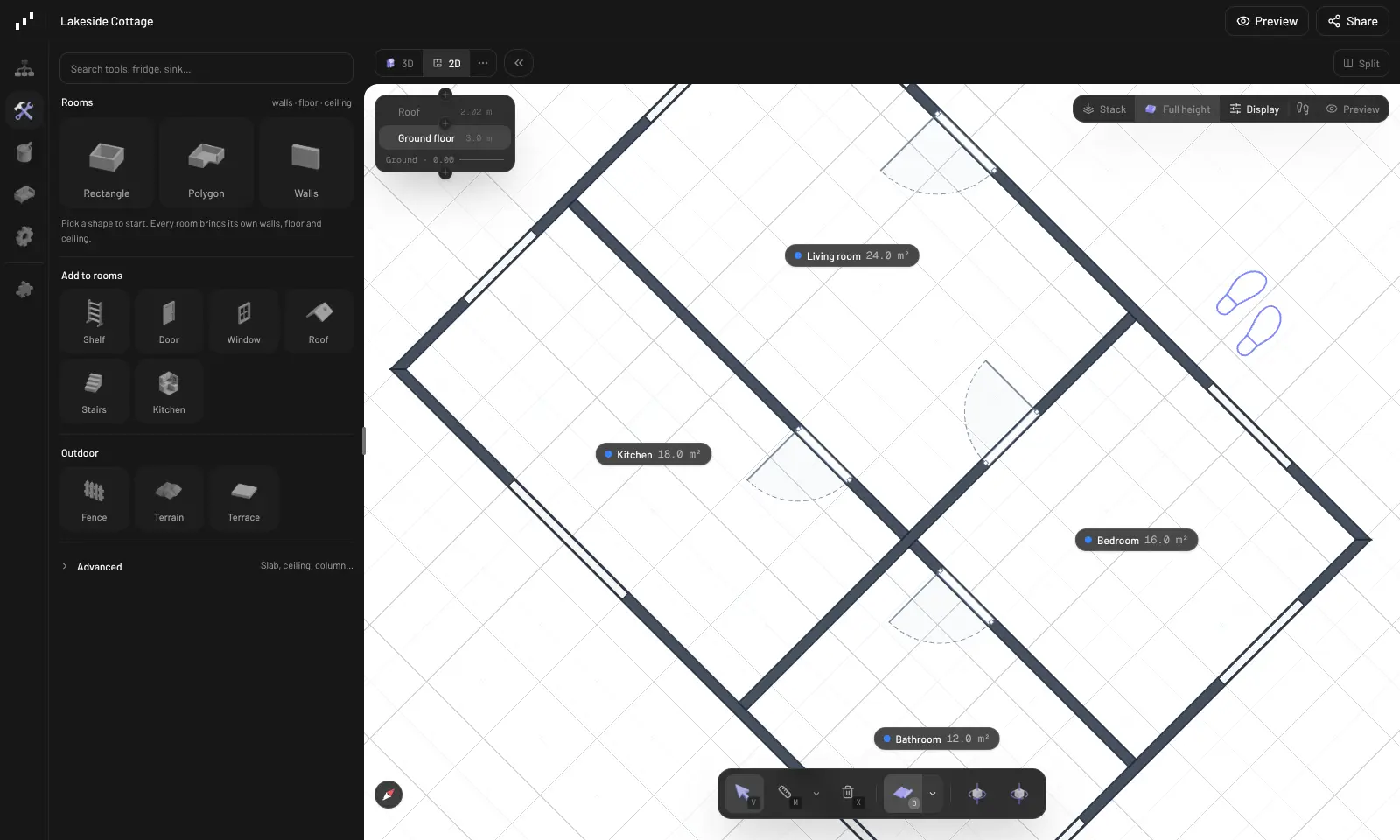
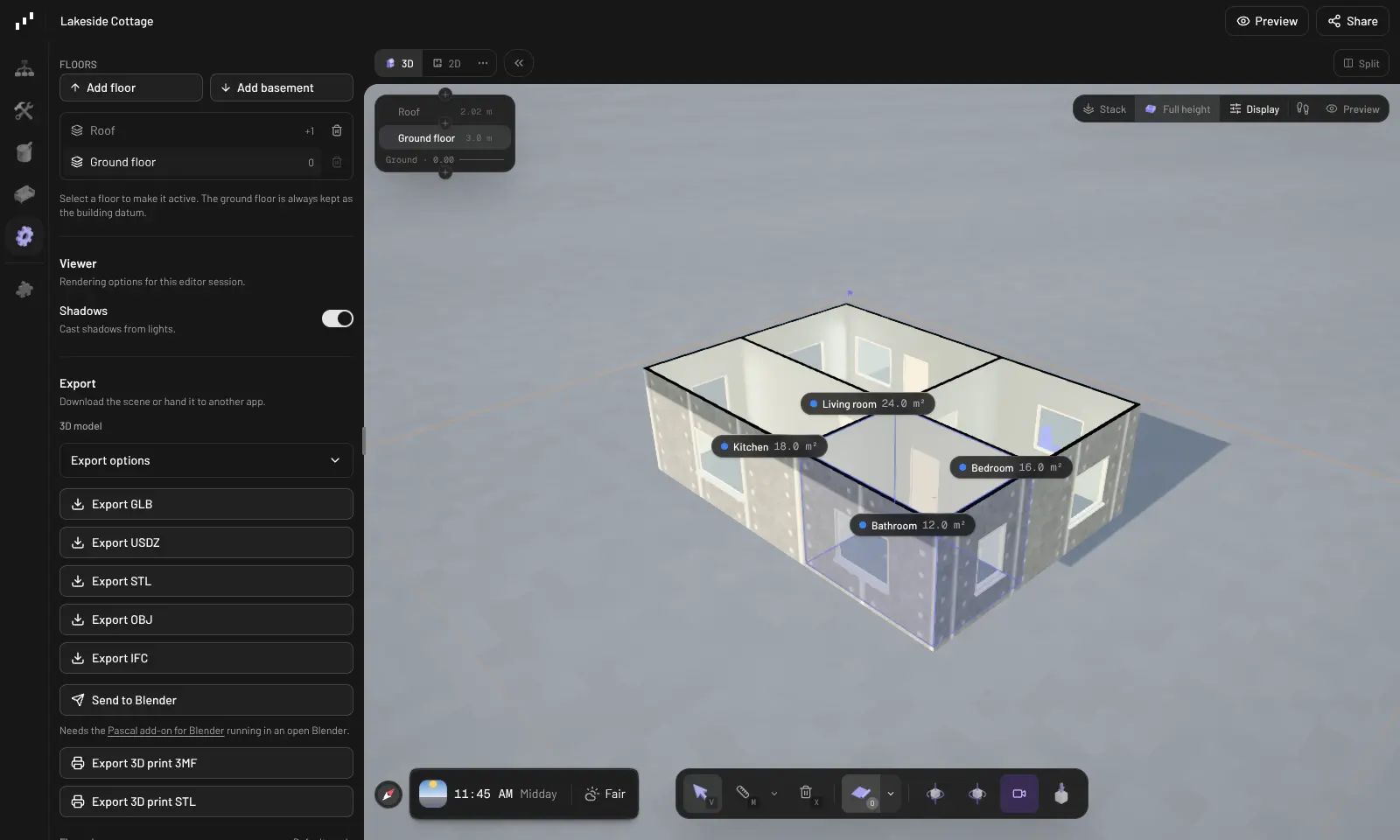
What is Pascal Editor?
Self-hosted Pascal Editor lets you draw floor plans and 3D building models in the browser, with rooms, roofs and furniture, and export to IFC or GLB.
Self-hosted Pascal Editor is a free, open-source 3D floor plan and building editor that runs in your web browser, an alternative to tools such as Planner 5D and SketchUp with your projects kept on your own server. You draw rooms with a few clicks, add doors, windows, stairs, kitchens and roofs, and see the result in 3D and as a 2D floor plan at the same time.
Each room knows its walls, floor, ceiling and area, and buildings can have several floors and a basement. You can furnish rooms, paint surfaces, add terrain and fences around the building, and export the model as IFC, GLB, OBJ or STL, or the floor plan as a PDF. A small builder, for example, could trace a client's existing house from a photo of the old plan, sketch the new extension on top, and send the client a link to look around it in 3D.
Pascal Editor works in a desktop browser; it has no phone apps. AI tools such as Claude Code or Cursor can edit the same projects if you want help from an agent, though nothing needs an AI account. Cloudgate installs Pascal Editor on your server with a secure web address, protected by one password that everyone on your team shares.
What you can do with Pascal Editor
- Draw rooms in a few clicks Pick a rectangle or polygon, or draw walls one by one, and each room gets its walls, floor, ceiling, name and area.
- Add doors, windows, stairs and roofs Place doors, windows, shelves, kitchens and stairs, and choose from hip, gable, flat, mansard, barrel and other roof types.
- Switch between 3D and the floor plan Work in the 3D view, the 2D floor plan or both side by side, across several floors and basements.
- Plan the site around the building Add terrain, fences, terraces and roads, and set the time of day to see the light.
- Furnish and finish Search a library of furniture and fittings, and paint walls, floors and roofs with materials.
- Trace over a scan or a drawing Upload a 3D scan or a picture of an old plan as a guide layer and draw the building over it.
- Export and share Download the model as GLB, USDZ, OBJ, STL or IFC, print the floor plan to PDF, or share a read-only 3D view by link.
- Let an AI agent help AI tools such as Claude Code, Cursor or Codex can read and edit the same projects through Pascal's agent connection.
Replaces Planner 5D, SketchUp and RoomSketcher
Pascal Editor does the same job as Planner 5D, SketchUp and RoomSketcher. Here is what changes when you switch.
- Free and open source under the MIT licence, with no plan or project limits
- Projects stay on your own server, shared by everyone on your team
- Exports to IFC, GLB, OBJ and STL for architects, 3D printing and other software
- Rooms, walls and roofs are real building parts you can adjust, not just shapes
- A smaller furniture catalogue and no photo-quality renders, unlike Planner 5D
- It cannot open SketchUp, Planner 5D or RoomSketcher files
- Browser only, with no phone apps, and it needs a computer with decent graphics
- One shared password and no separate user accounts or roles
What happens when you click Deploy?
You do not need a server or any technical knowledge. Four steps, and Pascal Editor is running at its own web address.
- Step 1 Click Deploy and create your account
Deploy takes you to Cloudgate. Create an account, or log in if you have one. Pascal Editor itself is free.
- Step 2 Choose a server
No server? Get one from Cloudgate: pick a size and a country, and Cloudgate gets it ready. Already have one? Connect it instead.
- Step 3 Cloudgate sets up Pascal Editor
It prepares the server, makes the passwords the app needs and starts it. There is nothing to install and nothing to write down.
- Step 4 Open your app and sign in
Your app gets a free web address to start, without https. Add your own domain, like app.yourshop.com, and Cloudgate secures it with https for you.
New to Cloudgate? See what Cloudgate is
Run Cloudgate yourself? Deploy from your own console
In your Cloudgate console, open Templates and choose Pascal Editor.
Questions
What is Pascal Editor?
Pascal Editor is a free, open-source 3D building editor that runs in your web browser. You draw rooms, walls, doors, windows, stairs and roofs, see them in 3D and as a 2D floor plan, and export the model. Self-hosted, it keeps every project on your own server.
Is Pascal Editor free?
Yes, Pascal Editor is free and open source under the MIT licence, and the self-hosted editor has every drawing, 3D and export feature with no limits. You pay only for your server. Pascal's own hosted service sells extras such as AI design runs paid with credits, and those are not part of the self-hosted editor.
Is Pascal Editor a good alternative to Planner 5D or SketchUp?
Yes, for drawing floor plans and simple building models. In Pascal Editor, like Planner 5D, you draw rooms and see them in 3D in the browser, and unlike SketchUp, walls, rooms and roofs are building parts rather than loose shapes. Planner 5D has a much bigger furniture catalogue and realistic renders, and SketchUp is a more general 3D modelling tool.
How do I sign in to Pascal Editor the first time?
Open your Pascal Editor web address and enter the password Cloudgate created, shown on the app's variables page. There are no usernames; everyone who has the password signs in to the same workspace and sees the same projects. Then choose New project to start drawing.
Can I import my SketchUp or Planner 5D projects into Pascal Editor?
No, Pascal Editor cannot open SketchUp, Planner 5D or RoomSketcher files. You can upload a 3D model as a GLB file, or a picture of an existing plan, as a guide layer and draw the rooms over it.
What file formats can Pascal Editor export?
Pascal Editor exports 3D models as GLB, USDZ, OBJ, STL and IFC, makes 3MF and STL files for 3D printing, and saves floor plans as PDF. It can also send a model to Blender with Pascal's Blender add-on.
Where are my Pascal Editor projects stored, and what server do I need?
Pascal Editor saves your projects on your own server, so they survive restarts and updates and never go to Pascal's cloud. The server side is light, so Cloudgate uses a small server; the 3D drawing happens in each person's browser, so a computer with decent graphics helps.
Do I need technical skills to run Pascal Editor?
No. Click Deploy, create your Cloudgate account and choose a server, and Cloudgate sets up Pascal Editor and gives it a web address. You use it in your browser like any other online tool.
Do I need my own server for Pascal Editor?
No. When you deploy Pascal Editor, hosted Cloudgate can provide a server. If you already rent one, you can connect it instead.
Related apps

Draw flowcharts, org charts and diagrams in your browser.

A free whiteboard for mind maps, flowcharts and sketches.

AI design studio for web pages, prototypes and decks.

Design and prototype together in your browser, like Figma.