
Open-source alternative to SketchUp

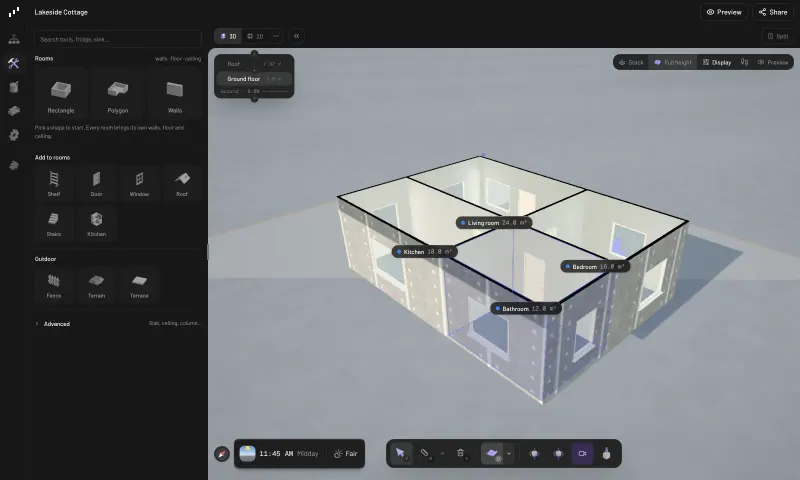
Pascal Editor is a free, open-source SketchUp alternative for one part of SketchUp’s work, modelling buildings: walls, rooms, floors, doors, windows, stairs and roofs are real building parts you adjust rather than shapes you push and pull, with 3D and 2D plan views side by side. SketchUp is a subscription tool for general 3D modelling with a huge library of models and extensions; Pascal Editor is simpler and narrower, cannot open SketchUp files and runs in the browser on your own server.

Free app Code: Open source Import from SketchUp: No Easy

Why look for an alternative to SketchUp?

SketchUp is a 3D modelling tool, sold by subscription, used by architects, builders, interior designers and homeowners to model buildings, interiors and objects, with a huge library of ready-made models and many extensions.

People look for a SketchUp alternative when they mainly draw buildings and floor plans and don't want a yearly subscription, or want their projects on their own server. Pascal Editor is narrower and simpler: it draws walls, rooms and roofs as building parts that know their size and area, rather than shapes you push and pull, and runs in the browser.

How Pascal Editor compares

Design 3D floor plans in your browser.

Replaces SketchUp for drawing buildings: walls, rooms, floors, doors, windows, stairs and many roof types are building parts you adjust, with 3D and 2D floor plan views side by side, several floors, and exports to IFC, GLB, OBJ, STL and a floor plan PDF. It is not a general 3D modeller, has no 3D Warehouse or extensions, and cannot open SketchUp files.
Easy Open source

Moving from SketchUp

Pascal Editor cannot open SketchUp files. Export the model from SketchUp as a GLB file, or a picture of the floor plan, and upload it in Pascal Editor as a reference layer to trace over; it is a guide, not editable objects. Sign in with the password Cloudgate created, choose New project, draw the rooms and walls over the reference, then add doors, windows, stairs and the roof. Keep SketchUp for anything that is not a building, such as furniture design or product models.

Questions

What is the best open-source alternative to SketchUp?

Pascal Editor is the free, open-source alternative to SketchUp for 3D modelling of buildings in the catalogue today. Replaces SketchUp for drawing buildings: walls, rooms, floors, doors, windows, stairs and many roof types are building parts you adjust, with 3D and 2D floor plan views side by side, several floors, and exports to IFC, GLB, OBJ, STL and a floor plan PDF. It is not a general 3D modeller, has no 3D Warehouse or extensions, and cannot open SketchUp files.

Can Pascal Editor replace SketchUp completely?

No. Pascal Editor is made for buildings: rooms, walls, floors and roofs. For general 3D modelling, such as furniture, products or landscapes, SketchUp or another modeller is still the right tool.

Can Pascal Editor export to IFC?

Yes. Pascal Editor exports IFC, the open format architects' software uses, as well as GLB, USDZ, OBJ and STL, and 3MF for 3D printing.

Can Pascal Editor open SketchUp files?

No. Pascal Editor cannot open SketchUp files and has no 3D Warehouse or extensions, so you redraw each building in Pascal Editor as walls, rooms, floors and roofs. It can then export IFC, GLB, OBJ or STL files and a floor plan PDF.

Is Pascal Editor really free compared with SketchUp?

Yes, Pascal Editor is free. To run them you need Cloudgate and a server. Use hosted Cloudgate, which can also provide the server, or install Cloudgate on a server of your own for free. Cloudgate's plans and prices are at cloudgate.octabyte.io/pricing. One server can run several apps.

Do I need a developer to replace SketchUp?

No. Cloudgate installs Pascal Editor on your server and gives it a secure web address, and you use it in your browser instead of SketchUp.