
WeKnora
Ask your company's documents questions and get answers with sources.
No server needed to start: Cloudgate can provide one. What happens when you click Deploy
What is WeKnora?
WeKnora is a self-hosted, open-source document Q&A tool from Tencent: upload your files and get answers with citations, plus an automatic wiki.
WeKnora is a self-hosted, open-source document Q&A tool from Tencent: you upload your company's files and ask questions that are answered with citations, as an alternative to Glean, Guru or CustomGPT for your own document collections. Every answer links to the passage it came from, so people can check it instead of trusting it blindly.
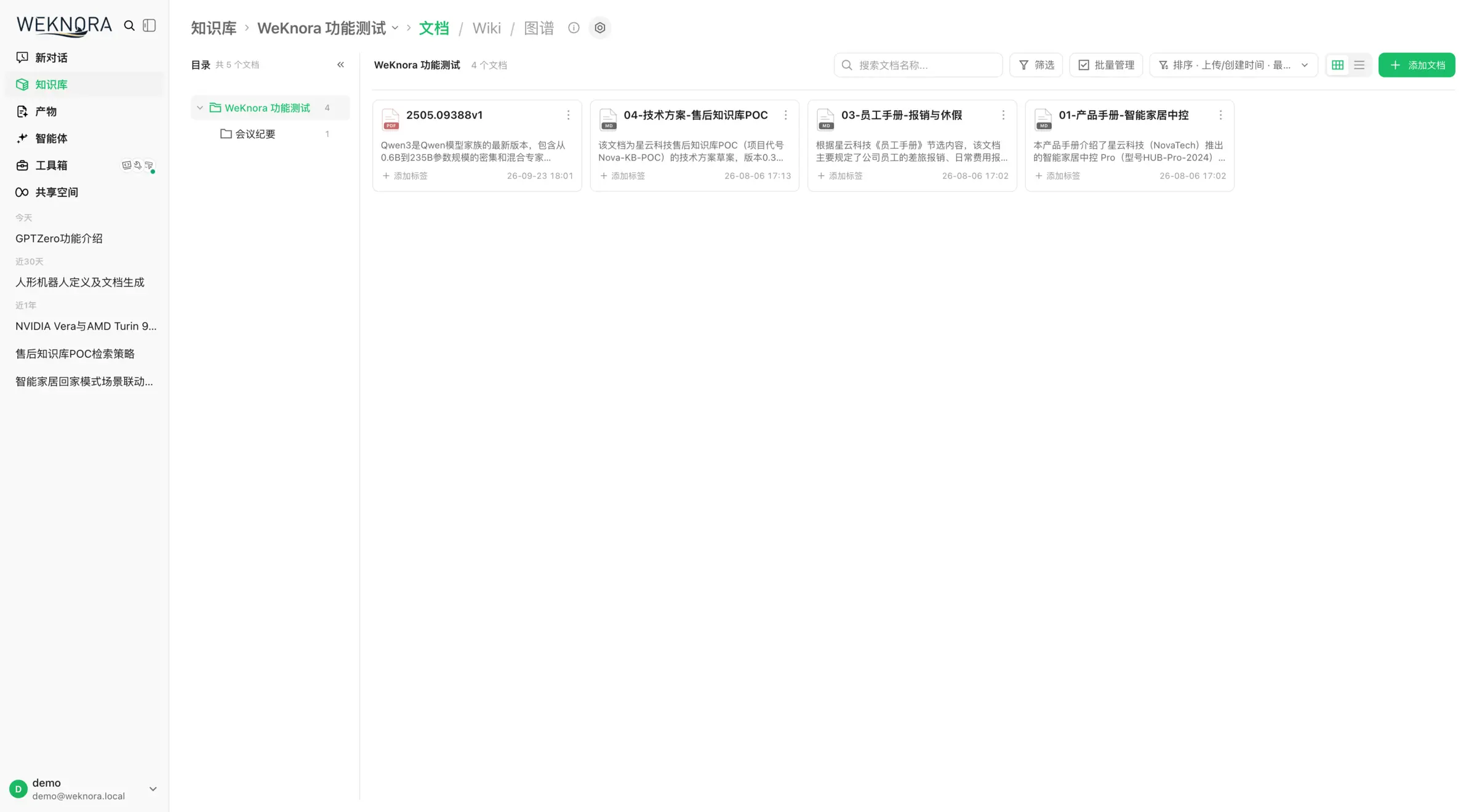
You put PDFs, Word files, spreadsheets, slides and images into knowledge bases, and WeKnora reads them and keeps them searchable. It can also write a wiki from your documents and hold FAQ lists of approved answers. A property management company, for example, could upload its tenancy agreements, building rules and staff handbook, so a new office assistant who asks "how many days of notice does a tenant give?" gets the answer with a link to the right clause.
The same knowledge bases can answer in a chat widget on your website and in Slack, Telegram or Mattermost, and stay in sync with Confluence, Notion or GitLab. WeKnora works with the AI model you choose, using your own API key or a model you run yourself with Ollama.
Cloudgate installs WeKnora on a server Cloudgate provides or one you connect and gives it a secure web address. After signing up, you connect your AI models and upload your first documents.
What you can do with WeKnora
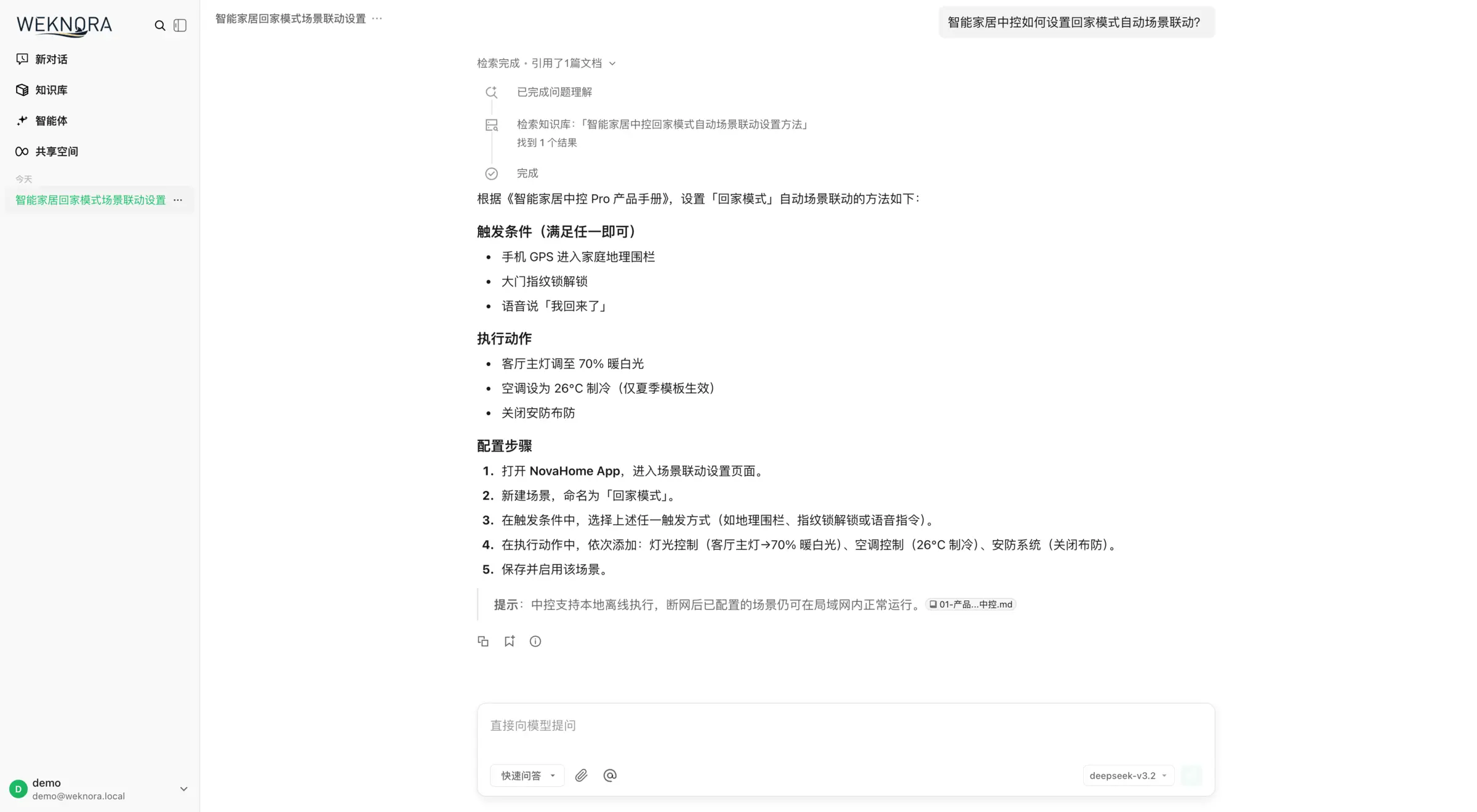
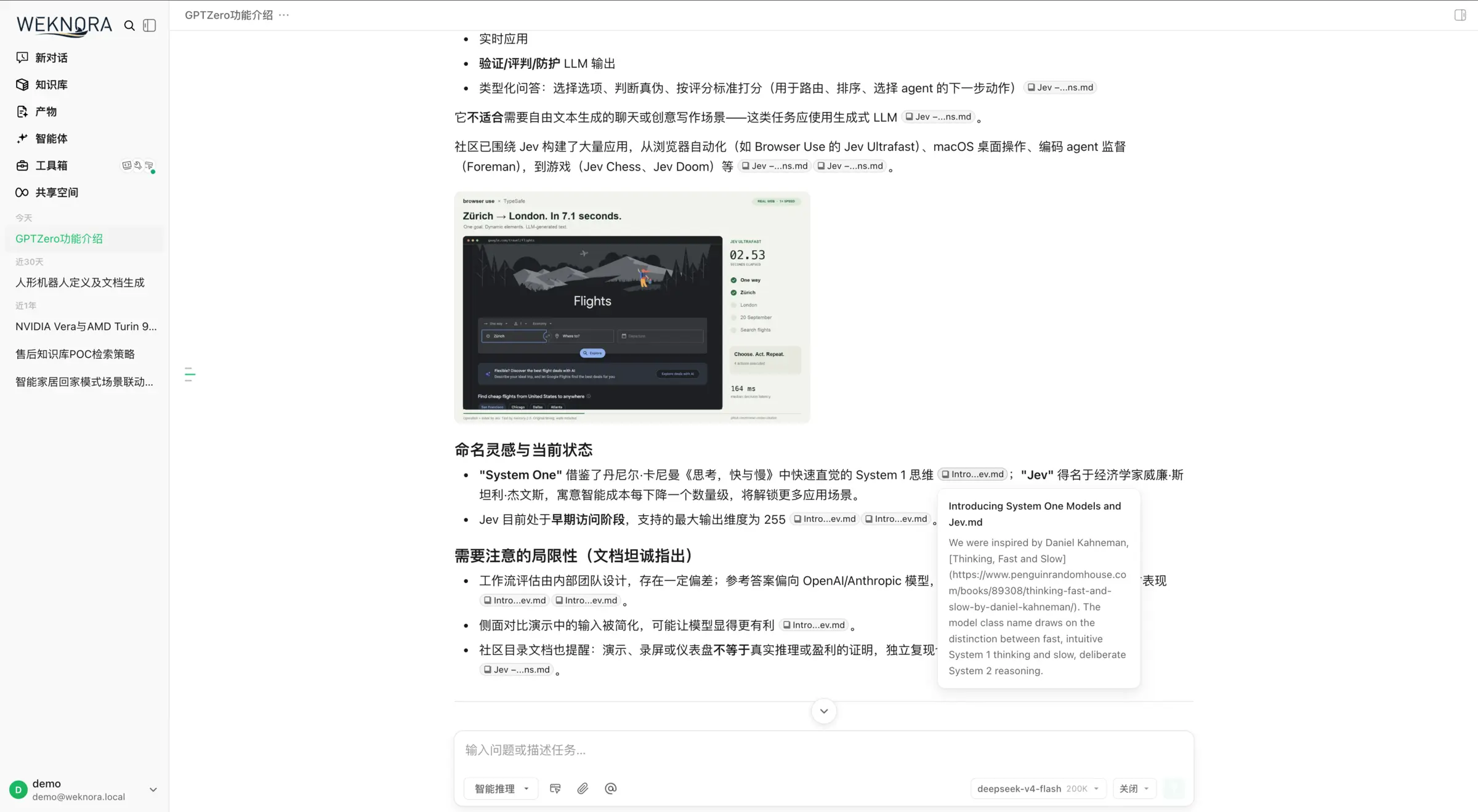
- Ask questions, get cited answers Quick Q&A finds the right passages in your knowledge bases and answers with citations you can click to read the original text.
- Upload almost any document Add PDF, Word, PowerPoint, Excel, Markdown, web pages, e-books and images, organised in folders with tags.
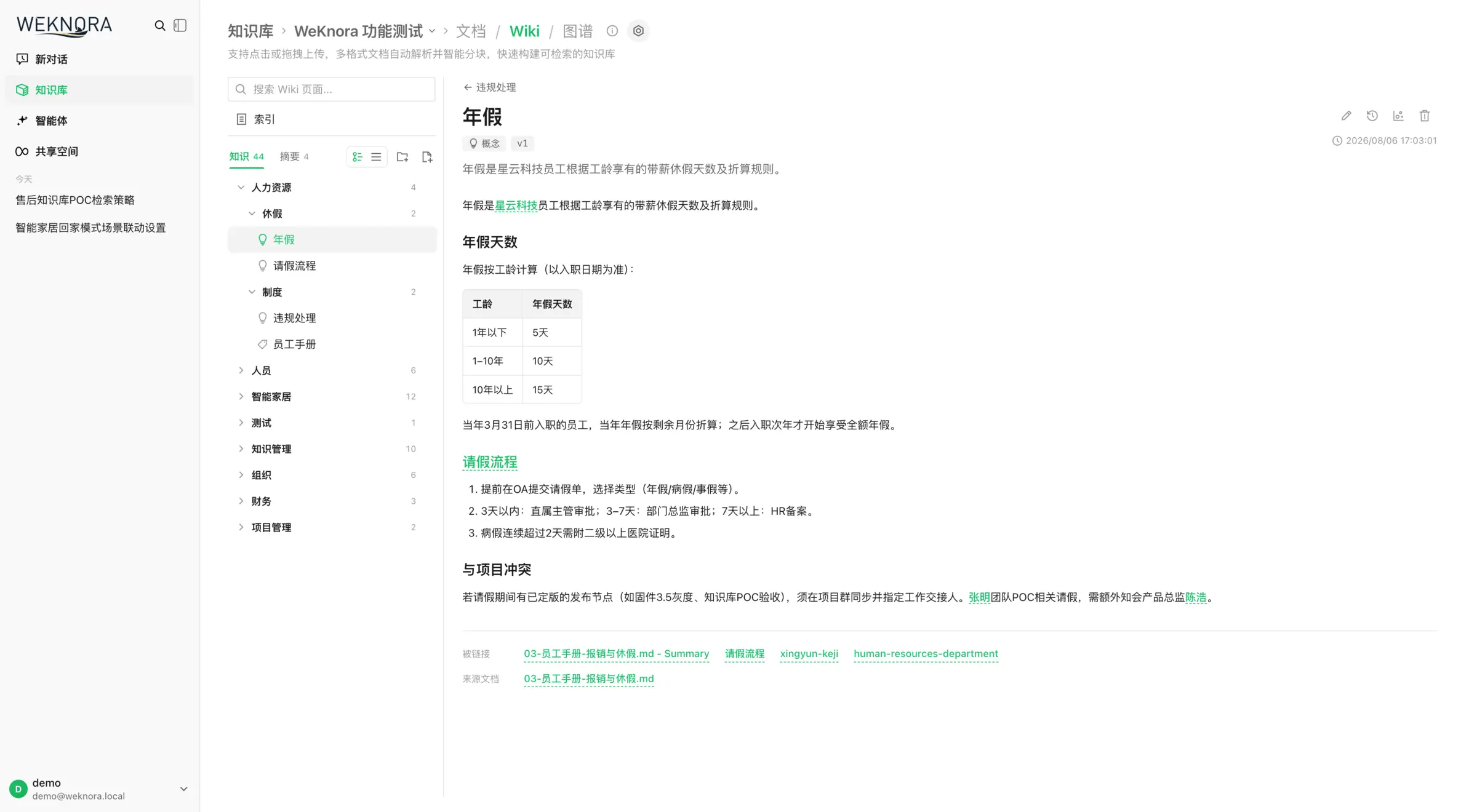
- Get a wiki written for you WeKnora turns your documents into linked wiki pages about your people, products and topics, each with its sources, which you can edit and roll back.
- Keep FAQ lists Build knowledge bases of approved questions and answers alongside your documents, and export them when you need to.
- Work through harder questions Smart reasoning mode plans several steps, searches and reads documents, and shows each step it took.
- Answer on your website and in chat apps Put a chat widget on your website, or answer questions in Slack, Telegram, Mattermost and other chat apps.
- Sync from your other tools Keep knowledge bases up to date from Confluence, Notion, GitLab, Seafile and RSS feeds.
- Share with your team by role Workspaces have owner, admin, contributor and viewer roles, invitation links and an activity log.
Replaces Guru, Glean and CustomGPT.ai
WeKnora does the same job as Guru, Glean and CustomGPT.ai. Here is what changes when you switch.
- No seat price or sales call; you pay for the server and the AI you use
- Your documents, answers and wiki stay on your own server
- Answers cite the passage they came from, so people can check them
- Open source under the MIT licence, from Tencent
- It searches the documents you add and a few synced tools, not every app in your company the way Glean does
- It has no answer verification workflow like Guru's, and does not copy each document's permissions from the source app
- You connect and pay an AI provider yourself, and set up models before anything works
- Much of the documentation is in Chinese, and there are many settings to learn
What happens when you click Deploy?
You do not need a server or any technical knowledge. Four steps, and WeKnora is running at its own web address.
- Step 1 Click Deploy and create your account
Deploy takes you to Cloudgate. Create an account, or log in if you have one. WeKnora itself is free.
- Step 2 Choose a server
No server? Get one from Cloudgate: pick a size and a country, and Cloudgate gets it ready. Already have one? Connect it instead.
- Step 3 Cloudgate sets up WeKnora
It prepares the server, makes the passwords the app needs and starts it. There is nothing to install and nothing to write down.
- Step 4 Open your app and sign in
Your app gets a free web address to start, without https. Add your own domain, like app.yourshop.com, and Cloudgate secures it with https for you.
New to Cloudgate? See what Cloudgate is
Run Cloudgate yourself? Deploy from your own console
In your Cloudgate console, open Templates and choose WeKnora.
Questions
Is WeKnora free?
Yes. WeKnora is free, open-source software from Tencent under the MIT licence, and the self-hosted version has no paid tier. You pay for your server and for the AI provider you connect.
Is WeKnora a good alternative to Glean or Guru?
Yes, for questions about a set of documents. WeKnora answers from the files you upload or sync, with citations, and builds a wiki and FAQ lists from them. Glean and Guru connect to many more company apps, follow each app's permissions, and Guru adds answer verification workflows that WeKnora does not have.
How is WeKnora different from RAGFlow and AnythingLLM?
WeKnora sits between them. RAGFlow reads hard scans and tables more deeply but needs a 16 GB server; AnythingLLM is lighter and simpler, with a desktop app. WeKnora adds an automatic wiki, FAQ knowledge bases and team workspaces with roles, and recommends 8 GB of memory.
Does WeKnora come with an AI model?
No. In WeKnora you add a chat model and an embedding model from a provider such as OpenAI, Anthropic, Gemini, DeepSeek or Qwen with your own API key, or from an Ollama server you run. Your documents stay on your server, but questions and the passages used to answer them go to the provider you connect.
Is WeKnora available in English?
Yes. The WeKnora interface is available in English, Chinese, Japanese, Korean and Russian; pick the language on the sign-in page or in General settings. Much of the official documentation is written in Chinese.
How do I sign in to WeKnora the first time?
WeKnora has no default account; open the app's address and sign up. To become the system administrator, sign up with the admin email you gave Cloudgate at setup, then restart the app once. Sign-up is open by default, so the administrator can switch it to invitation-only in the system settings.
What server size do I need for WeKnora?
WeKnora recommends at least 4 CPU cores and 8 GB of memory, because reading documents uses a lot of memory, plus disk space for your files. Running AI models on the same server would need much more.
Do I need technical skills to run WeKnora?
No. Click Deploy, create your Cloudgate account and choose a server, and Cloudgate sets up WeKnora and gives it a web address. You use it in your browser like any other online tool.
Do I need my own server for WeKnora?
No. When you deploy WeKnora, hosted Cloudgate can provide a server. If you already rent one, you can connect it instead.
Can I move my data from Guru to WeKnora?
Most people export from Guru and import into WeKnora. The official guides at weknora.weixin.qq.com walk through it.
Related apps

An AI assistant that reads your hardest documents and cites them.

Ask questions of your team's documents, in a chat you can reshape.

AI search and chat that answers from your company's own apps.

A self-hosted AI chatbot for your website, answering from your docs.