
OpenRAG
Ask questions of your team's documents, in a chat you can reshape.
No server needed to start: Cloudgate can provide one. What happens when you click Deploy

What is OpenRAG?
Self-hosted OpenRAG answers your team's questions from its own documents, with the AI provider you choose. Built on Langflow, OpenSearch and Docling.
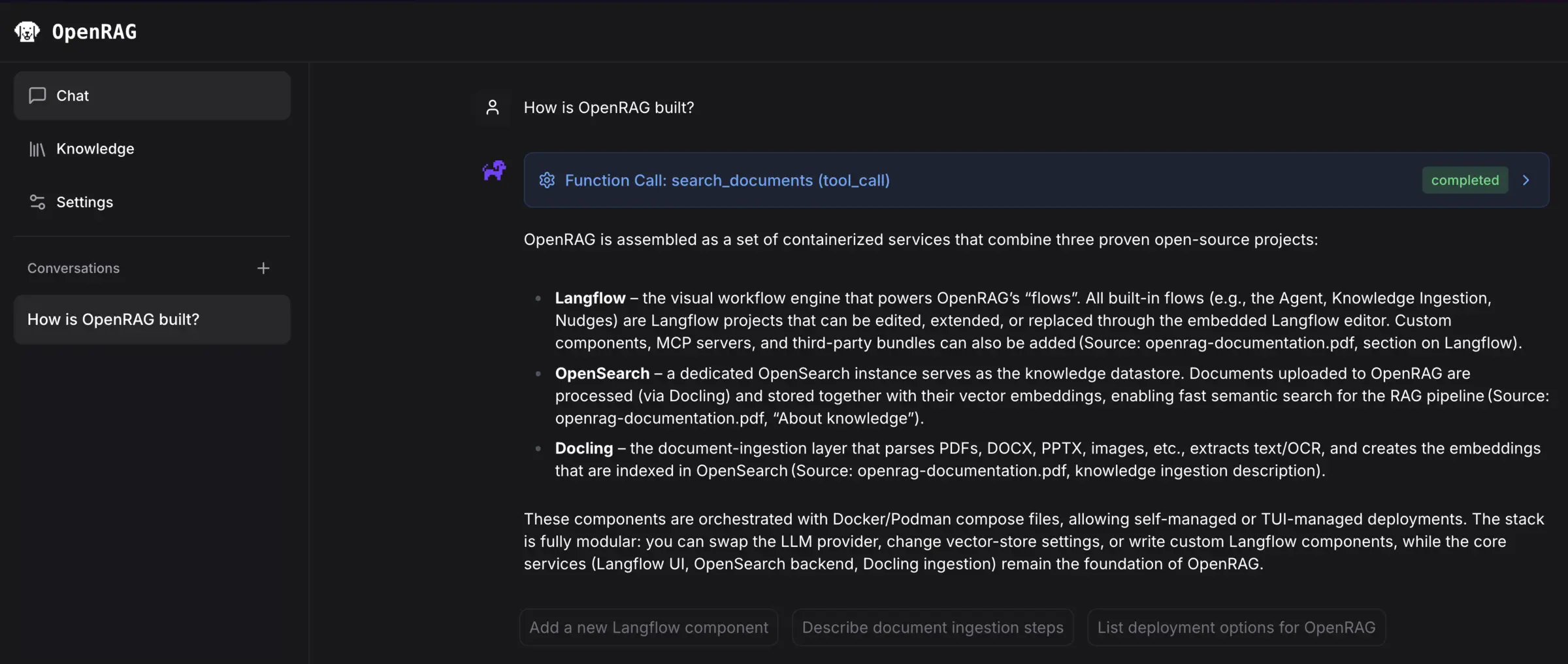
OpenRAG is a self-hosted AI assistant that answers questions from your team's own documents, and a free, open-source alternative to NotebookLM and Glean for document chat. You upload files and folders, or connect Google Drive, OneDrive, SharePoint or Amazon S3, choose the AI provider, and ask in plain words. The assistant searches your documents and answers from them.
It comes from the team behind Langflow at IBM, and it combines three open-source projects: Docling reads your files, OpenSearch stores and searches them, and Langflow runs the chat. Each step can be changed in Langflow's visual editor, from the AI model to how documents are split. A small accounting firm, for example, could load its procedures, letter templates and tax guides, so staff find the right answer without digging through folders.
OpenRAG works with OpenAI, Anthropic, IBM watsonx.ai and Ollama. Cloudgate puts a shared password in front of it, and Google sign-in can give each person their own documents.
Cloudgate installs OpenRAG on a server Cloudgate provides or one you connect, and gives it a secure web address. After signing in with the admin password, you connect an AI provider and pick the models; Google sign-in is an option at install.
What you can do with OpenRAG
- Ask questions about your documents An AI assistant searches your documents for each question and answers from what it finds, and you can open each search to see what it looked up.
- Upload files and whole folders Add PDFs, Word files, spreadsheets saved as CSV, web pages and text files one at a time or a folder at once.
- Pull in files from cloud storage Connect Google Drive, OneDrive, SharePoint or Amazon S3 and bring their files into the same knowledge base, once each service's access keys are added; you start each sync yourself.
- Add a web page from the chat Paste a link into a question and the assistant reads the page and keeps it with your other documents.
- Point a chat at the right documents Save filters for a project, topic or folder so the assistant answers only from those documents.
- Change how it works, without code The chat and the document reading are built in Langflow's visual editor, where you can swap the AI model, rewrite its instructions or add steps by drag and drop.
- Choose your AI provider Use OpenAI, Anthropic, IBM watsonx.ai, or your own model server with Ollama.
Replaces NotebookLM and Glean
OpenRAG does the same job as NotebookLM and Glean. Here is what changes when you switch.
- Your documents and chat history stay on your own server
- No price per seat; you pay for the server and the AI you use
- You choose the AI model, including one you run yourself
- Every step of searching and answering can be changed in a visual editor
- You need your own AI provider account and API key, or a model server you run
- Everyone shares one password, documents and settings unless you add Google sign-in
- Only four cloud connectors, Google Drive, OneDrive, SharePoint and Amazon S3, against the many a hosted tool offers
- It needs a larger server than most apps, with 8 GB of memory, and is still a young 0.x release
What happens when you click Deploy?
You do not need a server or any technical knowledge. Four steps, and OpenRAG is running at its own web address.
- Step 1 Click Deploy and create your account
Deploy takes you to Cloudgate. Create an account, or log in if you have one. OpenRAG itself is free.
- Step 2 Choose a server
No server? Get one from Cloudgate: pick a size and a country, and Cloudgate gets it ready. Already have one? Connect it instead.
- Step 3 Cloudgate sets up OpenRAG
It prepares the server, makes the passwords the app needs and starts it. There is nothing to install and nothing to write down.
- Step 4 Open your app and sign in
Your app gets a free web address to start, without https. Add your own domain, like app.yourshop.com, and Cloudgate secures it with https for you.
New to Cloudgate? See what Cloudgate is
Run Cloudgate yourself? Deploy from your own console
In your Cloudgate console, open Templates and choose OpenRAG.
Questions
Is OpenRAG free?
Yes, OpenRAG is free and open source under the Apache 2.0 licence, with no paid edition of the app. You pay for your server and for the AI provider you connect. IBM sells an optional support subscription for companies that want direct help from the team that builds it.
Does OpenRAG come with an AI model?
No, OpenRAG installs the app but no AI model. It needs a chat model and a search (embedding) model, from OpenAI, IBM watsonx.ai, or Ollama, with Anthropic as a chat model only. You paste your API key on the first screen, or give the address of an Ollama server you run, and the provider bills its own usage. The chat model must support tool calling; small models give weak answers.
Is OpenRAG a good alternative to NotebookLM?
Yes. OpenRAG is a good alternative to NotebookLM for a team that wants to ask questions of shared documents on its own server, with the AI provider it picks. You upload files or folders, or connect Google Drive, OneDrive or SharePoint, and chat with the assistant about them. It has no notebooks, audio overviews or podcasts, and it needs more setup than NotebookLM.
How is OpenRAG different from RAGFlow and AnythingLLM?
OpenRAG is built on Langflow, so every step of reading documents and answering can be changed in a visual editor. RAGFlow focuses on reading hard documents, such as scans and tables, with citations, and needs a 16 GB server. AnythingLLM is lighter, sorts documents into workspaces and can put a chat on your website, which OpenRAG cannot.
How do I sign in to OpenRAG the first time?
Your browser asks for a username and password, so enter admin and the password Cloudgate generates, shown with the app's settings in Cloudgate. OpenRAG has no login of its own, so Cloudgate adds this one. Then you pick an AI provider, paste its API key and choose the models, and OpenRAG loads its own guide as sample documents. Everyone who knows the password shares the same documents and settings. The Langflow editor has its own address and login, also user admin with a generated password.
Can each person keep their own documents in OpenRAG?
Only with Google sign-in, which you turn on by entering a Google OAuth client ID and secret when you install OpenRAG. Then each person signs in with a Google account and sees the documents they uploaded or can open in their own cloud storage. Without it, everyone who knows the shared password sees every document.
What server size do I need for OpenRAG?
OpenRAG's makers recommend at least 8 GB of memory and 50 GB of free disk space, more if you add many large files. It runs without a graphics card when the AI model is with a cloud provider. Running your own models with Ollama needs a much larger server.
Do I need technical skills to run OpenRAG?
No. Click Deploy, create your Cloudgate account and choose a server, and Cloudgate sets up OpenRAG and gives it a web address. You use it in your browser like any other online tool.
Do I need my own server for OpenRAG?
No. When you deploy OpenRAG, hosted Cloudgate can provide a server. If you already rent one, you can connect it instead.
Can I move my data from NotebookLM to OpenRAG?
Most people export from NotebookLM and import into OpenRAG. The official guides at docs.openr.ag walk through it.
Related apps
Ask an AI about your own documents, on your own server.

Ask your company's documents questions and get answers with sources.

A self-hosted AI second brain that answers from your own notes.

Chat with your documents and see the cited passage in each answer.