
OpenProject
Gantt charts, agile boards and time tracking for projects.
No server needed to start: Cloudgate can provide one. What happens when you click Deploy
What is OpenProject?
Self-hosted OpenProject plans projects with Gantt charts, agile boards and time tracking, in place of Microsoft Project or Jira.
OpenProject is open-source project management software you can self-host, a free alternative to Microsoft Project and Jira that combines Gantt charts, agile boards and time tracking in one place. This template installs the free Community edition, with no fee per user.
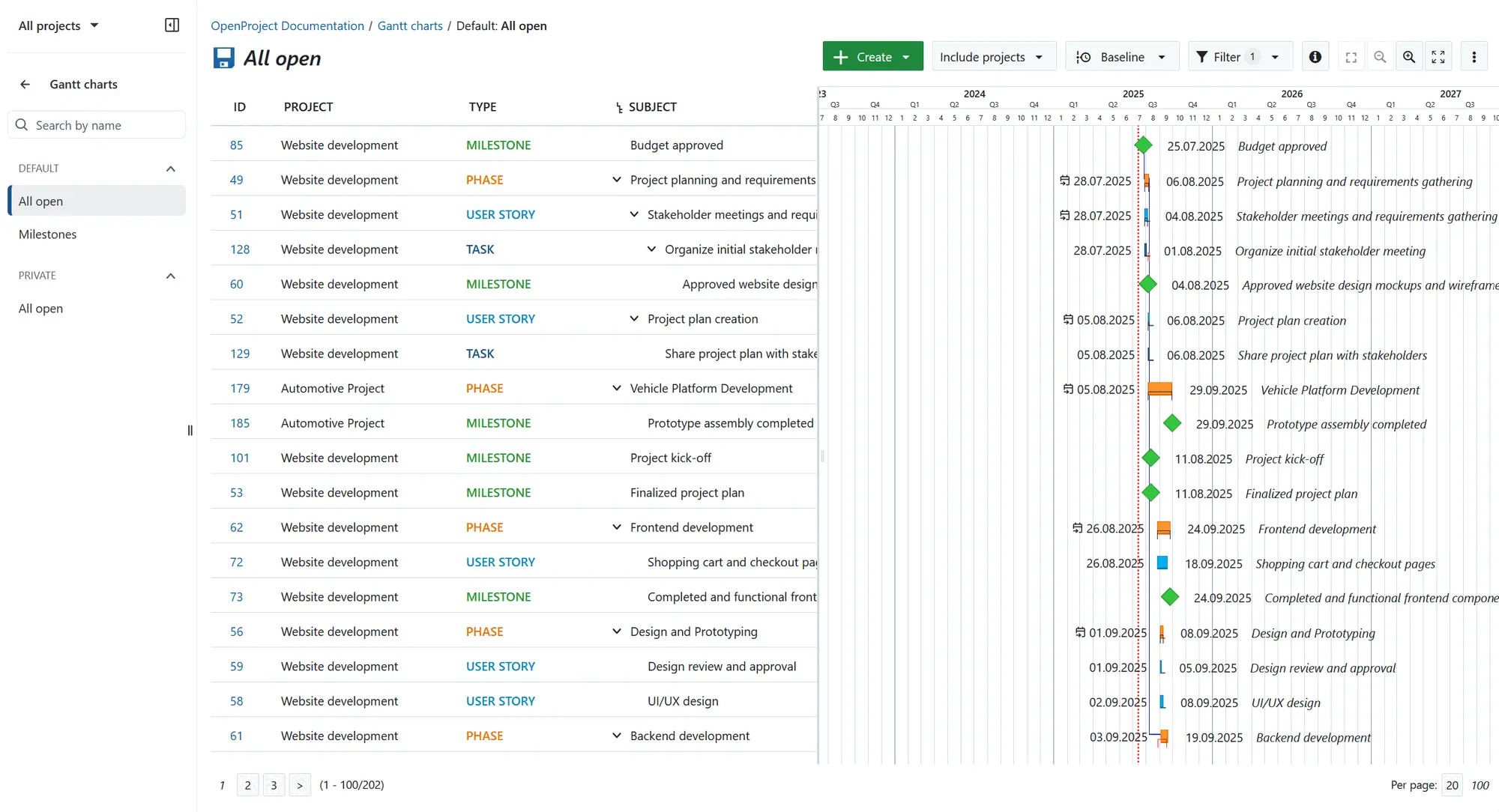
Every task, bug, phase or milestone is a work package. You can plan on a Gantt chart, move cards on Kanban boards, run sprints from a backlog, log hours and costs against a budget, and keep a wiki, forum and meeting minutes for each project. A small engineering firm, for example, could plan a building project as phases and milestones on the Gantt chart, log hours against each task, and run the weekly site meeting from a linked agenda.
OpenProject works in any web browser and has a phone app for iPhone and Android in beta. It links to Nextcloud, GitHub and GitLab, exports work to PDF, Excel and CSV, and can bring in projects from Jira Data Center with its beta Jira Migrator. Single sign-on, the Team planner and portfolio management are paid Enterprise add-ons.
Cloudgate installs OpenProject on a server Cloudgate provides or one you connect and gives it a secure web address. The first start takes several minutes; then sign in as admin with the password admin and set a new password straight away.
What you can do with OpenProject
- Plan on a Gantt chart Lay out phases, milestones and tasks on a timeline, for one project or several at once.
- Track every work package Tasks, bugs, milestones and user stories get sub-items, links to related work, filters and saved views.
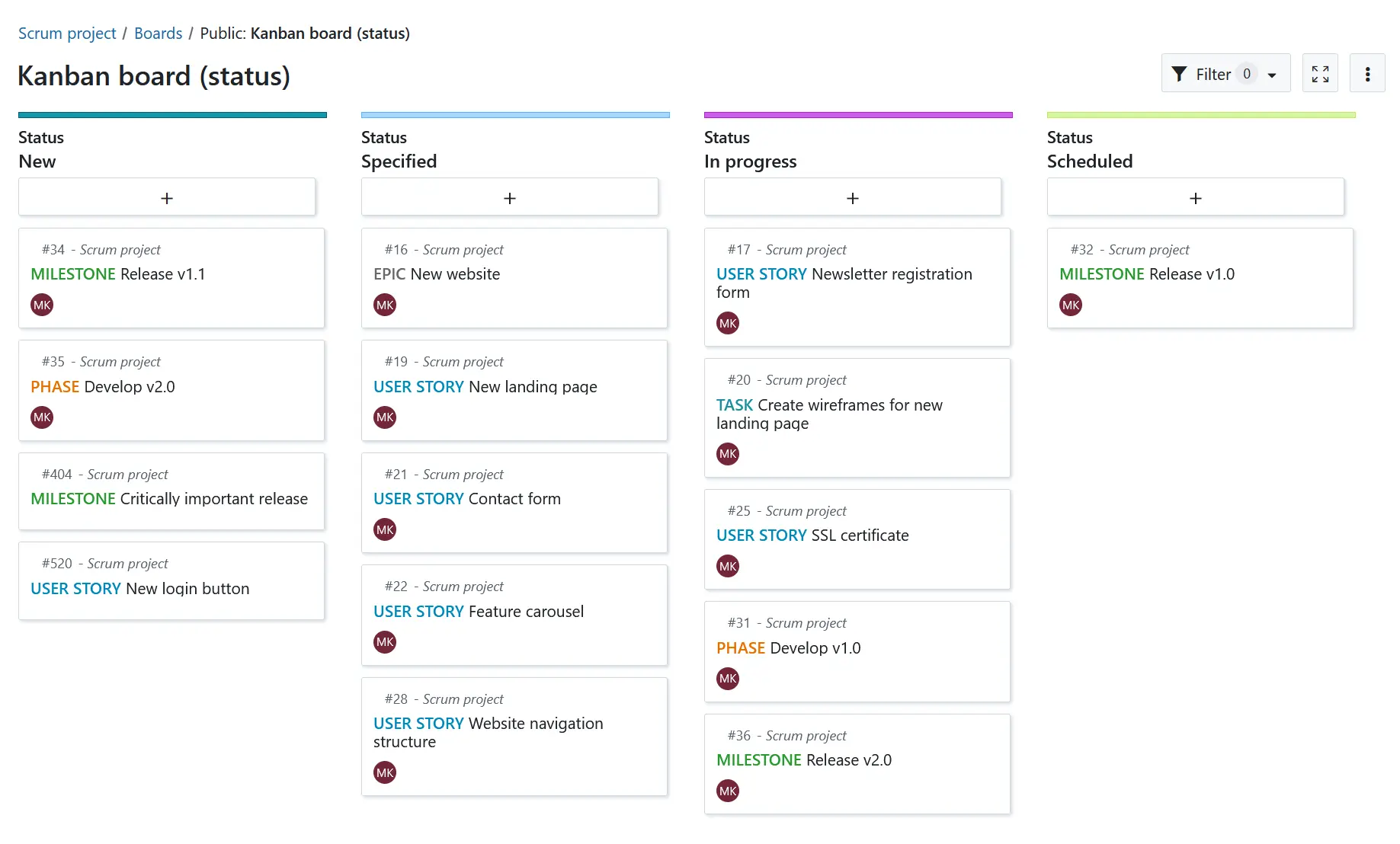
- Work on agile boards Move cards on Kanban boards by status, assignee, version or subproject, all in the free edition.
- Run sprints from a backlog Keep a Scrum backlog and plan the work for each sprint.
- Track time and costs Log hours and costs against the work and follow them against a project budget.
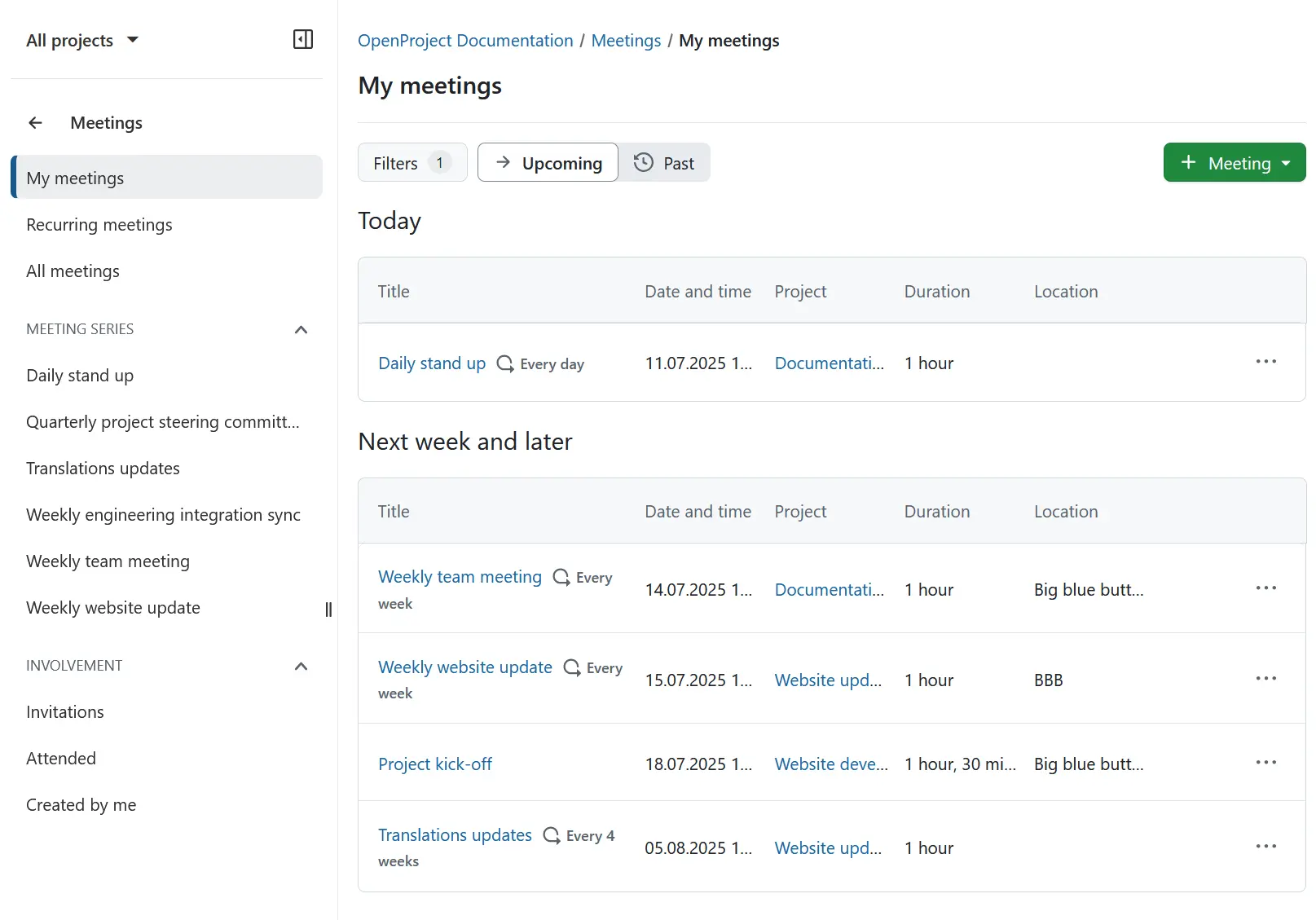
- Hold meetings that lead somewhere Write agendas, set up recurring meetings and keep minutes, with outcomes linked to the work they concern.
- Keep project knowledge together Each project can have its own wiki, forum and news page next to its plan.
- Connect the tools you use Link Nextcloud files, GitHub and GitLab to your work, or use the API and webhooks.
Replaces Microsoft Project, Jira, Asana and monday.com
OpenProject does the same job as Microsoft Project, Jira, Asana and monday.com. Here is what changes when you switch.
- No per-user fee in the Community edition, however many people join
- Gantt planning, agile boards, time tracking and meetings in one tool
- Everyone works in a web browser, with no desktop software to install
- Your plans, hours and files stay on your own server
- Single sign-on, the Team planner, portfolio and resource management and custom branding are paid Enterprise add-ons
- The Jira import is in beta and works only with Jira Data Center; there is no importer for Jira Cloud, Asana or monday.com
- OpenProject is a larger tool than most task apps; it needs a bigger server and its many modules take time to learn
- The phone app is still in beta
What happens when you click Deploy?
You do not need a server or any technical knowledge. Four steps, and OpenProject is running at its own web address.
- Step 1 Click Deploy and create your account
Deploy takes you to Cloudgate. Create an account, or log in if you have one. OpenProject itself is free.
- Step 2 Choose a server
No server? Get one from Cloudgate: pick a size and a country, and Cloudgate gets it ready. Already have one? Connect it instead.
- Step 3 Cloudgate sets up OpenProject
It prepares the server, makes the passwords the app needs and starts it. There is nothing to install and nothing to write down.
- Step 4 Open your app and sign in
Your app gets a free web address to start, without https. Add your own domain, like app.yourshop.com, and Cloudgate secures it with https for you.
New to Cloudgate? See what Cloudgate is
Run Cloudgate yourself? Deploy from your own console
In your Cloudgate console, open Templates and choose OpenProject.
Questions
Is OpenProject free?
Yes, the OpenProject Community edition is free and open source under the GPL-3.0 licence, with no minimum or limit on users, and it is what this template installs. OpenProject GmbH also sells paid Enterprise plans that unlock add-ons such as single sign-on, the Team planner and portfolio management.
Is OpenProject a good alternative to Microsoft Project?
Yes, OpenProject suits teams that plan with Gantt charts, phases, milestones and dependencies and want to track time and costs in a web browser. Resource and portfolio management are paid Enterprise add-ons, so organisations that rely on those in Microsoft Project need a paid plan.
Is OpenProject a good alternative to Jira?
Yes, OpenProject suits teams that want work packages, boards, backlogs, sprints and bug tracking with GitHub and GitLab links, alongside classic Gantt planning with phases and milestones. It is a broader project management suite than a developer issue tracker, so it can feel heavier to software teams.
Can I import my projects from Jira into OpenProject?
Partly, OpenProject's Jira Migrator, still in beta, imports projects, issues with their attachments, dates and estimates, and basic custom fields from Jira Data Center. It does not import from Jira Cloud, and there is no importer for Asana or monday.com.
How do I sign in to OpenProject the first time?
OpenProject starts with one admin account, username admin and password admin, and asks for a new password at that first sign-in. Sign in and change it right after setup, because the web address is public until the default password is changed.
Does OpenProject have a phone app?
Yes, an OpenProject app for iPhone and Android is available in beta. An administrator first turns on its sign-in in OpenProject's settings, and the web app also works in a phone's browser.
What server size do I need for OpenProject?
OpenProject asks for 4 GB of memory, a 4-core processor and 20 GB of disk for up to 200 users, so Cloudgate asks for a large server. The first start takes several minutes while OpenProject prepares its database.
Do I need technical skills to run OpenProject?
No. Click Deploy, create your Cloudgate account and choose a server, and Cloudgate sets up OpenProject and gives it a web address. You use it in your browser like any other online tool.
Do I need my own server for OpenProject?
No. When you deploy OpenProject, hosted Cloudgate can provide a server. If you already rent one, you can connect it instead.
Related apps

Project tracking with sprints, boards and timelines.

Simple project management with boards, timelines, goals and time.

A free, self-hosted task manager with issues, sprints and docs.

Issue tracking with Gantt charts, wikis and time logs.