
Lowcoder
Build internal tools and public web apps on your own data.
No server needed to start: Cloudgate can provide one. What happens when you click Deploy



What is Lowcoder?
Self-hosted Lowcoder Community Edition: build internal tools, dashboards and public web apps on your own databases and APIs, with no per-user fee.
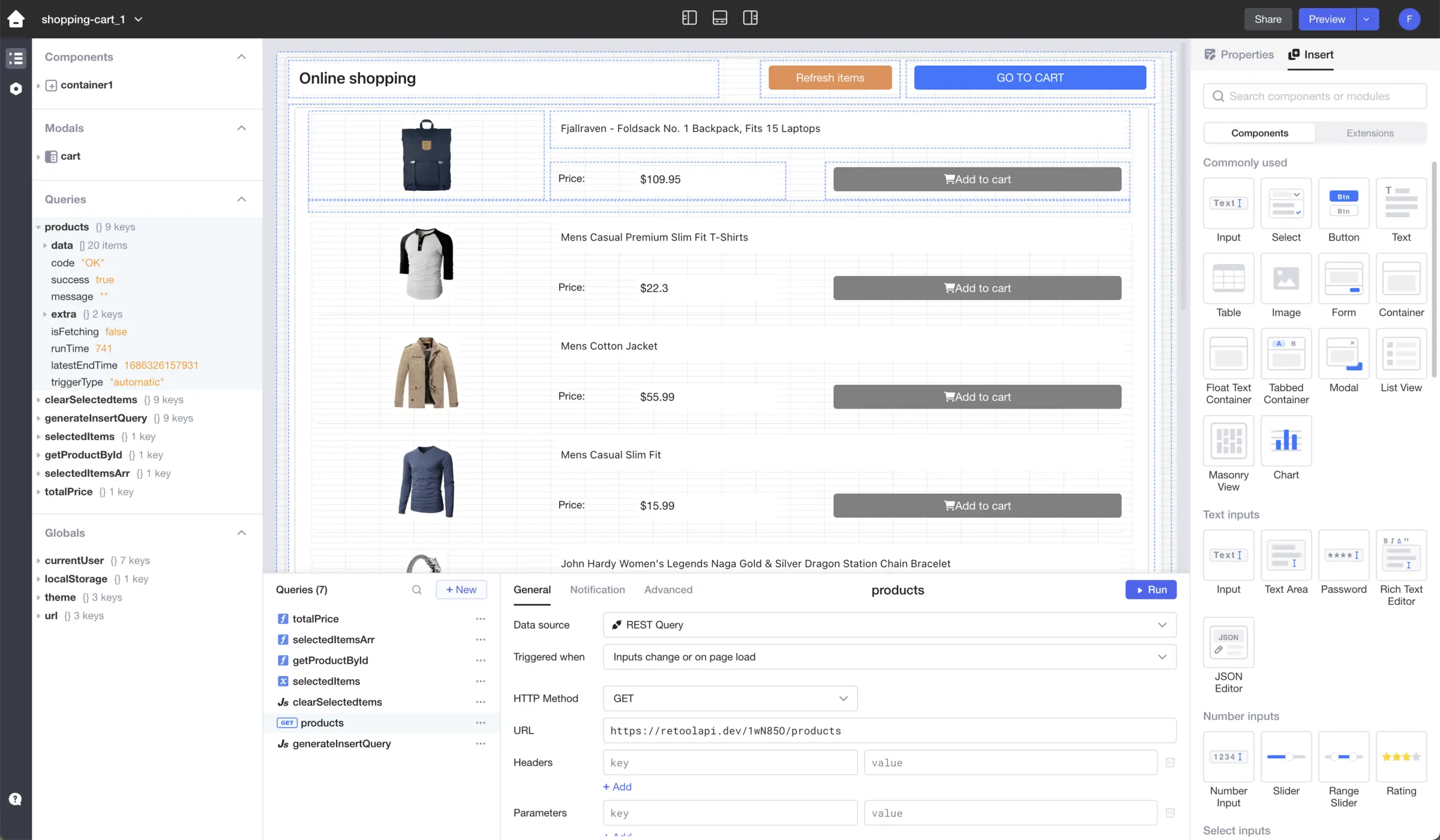
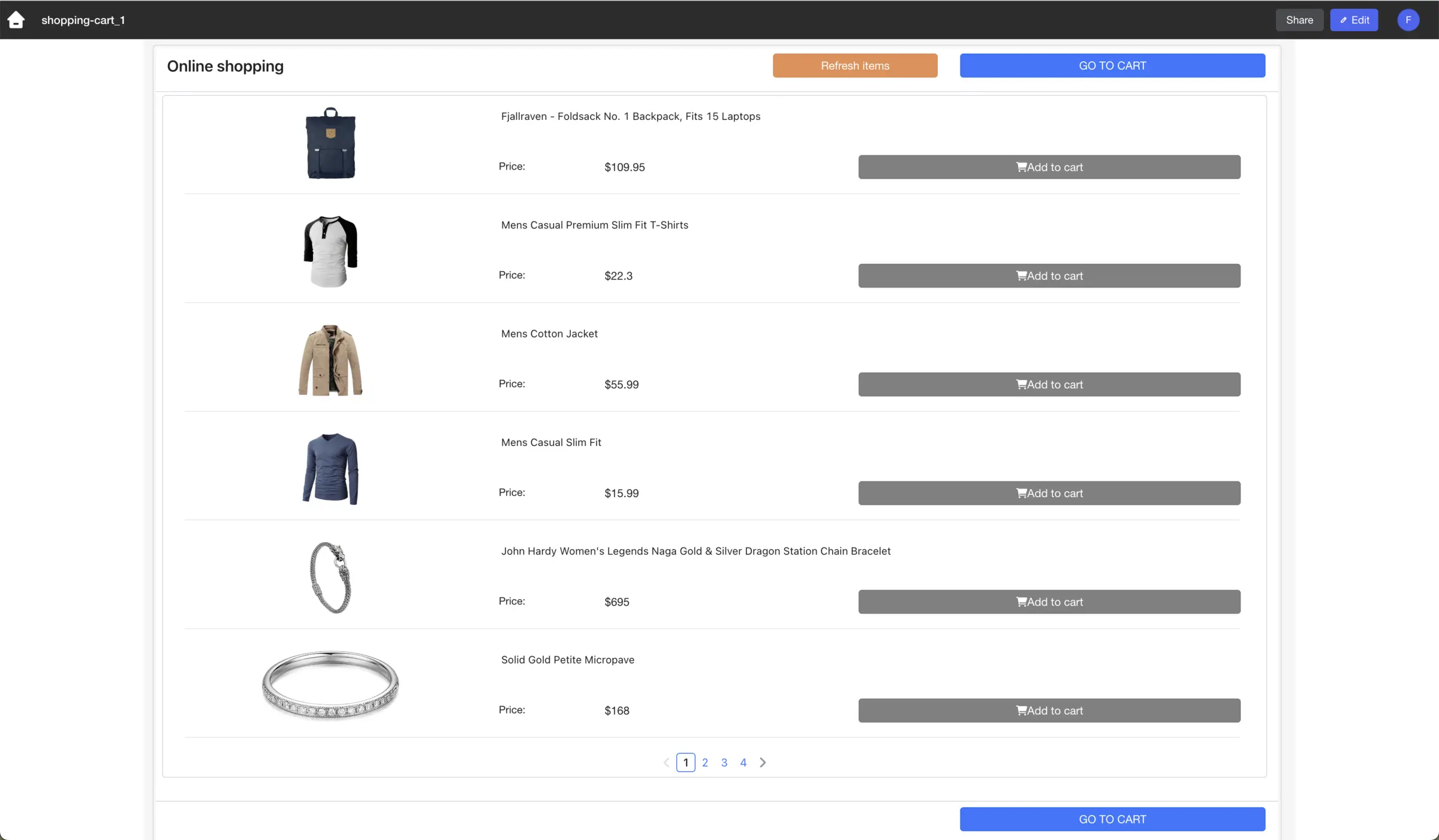
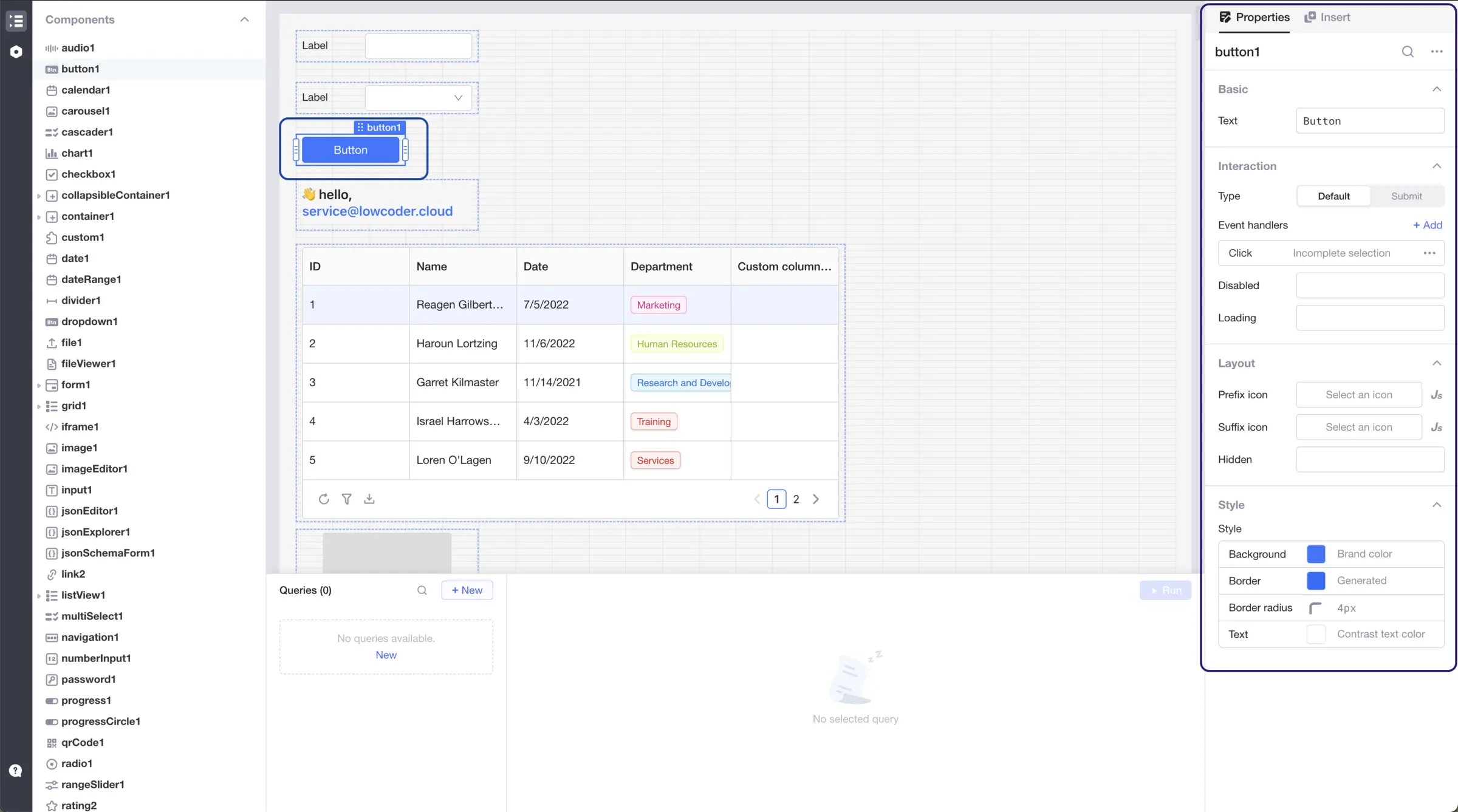
Self-hosted Lowcoder is an open-source app builder for internal tools, dashboards and public web apps, and an alternative to Retool, Microsoft Power Apps and Softr that runs on your own server. You drag tables, forms, charts and buttons onto a page, connect them to your databases and APIs, and add logic in SQL and JavaScript. This template installs Lowcoder Community Edition, the free edition, with no per-user fee.
A small cleaning company, for example, could build a booking screen where staff see the week's jobs and mark them done, and a public request form on its website that customers fill in without an account. Both apps read and write the same database, and the form can sit inside an existing web page.
Lowcoder connects to PostgreSQL, MySQL, Microsoft SQL Server, MongoDB, Google Sheets, REST and GraphQL APIs and more, and finished apps open in any browser, including on a phone. It keeps no data of its own for your apps, so you bring a database, API or spreadsheet. Paid Enterprise features such as audit logs, environments and custom branding are not part of Community Edition.
Cloudgate installs Lowcoder on a server Cloudgate provides or one you connect, and gives it a secure web address. Open it right after setup and sign up to create your workspace.
What you can do with Lowcoder
- Drag and drop the screens Place tables, forms, charts, lists, modals, calendars and buttons on a canvas, with layouts that adapt to phone screens.
- Work on your existing data Connect PostgreSQL, MySQL, Microsoft SQL Server, Oracle, MongoDB, Snowflake, BigQuery, Google Sheets and other sources, or any REST or GraphQL API.
- Add logic in JavaScript Write SQL queries for your data and use JavaScript anywhere to transform results, react to clicks and control components.
- Publish apps for staff or the public Share an app with chosen people and groups, or make it public so anyone can use it without an account.
- Put apps on your website Embed a finished app in an existing website or web page.
- Reuse your work Build modules and shared queries once and use them in every app, with an edit history you can restore from.
- Give each person the right access Workspaces, groups and viewer, editor and owner roles, with optional Google, GitHub or Keycloak sign-in.
Replaces Retool, Power Apps and Softr
Lowcoder does the same job as Retool, Power Apps and Softr. Here is what changes when you switch.
- Self-hosted with no per-user fee
- Free apps can be public, for forms and simple customer portals
- Your data and database passwords stay on your own server
- Open source under the AGPL-3.0 licence
- Audit logs, separate test and live environments, usage statistics, custom branding and the AI app builder are paid Enterprise extras
- There is no built-in database; apps work on a database, API or Google Sheet you already have
- Retool, Power Apps and Softr apps don't import; you rebuild them
- Real apps take SQL queries and some JavaScript; it is not fully no-code
What happens when you click Deploy?
You do not need a server or any technical knowledge. Four steps, and Lowcoder is running at its own web address.
- Step 1 Click Deploy and create your account
Deploy takes you to Cloudgate. Create an account, or log in if you have one. Lowcoder itself is free.
- Step 2 Choose a server
No server? Get one from Cloudgate: pick a size and a country, and Cloudgate gets it ready. Already have one? Connect it instead.
- Step 3 Cloudgate sets up Lowcoder
It prepares the server, makes the passwords the app needs and starts it. There is nothing to install and nothing to write down.
- Step 4 Open your app and sign in
Your app gets a free web address to start, without https. Add your own domain, like app.yourshop.com, and Cloudgate secures it with https for you.
New to Cloudgate? See what Cloudgate is
Run Cloudgate yourself? Deploy from your own console
In your Cloudgate console, open Templates and choose Lowcoder.
Questions
Is Lowcoder free?
Yes, Lowcoder Community Edition is free and open source under the AGPL-3.0 licence, with no per-user fee when you host it yourself. Lowcoder also sells an Enterprise licence and paid AI and support add-ons, which this template doesn't include.
What does Lowcoder Community Edition leave out?
Lowcoder Community Edition leaves out the paid Enterprise features, namely audit logs, separate environments for testing and production, app usage statistics and custom branding, and the Automator AI that builds whole apps from a prompt needs a paid subscription. Building, sharing, public apps, embedding and Google, GitHub or Keycloak sign-in are all included.
Is Lowcoder a good alternative to Retool?
Yes, for teams that want the same approach of components, SQL queries and JavaScript on their own server without paying per user. Lowcoder's free edition can also publish public apps and embed them in a website, while audit logs and environments are paid extras. There is no importer, so Retool apps are rebuilt.
Can Lowcoder build a customer portal or public form?
Yes. Any Lowcoder app can be made public, so customers can use it without an account, and it can be embedded in your website. Lowcoder has no built-in database, so a portal reads and writes a database, API or Google Sheet you connect.
Do I need to know how to code to use Lowcoder?
Some, yes. In Lowcoder you drag the screens together without code, but connecting them to your data takes SQL queries and a little JavaScript, so a semi-technical person should build the apps. The people who use the finished apps need no technical skill.
How do I sign in to Lowcoder the first time?
Open Lowcoder's web address right after setup and click Sign up with your email address and a password; the first person to sign up gets their own workspace, as its admin. Sign-up stays open, and each later sign-up gets a separate workspace of its own, so bring teammates into yours with an invite from the workspace's Members settings. There is also a built-in super-admin account, admin@localhost, whose generated password is on the service's variables page in Cloudgate.
What server size does Lowcoder need?
A server with 4 GB of memory, which is what this template uses. Lowcoder runs its app server, database and cache in one container that uses about 1.5 GB as soon as it starts; the project's own minimum of 1 CPU core and 2 GB gets tight once your apps run.
Do I need my own server for Lowcoder?
No. When you deploy Lowcoder, hosted Cloudgate can provide a server. If you already rent one, you can connect it instead.
Can I move my data from Retool to Lowcoder?
Most people export from Retool and import into Lowcoder. The official guides at docs.lowcoder.cloud walk through it.
Related apps

Build internal tools and admin panels on your own databases.

Build admin panels and internal tools on your own data and server.

A self-hosted low-code platform for your own CRM or records apps.

Build no-code database apps, forms and portals on your own server.