
Appsmith
Build internal tools and admin panels on your own databases.
No server needed to start: Cloudgate can provide one. What happens when you click Deploy

What is Appsmith?
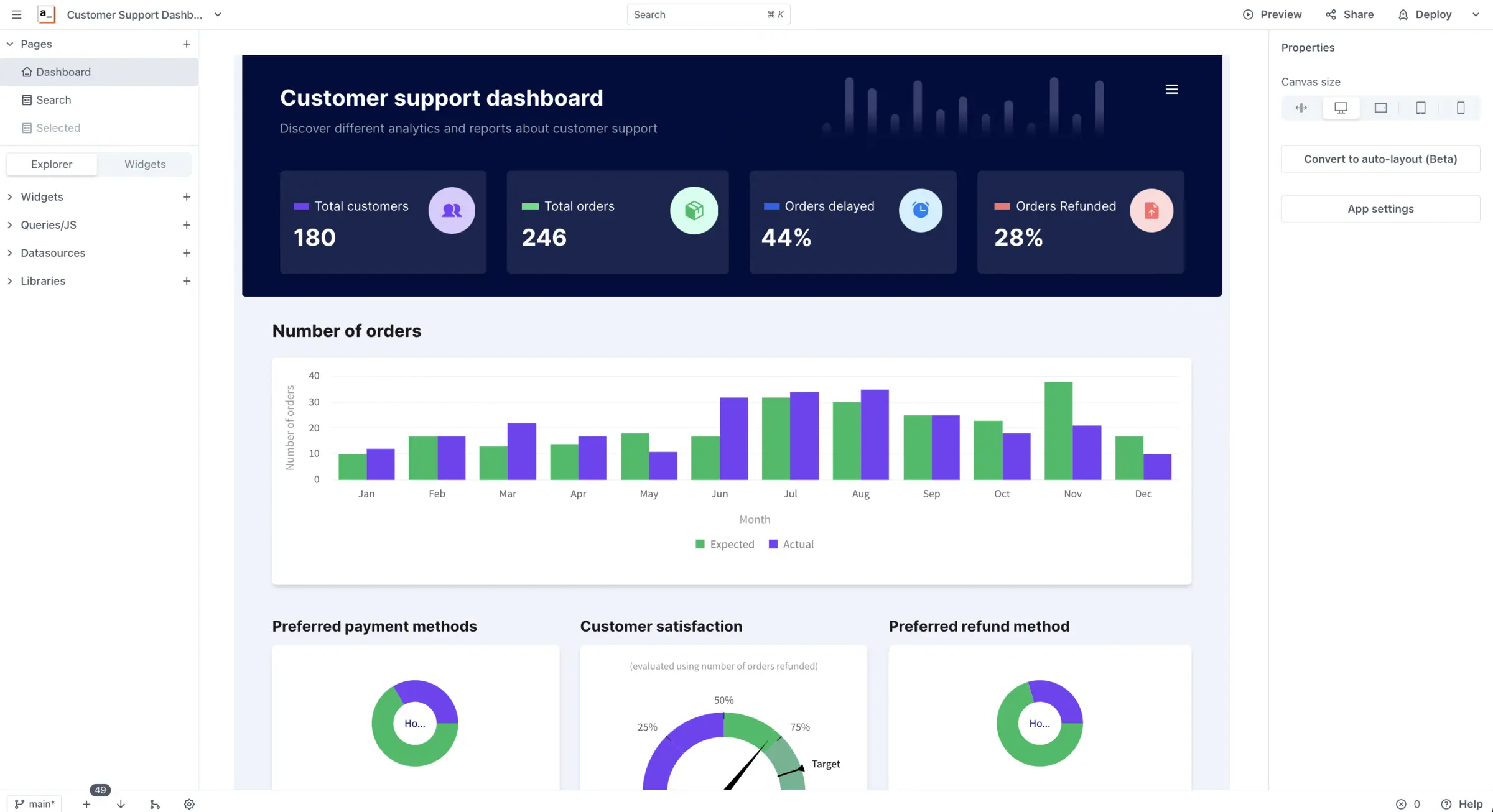
Self-hosted Appsmith Community Edition: build internal tools, admin panels and dashboards on your own databases and APIs, with no per-user fee.
Appsmith is an open-source, low-code builder for internal tools that you can self-host as an alternative to Retool or Microsoft Power Apps. You drag tables, forms, charts and buttons onto a page, connect them to your own databases and APIs, and add logic in SQL and JavaScript. Then you share the finished app with your team. This template installs Appsmith Community Edition, the free edition.
A small online shop, for example, could build a refunds screen on top of its PostgreSQL orders database: support staff search for an order, see the customer's history, and approve a refund with one button, while a dashboard page shows delayed orders by day. Nobody needs to log in to the database itself.
Appsmith connects to PostgreSQL, MySQL, MongoDB, Microsoft SQL Server, Google Sheets, REST and GraphQL APIs and more, and can call OpenAI, Anthropic or Google AI. Apps run in the browser on computers and phones. Features of Appsmith's paid plans, such as workflows, audit logs and single sign-on with SAML or OIDC, are not part of Community Edition.
Cloudgate installs Appsmith on a large server Cloudgate provides or one you connect, and gives it a secure web address. Open it right after setup: the first person to visit creates the admin account.
What you can do with Appsmith
- Drag and drop the screens Tables, forms, inputs, charts, lists, modals and maps snap into place on a canvas.
- Work on your existing data Connect PostgreSQL, MySQL, MongoDB, Microsoft SQL Server, Oracle, Snowflake, Google Sheets and other databases, plus any REST or GraphQL API.
- Write the logic in JavaScript Write queries in SQL, add logic in JavaScript anywhere, and bring in JavaScript libraries.
- Add AI to your tools Connect OpenAI, Anthropic or Google AI to summarize, classify or answer questions about your data.
- Keep apps in Git Connect an app to a Git repository for version control and merging changes; Community Edition allows up to three private repositories.
- Share with your team Organise apps in workspaces, give people one of three standard roles, or publish an app publicly and embed it in another site.
Replaces Retool and Power Apps
Appsmith does the same job as Retool and Power Apps. Here is what changes when you switch.
- Self-hosted with no per-user fee
- Your data and your database passwords stay on your own server
- Open source under the Apache-2.0 licence
- Connect databases and APIs your cloud tools can't reach
- Workflows, audit logs, custom roles, single sign-on with SAML or OIDC, and connectors such as Salesforce and Slack are paid plans only
- Retool apps don't import; you rebuild them
- You need SQL and JavaScript for real apps; it's not built for non-technical staff
- It needs a large server and takes a few minutes to start
What happens when you click Deploy?
You do not need a server or any technical knowledge. Four steps, and Appsmith is running at its own web address.
- Step 1 Click Deploy and create your account
Deploy takes you to Cloudgate. Create an account, or log in if you have one. Appsmith itself is free.
- Step 2 Choose a server
No server? Get one from Cloudgate: pick a size and a country, and Cloudgate gets it ready. Already have one? Connect it instead.
- Step 3 Cloudgate sets up Appsmith
It prepares the server, makes the passwords the app needs and starts it. There is nothing to install and nothing to write down.
- Step 4 Open your app and sign in
Your app gets a free web address to start, without https. Add your own domain, like app.yourshop.com, and Cloudgate secures it with https for you.
New to Cloudgate? See what Cloudgate is
Run Cloudgate yourself? Deploy from your own console
In your Cloudgate console, open Templates and choose Appsmith.
Questions
Is Appsmith free?
Yes, Appsmith Community Edition is free and open source under the Apache-2.0 licence, with no per-user fee when you host it yourself. Appsmith also sells paid plans with extra features, which this template doesn't include.
Is Appsmith a good alternative to Retool?
Yes, for developers who want the same approach of widgets, queries and JavaScript on their own server. Retool has more polish and features and charges per user, while Appsmith Community Edition is free to self-host but leaves out features such as workflows and single sign-on with SAML or OIDC.
What does Appsmith Community Edition leave out?
Community Edition leaves out the paid-plan features, including workflows, reusable packages, audit logs, custom roles, single sign-on with SAML or OIDC, premium connectors such as Salesforce and Slack, multiple environments and removing the "Powered by Appsmith" branding. It also allows only three private Git repositories.
How do I sign in to Appsmith the first time?
The first person to open Appsmith's web address creates the admin account, so open it right after setup. After that anyone who reaches the address can sign up, until you turn sign-ups off in Admin settings under Authentication. The setup form also has a box for sharing anonymous usage data with Appsmith, which you can untick.
Which databases and APIs can Appsmith connect to?
Appsmith Community Edition connects to PostgreSQL, MySQL, MongoDB, Microsoft SQL Server, Oracle, Redis, Elasticsearch, Firestore, Redshift, Snowflake, DynamoDB, Databricks, Amazon S3 and Google Sheets. It also works with any REST or GraphQL API and with OpenAI, Anthropic and Google AI.
Do I need to know how to code to use Appsmith?
Some, yes. You drag the screens together without code, but connecting them to your data takes SQL queries and a little JavaScript, so Appsmith suits developers and technical team members best.
What server size does Appsmith need?
Appsmith needs a large server, because it runs its own editor and databases together in one container. Cloudgate sets it up on a large server with 4 GB of memory; Appsmith's Docker guide recommends 8 GB on the host for this all-in-one setup. The first start takes a few minutes.
Do I need my own server for Appsmith?
No. When you deploy Appsmith, hosted Cloudgate can provide a server. If you already rent one, you can connect it instead.
Can I move my data from Retool to Appsmith?
Most people export from Retool and import into Appsmith. The official guides at docs.appsmith.com walk through it.
Related apps

Build internal tools and public web apps on your own data.

Build admin panels and internal tools on your own data and server.

A self-hosted low-code platform for your own CRM or records apps.

A self-hosted low-code platform for Salesforce-style business apps.