Saltcorn
Build no-code database apps, forms and portals on your own server.
No server needed to start: Cloudgate can provide one. What happens when you click Deploy
What is Saltcorn?
Saltcorn is a self-hosted, open-source no-code builder for database apps: linked tables, forms, portals and workflows, replacing Microsoft Access.
Self-hosted Saltcorn is a free, open-source no-code builder for database apps, and an alternative to Microsoft Access, Softr, Glide and Zoho Creator that runs on your own server. You create tables and link them together, then lay out lists, forms, detail pages and dashboards by drag and drop, decide which people can see and change each one, and add automations such as an email when a record changes.
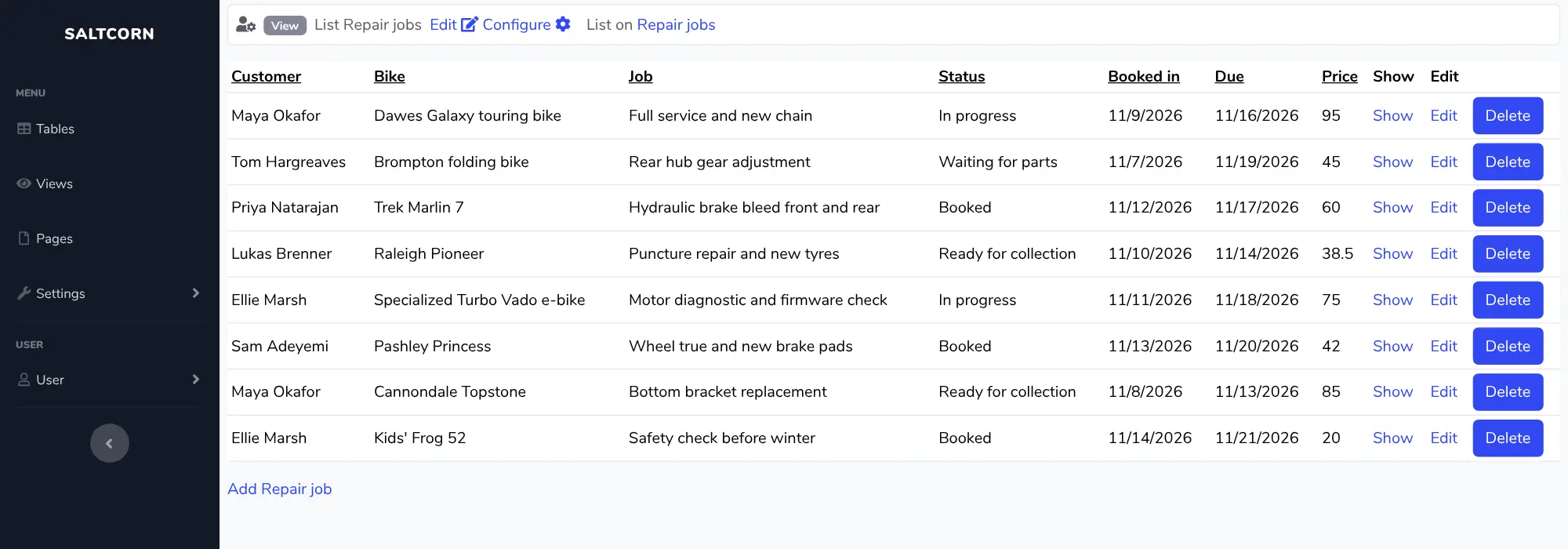
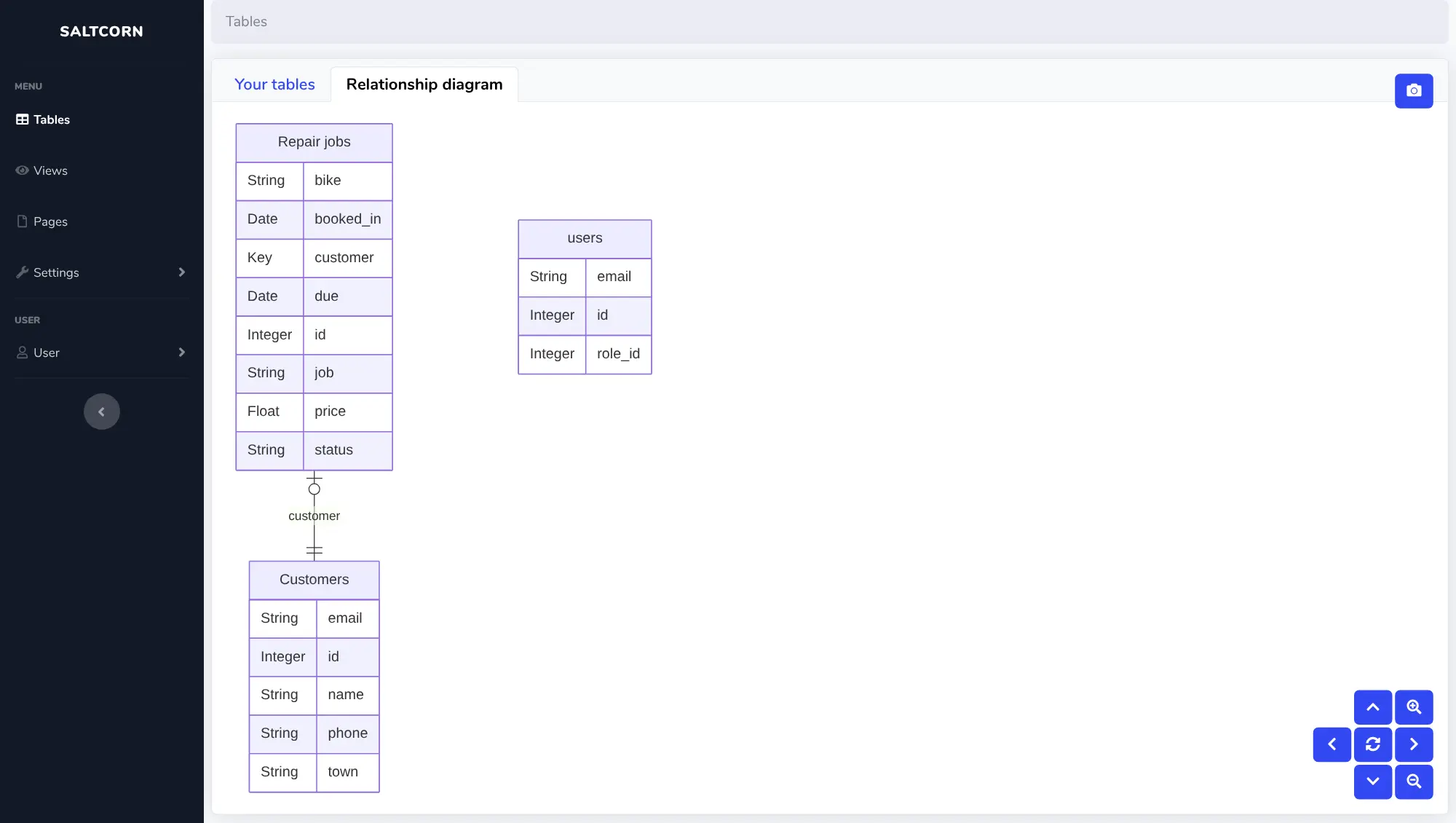
A bike repair shop, for example, could upload its customer spreadsheet, add a table of repair jobs linked to each customer, and build a booking-in form for the counter and a list of jobs by status for the workshop. A public page could later let customers check whether their bike is ready.
Saltcorn works in any browser, including on phones, and has a built-in API so other tools can read and add records. Modules from its store add calendars, kanban boards, maps, charts and AI features. Its screens are plain rather than polished, and it takes some time to learn how tables, views and pages fit together.
Cloudgate installs Saltcorn on a server Cloudgate provides or one you connect, and gives it a secure web address. Open it right after setup: the first person to visit creates the admin account.
What you can do with Saltcorn
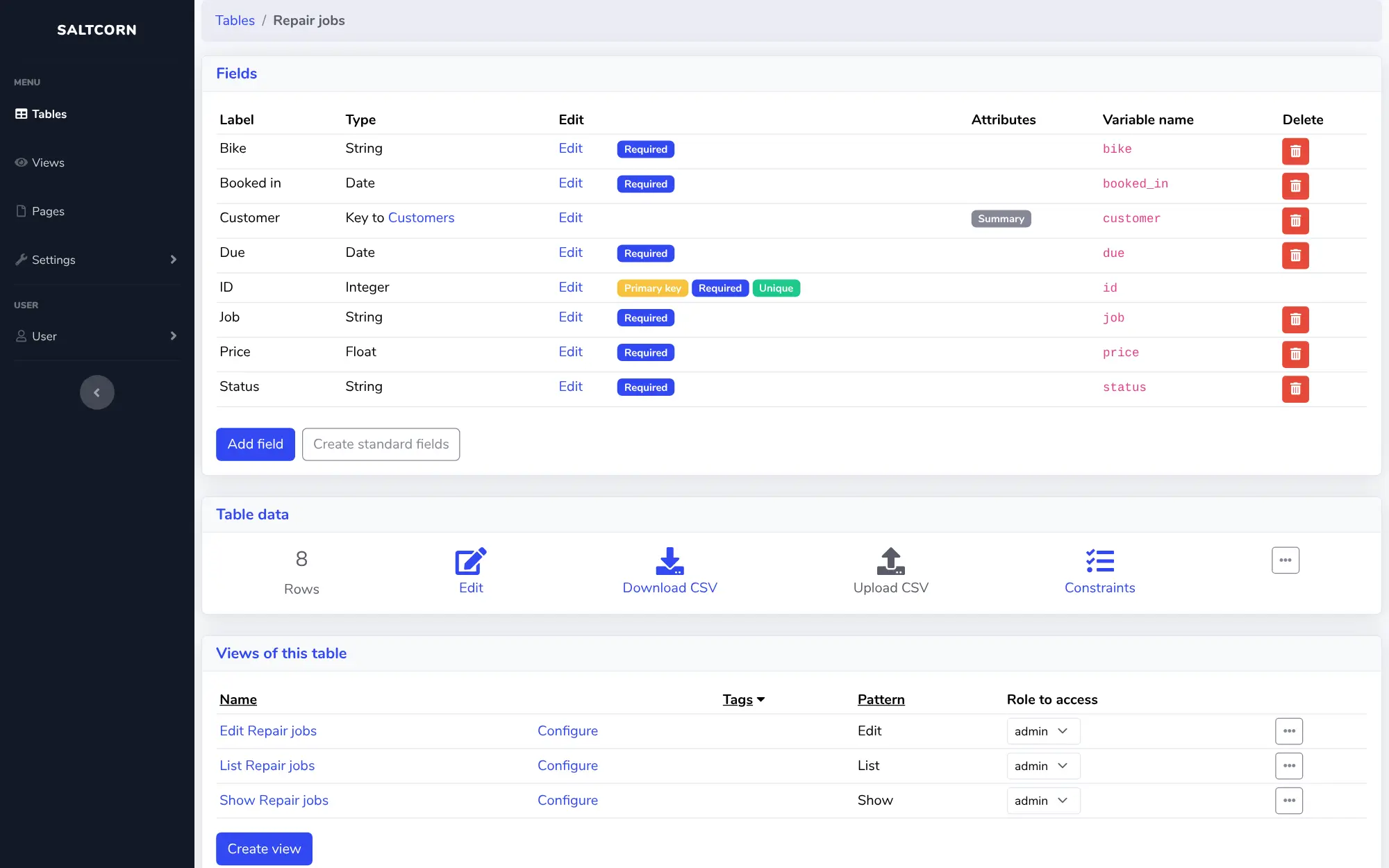
- Link your records together Create tables for customers, jobs, stock or members, choose a type for each field, and link rows between tables so a customer shows with all their jobs.
- Start from a spreadsheet Upload a CSV file to create a new table with its rows in one step, and download any table as a CSV file again.
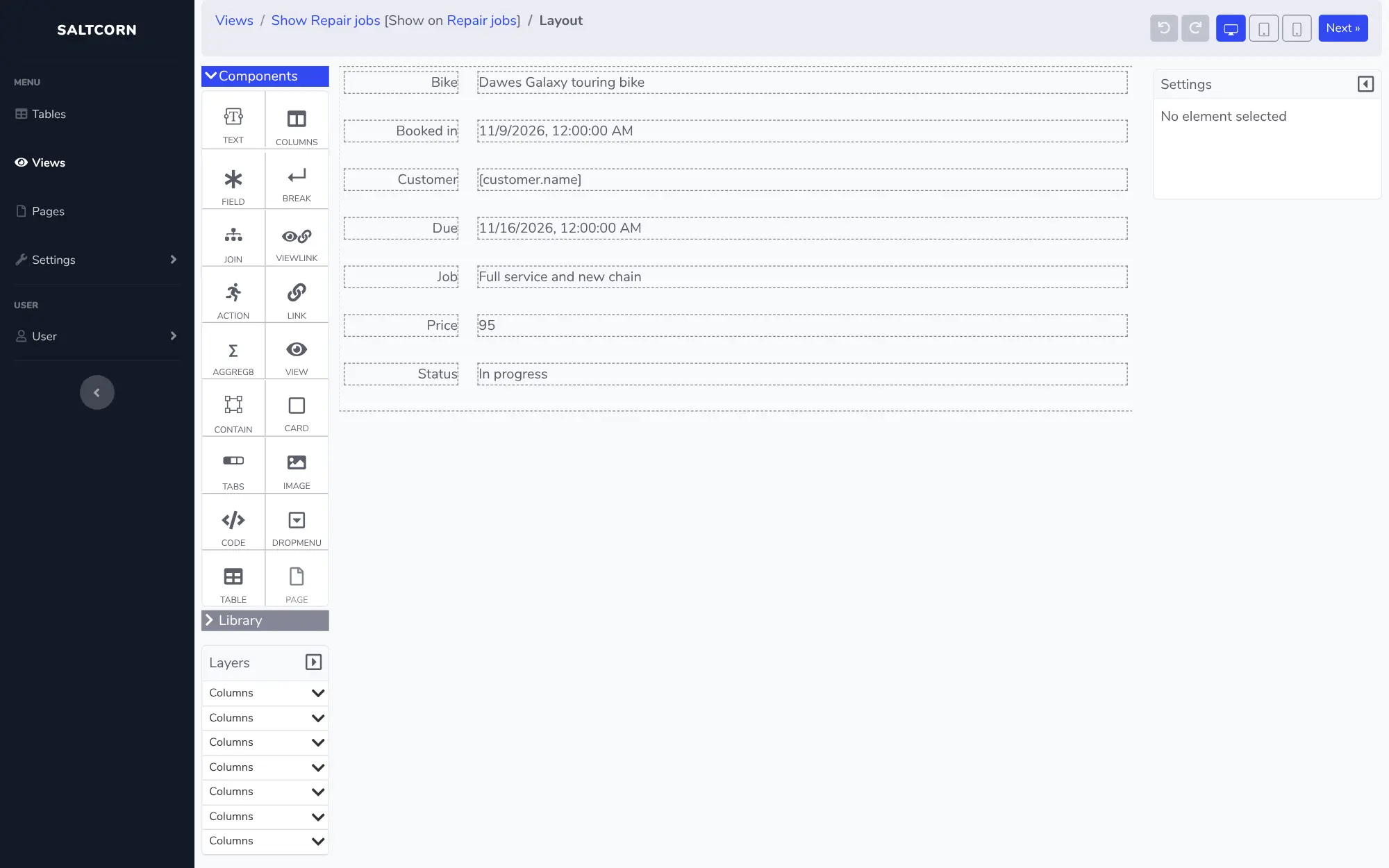
- Lay out screens by drag and drop Build lists, detail pages, forms and dashboards from columns, cards, tabs, text and images, and preview them at desktop, tablet and phone sizes.
- Decide who sees what Give people the admin, staff, user or a custom role, set which role can read or change each table and open each page, and make pages public for a customer portal.
- Automate the routine steps Send an email, update a row or call another app when a record changes or on a schedule, and chain steps into workflows that can wait for a person to approve.
- Add more with modules Install free modules from the Saltcorn store for calendars, kanban boards, maps, charts, themes and ready-made apps.
- Keep a history of changes Turn on version history for a table to keep earlier versions of each row and restore one when a change was a mistake.
Replaces Microsoft Access, Softr, Glide and Zoho Creator
Saltcorn does the same job as Microsoft Access, Softr, Glide and Zoho Creator. Here is what changes when you switch.
- Free and open source under the MIT licence, with no paid edition and no limit on users, apps or records
- Your records stay in a real database on your own server, which you can back up and query
- Pages can be public, so one app can serve both your staff and your customers
- A web app that works in any browser, for many people at once, instead of a desktop database file
- There is no importer for Access, Softr, Glide or Zoho Creator apps; bring your data in as CSV files and rebuild the screens
- The look is plain and functional, and building takes some learning of tables, views and pages
- Calendars, kanban boards, maps and AI features come as modules downloaded from the internet
- This template doesn't build native phone apps; people use the app in their phone's browser
What happens when you click Deploy?
You do not need a server or any technical knowledge. Four steps, and Saltcorn is running at its own web address.
- Step 1 Click Deploy and create your account
Deploy takes you to Cloudgate. Create an account, or log in if you have one. Saltcorn itself is free.
- Step 2 Choose a server
No server? Get one from Cloudgate: pick a size and a country, and Cloudgate gets it ready. Already have one? Connect it instead.
- Step 3 Cloudgate sets up Saltcorn
It prepares the server, makes the passwords the app needs and starts it. There is nothing to install and nothing to write down.
- Step 4 Open your app and sign in
Your app gets a free web address to start, without https. Add your own domain, like app.yourshop.com, and Cloudgate secures it with https for you.
New to Cloudgate? See what Cloudgate is
Run Cloudgate yourself? Deploy from your own console
In your Cloudgate console, open Templates and choose Saltcorn.
Questions
Is Saltcorn free?
Yes, Saltcorn is free and open source under the MIT licence, with no paid edition and no limit on users, apps or records. You pay only for the server it runs on.
Can Saltcorn replace Microsoft Access?
Yes, for most small business databases. Saltcorn's makers name Access replacement as one of its main uses. Like Access, you build linked tables, forms and lists without code, but the result is a web app many people can use at once in a browser. There is no Access importer, so export each table as a CSV file, upload it to Saltcorn and link the tables again.
Is Saltcorn a good alternative to Softr or Glide?
Yes, if you want to own the app and its data. Saltcorn builds staff tools and customer portals without code and keeps the data in its own database on your server. It looks plainer than Softr or Glide and takes longer to learn, and Softr and Glide apps don't import, so you rebuild them and bring your data across as CSV files.
Do I need to know how to code to use Saltcorn?
No. In Saltcorn, tables, screens, roles and automations are all set up with forms and drag-and-drop builders. If you do want code, you can add your own HTML, CSS or JavaScript in places, but it is optional.
How do I sign in to Saltcorn the first time?
The first person to open Saltcorn's web address creates the admin account with an email address and password, so open it right after setup. Saltcorn also allows anyone to sign up by default; if your app is only for your team, turn off Allow signups under Settings, Users and security, Login and Signup.
Can I use Saltcorn on my phone?
Yes, in the phone's browser. The screens you build resize for phones, and the builder lets you check the phone layout. Saltcorn can also build installable iPhone and Android apps, but that needs a larger version of Saltcorn that this template doesn't include.
What server size does Saltcorn need?
A small server with 1 GB of memory runs Saltcorn, and Cloudgate starts it on one. Saltcorn's makers recommend 2 GB for comfortable use and smooth upgrades, so move to a medium server once your team uses it every day.
Do I need my own server for Saltcorn?
No. When you deploy Saltcorn, hosted Cloudgate can provide a server. If you already rent one, you can connect it instead.
Can I move my data from Microsoft Access to Saltcorn?
Most people export from Microsoft Access and import into Saltcorn. The official guides at wiki.saltcorn.com walk through it.
Related apps

Build admin panels and internal tools on your own data and server.

Build internal tools and public web apps on your own data.

A self-hosted low-code platform for your own CRM or records apps.

A self-hosted low-code platform for Salesforce-style business apps.