
iTop
A self-hosted IT help desk linked to a CMDB of everything you run.
No server needed to start: Cloudgate can provide one. What happens when you click Deploy
What is iTop?
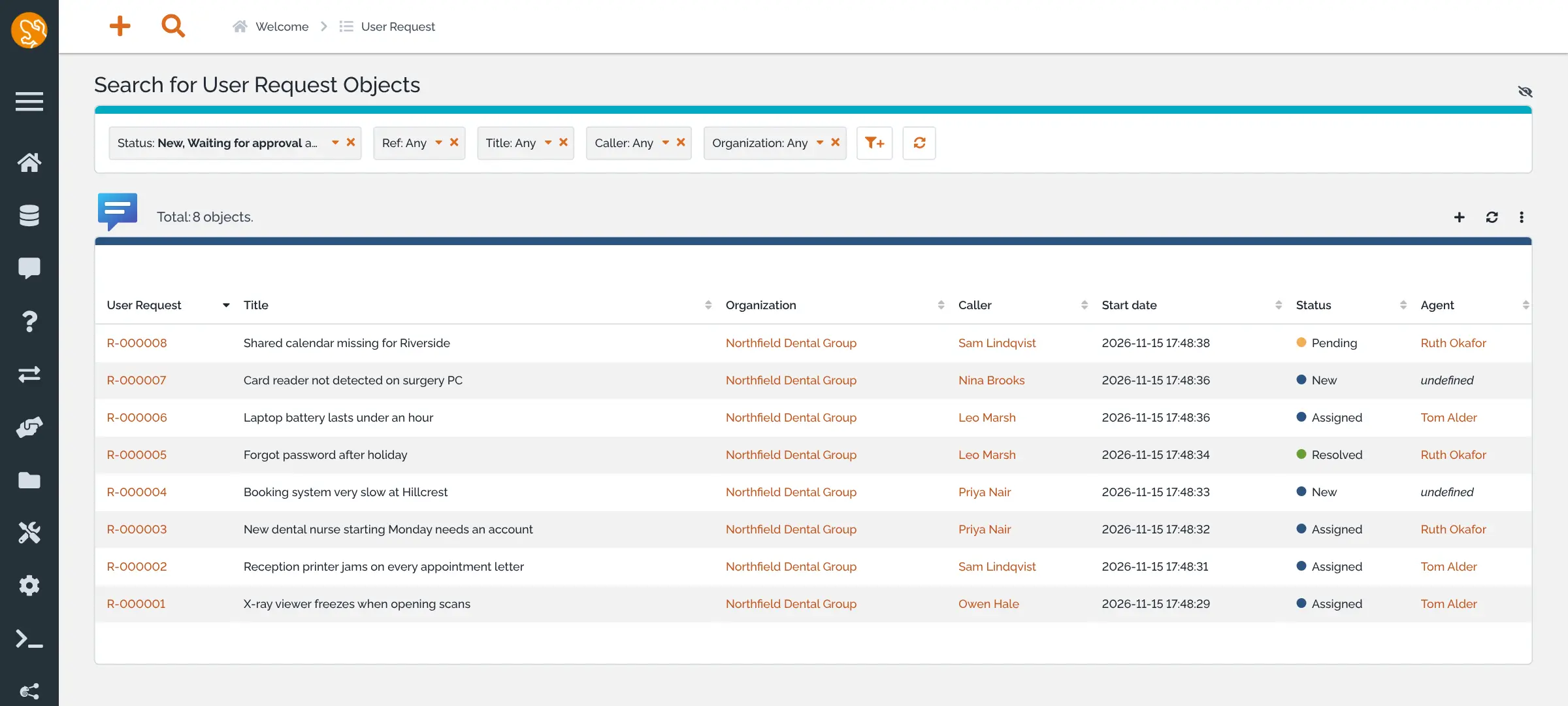
iTop is a self-hosted IT help desk and CMDB: requests, incidents, changes and SLAs, each linked to the servers and services it affects.
iTop is a free, open-source IT service management tool that you can self-host, an alternative to ServiceNow, Freshservice and Jira Service Management. It combines an IT help desk with a CMDB, a record of the servers, computers, applications and services your organisation relies on, and links each ticket to the equipment it is about.
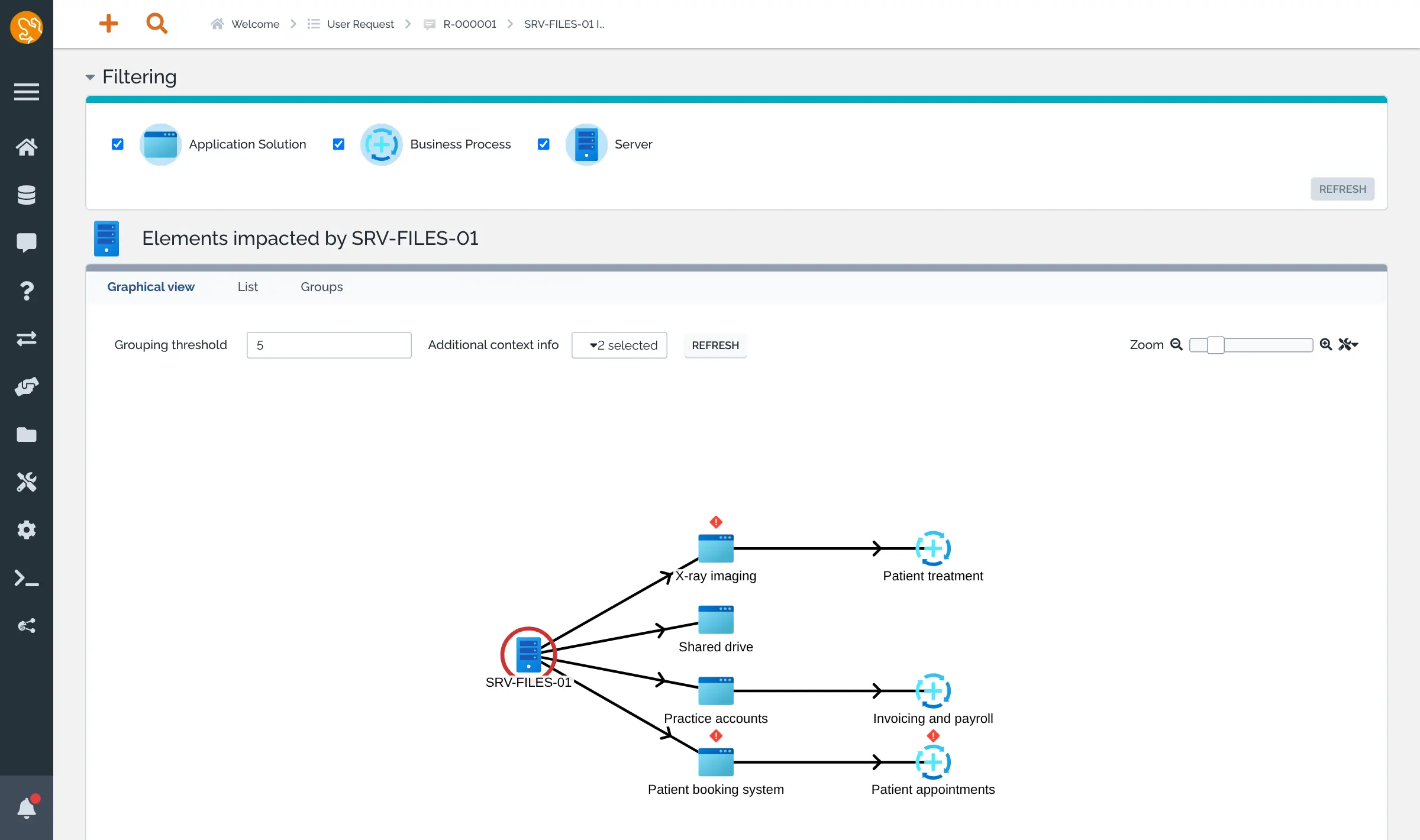
Agents work requests and incidents with priorities and response-time targets, link repeat faults to a problem, and plan changes. Staff open and follow their own requests in a simple portal. Because iTop knows how your systems depend on each other, it can show which services stop when one server fails. A two-person IT team at a dental group with three clinics, for example, could see at a glance that a failing file server takes down patient bookings and accounts, warn the clinics, and track every fix against its agreed response time.
iTop works in any web browser, in English, French, German, Spanish and a dozen other languages. It signs people in with LDAP or Active Directory, imports existing records from CSV files, and sends alerts to Slack or Microsoft Teams.
Cloudgate installs iTop on a server Cloudgate provides or one you connect, with its database, and gives it a secure web address. Sign in as admin with the password Cloudgate generates.
What you can do with iTop
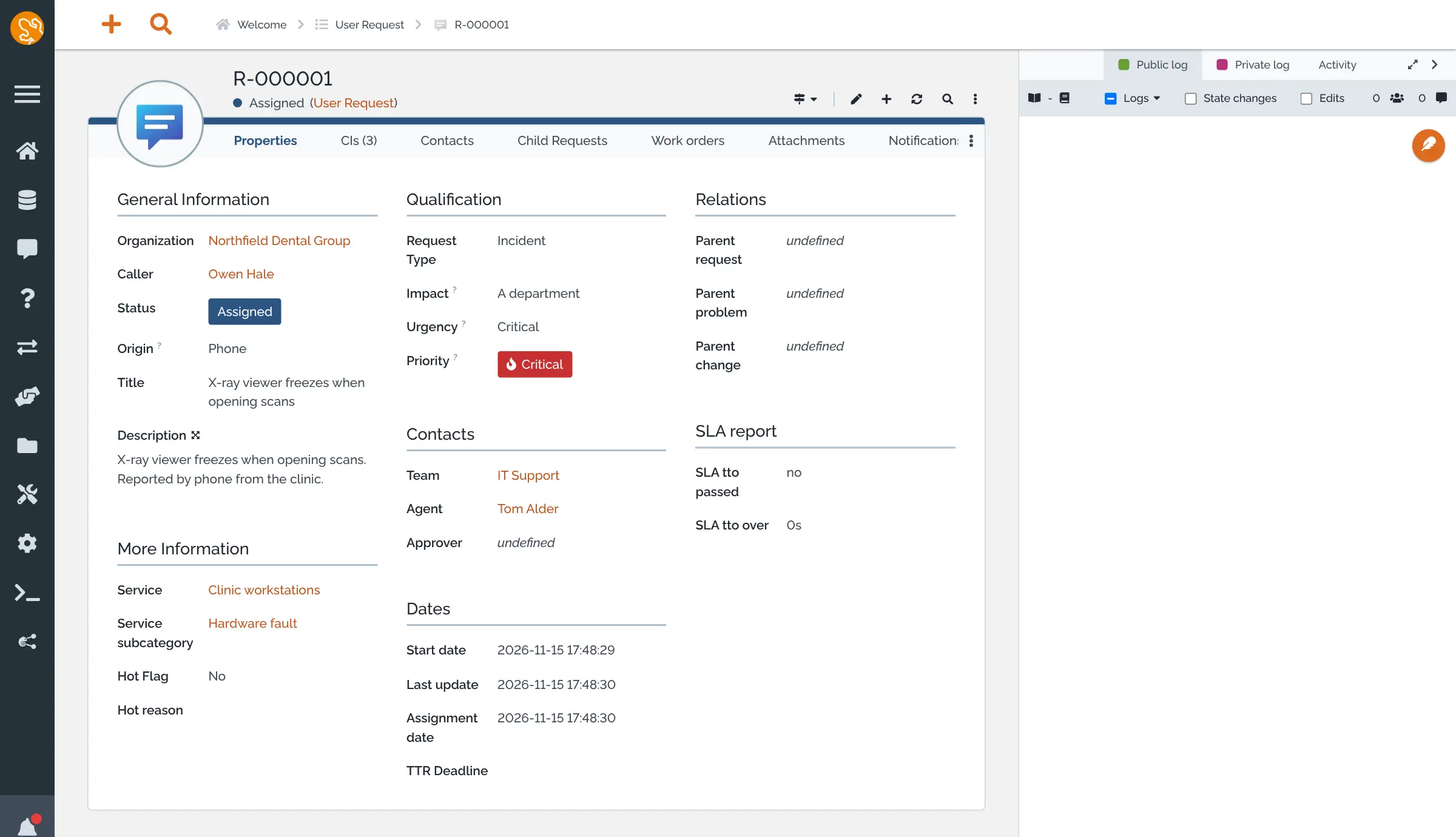
- Handle requests and incidents Every IT request becomes a ticket with a team, an agent, a priority set from impact and urgency, and public and private notes.
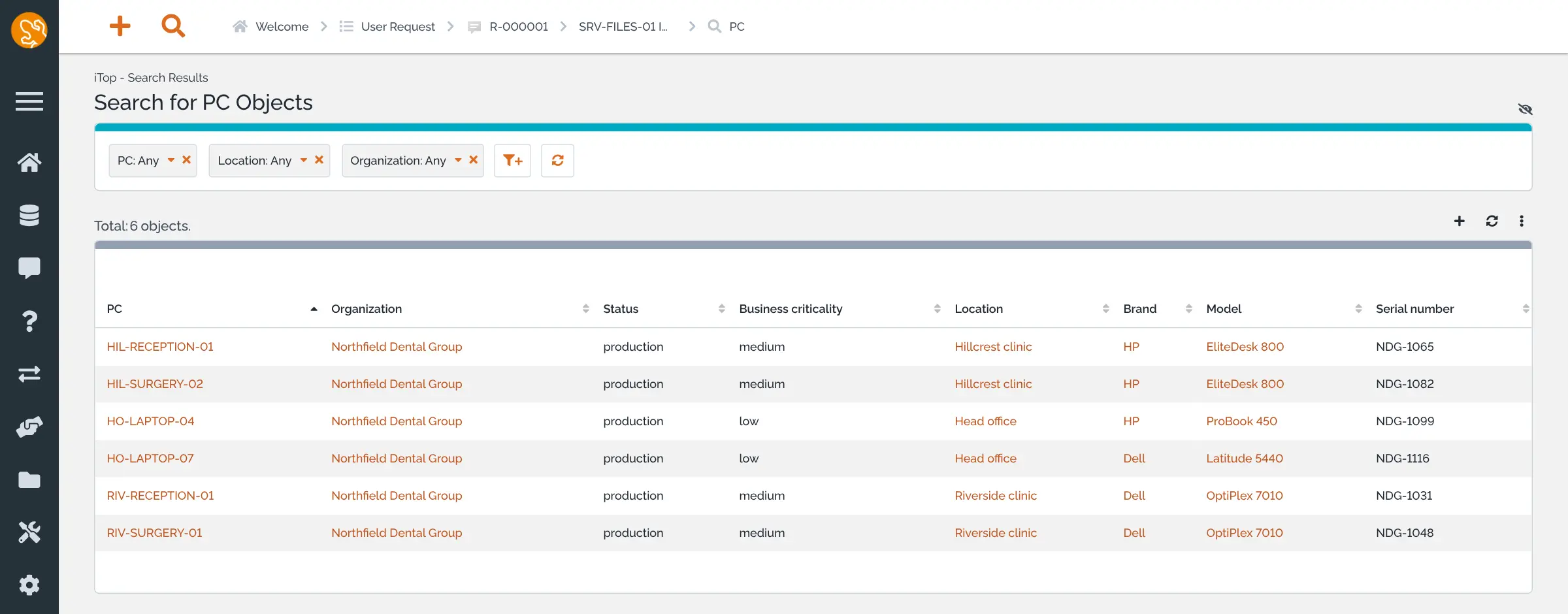
- Keep a CMDB of what you run Record servers, PCs, printers, phones, network devices, software and licences, with their location, owner and status.
- See what a failure affects An impact graph shows which applications and business processes stop when a server or application goes down.
- Work to service agreements Define your services and customer contracts, set response and resolution targets, and see on each ticket whether you met them.
- Manage problems and changes Link repeat incidents to a problem, record known errors and FAQs, and plan changes to your systems.
- Give staff a request portal Staff open requests, follow their progress and read answers in a simple portal, without the full console.
- Bring in your existing data Import servers, computers, people or any other records from a CSV file, and export any list to a spreadsheet.
- Sign in with your directory Connect LDAP or Active Directory, and send ticket alerts to Slack, Microsoft Teams, Rocket.Chat or Google Chat.
Replaces ServiceNow, Freshservice and Jira Service Management
iTop does the same job as ServiceNow, Freshservice and Jira Service Management. Here is what changes when you switch.
- No subscription and no fee per agent
- Tickets, contracts and your CMDB stay on your own server
- Each ticket shows the servers, PCs and services it affects
- Problem, change and service contract management are included
- It takes more setup, such as organisations, teams, services and contracts, before tickets flow well
- The screens are dense and use ITIL words such as incident, problem and change
- Turning emails into tickets needs the free Mail to ticket extension, which this template does not include
- There is no phone app and no importer from ServiceNow, Freshservice or Jira Service Management
What happens when you click Deploy?
You do not need a server or any technical knowledge. Four steps, and iTop is running at its own web address.
- Step 1 Click Deploy and create your account
Deploy takes you to Cloudgate. Create an account, or log in if you have one. iTop itself is free.
- Step 2 Choose a server
No server? Get one from Cloudgate: pick a size and a country, and Cloudgate gets it ready. Already have one? Connect it instead.
- Step 3 Cloudgate sets up iTop
It prepares the server, makes the passwords the app needs and starts it. There is nothing to install and nothing to write down.
- Step 4 Open your app and sign in
Your app gets a free web address to start, without https. Add your own domain, like app.yourshop.com, and Cloudgate secures it with https for you.
New to Cloudgate? See what Cloudgate is
Run Cloudgate yourself? Deploy from your own console
In your Cloudgate console, open Templates and choose iTop.
Questions
Is iTop free?
Yes. iTop Community is free and open source under the AGPL-3.0 licence, and you pay only for your server. Its maker, Combodo, also offers iTop Atelier and iTop Forge packages, priced on request, with more processes, customization and support; this template installs the free Community edition.
Is iTop a good alternative to ServiceNow or Freshservice?
Yes, for small and mid-sized IT teams. iTop covers the ITIL core of requests, incidents, problems, changes and SLAs around a CMDB, with no fee per agent. ServiceNow is a much larger platform with far more automation, and Freshservice is quicker to start with, while iTop needs more setup.
How do I sign in to iTop the first time?
Sign in with the username admin and the password Cloudgate generated, shown with the app's settings in Cloudgate. Cloudgate installs iTop for you on the first start, which takes a minute or two, so there is no setup wizard to fill in and no default password.
Can staff email the help desk in iTop?
Yes, staff can email the iTop help desk once you add Combodo's free Mail to ticket automation extension, which turns emails into new tickets and adds replies to existing ones. It is not part of this template, so out of the box people open requests in the portal or agents log them from phone calls.
Should I choose iTop or GLPI?
Choose iTop if you want tickets tied to a detailed CMDB, an impact graph and service contracts with SLAs, for your own company or for clients you support. Choose GLPI if you want automatic inventory of computers through its agent and stronger asset and licence tracking.
Can iTop import my tickets from ServiceNow or Freshservice?
No, iTop has no importer for ServiceNow, Freshservice or Jira Service Management. You can import people, locations and equipment from CSV files exported from your old tool, and most teams start new tickets fresh in iTop.
What server size do I need for iTop?
A server with 2 CPU cores and 4 GB of memory is enough for iTop for under 200 tickets a month and up to 20 people working in the console, according to Combodo. Larger teams should plan for 4 cores and 8 GB.
Do I need technical skills to run iTop?
No. Click Deploy, create your Cloudgate account and choose a server, and Cloudgate sets up iTop and gives it a web address. You use it in your browser like any other online tool.
Do I need my own server for iTop?
No. When you deploy iTop, hosted Cloudgate can provide a server. If you already rent one, you can connect it instead.
Related apps

A self-hosted IT service desk with an inventory of every device.

A self-hosted help desk and IT service desk that grew out of OTRS.

Self-hosted help desk for email tickets, SLAs and a customer portal.

An open-source ticketing system for support, IT and ops requests.