
GLPI
A self-hosted IT service desk with an inventory of every device.
No server needed to start: Cloudgate can provide one. What happens when you click Deploy
What is GLPI?
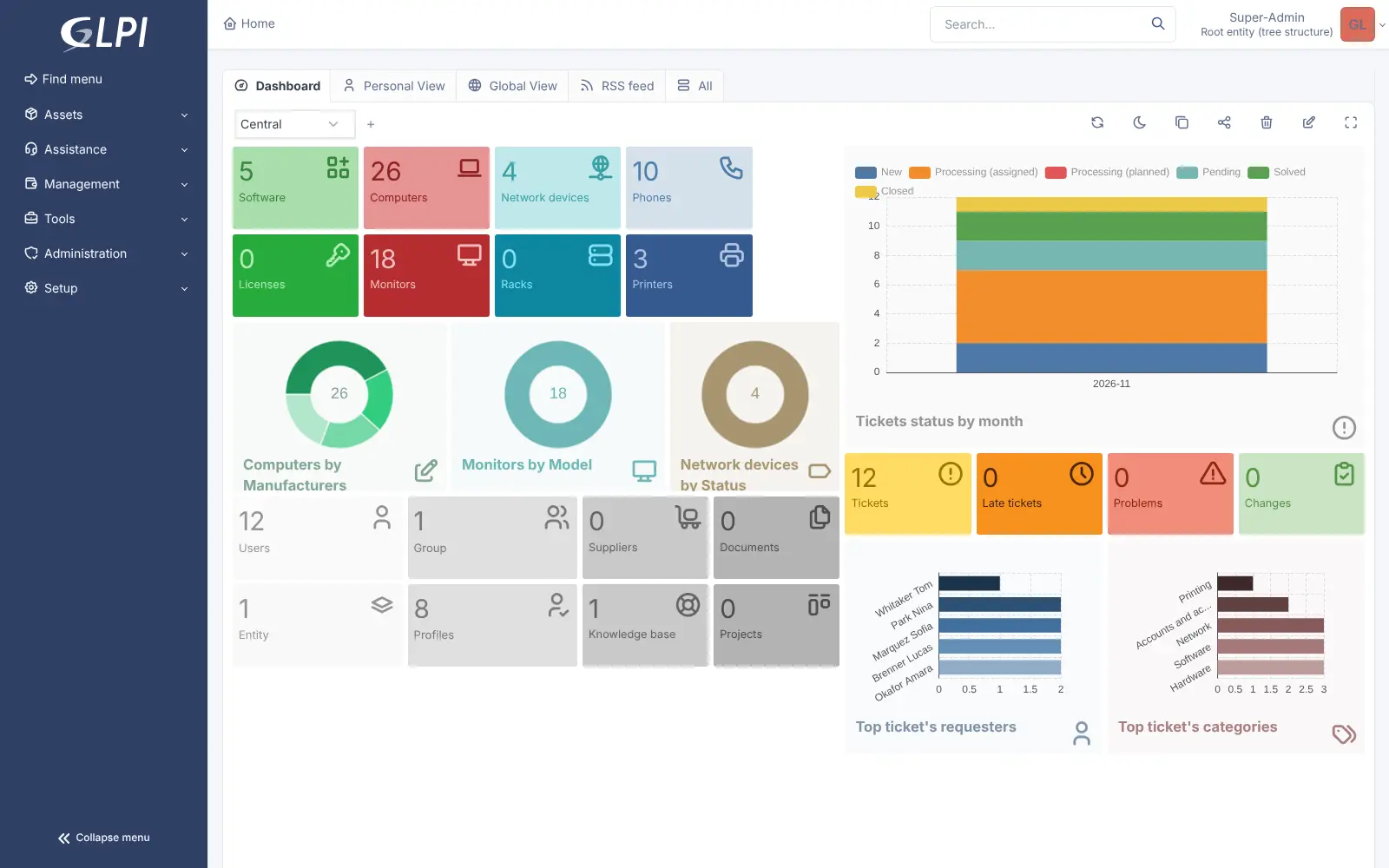
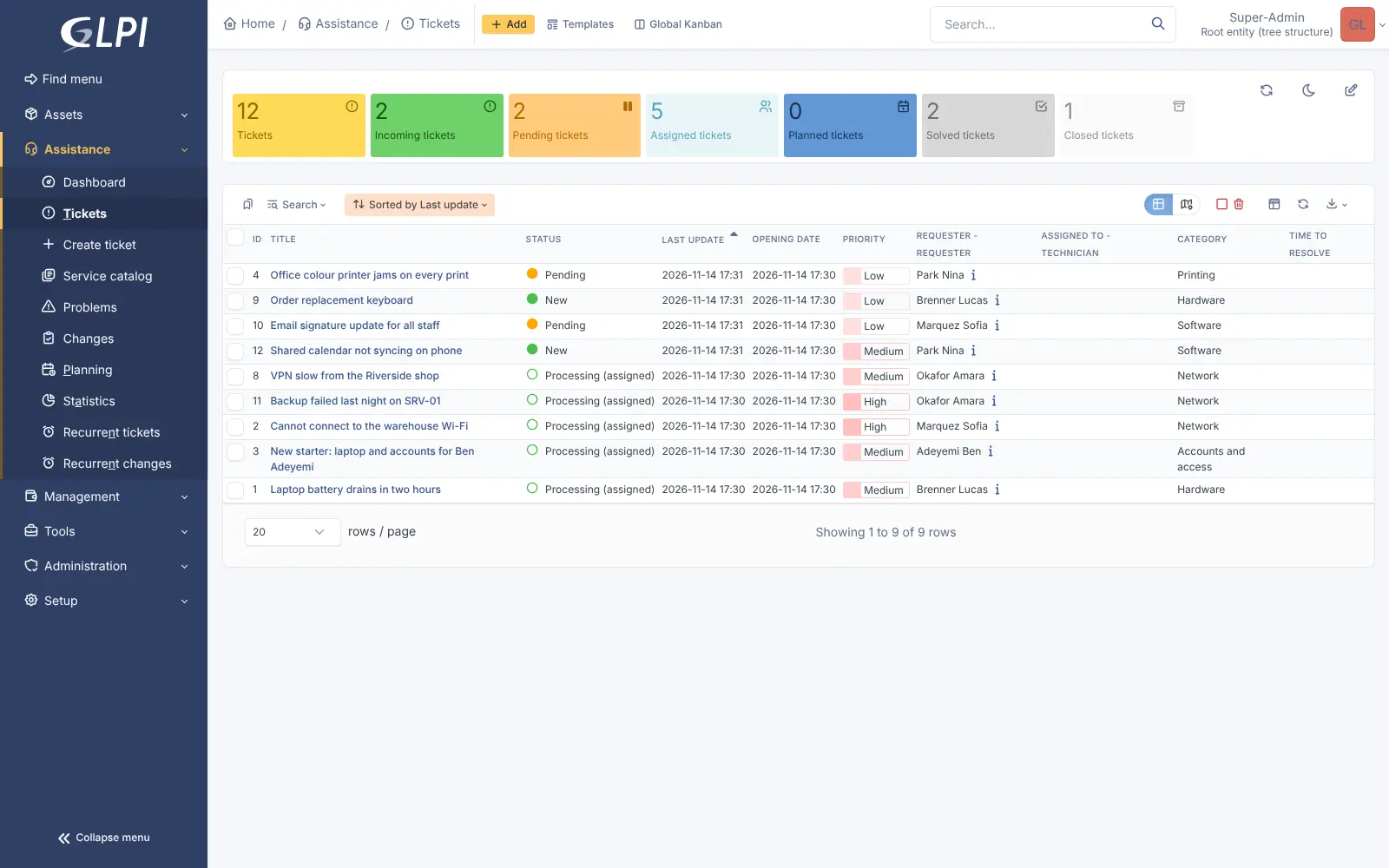
GLPI is a self-hosted IT service desk and asset inventory: handle IT tickets and track every computer, software licence and network device.
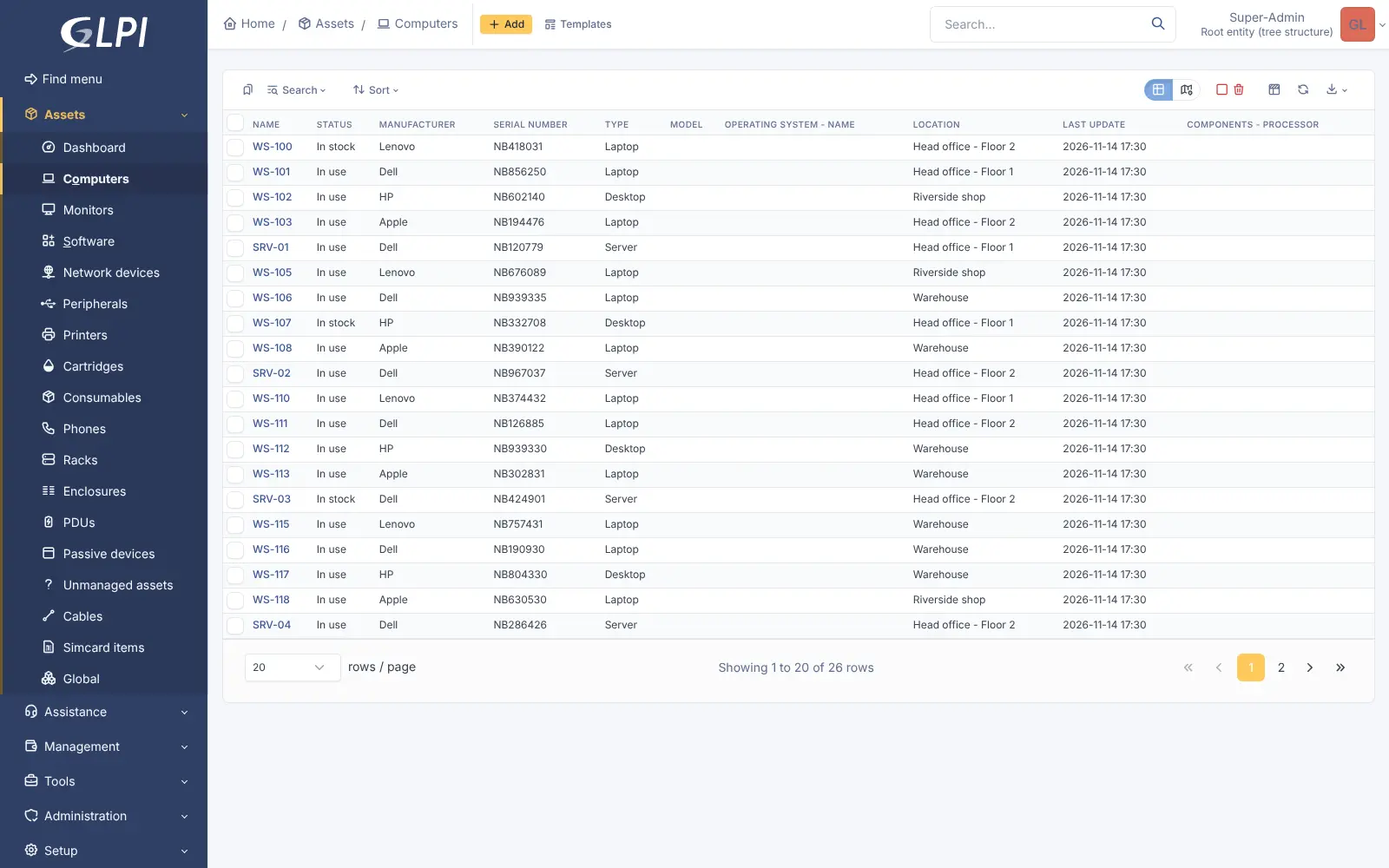
GLPI is a free, open-source IT service desk and asset inventory that you can self-host, an alternative to ServiceNow, Freshservice and Jira Service Management for internal IT teams. It turns every IT request into a ticket and keeps a record of every computer, monitor, printer, phone, software licence and network device your organisation owns.
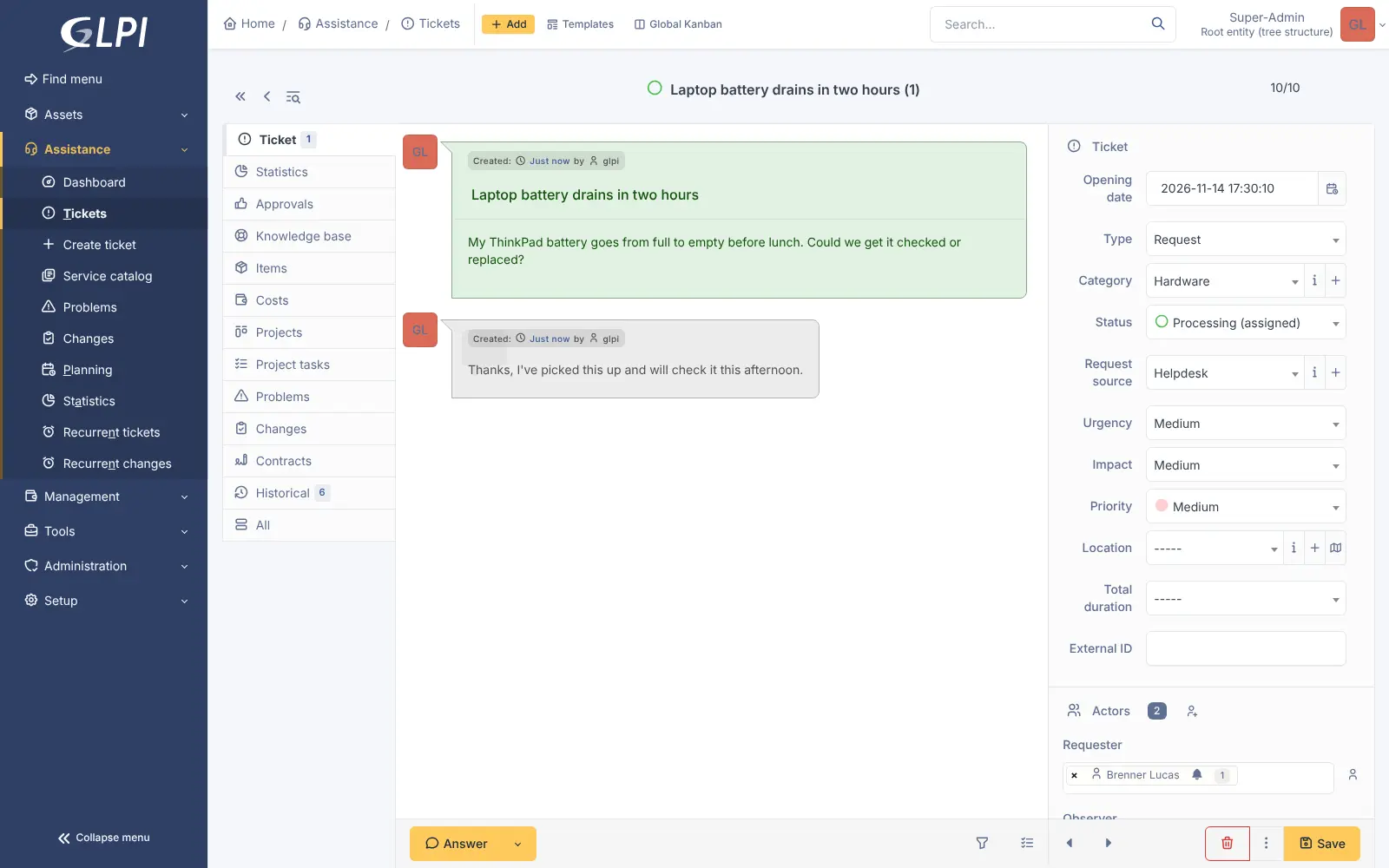
Technicians see each ticket's history, link it to the laptop or printer it is about, and track problems and planned changes. Staff can ask for help through request forms and a self-service portal, and read answers in the knowledge base. A two-person IT team at a regional chain of opticians, for example, could log every till and printer fault from five shops, see which shop's machines fail most often, and know which laptops are due for replacement.
GLPI works in any web browser. It can turn emails into tickets once you add a mailbox, sign people in with your company directory, and fill in its inventory automatically from the free GLPI Agent installed on each computer.
Cloudgate installs GLPI on a server Cloudgate provides or one you connect, with its database, and gives it a secure web address. Sign in as glpi with the password Cloudgate generates. The template has already turned off GLPI's other default accounts, so no well-known password is left open.
What you can do with GLPI
- Handle IT requests as tickets Incidents and requests get a timeline of replies, tasks, approvals and solutions, with response-time targets.
- Manage problems and changes Link recurring incidents to a problem and plan changes with their impact, the ITIL way.
- Know every device Keep computers, monitors, printers, phones and network devices with serial numbers, locations and status.
- Track software and licences See which software is installed where and how many licences you have left.
- Give staff a self-service portal Build request forms and a service catalogue so people ask for help in the right way.
- Write a knowledge base Keep how-to articles and an FAQ for your technicians or for every member of staff.
- Plan projects and visits Run IT projects with Gantt and Kanban views, and schedule technicians' interventions.
- Support several sites or clients Split GLPI into separate entities, each with its own tickets, assets and permissions.
Replaces ServiceNow, Freshservice, Jira Service Management, Asset Panda and EZOfficeInventory
GLPI does the same job as ServiceNow, Freshservice, Jira Service Management, Asset Panda and EZOfficeInventory. Here is what changes when you switch.
- No fee per technician and no paid packs for tracking more assets
- The help desk and a full inventory of your equipment in one tool
- Tickets, users and asset records stay on your own server
- Request forms, a self-service portal, dashboards and two-step sign-in are all included
- It takes more setup, such as categories, profiles and notifications, before the team starts
- The screens are dense and use ITIL words such as incident, problem and change
- There is no importer from ServiceNow, Freshservice or Jira Service Management
- GLPI AI and some extra plugins come only with Teclib's paid GLPI Network subscription
What happens when you click Deploy?
You do not need a server or any technical knowledge. Four steps, and GLPI is running at its own web address.
- Step 1 Click Deploy and create your account
Deploy takes you to Cloudgate. Create an account, or log in if you have one. GLPI itself is free.
- Step 2 Choose a server
No server? Get one from Cloudgate: pick a size and a country, and Cloudgate gets it ready. Already have one? Connect it instead.
- Step 3 Cloudgate sets up GLPI
It prepares the server, makes the passwords the app needs and starts it. There is nothing to install and nothing to write down.
- Step 4 Open your app and sign in
Your app gets a free web address to start, without https. Add your own domain, like app.yourshop.com, and Cloudgate secures it with https for you.
New to Cloudgate? See what Cloudgate is
Run Cloudgate yourself? Deploy from your own console
In your Cloudgate console, open Templates and choose GLPI.
Questions
Is GLPI free?
Yes. GLPI is free and open source under the GPL-3.0 licence, and the self-hosted software has no limit on technicians or assets. Its maker, Teclib', sells an optional GLPI Network subscription with support and extra plugins such as GLPI AI; those are not part of this template.
Is GLPI a good alternative to ServiceNow or Freshservice?
Yes, for small and mid-sized IT teams. GLPI covers the same core of incidents, requests, problems, changes and an asset database, with no fee per technician. ServiceNow is a much larger enterprise platform, and Freshservice is quicker to start with, while GLPI needs more setup.
How do I sign in to GLPI the first time?
Sign in with the username glpi and the password Cloudgate generated, shown with the app's settings in Cloudgate. GLPI normally creates four accounts with well-known passwords; this template gives glpi a strong password and turns the other three (tech, normal and post-only) off, so no default password is left open.
Can GLPI inventory our computers automatically?
Yes, with the GLPI Agent, a separate free program you install on each Windows, macOS, Linux or Android device. It sends each machine's hardware and software details to GLPI; you can also add equipment by hand.
Can staff email the help desk?
Yes. Once you add your mailbox in GLPI's settings, it turns incoming emails into tickets and sends email updates to requesters. Email is optional, and GLPI works without it.
Should I choose GLPI, Zammad or Snipe-IT?
Choose GLPI for an internal IT service desk with a full inventory of computers, licences and network devices. Zammad suits support teams answering customers by email, chat and other channels, and Snipe-IT is a simpler asset tracker built around checking equipment in and out.
Can I import my tickets from ServiceNow, Freshservice or Jira Service Management?
No, GLPI has no built-in importer for those tools. Most teams start fresh in GLPI and keep the old system read-only for past tickets.
Do I need technical skills to run GLPI?
No. Click Deploy, create your Cloudgate account and choose a server, and Cloudgate sets up GLPI and gives it a web address. You use it in your browser like any other online tool.
Do I need my own server for GLPI?
No. When you deploy GLPI, hosted Cloudgate can provide a server. If you already rent one, you can connect it instead.
Related apps

A self-hosted IT help desk linked to a CMDB of everything you run.

A self-hosted help desk and IT service desk that grew out of OTRS.

An open-source ticketing system for support, IT and ops requests.

Self-hosted help desk for email tickets, SLAs and a customer portal.