
Frappe Helpdesk
Self-hosted help desk for email tickets, SLAs and a customer portal.
No server needed to start: Cloudgate can provide one. What happens when you click Deploy




What is Frappe Helpdesk?
Frappe Helpdesk is a self-hosted Zendesk replacement that turns support email into tickets with SLAs, a customer portal and a knowledge base.
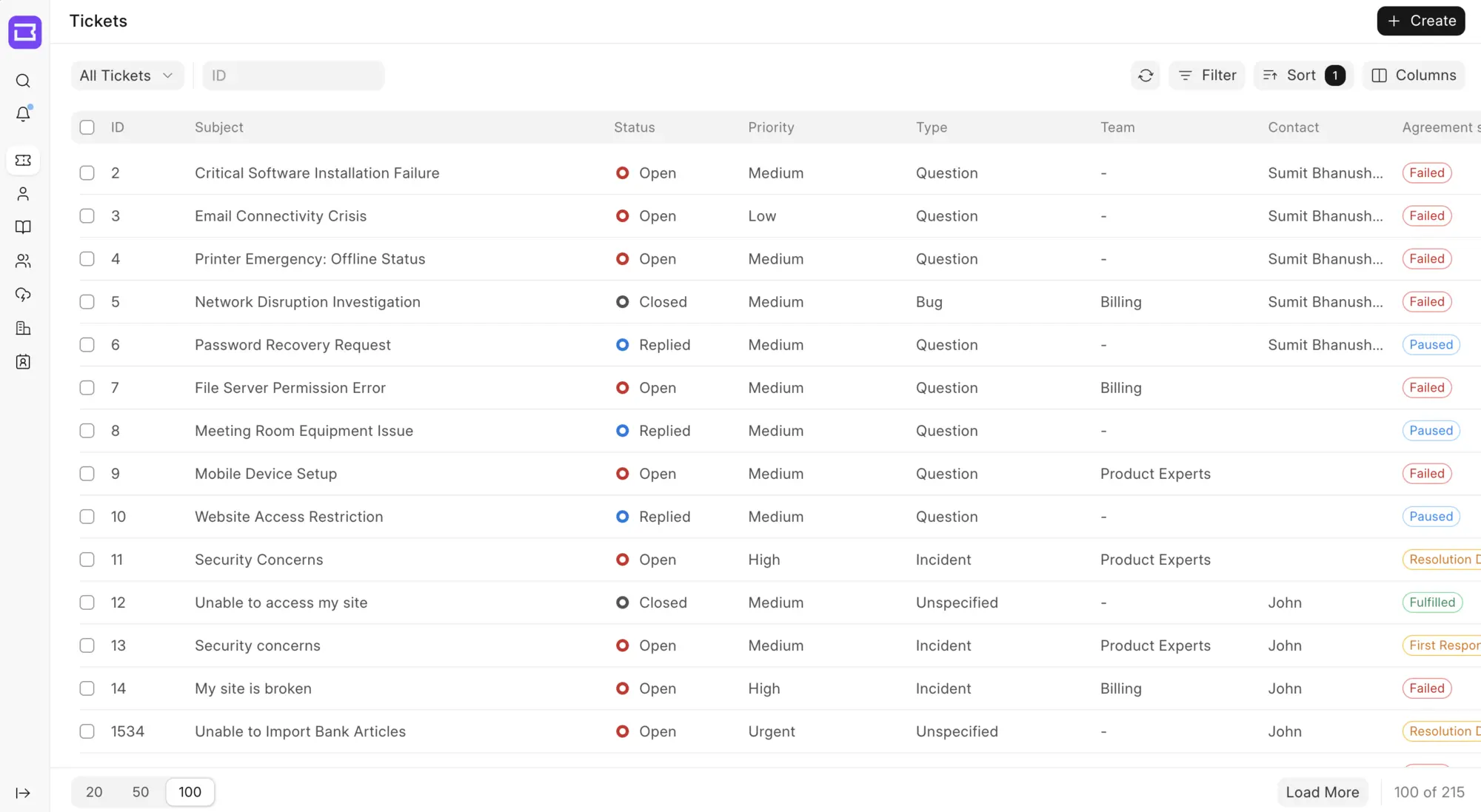
Frappe Helpdesk is a free, open-source, self-hosted help desk that turns support emails into tickets, a replacement for Zendesk or Freshdesk with no fee per agent. Agents assign, answer and track tickets against response-time targets, customers raise and follow their requests in their own portal, and a knowledge base answers common questions before they become tickets.
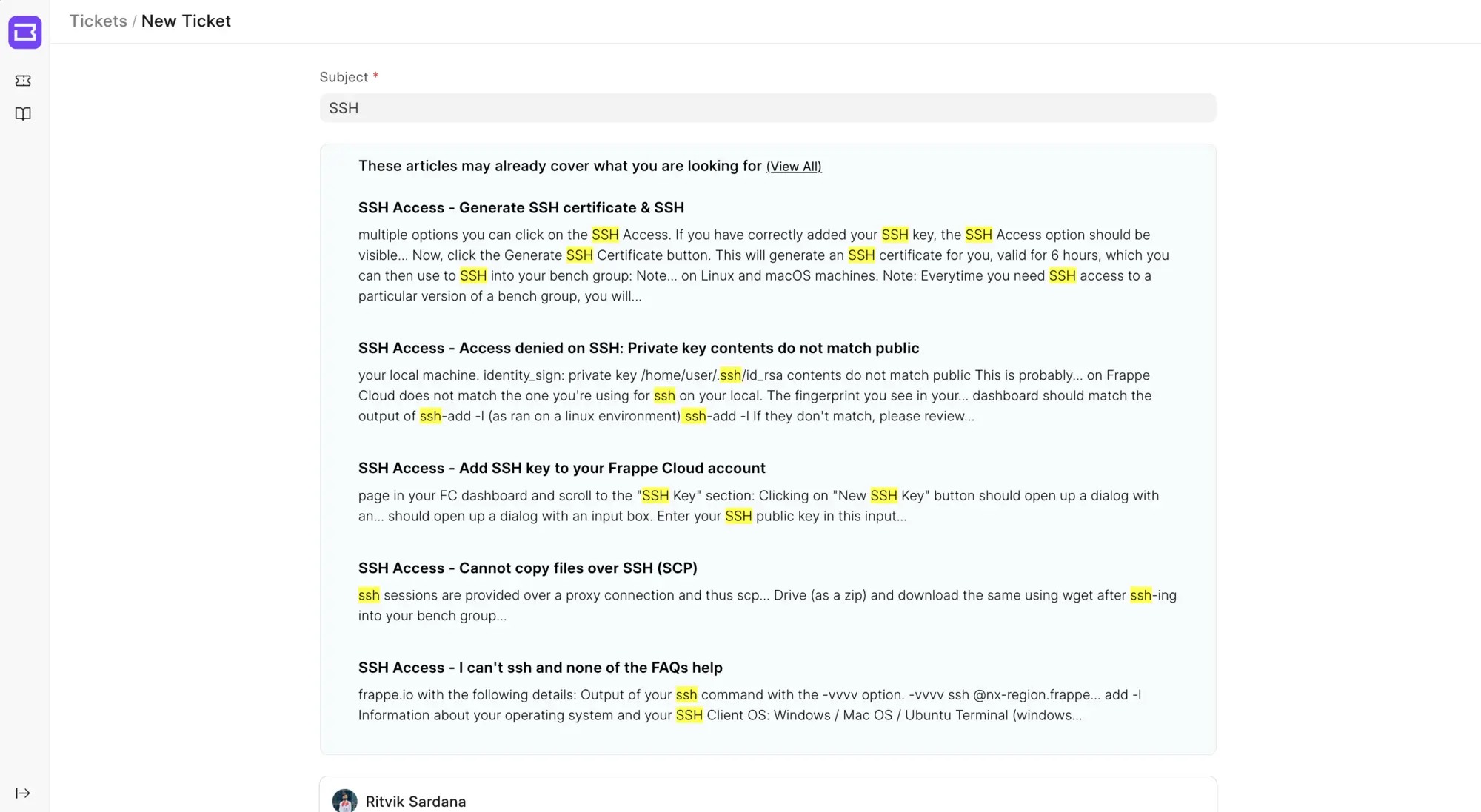
It comes from Frappe, the makers of ERPNext, and suits small and mid-sized support teams whose customers write in by email. A web hosting company, for example, can route its support address into Frappe Helpdesk, give urgent tickets a one-hour response target, hand new tickets to the next free agent in turn, and let customers find the answer to "how do I connect over SSH" in the knowledge base while they type.
Frappe Helpdesk works with ERPNext customers and contacts, and its phone view can be added to a home screen like an app. Email is the only channel: there is no live chat or messaging inbox.
Cloudgate installs Frappe Helpdesk on a server Cloudgate provides or one you connect, with the database it needs and a secure web address. Sign in as Administrator, name your help desk, connect your support mailbox and invite your agents. Your tickets stay on your server.
What you can do with Frappe Helpdesk
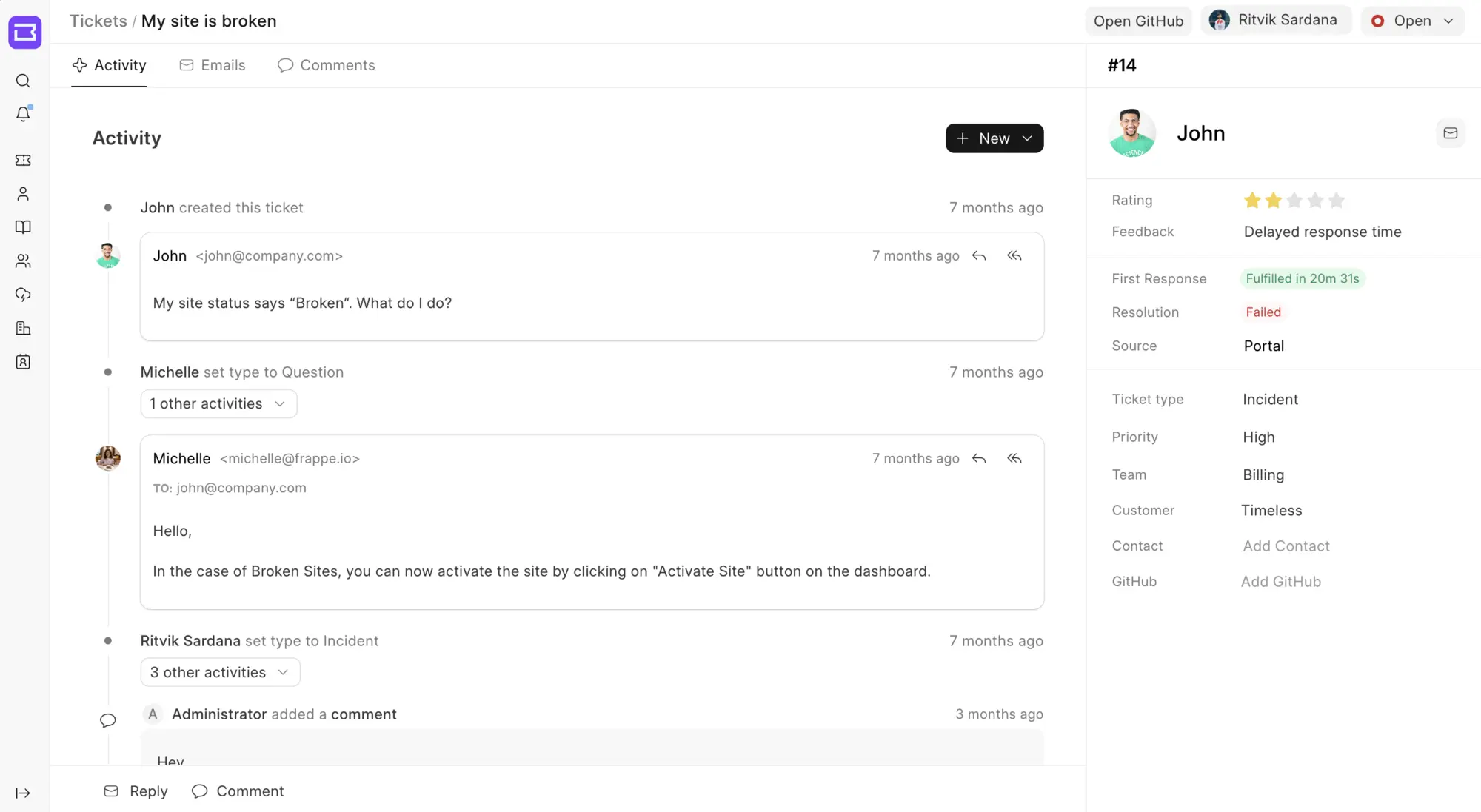
- Turn support email into tickets Connect your support mailbox and every email becomes a ticket, with your replies sent back by email.
- Work from clear ticket lists Filter, sort and choose columns, then save the views your team uses every day.
- Keep to your response times Set response and resolution targets per priority, with working hours and holidays, and see on each ticket whether you met them.
- Share the work automatically Assignment rules hand out tickets by priority, type or workload, including round robin, and teams can see only their own tickets.
- Give customers their own portal Customers raise tickets, follow their progress and rate the help they got.
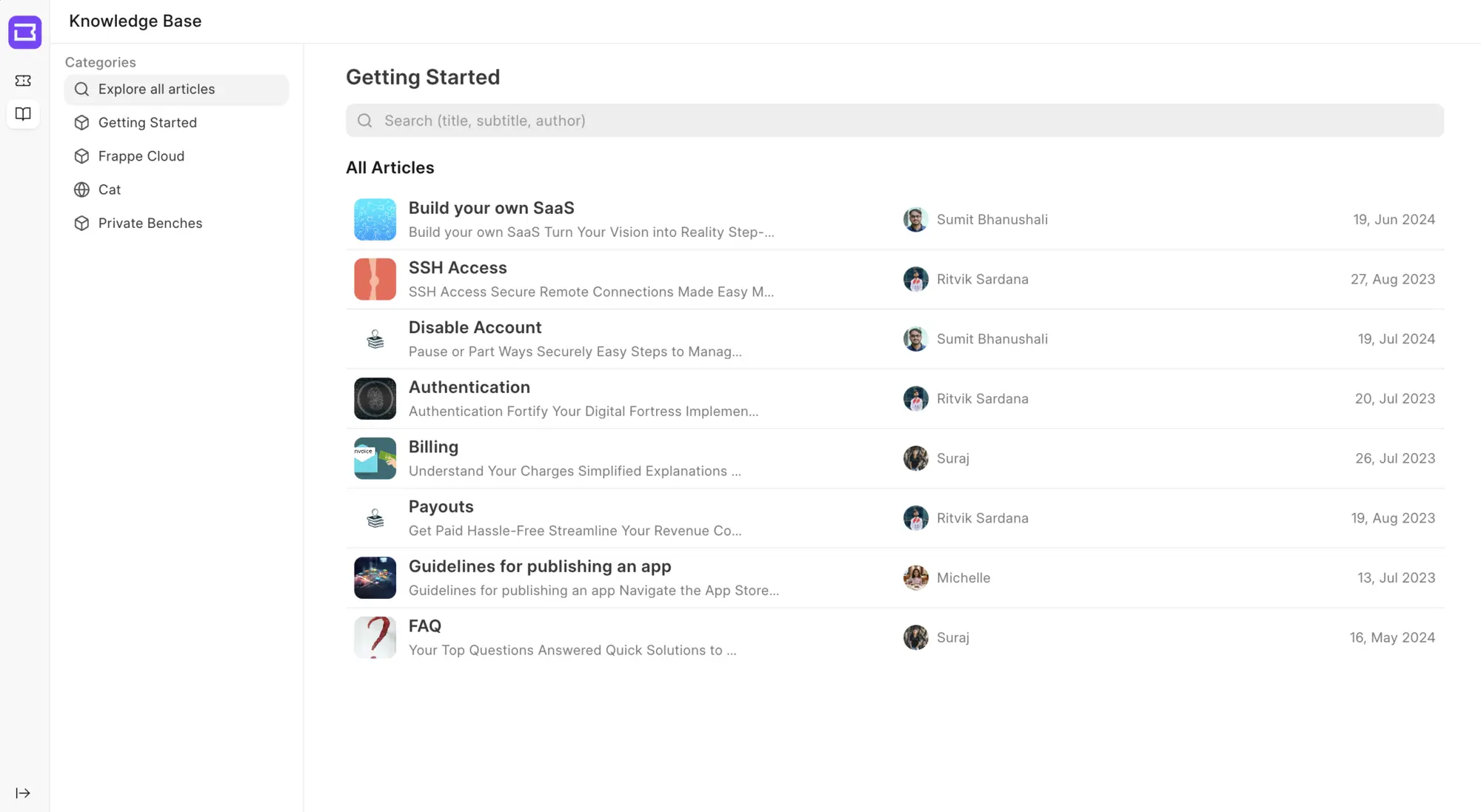
- Answer before the ticket is sent A knowledge base with categories suggests matching articles while a customer types a new ticket.
- Reply faster with saved replies Keep personal, team or company-wide answers to common questions and insert them in a click.
- Shape tickets to your business Add your own fields, ticket types, priorities, statuses and templates, and close quiet tickets after a set number of days.
Replaces Zendesk, Freshdesk, Jira Service Management and Help Scout
Frappe Helpdesk does the same job as Zendesk, Freshdesk, Jira Service Management and Help Scout. Here is what changes when you switch.
- No fee per agent, however many people answer tickets
- Tickets, customers and attachments stay on your own server
- SLAs, a customer portal and a knowledge base included, with no paid edition
- Customers and contacts shared with ERPNext if you already use it
- Email is the only channel; there is no live chat, WhatsApp or social media inbox
- No built-in import from Zendesk or Freshdesk; old data comes in by spreadsheet or not at all
- Far fewer ready-made integrations than the Zendesk marketplace, and no AI features
- No phone app; agents add the help desk to their phone's home screen from the browser
What happens when you click Deploy?
You do not need a server or any technical knowledge. Four steps, and Frappe Helpdesk is running at its own web address.
- Step 1 Click Deploy and create your account
Deploy takes you to Cloudgate. Create an account, or log in if you have one. Frappe Helpdesk itself is free.
- Step 2 Choose a server
No server? Get one from Cloudgate: pick a size and a country, and Cloudgate gets it ready. Already have one? Connect it instead.
- Step 3 Cloudgate sets up Frappe Helpdesk
It prepares the server, makes the passwords the app needs and starts it. There is nothing to install and nothing to write down.
- Step 4 Open your app and sign in
Your app gets a free web address to start, without https. Add your own domain, like app.yourshop.com, and Cloudgate secures it with https for you.
New to Cloudgate? See what Cloudgate is
Run Cloudgate yourself? Deploy from your own console
In your Cloudgate console, open Templates and choose Frappe Helpdesk.
Questions
Is Frappe Helpdesk free?
Yes, Frappe Helpdesk is free and open source under the AGPL-3.0 licence, with no fee per agent and no paid edition. The self-hosted app is the whole product; Frappe only sells optional hosting on Frappe Cloud.
Is Frappe Helpdesk a good alternative to Zendesk?
Yes, for teams whose support runs on email. Frappe Helpdesk covers email tickets, SLAs, assignment rules, a customer portal and a knowledge base with no fee per agent. Zendesk adds live chat, phone, AI and a large app marketplace, which Frappe Helpdesk does not have.
Can I import my tickets from Zendesk or Freshdesk?
No, Frappe Helpdesk has no importer for Zendesk or Freshdesk. You can load customers, contacts and tickets from CSV or Excel files with Frappe's general data import, or keep the old system for history and start fresh.
How do I sign in to Frappe Helpdesk the first time?
Sign in to Frappe Helpdesk as Administrator with the password Cloudgate generated, shown on the app's variables page in Cloudgate. Then open the help desk, where a short setup asks for your help desk's name and which tool you used before.
Should I choose Frappe Helpdesk or Zammad?
Choose Frappe Helpdesk for an email ticket system with SLAs, a portal and a knowledge base that runs on a medium server, especially if you use ERPNext. Choose Zammad if you need chat, phone, WhatsApp or social media tickets, or a built-in import from Zendesk or Freshdesk.
Does Frappe Helpdesk work with ERPNext?
Yes, Frappe Helpdesk is made by the same company as ERPNext and can link its customers and contacts to an ERPNext system. Both run on the Frappe Framework.
Is there a Frappe Helpdesk phone app?
No, there is no native iPhone or Android app. Frappe Helpdesk works in a phone's browser and can be added to the home screen like an app.
Do I need technical skills to run Frappe Helpdesk?
No. Click Deploy, create your Cloudgate account and choose a server, and Cloudgate sets up Frappe Helpdesk and gives it a web address. You use it in your browser like any other online tool.
Do I need my own server for Frappe Helpdesk?
No. When you deploy Frappe Helpdesk, hosted Cloudgate can provide a server. If you already rent one, you can connect it instead.
Related apps

A self-hosted help desk that turns customer messages into tickets.

A self-hosted shared inbox for customer email, like Help Scout.

An open-source ticketing system for support, IT and ops requests.

A self-hosted shared inbox for email, live chat and WhatsApp.