ConvertX
Convert images, video, documents and e-books on your own server.
No server needed to start: Cloudgate can provide one. What happens when you click Deploy

What is ConvertX?
ConvertX is a self-hosted file converter for images, video, audio, documents and e-books, with over a thousand formats in your browser.
ConvertX is a free, open-source file converter you can self-host, used in place of CloudConvert or Convertio to change images, video, audio, documents and e-books between more than a thousand formats in your browser. Your files are converted on your own server instead of being uploaded to a converter website.
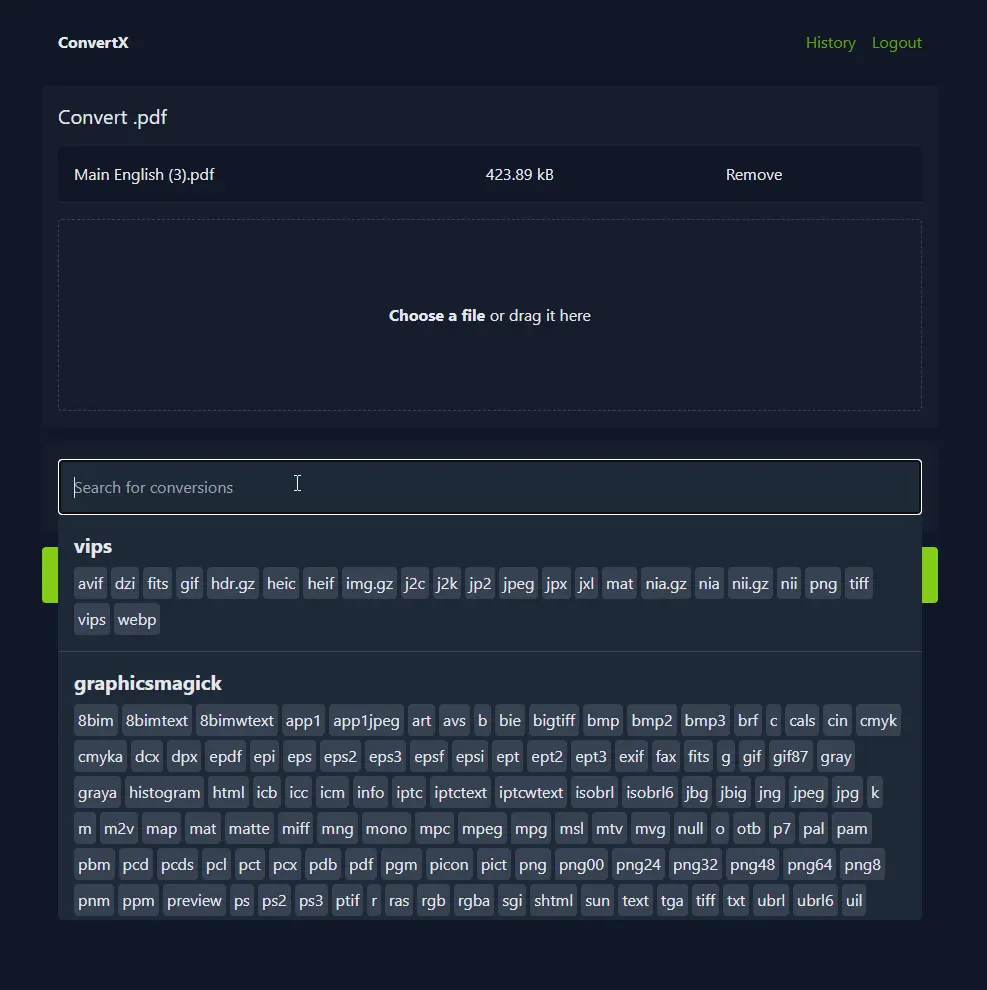
You drop in one file or many, search for the format you want and download the results one at a time or all together. Behind the scenes ConvertX uses well-known free tools, including FFmpeg for video and audio, LibreOffice for office documents, Calibre for e-books, ImageMagick for pictures, Pandoc for text and Inkscape for vector drawings. A small design studio, for example, could turn a client's iPhone HEIC photos into JPEGs and their Word documents into PDFs without sending either to a website it doesn't know.
ConvertX works in any browser. Each person has a password-protected account with their own conversion history, and files are deleted automatically after 24 hours.
Cloudgate installs ConvertX on a server Cloudgate provides or one you connect and gives it a secure web address. The first person to open that address creates the account, so do that straight after setup.
What you can do with ConvertX
- Convert over a thousand formats Pick a file, search for the format you want, and download the result.
- Convert many files at once Upload a batch, then download the results one by one or all together in one archive.
- Change photos and images Turn iPhone HEIC photos into JPEG, convert between PNG, WebP, AVIF, TIFF and more, or trace a picture into a vector.
- Convert video and audio Change video and sound files between hundreds of formats with FFmpeg.
- Convert documents and e-books Turn Word and other office files into PDF with LibreOffice, convert text formats with Pandoc and e-books with Calibre.
- Handle the odd file types Convert data files such as JSON, YAML and CSV, Outlook emails, contact cards and 3D models.
- Keep your own history Each person signs in with a password and sees a list of their past conversions.
- Clean up on its own Uploaded and converted files are deleted automatically after 24 hours.
Replaces CloudConvert and Convertio
ConvertX does the same job as CloudConvert and Convertio. Here is what changes when you switch.
- Your files are converted on your own server, not uploaded to a converter website
- No limit on how many files you convert
- Images, video, documents, e-books and more in one place
- Nothing to pay beyond your server
- No API or links to cloud storage and other apps
- Few settings for each conversion; you get each converter's standard result
- Video conversion is slow on a small server, as it uses a lot of processor time
- Adding more people means turning sign-ups on for a moment, as there is no user admin screen
What happens when you click Deploy?
You do not need a server or any technical knowledge. Four steps, and ConvertX is running at its own web address.
- Step 1 Click Deploy and create your account
Deploy takes you to Cloudgate. Create an account, or log in if you have one. ConvertX itself is free.
- Step 2 Choose a server
No server? Get one from Cloudgate: pick a size and a country, and Cloudgate gets it ready. Already have one? Connect it instead.
- Step 3 Cloudgate sets up ConvertX
It prepares the server, makes the passwords the app needs and starts it. There is nothing to install and nothing to write down.
- Step 4 Open your app and sign in
Your app gets a free web address to start, without https. Add your own domain, like app.yourshop.com, and Cloudgate secures it with https for you.
New to Cloudgate? See what Cloudgate is
Run Cloudgate yourself? Deploy from your own console
In your Cloudgate console, open Templates and choose ConvertX.
Questions
Is ConvertX free?
Yes, ConvertX is free and open source under the AGPL-3.0 licence, with no paid edition and no limit on conversions. You pay only for your server.
Is ConvertX a good alternative to CloudConvert or Convertio?
Yes, for converting files by hand in the browser while keeping them on your own server. ConvertX has no API, no cloud-storage links and fewer options for each conversion than CloudConvert or Convertio, and you look after the server.
How do I sign in to ConvertX the first time?
ConvertX has no default login; the first person to open its web address creates the account, so do it right after setup. After that, nobody else can sign up unless you turn sign-ups on.
Can more than one person use ConvertX?
Yes, each person can have their own ConvertX account and history, but there is no screen for adding users. Turn on new sign-ups in the app's settings in Cloudgate, let your colleagues register, then turn sign-ups off again. Do not leave them on, or anyone who finds the address can join.
Can ConvertX edit, merge or compress PDFs?
No, ConvertX converts files to and from PDF, such as Word to PDF, but does not edit, merge, split, compress or sign PDFs. For those jobs, use Stirling PDF.
Is my data private with ConvertX?
Yes. ConvertX converts files on your own server, so they are not sent to an outside website, and it deletes uploaded and converted files after 24 hours.
What server size do I need for ConvertX?
ConvertX needs a medium server with 2 GB of memory, which is what Cloudgate asks for. Video, office documents and e-books are the heaviest jobs, and the app is a large download, so the first install takes a while.
Do I need technical skills to run ConvertX?
No. Click Deploy, create your Cloudgate account and choose a server, and Cloudgate sets up ConvertX and gives it a web address. You use it in your browser like any other online tool.
Do I need my own server for ConvertX?
No. When you deploy ConvertX, hosted Cloudgate can provide a server. If you already rent one, you can connect it instead.
Can I move my data from CloudConvert to ConvertX?
Most people export from CloudConvert and import into ConvertX. The official guides at github.com walk through it.
Related apps

File tools for images, PDFs, video, audio and documents.

PDF tools that run in your browser, so files never upload.

Online office for Word, Excel and PowerPoint files.

Guided interviews that fill in letters, forms and contracts.