Open-source alternatives to Pocket Casts

PinePods is a free, open-source Pocket Casts alternative that syncs your podcast subscriptions, queue and listening progress between its web, desktop and phone apps from your own server. Pocket Casts keeps that sync in its own cloud, with extras such as cloud storage for your own files and watch apps in its paid Plus plan; self-hosted PinePods keeps every listener’s podcasts on your server with no subscription, but has no curated discovery or recommendations.

2 alternatives Free apps Our pick: PinePods

At a glance

App Good for Code Import from Pocket Casts Ease of use
PinePods Podcast listeners and households who want subscriptions and progress synced across every device Code Open source Import from Pocket Casts Partly Easy
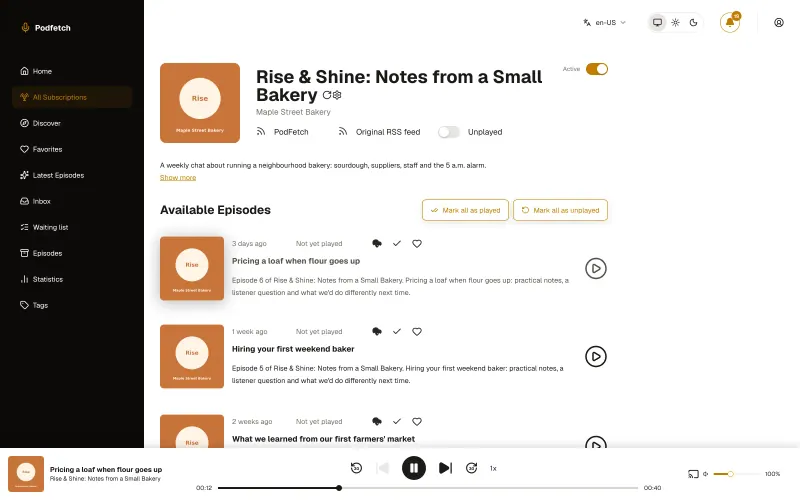
PodFetch Listeners who want every episode downloaded to their own server and synced with AntennaPod Code Open source Import from Pocket Casts Partly Easy

Why look for an alternative to Pocket Casts?

Pocket Casts is a popular podcast app that syncs your subscriptions and progress across devices through its own cloud account. Its web and desktop apps have been free since March 2025, and its paid Plus plan adds extras such as cloud storage for your own files, bookmarks and watch apps.

People look for an alternative when they want that cross-device sync without a subscription or an account with a third-party service. A self-hosted PinePods keeps every listener's podcasts, queue and progress on your own server and syncs them to its web, desktop and phone apps, at no cost. PodFetch also downloads and keeps every episode on your server, so shows you follow stay with you even if they are taken down.

The alternatives, compared

PinePods

Our pick

A self-hosted podcast player that syncs every device you own.

Syncs subscriptions, queue, listening position and downloads across a web app, desktop apps for Windows, macOS and Linux, and phone apps with CarPlay and Android Auto, all from your own server, with a separate library for each person. It has smart playlists, chapters, transcripts and listening statistics, and a built-in gPodder sync server for AntennaPod and Kasts. There is no curated discovery or recommendations.

What you gain
  • No subscription or app account; your listening history stays on your own server
  • Web, desktop and phone apps on every platform, including Android and Windows
  • Several people share one server, each with a private library
What is different
  • Only your subscriptions move across; listening history from the old app stays behind
  • There are no curated charts or editor picks to discover new shows
  • Podcast search uses the PinePods project's public search service
Easy Open source

A self-hosted podcast manager that downloads and keeps every episode.

Downloads every new episode to your server and keeps it there, so you build your own podcast archive, with clean-up rules, optional Opus conversion to save space and searchable transcripts. You listen in the browser and pick up where you stopped on any device, or keep a phone app you know: AntennaPod and other gPodder apps sync with it, and the Audiobookshelf apps for iPhone and Android can play from it. Its own phone app is Android-only, and it has fewer listening features than Pocket Casts.

What you gain
  • Every episode is saved on your own server, even if a show later removes it
  • No podcast-app account; your subscriptions and listening stay with you
  • Keep listening in AntennaPod or another gPodder app on your phone
What is different
  • There is no PodFetch app for iPhone; iPhone users listen in the browser or add it to the home screen
  • The PodFetch Android app is installed from its GitHub releases, not Google Play
  • Only your subscriptions move across; listening history stays in the old app
Easy Open source

Moving from Pocket Casts

Export your subscriptions from Pocket Casts as an OPML file and import it into PinePods, choosing which podcasts to keep. OPML carries the list of shows only, so your listening history and play positions do not come across. Then install the PinePods app on your phone, enter your server's address, user name and password, and do the same on any computer you listen on.

PodFetch imports the same OPML file from its Add Podcast window, and starts downloading episodes to your server. Sign in with the admin user and the password Cloudgate created, and invite other listeners with an invite link. On your phone, sign in to AntennaPod, or another gPodder app, with your PodFetch user name and password, or add PodFetch to your home screen from the browser.

Questions

What is the best open-source alternative to Pocket Casts?

Start with PinePods. Both are free and open source.

Should I choose PinePods or PodFetch?

PinePods if you want polished apps of its own on iPhone, Android and the desktop, with CarPlay and Android Auto. PodFetch if you want every episode downloaded and archived on your server, and are happy listening in the browser or in AntennaPod or the Audiobookshelf apps.

Can I move my podcasts from Pocket Casts to PinePods or PodFetch?

Yes, your subscriptions. Export an OPML file from Pocket Casts and import it into PinePods or PodFetch; listening history and progress do not transfer.

Does PinePods have phone apps?

Yes. There are free PinePods apps for iPhone, with CarPlay, and for Android, with Android Auto, plus desktop apps for Windows, macOS and Linux.

Can my family use the same PinePods server?

Yes. Each person gets their own subscriptions, queue, statistics and settings on the same server.

Are these Pocket Casts alternatives really free?

Yes, PinePods and PodFetch are free. To run them you need Cloudgate and a server. Use hosted Cloudgate, which can also provide the server, or install Cloudgate on a server of your own for free. Cloudgate's plans and prices are at cloudgate.octabyte.io/pricing. One server can run several apps.

Do I need a developer to replace Pocket Casts?

No. Cloudgate installs the app you choose on your server and gives it a secure web address, and you use it in your browser instead of Pocket Casts.