Open-source alternatives to Audible

Audiobookshelf is a free, open-source Audible alternative for listening to the audiobooks you already own, with your place in each book synced across your browser and phone. Audible is a monthly membership tied to its own store; self-hosted Audiobookshelf has no fee, though it has no store, so you bring your own DRM-free audiobooks.

3 alternatives Free apps Our pick: Audiobookshelf

At a glance

App Good for Code Ease of use
Audiobookshelf People and families with their own audiobooks and podcasts who want one app with synced progress Code Open source Some setup
Grimmory Readers and households with DRM-free e-books, comics and audiobooks who read on Kobo, KOReader or in the browser Code Open source Easy
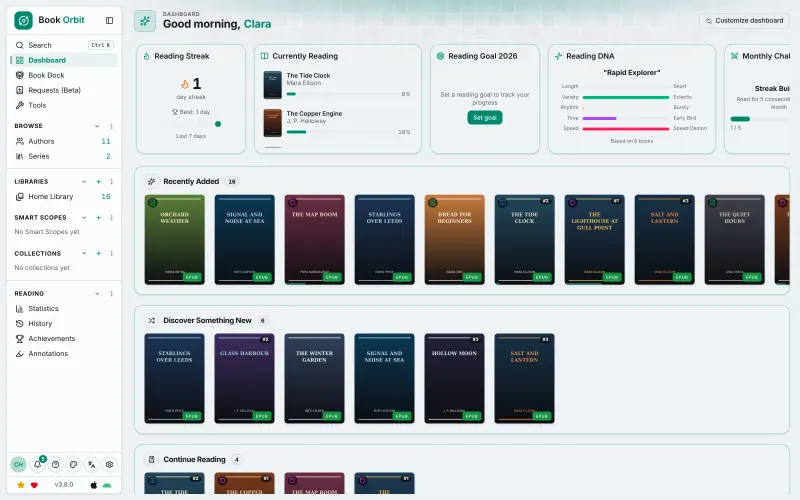
BookOrbit Readers and households with DRM-free ebooks, comics and audiobooks who want one library synced across devices Code Open source Easy

Why look for an alternative to Audible?

Audible, from Amazon, is the best-known audiobook store and app. A monthly membership gives you credits to buy audiobooks and access to a catalogue of included titles, and the app keeps your place and plays them on your phone and computer.

People look for an alternative because the membership is a monthly cost and the books you buy are copy-protected, so they only play in Audible's own apps. Families with audiobooks from other shops, CDs or free sources also want them in one place. A self-hosted audiobook server such as Audiobookshelf plays your own DRM-free audiobooks on every device with no membership, though it has no store, so it complements a shop rather than replacing one.

The alternatives, compared

Audiobookshelf

Our pick

A self-hosted audiobook and podcast server with synced progress.

Plays your own audiobooks in the browser and in its Android and iPhone apps, both still in beta, and remembers each listener's place across devices. It has chapters, bookmarks, playback speed and a sleep timer, and follows podcasts too. It has no store, and Audible titles can't be imported because they are copy-protected.

What you gain
  • No monthly membership, and nothing disappears when you cancel a subscription
  • Plays DRM-free audiobooks from any shop, CD or free source, not only one store
  • Podcasts and audiobooks in the same app, with each family member's progress kept apart
What is different
  • There is no store or catalogue; you bring your own DRM-free audiobook files
  • Audible purchases can't be imported, because they are copy-protected
  • The iPhone app is a beta through Apple's TestFlight, and the Android app is labelled beta
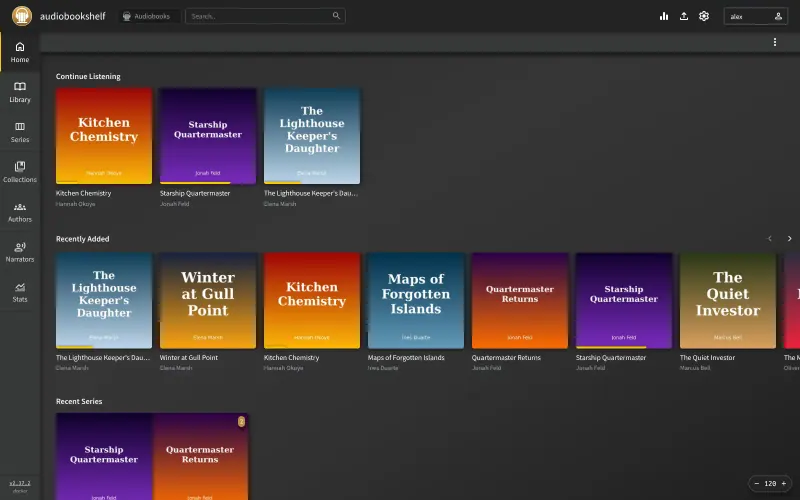
Some setup Open source

A self-hosted library for your e-books, comics and audiobooks.

Plays your own M4B and MP3 audiobooks in the browser with chapters, speed control and a sleep timer, in the same library as your e-books and comics. It has no phone app and fewer listening features than Audiobookshelf, no store, and Audible titles can't be imported because they are copy-protected.

Easy Open source

A self-hosted library to read and listen, synced to Kobo and iPhone.

Plays your own DRM-free audiobooks in the browser and its iPhone app, in the same library as your e-books and comics, and remembers each listener’s place. Audiobookshelf is the more complete audiobook app, with an Android app and podcasts; BookOrbit suits people who want books and audiobooks in one place. It has no store, and Audible titles can’t be imported because they are copy-protected.

Easy Open source

Moving from Audible

Audible purchases are copy-protected, so they can't be moved into Audiobookshelf. Build your library from audiobooks you have as DRM-free files instead, such as books bought from shops that sell them without copy protection, audiobooks on CD, and free public-domain recordings. Put each book in its own folder, ideally Author/Title, and drag the folders onto Audiobookshelf's Upload page. It looks up covers, narrators and descriptions, including from Audible, and each person then signs in on their phone and picks up their own books. In BookOrbit, upload the same DRM-free audiobook files into a library in the browser, alongside your e-books. Grimmory takes the same DRM-free audiobook files: upload them in the browser or drop them into its BookDrop folder, next to your e-books.

Questions

What is the best open-source alternative to Audible?

Start with Audiobookshelf. If you want something simpler, try Grimmory. All 3 are free and open source.

Where can I get audiobooks to play in Audiobookshelf?

From anywhere that gives you DRM-free files: shops that sell audiobooks without copy protection, audiobooks on CD that you copy to your computer, and free public-domain recordings such as those from LibriVox. Audible's own titles don't work, because they are copy-protected.

Should I choose Audiobookshelf or BookOrbit?

Choose Audiobookshelf if you mostly listen, want an Android app or follow podcasts. Choose BookOrbit if you want your e-books, comics and audiobooks in one library, with reading progress synced to a Kobo or KOReader.

Does Audiobookshelf have a sleep timer and speed control like the Audible app?

Yes. Its player has a sleep timer, playback speed, bookmarks and a chapter list, and it keeps your place in each book when you switch between the browser and your phone.

Where does Grimmory fit?

It suits people who mostly read and also listen to some audiobooks, and want both in one library in the browser. For listening on a phone, Audiobookshelf is the better choice, because Grimmory has no phone app.

Are these Audible alternatives really free?

Yes, Audiobookshelf, Grimmory and BookOrbit are free. To run them you need Cloudgate and a server. Use hosted Cloudgate, which can also provide the server, or install Cloudgate on a server of your own for free. Cloudgate's plans and prices are at cloudgate.octabyte.io/pricing. One server can run several apps.

Do I need a developer to replace Audible?

No. Cloudgate installs the app you choose on your server and gives it a secure web address, and you use it in your browser instead of Audible.