
R

Open-source alternative to Radio.co

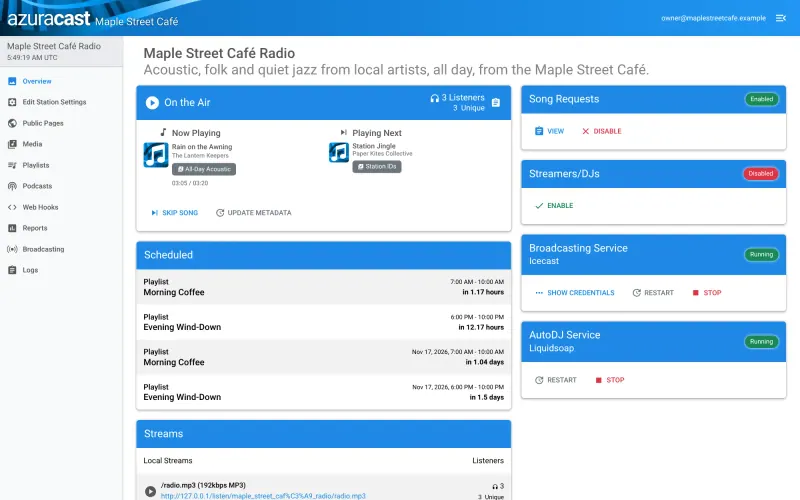
AzuraCast is the free, open-source Radio.co alternative: complete internet radio software with an AutoDJ that plays your music around the clock, scheduled playlists, song requests, a web player and listener reports, on your own server. Radio.co is a managed hosting service with a monthly fee; AzuraCast has none, though you look after the server, pay for its bandwidth and arrange your own music licences, and on Cloudgate DJs cannot broadcast live.

Free app Code: Open source Import from Radio.co: No Some setup

Why look for an alternative to Radio.co?

Radio.co is a managed internet radio hosting service: you upload music, schedule playlists and live shows, and it streams your station to listeners, with apps, statistics and a website player, for a monthly fee.

Station owners look for a Radio.co alternative when the monthly plan costs more than their community, school or hobby station can justify, or when they want their music library and listener data on their own server. A self-hosted AzuraCast runs the whole station, AutoDJ, schedules, requests, player and reports, with no hosting fee; in return you run the server, pay for its bandwidth and arrange music licences yourself.

How AzuraCast compares

Internet radio with an AutoDJ that plays around the clock.

Runs the same kind of automated station: an AutoDJ that plays your uploaded music around the clock, playlists with time slots, jingles, song requests, an embeddable web player, listener reports and posts of what's playing to Discord, Slack and TuneIn, with several stations on one install. You look after the server and its bandwidth and arrange your own music licences. On Cloudgate there is no live DJ broadcasting, and it has no Radio.co importer.

What you gain
  • No monthly hosting fee; you pay only for your server
  • Your music library, playlists and listener data stay on your own server
  • Several stations on one install, with no limit set by a plan
What is different
  • On Cloudgate the station runs on its AutoDJ only; DJs can't broadcast live into it
  • Music licences and royalties are yours to arrange; Live365, for example, bundles US licensing
  • Streams come from your own server, so bandwidth grows with your audience
Some setup Open source

Moving from Radio.co

AzuraCast has no Radio.co importer, so you upload your music again. Open your web address right after setup to create the admin account, then follow the short wizard to create your station. Upload your songs in the browser, build playlists the way you had them, give each one its time slot, and add jingles every few songs if you use them. Embed the new player on your website and update the stream link in any directories that list your station, then run both for a few days before you cancel Radio.co. Plan your schedule around playlists, since DJs cannot broadcast live into AzuraCast on Cloudgate.

Questions

What is the best open-source alternative to Radio.co?

AzuraCast is the free, open-source alternative to Radio.co for running an internet radio station in the catalogue today. Runs the same kind of automated station: an AutoDJ that plays your uploaded music around the clock, playlists with time slots, jingles, song requests, an embeddable web player, listener reports and posts of what's playing to Discord, Slack and TuneIn, with several stations on one install. You look after the server and its bandwidth and arrange your own music licences. On Cloudgate there is no live DJ broadcasting, and it has no Radio.co importer.

Can DJs broadcast live on AzuraCast like on Radio.co?

Not on Cloudgate. Live broadcasting needs extra network ports that Cloudgate does not open, so the station runs on its AutoDJ with playlists and schedules.

Do I still need a music licence with AzuraCast?

Usually, yes, if you play music you don't own, and the rules depend on your country. AzuraCast does not pay royalties for you.

How many listeners can AzuraCast handle?

As many as your server's bandwidth allows, since the stream comes from your own server. Its makers recommend 4 GB of memory and 4 CPU cores for five to ten stations.

Is AzuraCast really free compared with Radio.co?

Yes, AzuraCast is free. To run them you need Cloudgate and a server. Use hosted Cloudgate, which can also provide the server, or install Cloudgate on a server of your own for free. Cloudgate's plans and prices are at cloudgate.octabyte.io/pricing. One server can run several apps.

Do I need a developer to replace Radio.co?

No. Cloudgate installs AzuraCast on your server and gives it a secure web address, and you use it in your browser instead of Radio.co.