
J

Open-source alternatives to JumpCloud

LLDAP is a free, open-source JumpCloud alternative for the directory part: one list of your team’s users and groups, managed on a simple web page, that your self-hosted apps check over LDAP when people sign in. JumpCloud is a cloud directory priced per user each month that also manages devices and adds single sign-on; LLDAP does only the user directory, so pair it with a sign-in app such as authentik for single sign-on.

2 alternatives Free apps Our pick: LLDAP

At a glance

App Good for Code Ease of use
LLDAP Small teams that want one login for their self-hosted apps, on a simple web page Code Open source Some setup
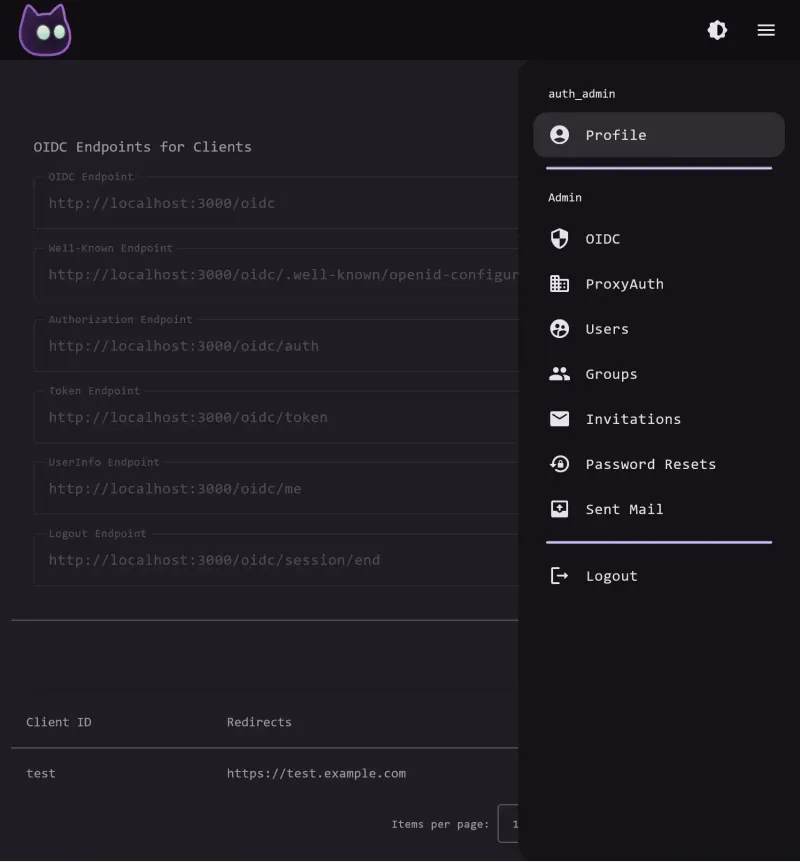
VoidAuth Small teams and families who want one simple login, with passkeys and invitations, for their self-hosted apps Code Open source Some setup

Why look for an alternative to JumpCloud?

JumpCloud is a cloud directory platform: one place for your team's user accounts, with a cloud LDAP service for apps, single sign-on, two-step sign-in, RADIUS and device management. It is priced per user each month.

People look for an alternative when they mainly need one username and password across their self-hosted apps and the per-user price covers far more than that. A self-hosted LLDAP keeps that user list on your own server with no per-user fee and very little memory. It does the directory part only, so teams that need single sign-on add a sign-in app on top. VoidAuth does the single sign-on part, with passkeys, two-step sign-in and invitations, and no user fee; it leaves out device management and the wider directory.

The alternatives, compared

LLDAP

Our pick

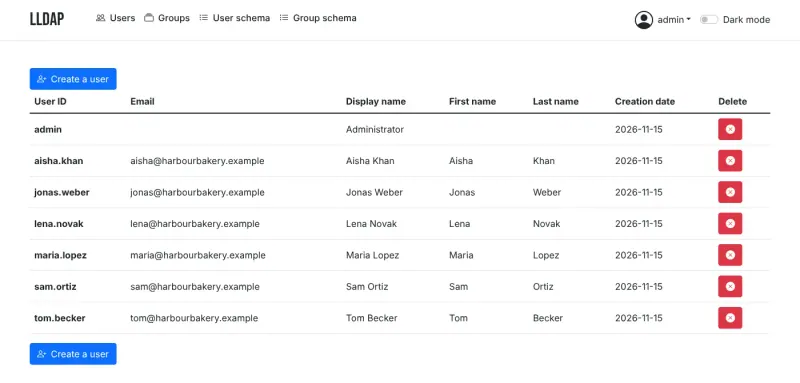
A light self-hosted LDAP server with one user list for your apps.

Replaces JumpCloud's directory and cloud LDAP: one list of users and groups, managed on a simple web page, that apps such as Nextcloud, Jellyfin, Gitea and Vaultwarden check over LDAP when people sign in, and people can change their own details and password. It does no device management, single sign-on, two-step sign-in or RADIUS, has no commercial support, and its LDAP is reachable only by apps on the same server.

What you gain
  • No fee per user, and your staff list stays on your own server
  • A simple directory you can learn in an afternoon
  • Works with the self-hosted apps you already run
What is different
  • Only the user directory, with no device management, single sign-on or two-step sign-in of its own
  • The directory is for apps on the same server, not reachable from outside
  • Not a full LDAP server, so a few apps, such as Synology, cannot use it
Some setup Open source

Simple self-hosted single sign-on, with passkeys and invitations.

Covers JumpCloud's single sign-on and two-step sign-in for your self-hosted apps: one login through OpenID Connect or a reverse-proxy login, passkeys, authenticator codes, user groups and invitations by link. It has no device management, no RADIUS, only an experimental read-only LDAP server that this template leaves off, no SAML and no catalogue of ready-made business app connections, and it is a young project that has not been security-audited.

Some setup Open source

Moving from JumpCloud

There is no importer for JumpCloud. Sign in to LLDAP as admin and create your groups, then add each user, or script it through LLDAP's GraphQL API from a list exported from JumpCloud. Set up email sending so people can reset their passwords, and give each app a read-only account to connect with. Then switch your apps one at a time from JumpCloud's LDAP to LLDAP's address and base DN, testing a sign-in after each. For single sign-on and two-step sign-in, add a sign-in app such as authentik that uses LLDAP as its user list.

With VoidAuth, create your groups, then invite each person by link so they set their own password or passkey; add your mail server first if you want VoidAuth to send the invitations. Connect one app at a time through OpenID Connect, using the project's setup guides, or put apps without a login behind Caddy, Traefik or nginx with VoidAuth's proxy login. Test each app before you remove its JumpCloud connection, and keep JumpCloud for laptops and any SAML-only apps. Keep a backup of VoidAuth and a separate admin login for each important app.

Questions

What is the best open-source alternative to JumpCloud?

Start with LLDAP. Both are free and open source.

Do LLDAP and VoidAuth do single sign-on like JumpCloud?

VoidAuth does; LLDAP does not. VoidAuth gives your self-hosted apps one login through OpenID Connect or a reverse-proxy login, with passkeys and two-step sign-in. LLDAP is a user directory only; pair it with a sign-in app such as authentik, Authelia or Keycloak to get single sign-on and two-step sign-in.

Which apps can sign people in through LLDAP or VoidAuth?

For LLDAP, any app that supports LDAP login; the project has tested example settings for about 80 apps, including Nextcloud, Jellyfin, Gitea, Grafana, Vaultwarden and authentik. For VoidAuth, any app that supports OpenID Connect, and apps with no login of their own when they sit behind Caddy, Traefik or nginx with VoidAuth's proxy login. Apps that only support SAML cannot connect to VoidAuth.

Can LLDAP or VoidAuth manage computers like JumpCloud?

No. Neither has device management, so the laptops and phones your team uses are managed some other way. JumpCloud's RADIUS has no counterpart in either, and VoidAuth's LDAP server is experimental and read-only.

Does VoidAuth support passkeys and two-step sign-in?

Yes. People can sign in with a passkey, or with a password plus an authenticator app code, and accounts can be passkey-only.

What happens if LLDAP or VoidAuth goes down?

Apps that check sign-ins against it cannot sign people in until it is back. Keep backups and a local admin login in each important app.

Are these JumpCloud alternatives really free?

Yes, LLDAP and VoidAuth are free. To run them you need Cloudgate and a server. Use hosted Cloudgate, which can also provide the server, or install Cloudgate on a server of your own for free. Cloudgate's plans and prices are at cloudgate.octabyte.io/pricing. One server can run several apps.

Do I need a developer to replace JumpCloud?

No, but someone has to connect each app to it. Cloudgate installs LLDAP and creates the admin account; you then add people and groups in the browser, and enter LLDAP's details, its address, base DN and a read-only account, in each app's LDAP settings. With VoidAuth you create groups, invite people by link and connect each app through OpenID Connect or VoidAuth's proxy login.