G

Open-source alternative to Google Find My Device

FMD Server is a free, open-source alternative to Google Find My Device, now called Find Hub: with the FMD app on your Android phone, you can see where it is, make it ring, lock it or wipe it from a web page on your own server. Google’s service comes built in and can find phones that are offline, which FMD can’t; FMD works without Google services and encrypts locations so only you can read them.

Free app Code: Open source Import from Google Find My Device: No Some setup

Why look for an alternative to Google Find My Device?

Google Find My Device, renamed Find Hub in 2025, is Google's service for locating a lost Android phone, tablet or tracker. It is built in to phones with Google Play Services, and from a web page or another phone you can see the device on a map, ring it, lock it or erase it.

People look for an alternative when their phone runs without Google services, where Google's service isn't there, or when they would rather Google did not hold their phones' locations. FMD Server, with the free FMD app on each phone, does the find, ring, lock and wipe jobs from a server you run, and encrypts locations so even whoever runs the server can't read them. It has to be set up before a phone goes missing, works on Android only, and can't use other people's phones to find one that is offline.

How FMD Server compares

Locate, ring or lock your lost phone from your browser.

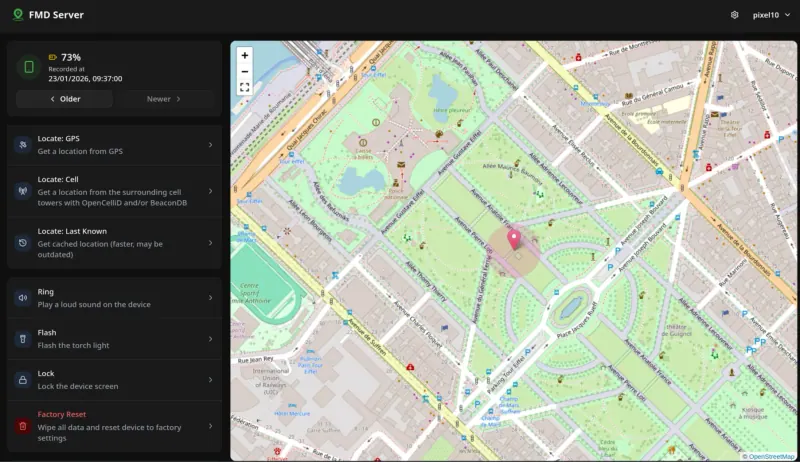
Shows your Android phone on a map and lets you locate it by GPS or cell towers, ring it, flash its torch, lock it, take a photo or wipe it, from a web page on your own server, with locations and photos encrypted by your password. Each phone needs the FMD app and a push app installed before it is lost, there is no iPhone app, and unlike Google's network it can't find a phone that is switched off or offline.

What you gain
  • Works on Android phones without Google services, such as GrapheneOS or LineageOS
  • Locations stay on your own server, encrypted so only you can read them
  • Ring, lock, wipe and photo commands from any web browser
What is different
  • Each phone needs the FMD app from F-Droid and a push app installed and set up before it goes missing
  • Android only; there is no iPhone app
  • It can't find a phone that is switched off or offline, and has no network of other people's phones to help
Some setup Open source

Moving from Google Find My Device

There is nothing to move: Find My Device keeps no history you would bring across. On each Android phone, install the FMD app from F-Droid and a push app such as ntfy or Sunup, choose FMD Server in the app, enter your server's address and the registration token Cloudgate shows, and set a strong password; that creates the phone's account. Give FMD the permissions for the commands you want, such as Device Admin to lock and wipe, and set the separate password it asks for before it will wipe. Then sign in on the web page and try Locate and Ring while the phone is still in your hand. On phones with Google services you can keep Google's Find Hub switched on alongside it.

Questions

What is the best open-source alternative to Google Find My Device?

FMD Server is the free, open-source alternative to Google Find My Device for finding a lost Android phone in the catalogue today. Shows your Android phone on a map and lets you locate it by GPS or cell towers, ring it, flash its torch, lock it, take a photo or wipe it, from a web page on your own server, with locations and photos encrypted by your password. Each phone needs the FMD app and a push app installed before it is lost, there is no iPhone app, and unlike Google's network it can't find a phone that is switched off or offline.

Can FMD find a phone that is switched off or has no signal?

No. The FMD app has to be running and online to answer, so the web page shows the last location it sent. Google's Find Hub can also find offline devices through a network of other people's Android phones, which FMD has no equivalent of.

Does FMD work on phones without Google Play Services?

Yes. FMD needs no Google services, so it works on Android versions without them, such as GrapheneOS or LineageOS, where Google's Find My Device is not built in.

Do I have to set FMD up before I lose my phone?

Yes. Install the FMD app and a push app, connect them to your server and grant the permissions while you still have the phone. Nothing can be added once it is lost.

Is FMD Server really free compared with Google Find My Device?

Yes, FMD Server is free. To run them you need Cloudgate and a server. Use hosted Cloudgate, which can also provide the server, or install Cloudgate on a server of your own for free. Cloudgate's plans and prices are at cloudgate.octabyte.io/pricing. One server can run several apps.

Do I need a developer to replace Google Find My Device?

No. Cloudgate installs FMD Server on your server and gives it a secure web address, and you use it in your browser instead of Google Find My Device.