FMD Server
Locate, ring or lock your lost phone from your browser.
No server needed to start: Cloudgate can provide one. What happens when you click Deploy

What is FMD Server?
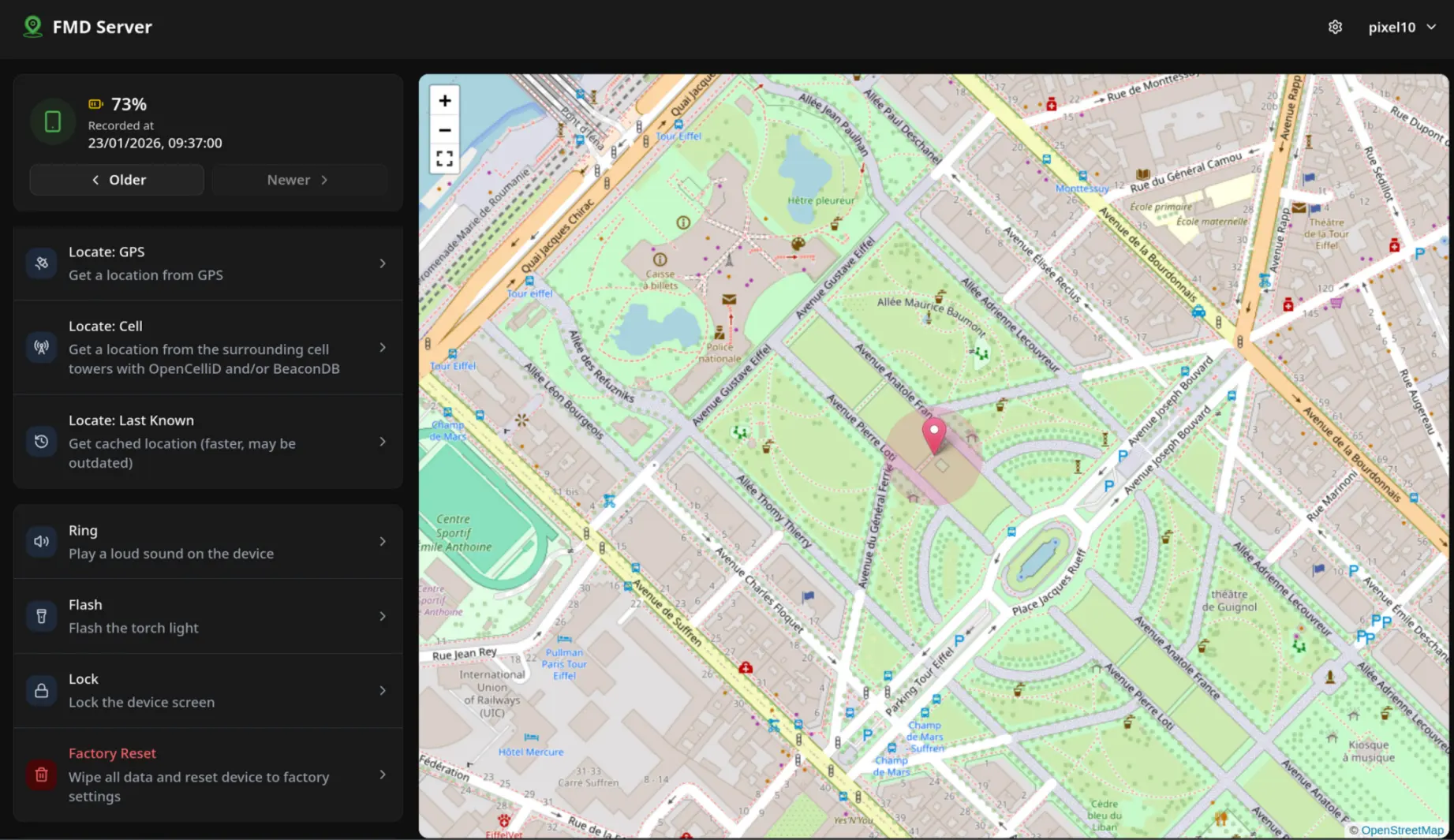
FMD Server is a self-hosted Find My Device server for Android: see a lost phone on a map, make it ring, lock it or wipe it with the free FMD app.
FMD Server is the free, self-hosted server for the FMD Android app (formerly FindMyDevice): it lets you locate, ring, lock or wipe a lost Android phone from your own web page, instead of Google's Find My Device, now called Find Hub. It works on phones without Google services too.
FMD Server only works together with the FMD app, so install it on each phone before you need it: get FMD from F-Droid, add a push app such as ntfy or Sunup, and register the phone with your server. The phone then sends its location now and then, and from any browser you can see it on a map, ask for a fresh location, make it ring, lock the screen, take a photo or, as a last resort, factory-reset it. Locations and photos are encrypted with your password on the phone, so only you can read them.
A small business could, for example, register each work phone, ring one that went missing in the warehouse, and lock or wipe one left behind on a train.
FMD has no iPhone app, and it can't find a phone that is switched off. Cloudgate installs FMD Server on a server Cloudgate provides or one you connect, gives it a secure web address and a registration token so only your phones can join.
What you can do with FMD Server
- See your phone on a map The latest location appears on an OpenStreetMap map with its accuracy, time and battery level, and you can step back through earlier locations.
- Ask where it is now Request a fresh location from GPS, from nearby cell towers or the last one the phone knew.
- Make it ring Play a loud sound on the phone to find it under a sofa cushion, or flash its torch in the dark.
- Lock it or wipe it Lock the screen from your browser, or factory-reset a phone you won't get back, using a separate delete password set on the phone.
- Take a photo Have the phone take a picture with its front or back camera and view it in your browser.
- Kept private by encryption Locations and photos are encrypted with your password on the phone, so even the person running the server can't read them or send commands.
- Only your phones can join A registration token keeps strangers from opening accounts on your server, and each phone gets its own account.
Replaces Google Find My Device
FMD Server does the same job as Google Find My Device. Here is what changes when you switch.
- Works on Android phones without Google services, such as GrapheneOS or LineageOS
- Locations stay on your own server, encrypted so only you can read them
- Ring, lock, wipe and photo commands from any web browser
- Free and open source, with no Google account needed
- Each phone needs the FMD app from F-Droid and a push app installed and set up before it goes missing
- Android only; there is no iPhone app
- It can't find a phone that is switched off or offline, and has no network of other people's phones to help
- Some phone brands stop background apps, so you may need to turn off battery optimisation for FMD
What happens when you click Deploy?
You do not need a server or any technical knowledge. Four steps, and FMD Server is running at its own web address.
- Step 1 Click Deploy and create your account
Deploy takes you to Cloudgate. Create an account, or log in if you have one. FMD Server itself is free.
- Step 2 Choose a server
No server? Get one from Cloudgate: pick a size and a country, and Cloudgate gets it ready. Already have one? Connect it instead.
- Step 3 Cloudgate sets up FMD Server
It prepares the server, makes the passwords the app needs and starts it. There is nothing to install and nothing to write down.
- Step 4 Open your app and sign in
Your app gets a free web address to start, without https. Add your own domain, like app.yourshop.com, and Cloudgate secures it with https for you.
New to Cloudgate? See what Cloudgate is
Run Cloudgate yourself? Deploy from your own console
In your Cloudgate console, open Templates and choose FMD Server.
Questions
Is FMD Server free?
Yes, FMD Server is free and open source under the GPL-3.0-or-later licence, with no paid edition. The FMD Android app is free too. You pay only for your server.
Is FMD Server a good alternative to Google Find My Device?
Yes, FMD Server fits if your phones run Android and you can install an app on each one in advance. FMD shows where the phone is, makes it ring, locks or wipes it and can take a photo, without Google services and with your data on your own server. Google's Find My Device, now called Find Hub, comes built in and can find offline phones through other people's devices, which FMD can't.
What do I need to install on each phone for FMD Server?
To use FMD Server, each phone needs the free FMD app, from F-Droid or the FMD team's own F-Droid repository, plus a push app such as ntfy or Sunup so it can receive commands from your server. Grant FMD the permissions for the commands you plan to use, such as Device Admin for lock and wipe.
How do I sign in to FMD Server the first time?
You create the account from the FMD app on the phone, not on the website. In the FMD app, choose FMD Server, enter your server's web address and the registration token Cloudgate shows you, and pick a strong password. Then sign in on the web page with the username the app gives you and that password.
Can the person running the server see where my phone is?
No, locations and photos are encrypted with your password on the phone before they reach FMD Server, so whoever runs it can't read them or send commands to your phone. Choose a strong password, because the protection depends on it.
Does FMD Server work with iPhones?
No, FMD Server only works with the FMD Android app, so it can't locate or control iPhones.
What server size do I need for FMD Server?
The smallest server is enough. FMD Server is a single small program that keeps its data in one file, so Cloudgate gives it an extra-small server.
Do I need technical skills to run FMD Server?
No. Click Deploy, create your Cloudgate account and choose a server, and Cloudgate sets up FMD Server and gives it a web address. You use it in your browser like any other online tool.
Do I need my own server for FMD Server?
No. When you deploy FMD Server, hosted Cloudgate can provide a server. If you already rent one, you can connect it instead.
Can I move my data from Google Find My Device to FMD Server?
Most people export from Google Find My Device and import into FMD Server. The official guides at fmd-foss.org walk through it.
Related apps
One sign-in with two-step login for the apps you host yourself.
Single sign-on and one user list for all your apps, on your server.
Encrypted notes that self-destruct by views or by timer.

Read your DMARC reports and see who sends email as your domain.