Open-source alternatives to DeepL

LibreTranslate is a free, open-source DeepL alternative for translating text and documents on your own server, by hand in a web page or automatically through its API. DeepL is known for fluent translations, and DeepL Pro is a paid subscription per user; self-hosted LibreTranslate is less fluent, but has no fees and never sends your text to an outside company.

2 alternatives Free apps Our pick: LibreTranslate

At a glance

App Good for Code Ease of use
LibreTranslate Translating text and documents in your own tools, with no per-character fees Code Open source Some setup
PDFMathTranslate Researchers, students and firms who need papers and technical PDFs in another language with the maths intact Code Open source Some setup

Why look for an alternative to DeepL?

DeepL is a translation service known for natural, fluent translations. It offers a translator in the browser and in apps, DeepL Pro subscriptions for people and teams, and an API that developers build into their own apps.

People look for an alternative because DeepL Pro is paid per user: when we checked its website in November 2026, DeepL Pro cost €24.99 per user a month, billed yearly, so the cost grows with every person who translates. Every text you translate is also sent to DeepL's servers, which some companies can't allow for customer data or confidential documents. A self-hosted translation server such as LibreTranslate translates on your own server with no fees, though its translations are less fluent than DeepL's.

The alternatives, compared

LibreTranslate

Our pick

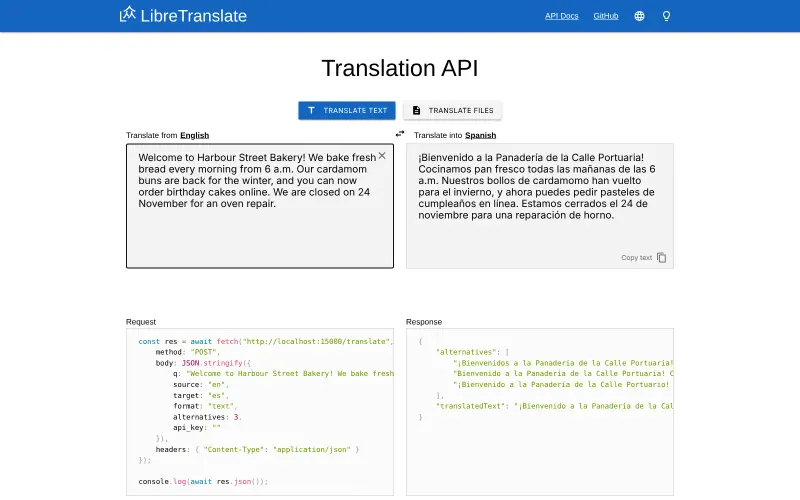
A self-hosted translation API and web page that keeps text private.

Translates text and documents on your own server, in a web page or through an API for your own tools, with no fees and no text sent outside. DeepL's translations are clearly more fluent, especially between less common languages, so LibreTranslate suits drafts, gist and high volumes better than text you publish without checking.
Some setup Open source

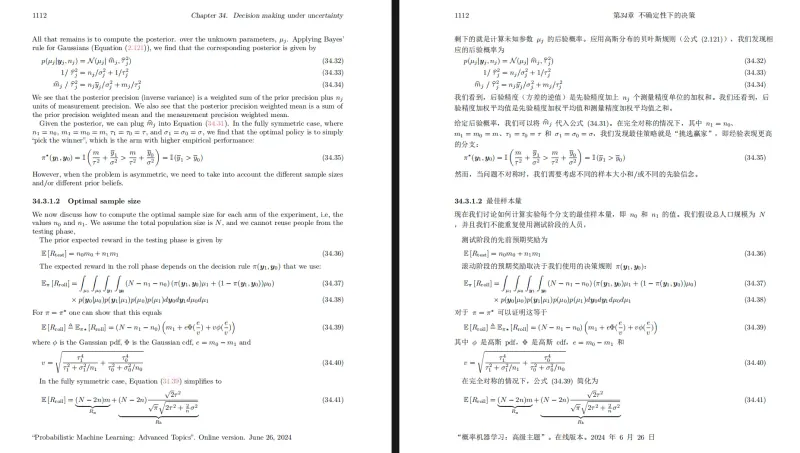
Translate scientific PDFs and keep every formula and chart in place.

Made for one job DeepL's document translation often gets wrong: scientific papers and technical PDFs, translated with formulas, charts, tables of contents and annotations kept in place, plus a bilingual side-by-side copy. It doesn't translate by itself; it sends the text to a service you choose, which can be DeepL with your own API key, Google or Bing with no key, or a model on your own server for full privacy. It handles PDFs only.

What you gain
  • Formulas, figures and page layout in papers stay where they were
  • A bilingual side-by-side PDF for checking the translation against the original
  • No per-user subscription; you pay only for the service you choose, or nothing with Google or Bing
What is different
  • It sends the text to the translation service you pick, so documents stay private only if you use your own AI server
  • Translation quality depends on that service, and large PDFs take a few minutes
  • One shared login for everyone who uses it
Some setup Open source

Moving from DeepL

DeepL keeps nothing you need to bring over, so moving is about where your text goes. Install LibreTranslate with the languages you use, then connect the tools that offer a LibreTranslate option to your web address and API key. Code written for DeepL's API needs changing, because LibreTranslate's requests are different. Many teams keep DeepL for text that is published or sent to customers and use LibreTranslate for everything else, such as reading incoming messages or translating internal notes.

For PDFs with formulas, use PDFMathTranslate alongside either: upload the paper or paste its link, pick the languages and a translation service, and download the translated and bilingual PDFs. To keep DeepL's quality, choose DeepL and paste your DeepL API key; to keep the text private, choose a model you run yourself, such as one served by Ollama, because the default Google service sends the text to Google.

Questions

What is the best open-source alternative to DeepL?

Start with LibreTranslate. Both are free and open source.

Should I keep DeepL for some texts?

Often, yes. LibreTranslate is good enough to understand a message or draft a reply, but DeepL is more fluent. Use LibreTranslate for high volumes and private text, and DeepL, or a person, for text you publish.

Can PDFMathTranslate use DeepL?

Yes. Choose DeepL as the translation service and enter your DeepL API key; PDFMathTranslate then keeps the PDF's layout and formulas while DeepL translates the text. DeepL bills the API use separately.

Should I choose LibreTranslate or PDFMathTranslate?

LibreTranslate for everyday text and Office documents translated entirely on your own server. PDFMathTranslate for scientific papers and technical PDFs where formulas and layout must survive.

Can LibreTranslate translate Word and PowerPoint files like DeepL?

Yes. Its web page and API take Word, PowerPoint, OpenDocument, PDF, EPUB, HTML, subtitle and plain text files and return them translated.

Are these DeepL alternatives really free?

Yes, LibreTranslate and PDFMathTranslate are free. To run them you need Cloudgate and a server. Use hosted Cloudgate, which can also provide the server, or install Cloudgate on a server of your own for free. Cloudgate's plans and prices are at cloudgate.octabyte.io/pricing. One server can run several apps.

Do I need a developer to replace DeepL?

No. Cloudgate installs the app you choose on your server and gives it a secure web address, and you use it in your browser instead of DeepL.