PDFMathTranslate
Translate scientific PDFs and keep every formula and chart in place.
No server needed to start: Cloudgate can provide one. What happens when you click Deploy


What is PDFMathTranslate?
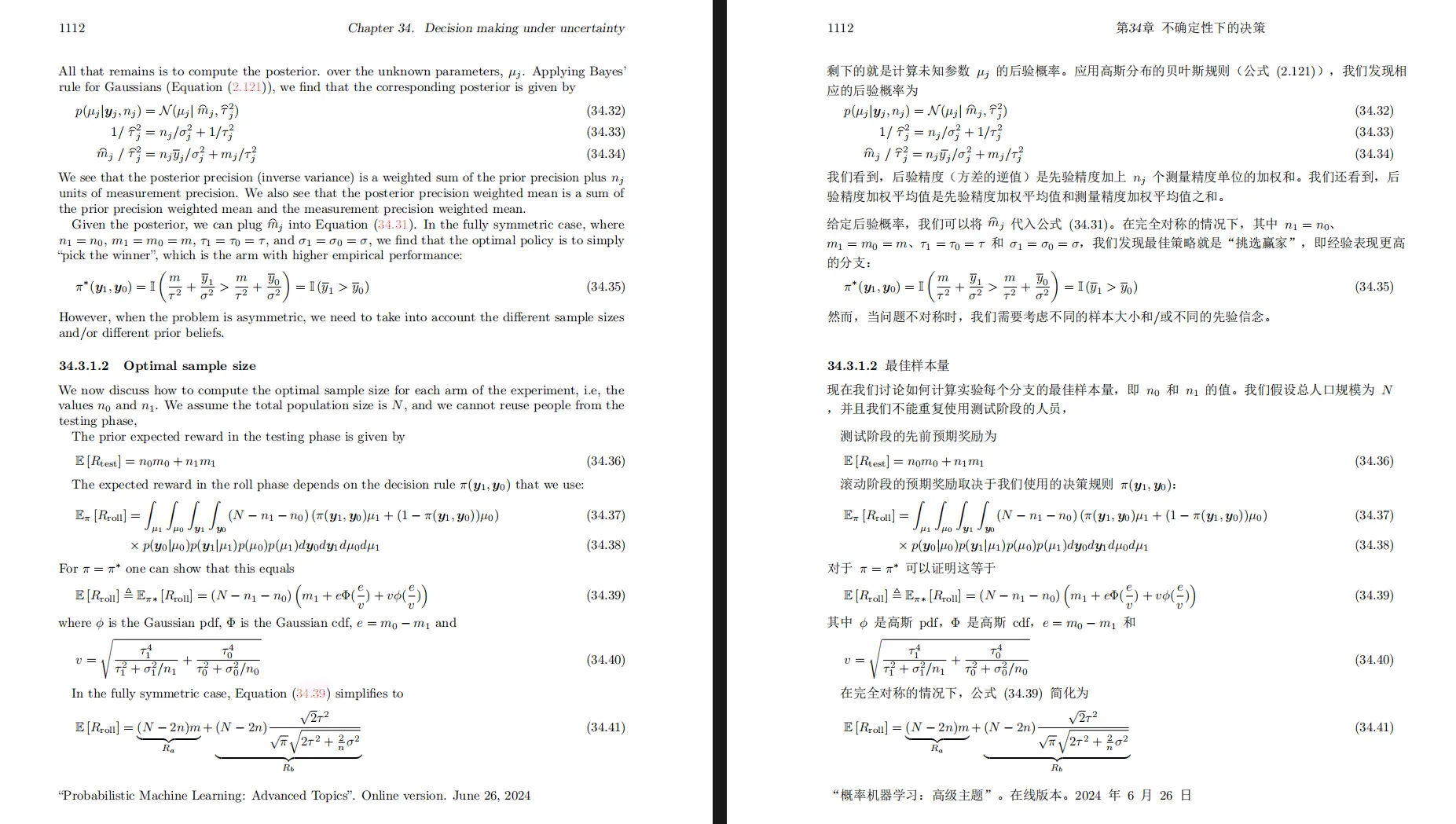
Self-hosted PDFMathTranslate (pdf2zh): translate scientific PDFs and keep formulas, charts and layout, with a side-by-side bilingual copy.
PDFMathTranslate is a free, self-hosted PDF translator that turns scientific papers and technical documents into another language while keeping formulas, charts and the page layout in place, as an alternative to DeepL or Google Translate for PDFs. You get a translated PDF and a bilingual copy with the original and the translation side by side.
It suits anyone who reads papers, datasheets or manuals in a language they don't know well. A small engineering firm, for example, can translate a German standard or a Chinese research paper into English and still see every equation and diagram exactly where the authors put them.
PDFMathTranslate does not translate by itself: it sends the text to the service you choose. Google and Bing work with no key, and you can add your own key for DeepL, OpenAI, Gemini, Azure or DeepSeek, or point it at your own Ollama server to keep documents in-house.
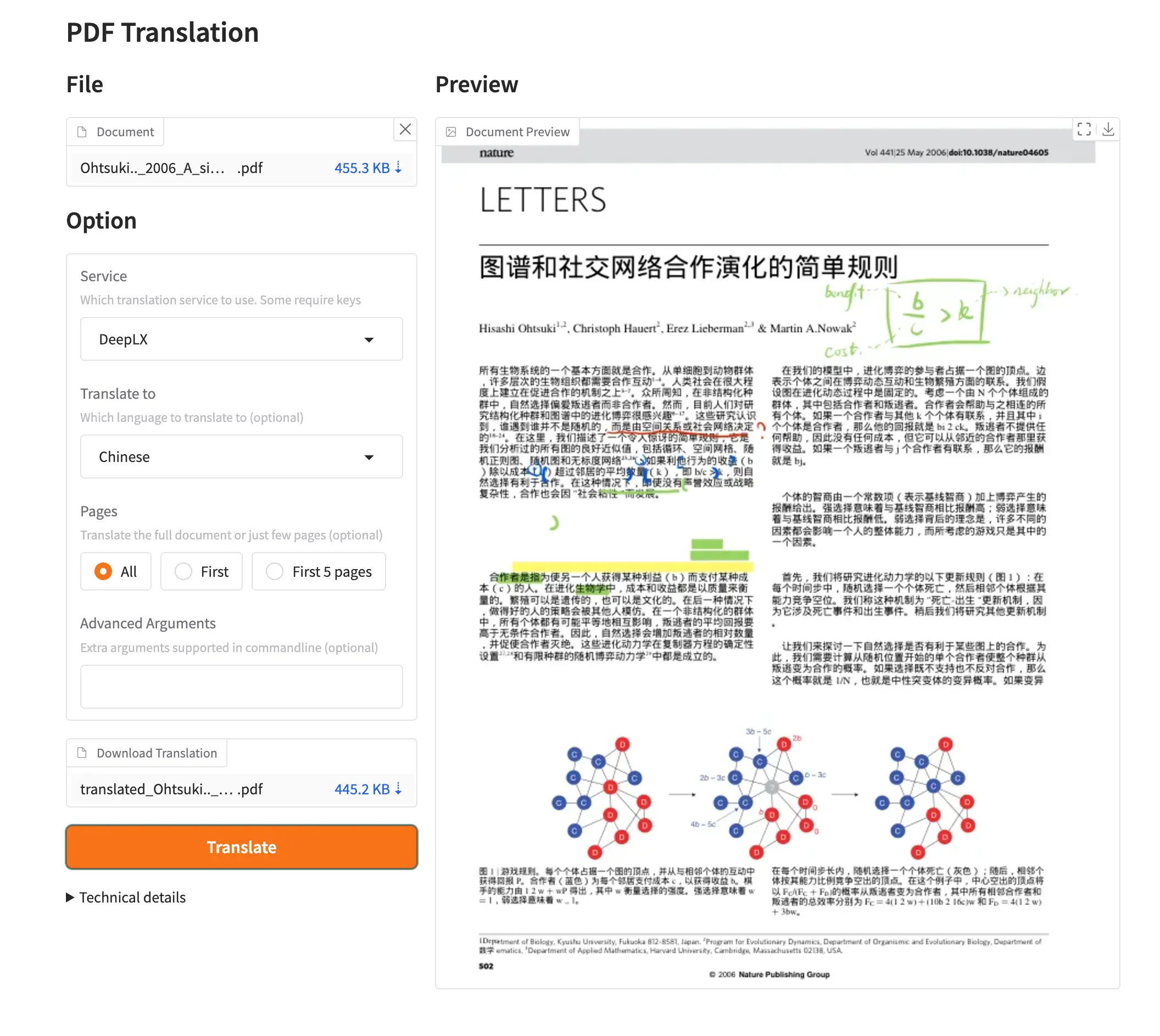
Cloudgate installs PDFMathTranslate on your server, gives it a secure web address and protects it with a login. Sign in as admin with the password Cloudgate created, upload a PDF and press Translate.
What you can do with PDFMathTranslate
- Keep the layout Formulas, charts, tables of contents and annotations stay where they were, so a translated paper still reads like the original.
- Read side by side Download a translated PDF and a bilingual one with the original and the translation next to each other.
- Choose your translation service Use Google or Bing with no key, or DeepL, OpenAI, Gemini, Azure, DeepSeek or your own Ollama server with your key or address.
- Translate only what you need Translate the whole document, the first page or the first five pages to check the result before doing the rest.
- Many languages Translate between English, Chinese, French, German, Japanese, Korean, Russian, Spanish, Italian and more.
- Simple web page Upload a PDF, pick the languages and press Translate; nothing to install on anyone's computer.
Replaces DeepL and Google Translate
PDFMathTranslate does the same job as DeepL and Google Translate. Here is what changes when you switch.
- Formulas, figures and page layout in papers stay where they were
- A bilingual side-by-side PDF for checking the translation against the original
- No per-user subscription; you pay only for the service you choose, or nothing with Google or Bing
- You can use DeepL as the engine, with your own DeepL API key
- It sends the text to the translation service you pick, so documents stay private only if you use your own AI server
- Translation quality depends on that service, and large PDFs take a few minutes
- One shared login for everyone who uses it
- This is the 1.x version; the project's newer 2.x lives in a separate repository
What happens when you click Deploy?
You do not need a server or any technical knowledge. Four steps, and PDFMathTranslate is running at its own web address.
- Step 1 Click Deploy and create your account
Deploy takes you to Cloudgate. Create an account, or log in if you have one. PDFMathTranslate itself is free.
- Step 2 Choose a server
No server? Get one from Cloudgate: pick a size and a country, and Cloudgate gets it ready. Already have one? Connect it instead.
- Step 3 Cloudgate sets up PDFMathTranslate
It prepares the server, makes the passwords the app needs and starts it. There is nothing to install and nothing to write down.
- Step 4 Open your app and sign in
Your app gets a free web address to start, without https. Add your own domain, like app.yourshop.com, and Cloudgate secures it with https for you.
New to Cloudgate? See what Cloudgate is
Run Cloudgate yourself? Deploy from your own console
In your Cloudgate console, open Templates and choose PDFMathTranslate.
Questions
Is PDFMathTranslate free?
Yes, PDFMathTranslate is free and open source under the AGPL-3.0 licence. The Google and Bing services it uses by default cost nothing; paid services such as DeepL or OpenAI bill you for your own API key.
Is PDFMathTranslate a good alternative to DeepL for PDFs?
Yes, for scientific and technical PDFs. PDFMathTranslate keeps formulas, charts and layout in place and gives you a bilingual copy, and it can even use DeepL as its translation engine; for plain documents, DeepL's own apps are simpler.
Does PDFMathTranslate keep my documents private?
Only if you choose a private engine. With PDFMathTranslate's default Google or Bing service, the text of your PDF is sent to Google or Microsoft for translation; to keep everything in-house, connect it to your own AI server such as Ollama.
How do I sign in to PDFMathTranslate?
PDFMathTranslate's web page asks for a username and password. Use admin and the password Cloudgate created for it; there is one shared login.
Which languages can PDFMathTranslate translate?
PDFMathTranslate's web page offers English, Simplified and Traditional Chinese, French, German, Japanese, Korean, Russian, Spanish and Italian. Which pairs work well also depends on the translation service you choose.
What server size do I need for PDFMathTranslate?
PDFMathTranslate needs a medium server with about 2 GB of memory, because it analyses each page's layout on the server before translating. Long PDFs simply take longer.
Do I need technical skills to run PDFMathTranslate?
No. Click Deploy, create your Cloudgate account and choose a server, and Cloudgate sets up PDFMathTranslate and gives it a web address. You use it in your browser like any other online tool.
Do I need my own server for PDFMathTranslate?
No. When you deploy PDFMathTranslate, hosted Cloudgate can provide a server. If you already rent one, you can connect it instead.
Can I move my data from DeepL to PDFMathTranslate?
Most people export from DeepL and import into PDFMathTranslate. The official guides at github.com walk through it.
Related apps

A self-hosted translation API and web page that keeps text private.

A self-hosted AI agent with its own computer that does tasks for you.

Private AI chat over your own documents, for staff and your website.

One private AI chat for many models, using your own API keys.