
Zabbix
Monitor every server, switch and printer, and get alerts on problems.
No server needed to start: Cloudgate can provide one. What happens when you click Deploy
What is Zabbix?
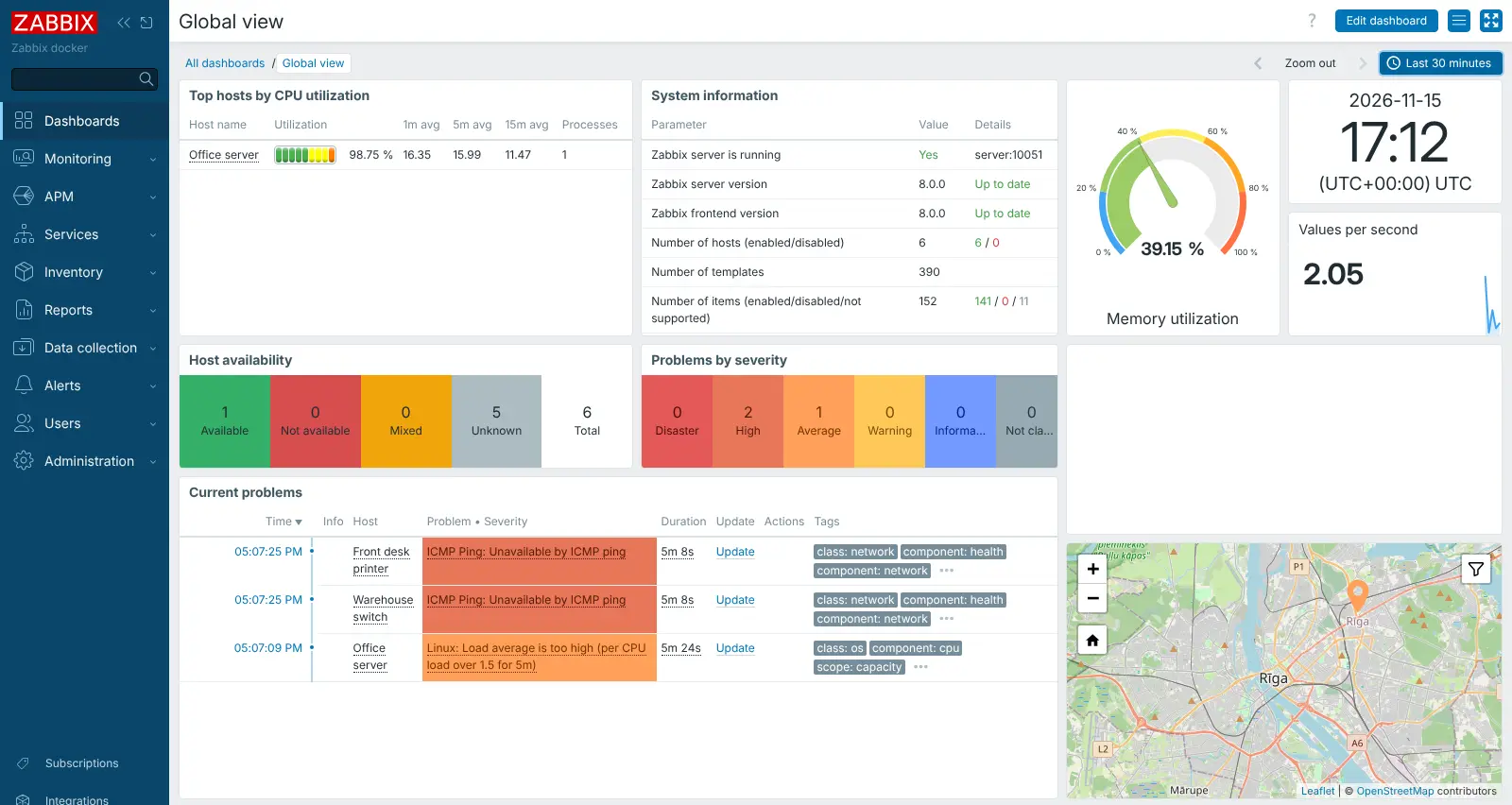
Self-hosted Zabbix monitors your servers, switches, printers and websites, with dashboards, network maps and alerts by email, Slack or Teams.
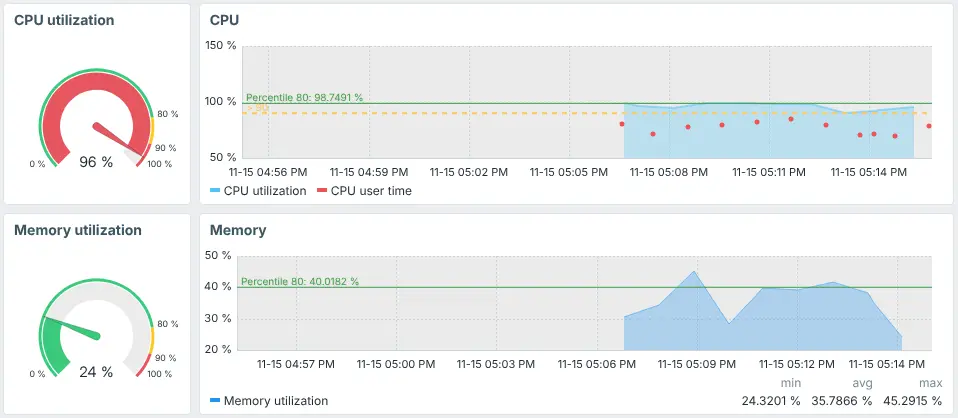
Zabbix is free, open-source network and server monitoring software, and a self-hosted alternative to PRTG, Datadog's infrastructure monitoring and SolarWinds. It checks your machines and devices around the clock, keeps a history of how they perform and alerts you when something crosses a line you set, such as a full disk, a busy processor or a switch that stops answering.
It works with almost anything on a network: Windows and Linux servers through a small agent you install on each one, and routers, switches, printers, firewalls and storage boxes over SNMP or a simple ping. Built-in templates decide what to measure, and dashboards, graphs and network maps show it all in one place. An IT provider looking after a few small offices, for example, could watch each client's file server, backup box and switches, get a Teams message when a backup disk is nearly full, and send each client a monthly PDF report.
Zabbix is detailed and takes time to learn. Alerts go to email, SMS, Slack, Microsoft Teams, Telegram and more, and the web interface works on a phone. Cloudgate installs Zabbix on your server with a secure web address and replaces its default password with a strong one.
What you can do with Zabbix
- Watch servers and network devices Track processor, memory, disk and network use on servers, and check switches, routers, printers and firewalls over SNMP or ping.
- Start from ready-made templates Hundreds of built-in templates for common systems and devices set up what to measure and when to warn you.
- Find devices automatically Scan a range of network addresses and add the devices it finds, or let new servers register themselves.
- Get alerted your way Send problems by email, SMS, Slack, Microsoft Teams, Telegram, PagerDuty or a webhook, and repeat or escalate until someone acts.
- See it on dashboards and maps Build dashboards from drag-and-drop widgets, and draw network maps that turn red where something is wrong.
- Check websites too Test that a web page answers and shows the right words, including checks that go through several pages in turn.
- Send reports Email a dashboard as a PDF every day, week or month, and track service availability against your targets.
Replaces PRTG, Datadog, SolarWinds NPM and LogicMonitor
Zabbix does the same job as PRTG, Datadog, SolarWinds NPM and LogicMonitor. Here is what changes when you switch.
- No licence fees, and no limit on the number of devices, servers or checks
- Your monitoring data stays on your own server
- Every feature is in the free version; paid plans only add support
- Templates, alerts and dashboards can be changed to fit exactly how you work
- It takes longer to learn and set up than PRTG or a cloud service
- Devices on your office network need a path to your server, such as a Zabbix proxy or VPN
- It does not trace code or analyse logs the way Datadog does
- Monitoring runs from your one server, so if that server goes down, it cannot alert you
What happens when you click Deploy?
You do not need a server or any technical knowledge. Four steps, and Zabbix is running at its own web address.
- Step 1 Click Deploy and create your account
Deploy takes you to Cloudgate. Create an account, or log in if you have one. Zabbix itself is free.
- Step 2 Choose a server
No server? Get one from Cloudgate: pick a size and a country, and Cloudgate gets it ready. Already have one? Connect it instead.
- Step 3 Cloudgate sets up Zabbix
It prepares the server, makes the passwords the app needs and starts it. There is nothing to install and nothing to write down.
- Step 4 Open your app and sign in
Your app gets a free web address to start, without https. Add your own domain, like app.yourshop.com, and Cloudgate secures it with https for you.
New to Cloudgate? See what Cloudgate is
Run Cloudgate yourself? Deploy from your own console
In your Cloudgate console, open Templates and choose Zabbix.
Questions
Is Zabbix free?
Yes. Zabbix is free, open-source software under the AGPL-3.0 licence, with no licence fee and no features held back. The company behind it sells optional support, training and a hosted cloud version. You pay only for your server.
Is Zabbix a good alternative to PRTG or Datadog?
Yes, for watching servers and network devices. Zabbix covers what PRTG does, including SNMP, ping, maps and alerts, with no limit on devices, but it takes longer to learn. Compared with Datadog it keeps your data on your own server, but it does not trace application code or analyse logs.
How do I sign in to Zabbix the first time?
Sign in with the user name Admin (with a capital A) and the password Cloudgate generated, which the Cloudgate console shows you. Zabbix normally starts with the well-known password "zabbix"; Cloudgate replaces it for you. After signing in, change the password in your user settings or create your own administrator account.
How do I monitor my servers with Zabbix?
Install the free Zabbix agent on each server you want to watch, then add the server in Zabbix and pick a template such as "Linux by Zabbix agent". Your Zabbix server asks the agent for its figures, so it must be able to reach that machine. Agents that send figures in on their own, and Zabbix proxies for remote offices, need one more network port opened on your server, which Cloudgate does not open by default. Network devices can be watched over SNMP or ping without an agent.
Can Zabbix import my devices from PRTG or SolarWinds?
No, Zabbix has no automatic import from PRTG, SolarWinds or Datadog. Network discovery can scan your address ranges and add the devices it finds, which saves typing them in one by one.
Does Zabbix have a phone app?
No, not an official one yet; Zabbix describes its own mobile app as coming soon. The web interface works in a phone's browser, several third-party apps exist, and alerts can reach your phone by SMS, Telegram, Slack or email.
What server size do I need for Zabbix?
For a small business with a few dozen devices, Cloudgate's 2 GB size is a reasonable start. Zabbix's own guide suggests 2 processor cores and 8 GB of memory for about 1,000 measurements, so give it more as you add devices and keep history longer.
Do I need technical skills to run Zabbix?
No. Click Deploy, create your Cloudgate account and choose a server, and Cloudgate sets up Zabbix and gives it a web address. You use it in your browser like any other online tool.
Do I need my own server for Zabbix?
No. When you deploy Zabbix, hosted Cloudgate can provide a server. If you already rent one, you can connect it instead.
Related apps
Watch your servers and network, and get alerts when something breaks.

Network monitoring for switches, routers and servers.

Watch all your servers and Docker apps on one light dashboard.

A live, self-hosted dashboard of your server's CPU, memory and disks.