Checkmk
Watch your servers and network, and get alerts when something breaks.
No server needed to start: Cloudgate can provide one. What happens when you click Deploy
What is Checkmk?
Checkmk Community is free, self-hosted IT monitoring that checks your servers, network devices and services and alerts you when something fails.
Checkmk is IT monitoring software that checks your servers, network devices and services around the clock and alerts you when something fails, fills up or slows down. Checkmk Community, formerly Checkmk Raw, is the free, open-source edition, and a self-hosted alternative to PRTG and SolarWinds with no per-sensor licence.
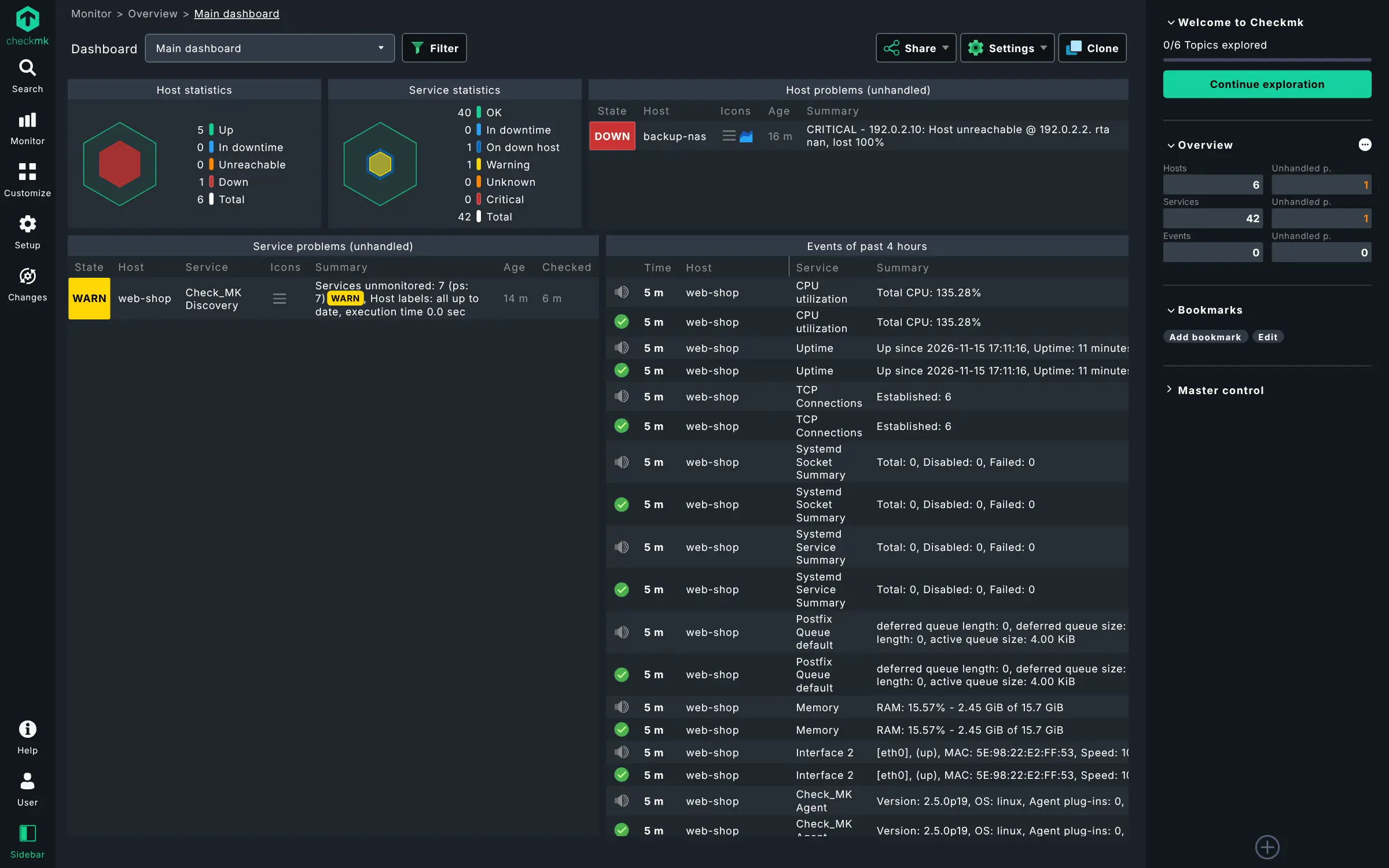
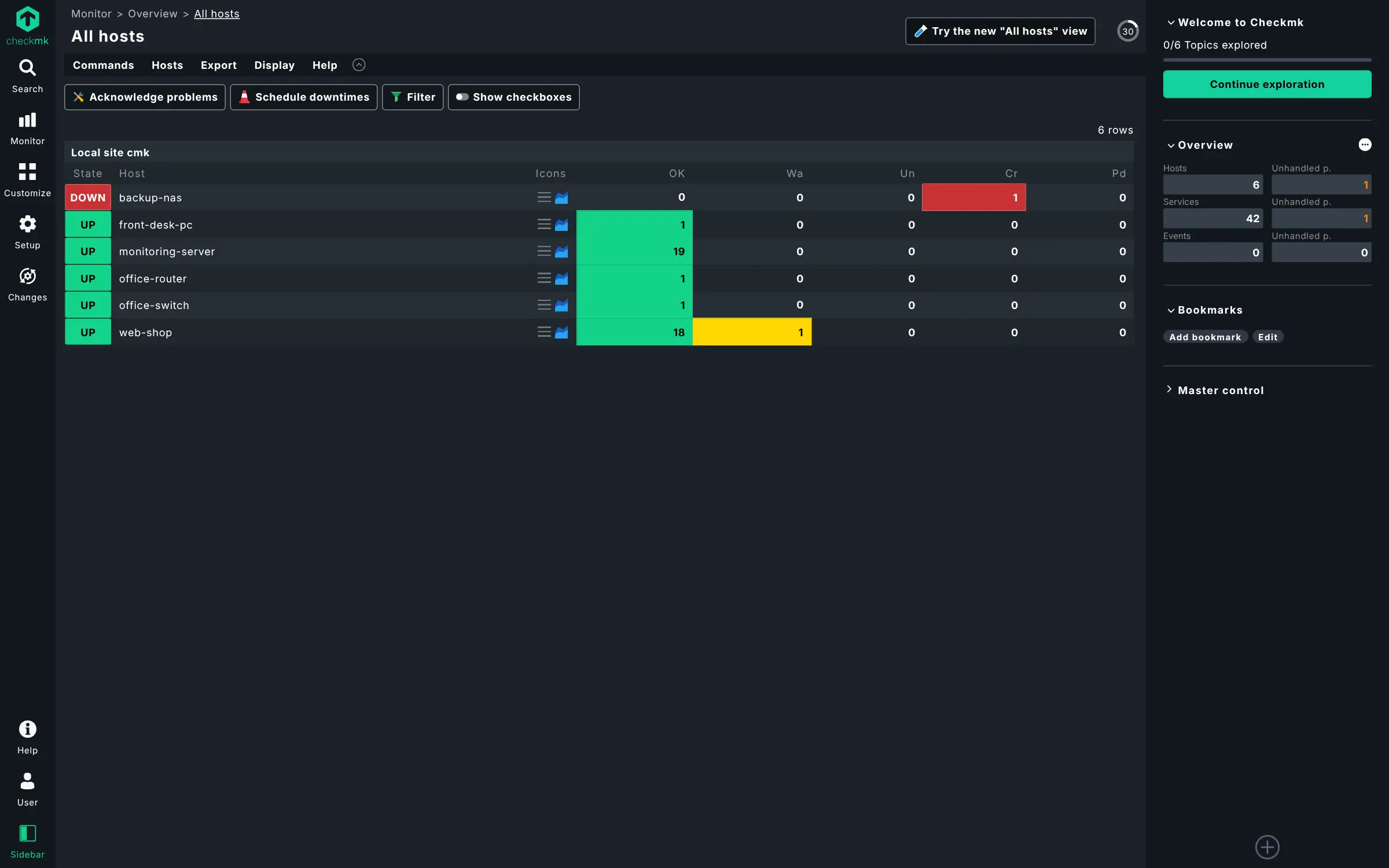
It finds what to watch on its own: add a server, install the small Checkmk agent on it, and Checkmk lists its disks, memory, services and network interfaces and checks them every minute. Network switches and routers can be checked without an agent. An IT provider looking after a few dental practices, for example, could see every office's server, firewall and backup disk on one screen and get a Microsoft Teams message when a disk is nearly full.
Results are kept as graphs, and you can build dashboards and send alerts to Slack, Mattermost, Microsoft Teams or PagerDuty, or by email once you connect a mail server. The paid editions add automatic agent updates, PDF and SLA reports, two-step sign-in and single sign-on; this page describes only what Community includes.
Cloudgate installs Checkmk Community on your server with a secure web address and creates the cmkadmin account with a strong password.
What you can do with Checkmk
- Monitor servers and network devices Check Linux and Windows servers through the Checkmk agent, and network switches and routers without one.
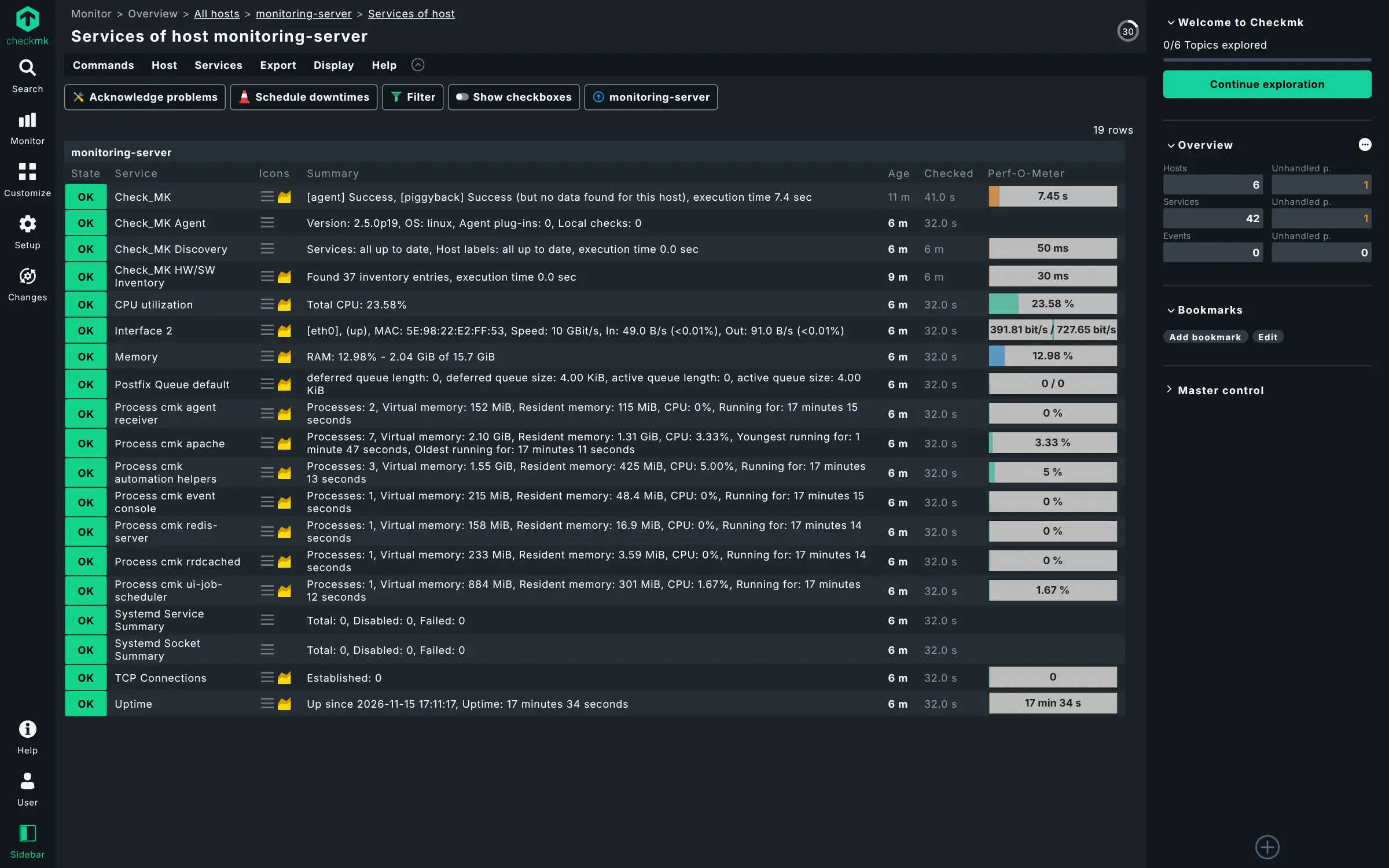
- Find what to watch automatically Checkmk discovers the disks, services, interfaces and processes on each machine and starts checking them.
- Get alerts where you work Send alerts to Slack, Microsoft Teams, Mattermost or PagerDuty, with rules for who hears about what.
- See history in graphs Every measurement is kept as a graph, so you can see when a disk started filling or a link slowed down.
- Build your own dashboards Arrange views and graphs into dashboards that show the state of your systems at a glance.
- Keep a hardware and software list Collect an inventory of the hardware and installed software on the machines you monitor.
- Choose from thousands of checks Over 2,000 official integrations cover operating systems, databases, network gear and common business applications.
Replaces PRTG and SolarWinds
Checkmk does the same job as PRTG and SolarWinds. Here is what changes when you switch.
- No licence fee per sensor, device or user in the Community edition
- Unlimited user accounts with roles and permissions
- Your monitoring data stays on your own server
- Built on GPL open-source code you can inspect
- Setup takes more hand work; you install the agent on each server yourself
- Automatic agent updates, PDF and SLA reports, two-step sign-in and single sign-on are only in the paid editions
- Checkmk describes Community as made for smaller setups; the paid editions are built for much larger networks
- Your PRTG or SolarWinds settings don't move across
What happens when you click Deploy?
You do not need a server or any technical knowledge. Four steps, and Checkmk is running at its own web address.
- Step 1 Click Deploy and create your account
Deploy takes you to Cloudgate. Create an account, or log in if you have one. Checkmk itself is free.
- Step 2 Choose a server
No server? Get one from Cloudgate: pick a size and a country, and Cloudgate gets it ready. Already have one? Connect it instead.
- Step 3 Cloudgate sets up Checkmk
It prepares the server, makes the passwords the app needs and starts it. There is nothing to install and nothing to write down.
- Step 4 Open your app and sign in
Your app gets a free web address to start, without https. Add your own domain, like app.yourshop.com, and Cloudgate secures it with https for you.
New to Cloudgate? See what Cloudgate is
Run Cloudgate yourself? Deploy from your own console
In your Cloudgate console, open Templates and choose Checkmk.
Questions
Is Checkmk free?
Yes. Checkmk Community is free and open source under the GNU GPL v2, with no licence fee per host or user. Checkmk also sells paid editions (Pro, Ultimate and a cloud service) with extra features such as automatic agent updates, reports and single sign-on.
Is Checkmk a good alternative to PRTG?
Yes, for monitoring servers, network devices and services without per-sensor licences. Checkmk Community covers checks, auto-discovery, alerts and graphs, but it needs more setup than PRTG, and features such as PDF reports and automatic agent rollout are in Checkmk's paid editions.
What is the difference between Checkmk Community and the paid editions?
Checkmk Community, formerly called Checkmk Raw, has the monitoring engine, web interface, agents, alerts and graphs. The paid editions add automatic agent management, recurring maintenance windows, PDF and SLA reports, two-step sign-in, single sign-on, push agents and professional support.
How do I sign in to Checkmk the first time?
Sign in to Checkmk with the user cmkadmin and the password Cloudgate shows in the app's settings. There is no setup wizard; you start by adding your first host.
How do I monitor a server with Checkmk?
Add the server as a host in Checkmk, install the Checkmk agent on that server, and run service discovery. Checkmk then lists what it found, such as disks, memory and services, and starts checking them every minute.
What server size do I need for Checkmk?
A medium server with 2 GB of memory is enough to start, so Cloudgate asks for that size. Checkmk needs more memory and disk as you add hosts, and you can move to a bigger server later.
Do I need technical skills to run Checkmk?
No. Click Deploy, create your Cloudgate account and choose a server, and Cloudgate sets up Checkmk and gives it a web address. You use it in your browser like any other online tool.
Do I need my own server for Checkmk?
No. When you deploy Checkmk, hosted Cloudgate can provide a server. If you already rent one, you can connect it instead.
Can I move my data from PRTG to Checkmk?
Most people export from PRTG and import into Checkmk. The official guides at docs.checkmk.com walk through it.
Related apps

Monitor every server, switch and printer, and get alerts on problems.

Network monitoring for switches, routers and servers.

Watch all your servers and Docker apps on one light dashboard.

Uptime, server and SSL monitoring with status pages.