
M

Open-source alternative to Microsoft Access

Saltcorn is a free, open-source Microsoft Access alternative: you build linked tables, forms, lists and reports without code, and the result is a web app many people use at once in their browsers. Access is a Windows desktop database that comes with some Microsoft 365 plans, and a database file is awkward to share across a team; Saltcorn runs on your own server with no limit on users, though it cannot import Access files, so your tables come across as CSV.

Free app Code: Open source Import from Microsoft Access: Partly Some setup

Why look for an alternative to Microsoft Access?

Microsoft Access is a desktop database for Windows that comes with some Microsoft 365 plans. Small businesses and departments have used it for years to build their own record-keeping apps, with tables, forms, queries, reports and macros, without hiring a developer.

People look for an alternative because an Access database is a file on one Windows computer or a shared drive: it does not run on a Mac or a phone, and several people working in it at once is awkward. A self-hosted Saltcorn builds the same kind of app without code, but as a website your whole team, and if you choose your customers, can use at once from any device, with no limit on users.

How Saltcorn compares

Build no-code database apps, forms and portals on your own server.

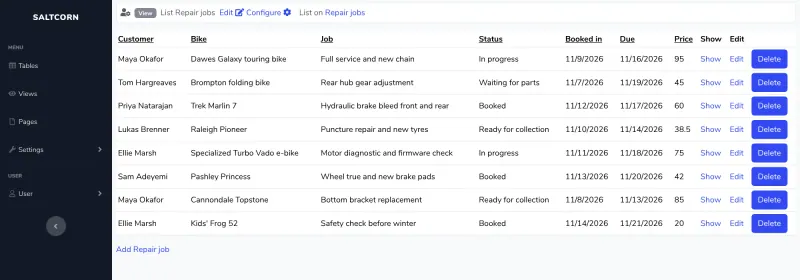
Builds the same kind of database app as Access, linked tables with forms, lists and reports made without code, but as a web app that many people use at once in their browsers, with user roles and pages that can be public. It cannot open Access files or run VBA macros, its look is plain, and calendars, kanban boards and maps come as add-on modules.

What you gain
  • Free and open source under the MIT licence, with no paid edition and no limit on users, apps or records
  • Your records stay in a real database on your own server, which you can back up and query
  • Pages can be public, so one app can serve both your staff and your customers
What is different
  • There is no importer for Access, Softr, Glide or Zoho Creator apps; bring your data in as CSV files and rebuild the screens
  • The look is plain and functional, and building takes some learning of tables, views and pages
  • Calendars, kanban boards, maps and AI features come as modules downloaded from the internet
Some setup Open source

Moving from Microsoft Access

Saltcorn cannot open an Access database, so bring the data across one table at a time. In Access, export each table to a CSV file. In Saltcorn, create a table from each CSV upload, check the field types, then add the links between tables again as key fields. Rebuild your Access forms and reports as Saltcorn views, such as edit forms, lists and detail pages, set up roles for who may see and change what, and turn off open sign-ups if the app is only for your staff. Rewrite macros as Saltcorn actions or triggers. Run both side by side for a while before you retire the Access file.

Questions

What is the best open-source alternative to Microsoft Access?

Saltcorn is the free, open-source alternative to Microsoft Access for building small business databases in the catalogue today. Builds the same kind of database app as Access, linked tables with forms, lists and reports made without code, but as a web app that many people use at once in their browsers, with user roles and pages that can be public. It cannot open Access files or run VBA macros, its look is plain, and calendars, kanban boards and maps come as add-on modules.

Can Saltcorn open my Access database?

No. Export each Access table as a CSV file and upload it to Saltcorn, which creates the table from it. Links between tables, forms and reports are rebuilt by hand.

Can several people use a Saltcorn app at the same time?

Yes. Saltcorn runs on a server and everyone uses it in a browser, with roles that control who can see and edit each table, so there is no shared database file to lock or corrupt.

Does Saltcorn work on a Mac or a phone?

Yes, in any browser. The screens you build resize for phones, unlike Access, which runs only on Windows.

Is Saltcorn really free compared with Microsoft Access?

Yes, Saltcorn is free. To run them you need Cloudgate and a server. Use hosted Cloudgate, which can also provide the server, or install Cloudgate on a server of your own for free. Cloudgate's plans and prices are at cloudgate.octabyte.io/pricing. One server can run several apps.

Do I need a developer to replace Microsoft Access?

No. Cloudgate installs Saltcorn on your server and gives it a secure web address, and you use it in your browser instead of Microsoft Access.