
PrivateGPT
Ask an AI about your own documents, on your own server.
No server needed to start: Cloudgate can provide one. What happens when you click Deploy

What is PrivateGPT?
Self-hosted PrivateGPT: ask an AI about your own documents, with citations, using a model that runs on your server so files stay private.
PrivateGPT is a free, self-hosted private AI that answers questions about your own documents with an AI model running on your server, as an alternative to NotebookLM when your files must not leave the company. Answers drawn from your documents come with citations, so you can check where they came from.
It started in 2023 as a way to chat with documents fully offline, and version 1.0 rebuilt it as a private AI layer that other tools can use too. A small accounting firm, for example, can upload its internal procedures and ask "what do we need from a new client before the first VAT return?" without sending client files to a cloud AI company.
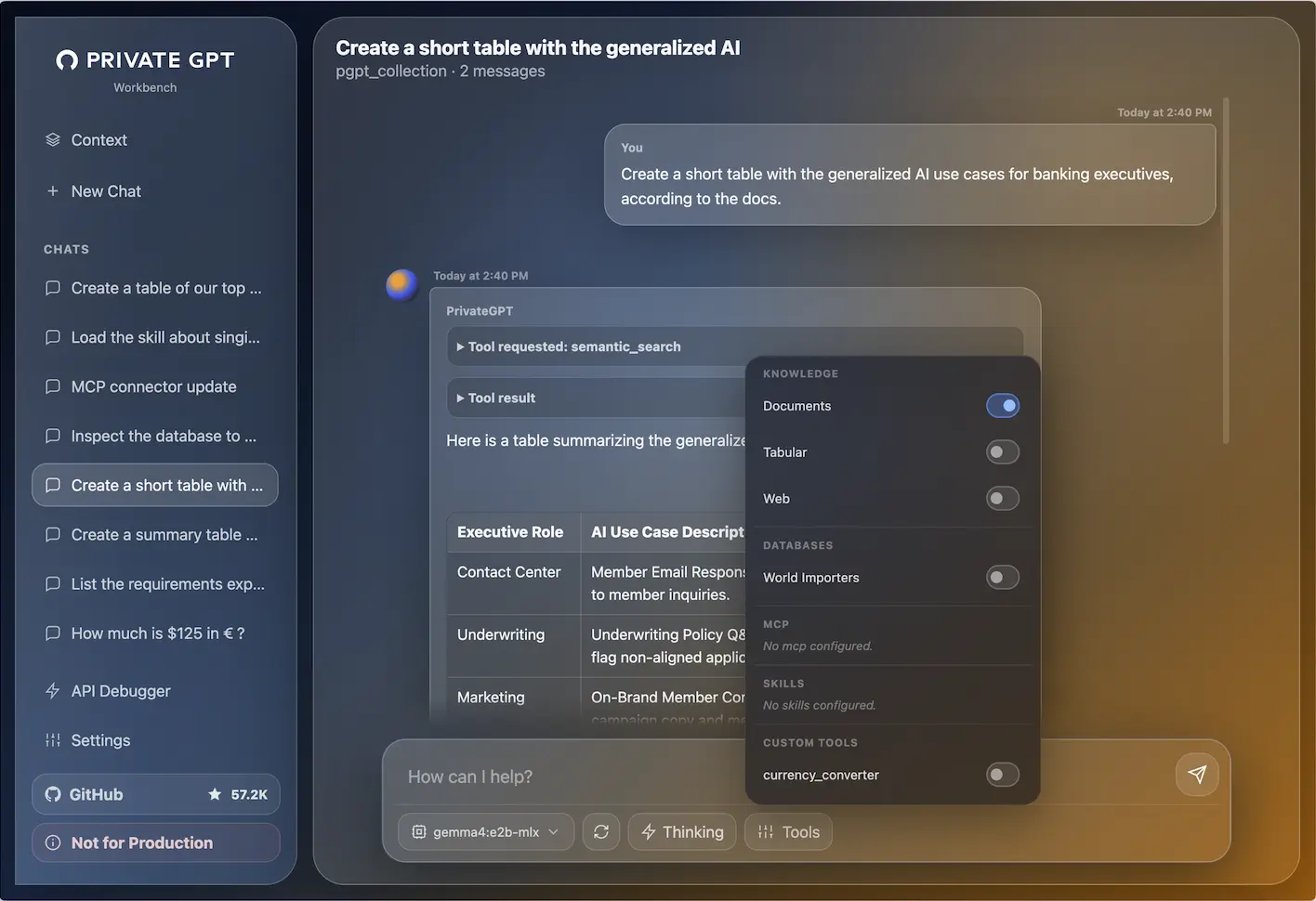
The built-in web page is a workbench for chatting, uploading documents, switching tools on and off and trying models; the project calls it a demonstrator, and its API is the main product. That API follows the Claude API, so Claude Code, Claude Desktop, n8n and other tools can use your private models through it.
Cloudgate installs PrivateGPT together with Ollama, which runs a small AI model on the server's processor, and gives it a secure web address. Answers from that small model are basic and take a moment; a bigger server can run better models.
What you can do with PrivateGPT
- Chat with a private AI Ask questions and get answers from an AI model that runs on your server, not at a cloud AI company.
- Ask about your documents Upload documents and get answers drawn from them, with citations showing where each answer came from.
- Analyse tables and databases Turn on tools to work with spreadsheet data in CSV files or to query a connected database.
- Choose tools per chat Switch documents, tables and web search on or off for each conversation.
- Plug in your other tools Its API follows the Claude API, so tools such as Claude Code, Claude Desktop, n8n and Cline can use your private models through it.
- Swap the model Use any model your AI server offers, from the small one Cloudgate starts with to larger ones on a bigger server.
Replaces NotebookLM
PrivateGPT does the same job as NotebookLM. Here is what changes when you switch.
- Your documents and questions stay on your server instead of going to a cloud AI company
- No per-user subscription; you pay only for the server
- Answers about your documents come with citations you can check
- The small model that fits a normal server gives simpler, slower answers than cloud AI services; better models need a much bigger server or a GPU
- Its web page is a workbench the project labels "Not for Production"; the API is the main product
- There are no user accounts, only one shared password, and chats are kept in each person's browser
- Setting up models and connecting other tools is a job for someone technical
What happens when you click Deploy?
You do not need a server or any technical knowledge. Four steps, and PrivateGPT is running at its own web address.
- Step 1 Click Deploy and create your account
Deploy takes you to Cloudgate. Create an account, or log in if you have one. PrivateGPT itself is free.
- Step 2 Choose a server
No server? Get one from Cloudgate: pick a size and a country, and Cloudgate gets it ready. Already have one? Connect it instead.
- Step 3 Cloudgate sets up PrivateGPT
It prepares the server, makes the passwords the app needs and starts it. There is nothing to install and nothing to write down.
- Step 4 Open your app and sign in
Your app gets a free web address to start, without https. Add your own domain, like app.yourshop.com, and Cloudgate secures it with https for you.
New to Cloudgate? See what Cloudgate is
Run Cloudgate yourself? Deploy from your own console
In your Cloudgate console, open Templates and choose PrivateGPT.
Questions
Is PrivateGPT free?
Yes, PrivateGPT is free and open source under the Apache-2.0 licence. You pay only for the server; its maker, Zylon, separately sells an enterprise platform built on it.
Does PrivateGPT send my documents to OpenAI or another AI company?
No, not as Cloudgate installs it. PrivateGPT talks to an AI model server running next to it on your server, so your documents and questions stay there.
Is PrivateGPT a good alternative to NotebookLM?
Partly. In PrivateGPT, like NotebookLM, you upload documents and get answers with citations, but everything runs on your own server. It has no notebooks, audio overviews or user accounts, and the small model a normal server can run is far less capable than Google's.
How do I sign in to PrivateGPT the first time?
PrivateGPT has no user accounts. Open its address, go to its connection settings, turn on basic authentication and enter the username admin and the password Cloudgate created for it.
What server size do I need for PrivateGPT?
At least 4 GB of memory for the small model Cloudgate starts with, which runs on the processor without a graphics card. The model in PrivateGPT's own guide is about 24 GB on its own, so better answers need a much bigger server or a graphics card.
Do I need technical skills to run PrivateGPT?
No. Click Deploy, create your Cloudgate account and choose a server, and Cloudgate sets up PrivateGPT and gives it a web address. You use it in your browser like any other online tool.
Do I need my own server for PrivateGPT?
No. When you deploy PrivateGPT, hosted Cloudgate can provide a server. If you already rent one, you can connect it instead.
Can I move my data from NotebookLM to PrivateGPT?
Most people export from NotebookLM and import into PrivateGPT. The official guides at docs.privategpt.dev walk through it.
Related apps

Ask questions of your team's documents, in a chat you can reshape.

A private NotebookLM that also writes and edits your Office files.

A self-hosted AI second brain that answers from your own notes.

Chat with your documents and see the cited passage in each answer.