
Notesnook Sync Server
Sync your encrypted Notesnook notes through a server you own.
No server needed to start: Cloudgate can provide one. What happens when you click Deploy
What is Notesnook Sync Server?
Self-hosted Notesnook: sync the end-to-end encrypted Notesnook apps on your phone, computer and the web through your own server instead of Notesnook's.
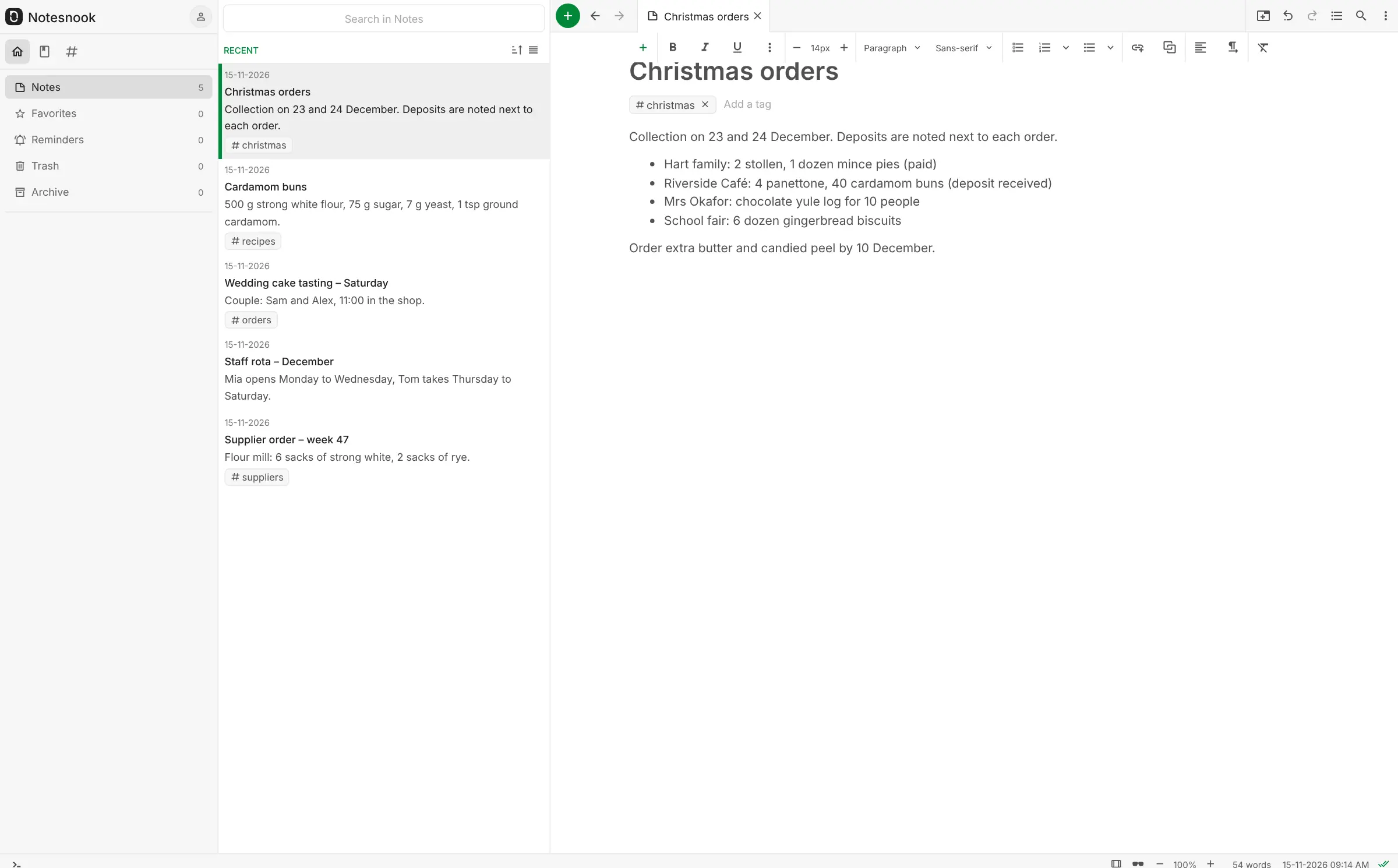
Self-hosted Notesnook lets the end-to-end encrypted Notesnook note apps sync through your own server instead of Notesnook's, much like Evernote or Google Keep but with your notes kept private and under your control. Every note is encrypted on your phone or computer before it is sent, so the server only stores data it cannot read.
You keep using Notesnook's own apps for iPhone, Android, Windows, macOS, Linux and the web. Write rich notes with tables, checklists and files, sort them into notebooks and tags, set reminders, lock private notes in a vault, or publish a note as a web page. A freelance journalist, for example, could keep interview notes, sources' contact details and article drafts in Notesnook on their phone and laptop, synced through their own server. Coming from Evernote, the importer brings your notebooks, tags and attachments across.
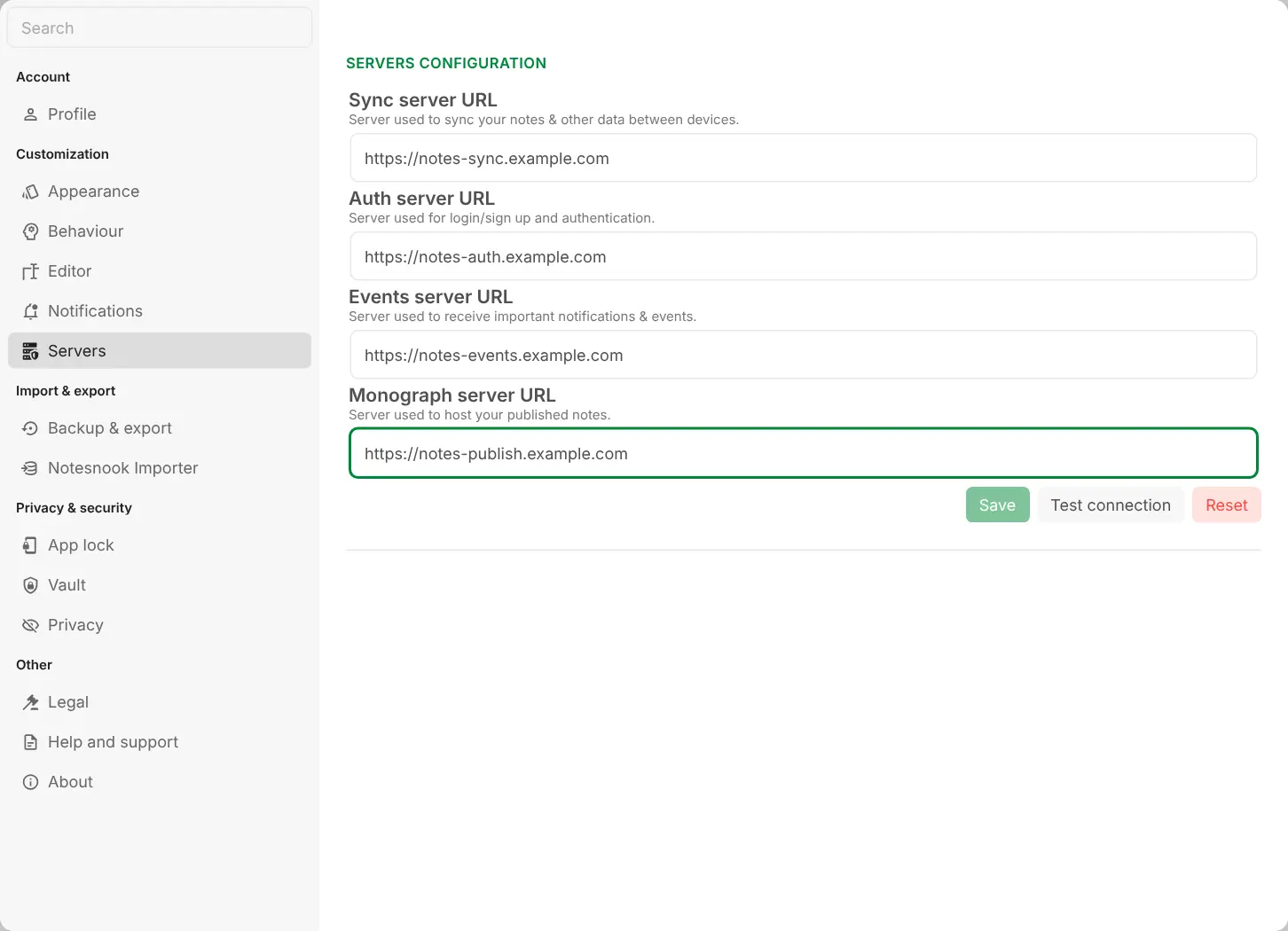
Cloudgate installs the Notesnook sync server, with its database and file storage, on a server Cloudgate provides or one you connect, and gives it secure web addresses. There is no admin page: in each app you enter four of those addresses under Settings, Customization, Servers, test the connection, then sign up. The server is still a beta that Notesnook doesn't support directly, so keep regular backups from the app.
What you can do with Notesnook Sync Server
- Keep notes private Every note is encrypted on your device before it syncs, so your server stores only scrambled data.
- Use it on every device The same Notesnook apps for iPhone, Android, Windows, macOS, Linux and the web sync through your server.
- Write rich notes Add tables, checklists, code, maths, images and files, with a history of earlier versions.
- Organise with notebooks and tags Sort notes into notebooks, add tags and colours, pin favourites and link notes to each other.
- Lock your most private notes Put notes in a vault with a second password, or lock the whole app with a PIN or fingerprint.
- Set reminders Reminders go off on every device you use.
- Publish a note Turn a note into a web page to share, with an optional password.
- Bring your old notes Import from Evernote, Google Keep, Simplenote, Joplin, Obsidian and more in the web or desktop app.
Replaces Evernote and Google Keep
Notesnook Sync Server does the same job as Evernote and Google Keep. Here is what changes when you switch.
- Notes are end-to-end encrypted, so not even the server can read them
- Your notes are stored on your own server, not on a notes company's
- Accounts on your server aren't held to Notesnook's plan limits
- Evernote notebooks, tags and attachments come across with the built-in importer
- The sync server is still a beta, and Notesnook offers no support for running it
- Each app needs your four server addresses entered once, while logged out
- If you forget your password and lose your recovery key, nobody can get your notes back
- Notesnook doesn't claim to search text inside scanned images the way Evernote does
What happens when you click Deploy?
You do not need a server or any technical knowledge. Four steps, and Notesnook Sync Server is running at its own web address.
- Step 1 Click Deploy and create your account
Deploy takes you to Cloudgate. Create an account, or log in if you have one. Notesnook Sync Server itself is free.
- Step 2 Choose a server
No server? Get one from Cloudgate: pick a size and a country, and Cloudgate gets it ready. Already have one? Connect it instead.
- Step 3 Cloudgate sets up Notesnook Sync Server
It prepares the server, makes the passwords the app needs and starts it. There is nothing to install and nothing to write down.
- Step 4 Open your app and sign in
Your app gets a free web address to start, without https. Add your own domain, like app.yourshop.com, and Cloudgate secures it with https for you.
New to Cloudgate? See what Cloudgate is
Run Cloudgate yourself? Deploy from your own console
In your Cloudgate console, open Templates and choose Notesnook Sync Server.
Questions
How do I connect the Notesnook apps to my own server?
Open a Notesnook app, log out if you are signed in, and go to Settings, then Customization, then Servers. Enter your four addresses from Cloudgate (sync, auth, events and monograph), press Test connection, then Save, and create your account with Sign up. Do this once in each app you use: phone, computer or the web app.
Is self-hosted Notesnook free?
Yes. The Notesnook sync server and the Notesnook apps are free, open-source software, and you pay only for your server. Accounts on your own server aren't limited by Notesnook's paid plans.
Is Notesnook a good alternative to Evernote?
Yes, for written notes. Notesnook has notebooks, tags, reminders, a web clipper and apps for phones and computers, and it encrypts every note on your device. It does not claim to read text in scanned images, so a document archive suits piles of scanned paperwork better.
Can I import my notes from Evernote?
Yes. Export each notebook from Evernote's desktop app as an ENEX file, then use Notesnook's importer in the web or desktop app; notebooks, tags, attachments and web clips come across, but reminders do not.
Can I move my existing Notesnook account to my own server?
No, not directly. An account on Notesnook's servers does not exist on yours, so back up your notes in the app, log out, connect to your server, sign up again and restore the backup.
Can the person who runs the Notesnook server read my notes?
No. Notesnook encrypts your notes on your device before they are sent, so the sync server only stores data it cannot open. That also means nobody can recover your notes if you lose both your password and your recovery key.
Is the Notesnook sync server ready for everyday use?
The Notesnook sync server works, but every release is still called a beta, and Notesnook says self-hosting comes without support. Keep regular backups from the app, and look to Notesnook's community for help.
Do I need technical skills to run Notesnook Sync Server?
No. Click Deploy, create your Cloudgate account and choose a server, and Cloudgate sets up Notesnook Sync Server and gives it a web address. You use it in your browser like any other online tool.
Related apps

Catch quick thoughts and keep notes, with AI search if you want it.

A simple self-hosted notepad that saves as you type, behind a PIN.

Notes, checklists and task boards in plain files.

Jot down quick notes and checklists on a private timeline.