
Jotty
Notes, checklists and task boards in plain files.
No server needed to start: Cloudgate can provide one. What happens when you click Deploy




What is Jotty?
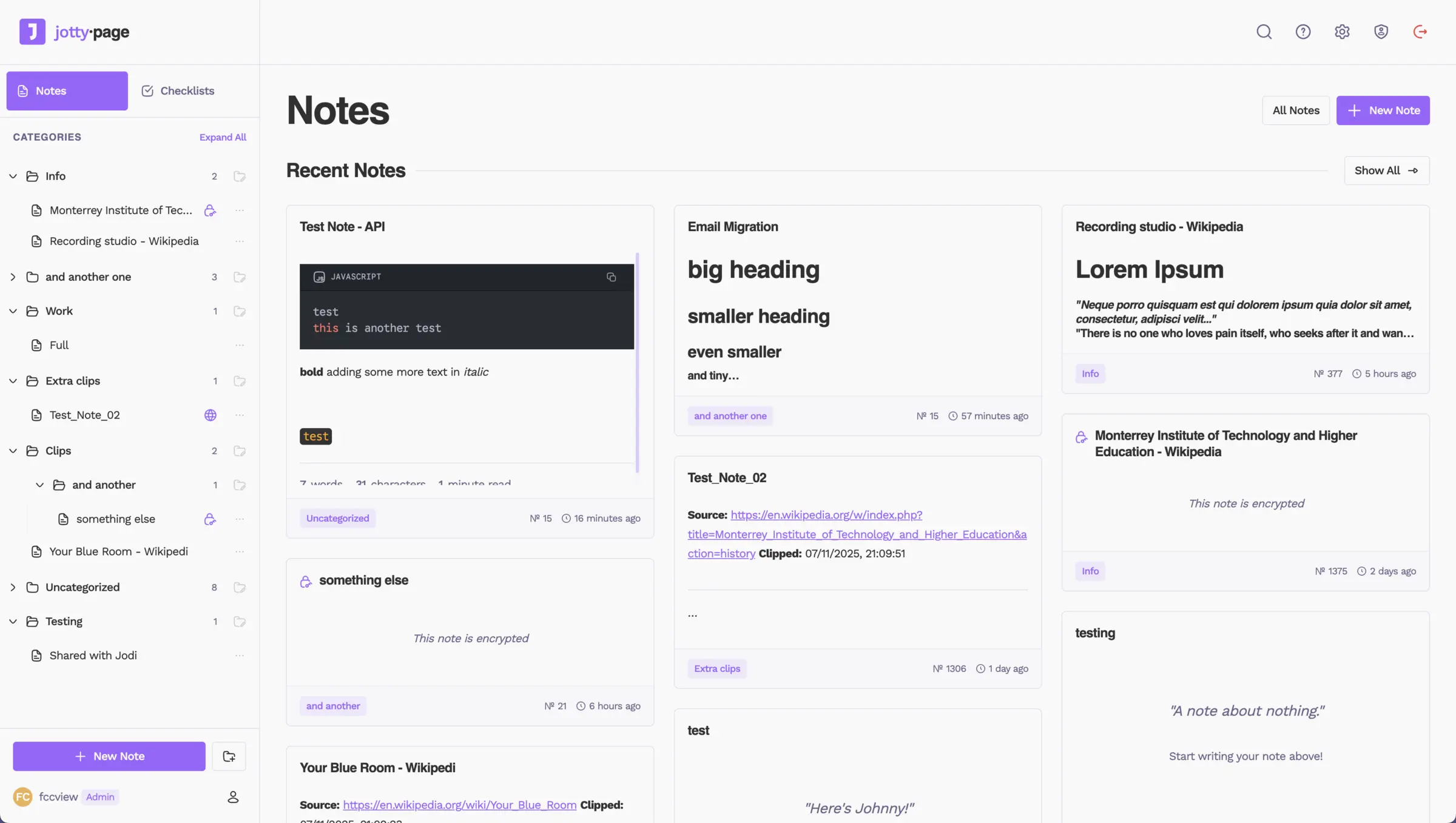
Jotty (formerly rwMarkable) is a self-hosted app for notes, checklists and Kanban boards, kept as Markdown files on your server, like Google Keep.
Jotty is a free, open-source, self-hosted app for notes and checklists, and an alternative to Google Keep and simple Todoist lists. Formerly called rwMarkable, it keeps your notes, checklists and task boards on your own server as plain Markdown files, with no database to look after.
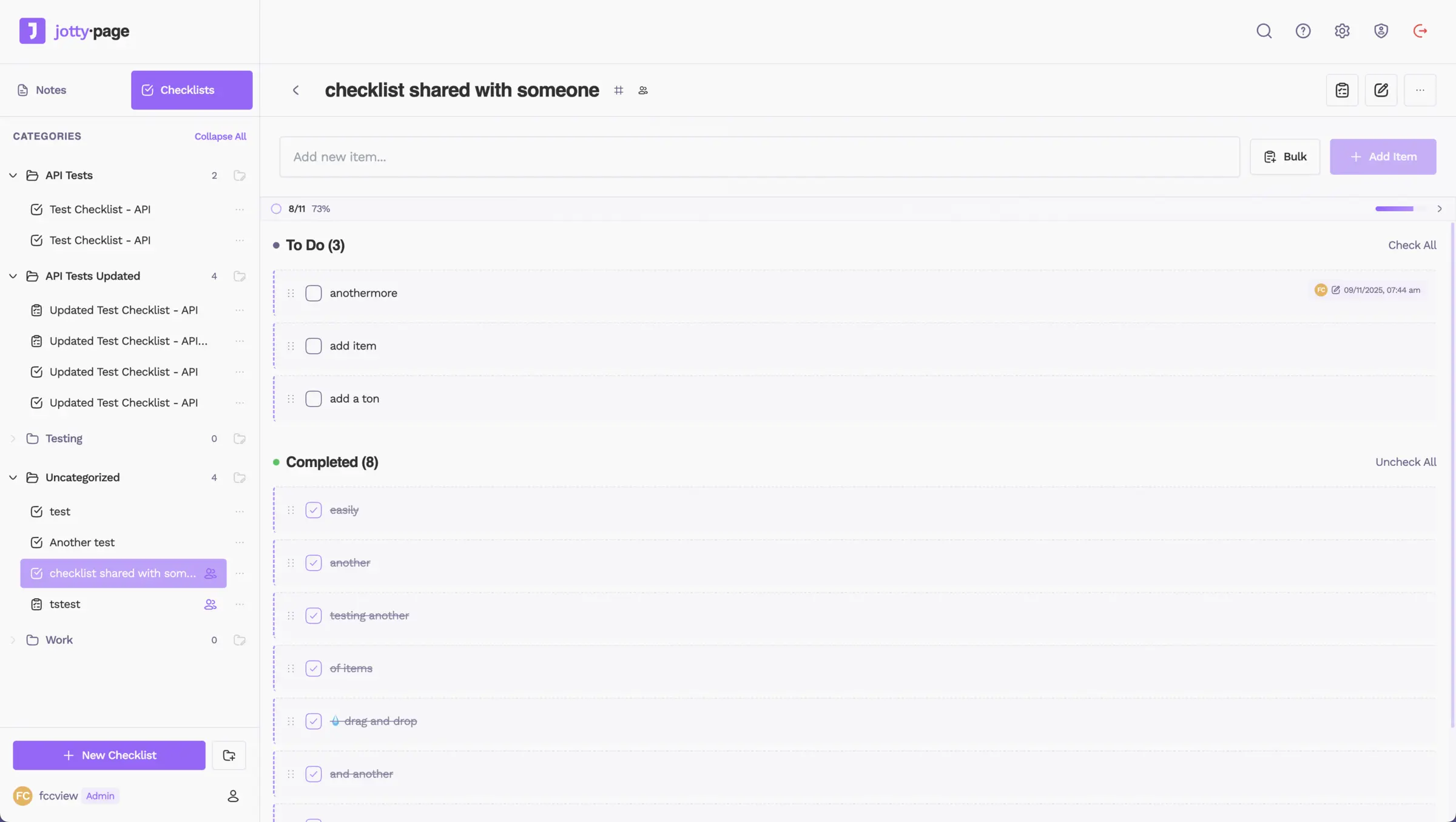
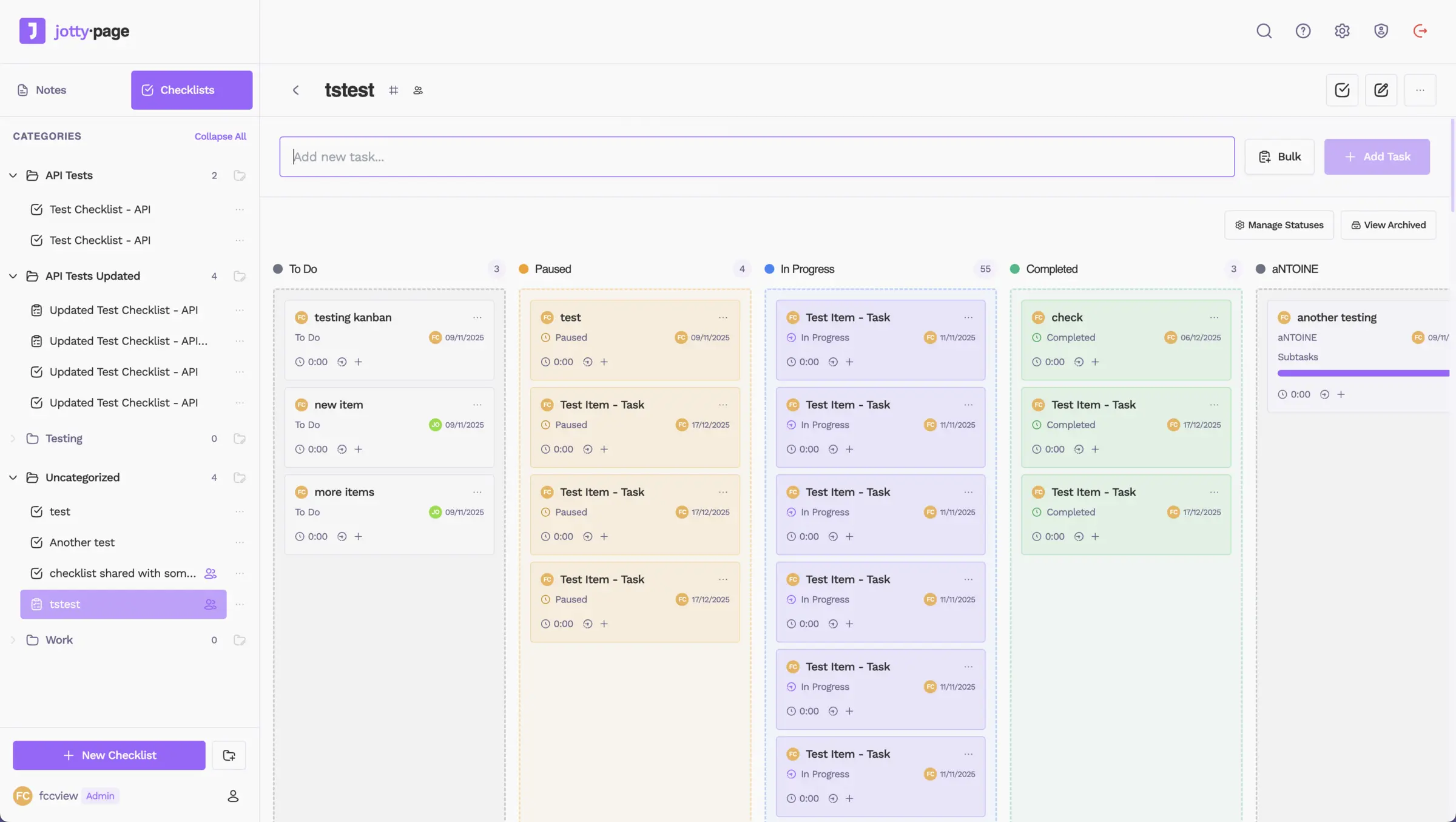
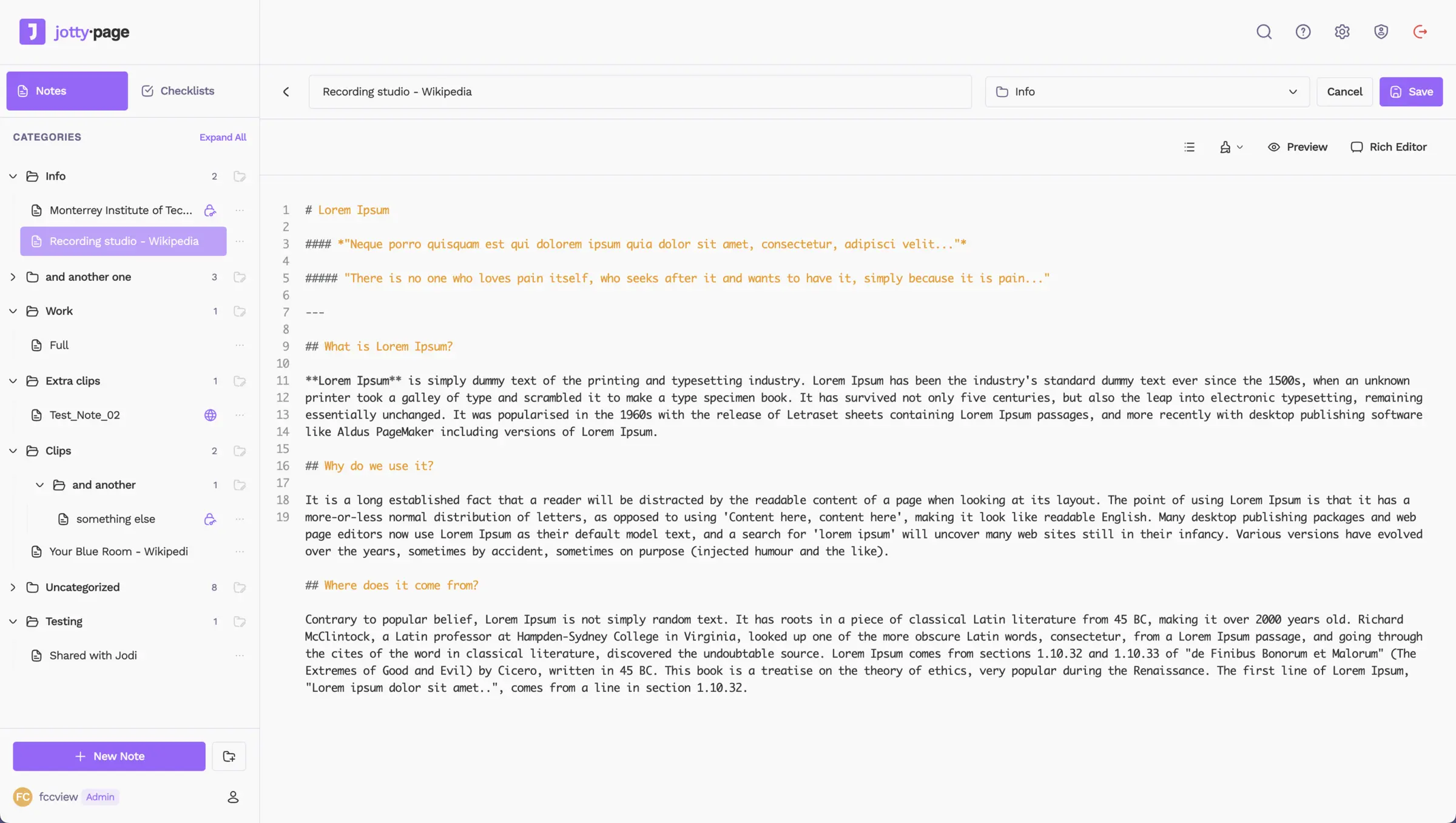
Notes open in a rich text editor or in plain Markdown, and you can link them with [[wikilinks]] the way Obsidian does. Checklists have categories, drag and drop and a progress bar, and task projects run as Kanban boards with their own columns and a timer on each task. A small cleaning company, for example, could keep a checklist for each client's home, share it with the cleaners who go there, and run the week's jobs on one board.
Each person gets their own account, and you can share a note, a list or a whole folder with set permissions, or send a public link. Private notes can be encrypted. Jotty works in any browser and installs on a phone's home screen like an app, though there is no app-store app.
Cloudgate installs Jotty on a server Cloudgate provides or one you connect and gives it a secure web address. The first person to open it creates the admin account.
What you can do with Jotty
- Tick off checklists Make lists with categories, drag items into order, add many at once and watch a progress bar fill up.
- Run projects on a board Make a task project a Kanban board with your own columns, subtasks and a timer on each task.
- Write notes your way Use a rich text editor or switch to plain Markdown, with headings, tables and code blocks.
- Link notes together Connect notes and checklists with [[wikilinks]] or @mentions, see what links back, and explore it all on a map.
- Share with your people Share a note, a checklist or a whole folder with others on your server and choose who can edit, or send a public link.
- Lock private notes Encrypt any note with a passphrase or your own PGP key, so it stays unreadable on the server until you unlock it.
- Keep your files readable Every note and checklist is saved as a Markdown file in one folder, so your writing is never locked inside the app.
- Sign in the way you like Use Jotty's own accounts with two-step sign-in, or single sign-on through your company login or directory.
Replaces Google Keep, Todoist and Obsidian
Jotty does the same job as Google Keep, Todoist and Obsidian. Here is what changes when you switch.
- Your notes and lists stay on your own server, not in a Google or Todoist account
- Notes, checklists and Kanban boards live in one app, sorted into folders
- Notes are plain Markdown files you can open and back up without Jotty
- Encryption and sharing with set permissions are built in and free
- There is no app-store phone app; you install Jotty from your phone's browser
- There are no due-date reminders, recurring tasks or calendar view
- There is no importer for Google Keep or Todoist
- You can't edit offline; pages you opened before can only be read
What happens when you click Deploy?
You do not need a server or any technical knowledge. Four steps, and Jotty is running at its own web address.
- Step 1 Click Deploy and create your account
Deploy takes you to Cloudgate. Create an account, or log in if you have one. Jotty itself is free.
- Step 2 Choose a server
No server? Get one from Cloudgate: pick a size and a country, and Cloudgate gets it ready. Already have one? Connect it instead.
- Step 3 Cloudgate sets up Jotty
It prepares the server, makes the passwords the app needs and starts it. There is nothing to install and nothing to write down.
- Step 4 Open your app and sign in
Your app gets a free web address to start, without https. Add your own domain, like app.yourshop.com, and Cloudgate secures it with https for you.
New to Cloudgate? See what Cloudgate is
Run Cloudgate yourself? Deploy from your own console
In your Cloudgate console, open Templates and choose Jotty.
Questions
Is Jotty free?
Yes. Jotty is free and open source under the AGPL-3.0 licence, with no paid edition and no features held back. You pay only for your server.
Is Jotty the same app as rwMarkable?
Yes. Jotty, also written jotty·page, is the new name of rwMarkable, the self-hosted checklists and notes app by the same developer.
Is Jotty a good alternative to Google Keep?
Yes, if you want notes and checklists on your own server. Jotty adds folders, Kanban boards, linked notes, encryption and sharing between accounts. Google Keep has phone apps from the app stores, reminders and offline editing, which Jotty does not.
How do I sign in to Jotty the first time?
The first person to open Jotty's web address creates the admin account, so do it right after setup. There is no default password, and the admin can then add accounts for family or colleagues.
Is there a Jotty phone app?
No, there is no app-store app, but Jotty is designed for phones first and installs from the browser to your home screen like an app. Pages you have opened can be read offline; changes need a connection.
Can I bring my Obsidian or Google Keep notes into Jotty?
Partly. Obsidian notes are Markdown files, so they can be copied into Jotty's notes folder on the server and their wikilinks keep working. There is no importer for Google Keep or Todoist.
Should I choose Jotty or Memos?
Choose Jotty for checklists, Kanban boards and notes sorted into folders that you share with others. Memos suits quick notes on a timeline you look back through by day.
Do I need technical skills to run Jotty?
No. Click Deploy, create your Cloudgate account and choose a server, and Cloudgate sets up Jotty and gives it a web address. You use it in your browser like any other online tool.
Do I need my own server for Jotty?
No. When you deploy Jotty, hosted Cloudgate can provide a server. If you already rent one, you can connect it instead.
Can I move my data from Google Keep to Jotty?
Most people export from Google Keep and import into Jotty. The official guides at github.com walk through it.
Related apps

Catch quick thoughts and keep notes, with AI search if you want it.

A simple self-hosted notepad that saves as you type, behind a PIN.

Jot down quick notes and checklists on a private timeline.

Markdown notes you find by search and tags, not folders.