Blinko
Catch quick thoughts and keep notes, with AI search if you want it.
No server needed to start: Cloudgate can provide one. What happens when you click Deploy

What is Blinko?
Blinko is a self-hosted notes app for quick thoughts and longer Markdown notes, with optional AI search and chat over your own notes.
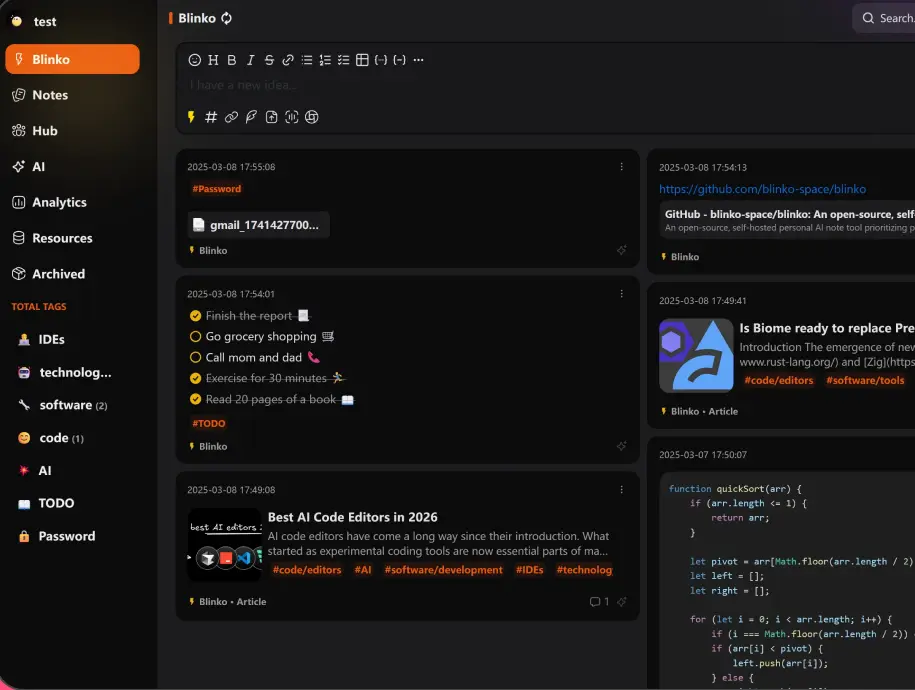
Blinko is an open-source, self-hosted note app for catching quick thoughts and keeping longer notes, with optional AI that searches your own notes, an alternative to Mem, flomo and Google Keep. You type into one box at the top of a timeline, and each thought becomes a card you can tag, tick off or turn into a lasting note.
Short "blinkos" are for things you only need for a while, and they can archive themselves on a schedule; notes are for what you want to keep. With an AI key from a provider you choose, you can ask questions such as "what did we decide about the spring menu?" and get an answer drawn from your notes. A café owner, for example, could jot supplier calls, menu ideas and to-dos from a phone during the day, then ask Blinko in the evening which suppliers mentioned new prices.
Blinko has an Android app and desktop apps for Windows, macOS and Linux that connect to your own server, and it works in any browser. It imports Markdown files and Memos notes, and can share a note by link. Cloudgate installs Blinko on your server, together with the database it needs, and gives it a secure web address; your notes stay with you.
What you can do with Blinko
- Write a thought in seconds Type into the box at the top of your timeline in plain text or Markdown, and it is saved as a card.
- Keep quick thoughts and lasting notes apart Short "blinkos" can archive themselves on a schedule, while longer notes stay as your knowledge base.
- Organise with tags and to-do lists Add nested tags such as #work/clients, tick off checklists, attach files and record voice notes.
- Ask your notes a question Optional AI search and chat answer in plain language from your own notes, and can suggest tags and help you write.
- Look back over your notes A daily review brings back older notes, and a heat map shows how much you wrote each day.
- Share a note by link Send a read-only link with an expiry date and an optional password, or make a note public.
- Bring your notes with you Import Markdown files or a Memos database, and export or back up your notes on a schedule.
Replaces Mem, flomo and Google Keep
Blinko does the same job as Mem, flomo and Google Keep. Here is what changes when you switch.
- Your notes stay on your own server, not in someone else's cloud
- AI search over your notes with the AI provider you choose, or none
- Separate accounts for each person, with two-step sign-in
- Android and desktop apps that connect to your own Blinko
- The AI features need an API key from an AI provider, which may charge for use
- There is no iPhone app; on an iPhone you use Blinko in the browser
- There is no importer for Mem, flomo or Google Keep notes
- You look after updates and backups yourself
What happens when you click Deploy?
You do not need a server or any technical knowledge. Four steps, and Blinko is running at its own web address.
- Step 1 Click Deploy and create your account
Deploy takes you to Cloudgate. Create an account, or log in if you have one. Blinko itself is free.
- Step 2 Choose a server
No server? Get one from Cloudgate: pick a size and a country, and Cloudgate gets it ready. Already have one? Connect it instead.
- Step 3 Cloudgate sets up Blinko
It prepares the server, makes the passwords the app needs and starts it. There is nothing to install and nothing to write down.
- Step 4 Open your app and sign in
Your app gets a free web address to start, without https. Add your own domain, like app.yourshop.com, and Cloudgate secures it with https for you.
New to Cloudgate? See what Cloudgate is
Run Cloudgate yourself? Deploy from your own console
In your Cloudgate console, open Templates and choose Blinko.
Questions
Is Blinko free?
Yes. Blinko is free and open source under the GPL-3.0 licence, and the self-hosted edition has no paid features. You pay only for your server, plus your AI provider if you turn on the AI features.
Is Blinko a good alternative to Mem?
Yes, if you want Mem-style AI search and chat over your notes on your own server. Blinko answers questions in plain language from your notes using the AI provider you choose. Mem is a hosted service with its AI built in, while Blinko needs your own API key for the AI parts.
Does Blinko need an AI key?
No. Blinko works as a plain notes app without one. To use AI search, chat, tags and writing help, add an API key in the settings for a provider such as OpenAI, Anthropic, Gemini, DeepSeek or OpenRouter, or point it at an Ollama model you run yourself.
How do I sign in to Blinko the first time?
Open your Blinko address and register; the first account becomes the admin. After that, new sign-ups are closed, so the admin creates accounts for other people or turns on registration in the settings.
Is there a Blinko phone app?
Yes, for Android. Blinko has an Android app and desktop apps for Windows, macOS and Linux that sign in to your own Blinko address. There is no iPhone app, but Blinko works in a phone's browser.
Can I import my notes into Blinko?
Yes. Blinko imports Markdown files (one file or a zip of them) and a Memos database. There is no direct importer for Mem, flomo or Google Keep.
Should I choose Blinko or Memos?
Choose Blinko if you want AI search and chat over your notes, or Android and desktop apps. Choose Memos for a lighter, simpler notes timeline with no AI.
Do I need technical skills to run Blinko?
No. Click Deploy, create your Cloudgate account and choose a server, and Cloudgate sets up Blinko and gives it a web address. You use it in your browser like any other online tool.
Do I need my own server for Blinko?
No. When you deploy Blinko, hosted Cloudgate can provide a server. If you already rent one, you can connect it instead.
Related apps

Jot down quick notes and checklists on a private timeline.
A simple self-hosted notepad that saves as you type, behind a PIN.

Notes, checklists and task boards in plain files.

Sync your encrypted Notesnook notes through a server you own.