
Gramps Web
A self-hosted family tree you build and share with your relatives.
No server needed to start: Cloudgate can provide one. What happens when you click Deploy

What is Gramps Web?
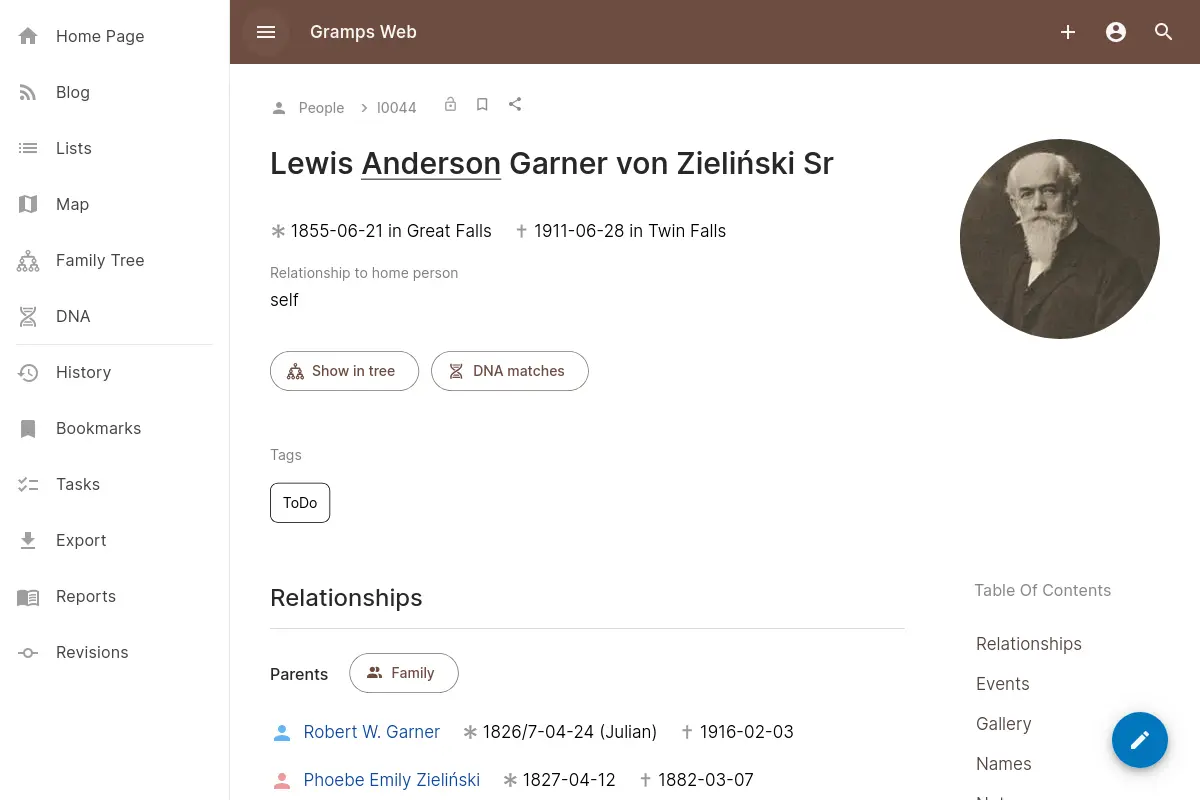
Gramps Web is a self-hosted family tree app: build your genealogy with relatives, with photos, sources, charts and maps, on your own server.
Gramps Web is a free, open-source family tree app you self-host, so you and your relatives can build and browse your genealogy together in the browser instead of on Ancestry or MyHeritage. It is the web version of Gramps, the long-standing open-source genealogy program, and keeps people, families, events, places, sources and photos on your own server.
You can explore the tree as ancestor, descendant or fan charts, add relatives right in the chart, see where the family lived on a map and follow events on a timeline. Relatives get their own sign-in, with roles from viewing only to editing, and records marked private stay hidden. Every change is recorded and can be undone. A family could, for example, gather grandmother's photos and stories in one tree and invite cousins abroad to add what they know.
If your tree is on Ancestry or MyHeritage, export it as a GEDCOM file and import it; files from Gramps Desktop and other genealogy programs work too, and the Gramps Web Sync add-on keeps Gramps Desktop in step. On phones it runs in the browser and can be added to the home screen. The interface is available in dozens of languages.
Cloudgate installs Gramps Web on a server Cloudgate provides or one you connect, with a secure web address. The first person to open it creates the owner account.
What you can do with Gramps Web
- See your family as a chart Explore ancestor, descendant, hourglass and fan charts, and add parents, children or a spouse right from the chart.
- Build the tree together Invite relatives to view or edit, each with their own sign-in, and see every change in a history you can undo.
- Keep some details private Mark living people or sensitive records as private, and only the relatives you allow can see them.
- Add photos and documents Upload old photos and scans, and tag the people in a photo with help from automatic face detection.
- Follow lives on a map and timeline See where your ancestors lived on a map, with historical maps, and every event on a timeline you can zoom.
- Write up your research Share family stories as blog posts, keep a list of research tasks, and print reports as PDF.
- Keep your DNA matches Upload DNA match data from a testing company and explore it in a chromosome browser on your own server.
Replaces Ancestry and MyHeritage
Gramps Web does the same job as Ancestry and MyHeritage. Here is what changes when you switch.
- No subscription to keep your tree, photos and notes online
- Your family's data stays on your own server, not on a genealogy company's
- Download everything, including photos and user accounts, at any time
- Works with Gramps Desktop, so you can keep using it on your computer
- No historical record collections, record hints or DNA tests; you bring your own research
- Photos don't travel in a GEDCOM file, so you upload them separately
- The tree is for signed-in relatives, not a public family website
- Gramps uses its own way of organizing people, families and events, which takes a little learning
What happens when you click Deploy?
You do not need a server or any technical knowledge. Four steps, and Gramps Web is running at its own web address.
- Step 1 Click Deploy and create your account
Deploy takes you to Cloudgate. Create an account, or log in if you have one. Gramps Web itself is free.
- Step 2 Choose a server
No server? Get one from Cloudgate: pick a size and a country, and Cloudgate gets it ready. Already have one? Connect it instead.
- Step 3 Cloudgate sets up Gramps Web
It prepares the server, makes the passwords the app needs and starts it. There is nothing to install and nothing to write down.
- Step 4 Open your app and sign in
Your app gets a free web address to start, without https. Add your own domain, like app.yourshop.com, and Cloudgate secures it with https for you.
New to Cloudgate? See what Cloudgate is
Run Cloudgate yourself? Deploy from your own console
In your Cloudgate console, open Templates and choose Gramps Web.
Questions
Is Gramps Web free?
Yes. Gramps Web is free, open-source software under the AGPL licence, with no paid edition, so you pay only for your server.
Is Gramps Web a good alternative to Ancestry or MyHeritage?
Yes, for keeping and sharing your family tree. Gramps Web holds your tree, photos, sources and DNA match data and lets relatives work on it with you. It does not include the historical record collections, record hints or DNA tests those sites sell, though a person's page can open a ready-made search on FamilySearch or Ancestry.
Can I import my family tree from Ancestry or MyHeritage into Gramps Web?
Yes. Export your tree as a GEDCOM file from Ancestry or MyHeritage and import it in Gramps Web, which shows how many people and families it found before adding them. Photos are not inside a GEDCOM file, so upload them afterwards.
Can my relatives see and edit the family tree in Gramps Web?
Yes. In Gramps Web, the owner invites relatives, or approves their sign-ups, and gives each a role, from viewing only to editing. Records marked private are hidden from anyone not allowed to see them.
Does Gramps Web work with Gramps Desktop?
Yes. Gramps Web uses the same family tree data as Gramps Desktop, and the free Gramps Web Sync add-on keeps the tree on your computer and the one on your server in step.
Is there a Gramps Web phone app?
No, there is no app-store app, but Gramps Web works in the browser on any phone, and you can add it to your home screen on Android or iPhone to open it like an app.
Who is the admin of Gramps Web?
The first person to open Gramps Web's address creates the owner account, so do this right after setup. The owner manages users and imports the family tree.
Do I need technical skills to run Gramps Web?
No. Click Deploy, create your Cloudgate account and choose a server, and Cloudgate sets up Gramps Web and gives it a web address. You use it in your browser like any other online tool.
Do I need my own server for Gramps Web?
No. When you deploy Gramps Web, hosted Cloudgate can provide a server. If you already rent one, you can connect it instead.
Related apps

A family tree website you build with relatives, public or private.

A self-hosted travel tracker, trip planner and world map in one.

A self-hosted flight tracker for every flight you take, on one map.

A self-hosted baby tracker the whole family can share.