
AirTrail
A self-hosted flight tracker for every flight you take, on one map.
No server needed to start: Cloudgate can provide one. What happens when you click Deploy




What is AirTrail?
AirTrail is a self-hosted flight tracker: log every flight you take, see them on a world map and get statistics. Imports from Flighty and App in the Air.
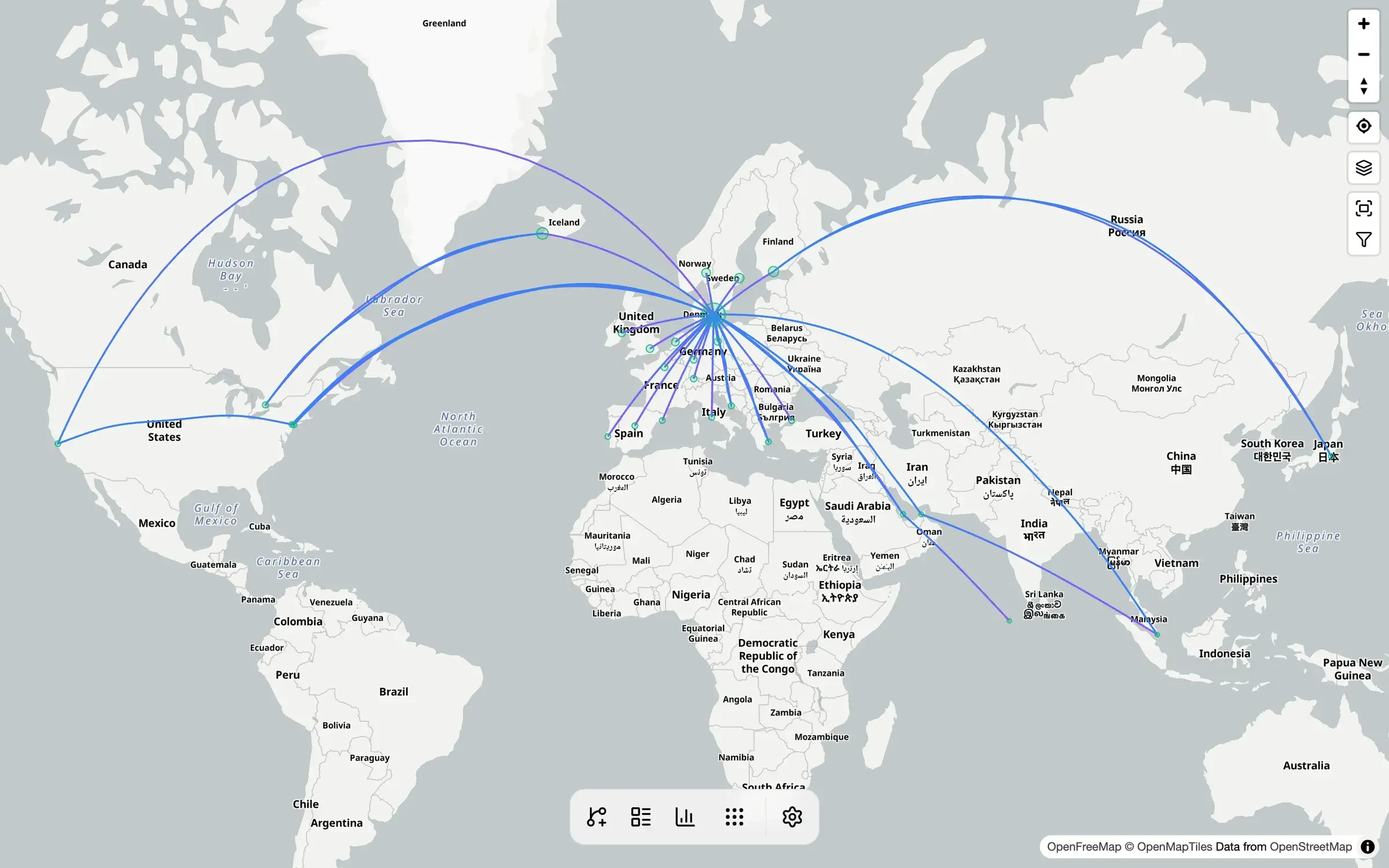
AirTrail is a free, open-source, self-hosted flight tracker: it keeps a log of every flight you take, draws your flights on a world map and turns them into statistics, much like Flighty's Passport or the flight diary App in the Air offered before it closed. It runs on your own server, so your history cannot disappear with an app.
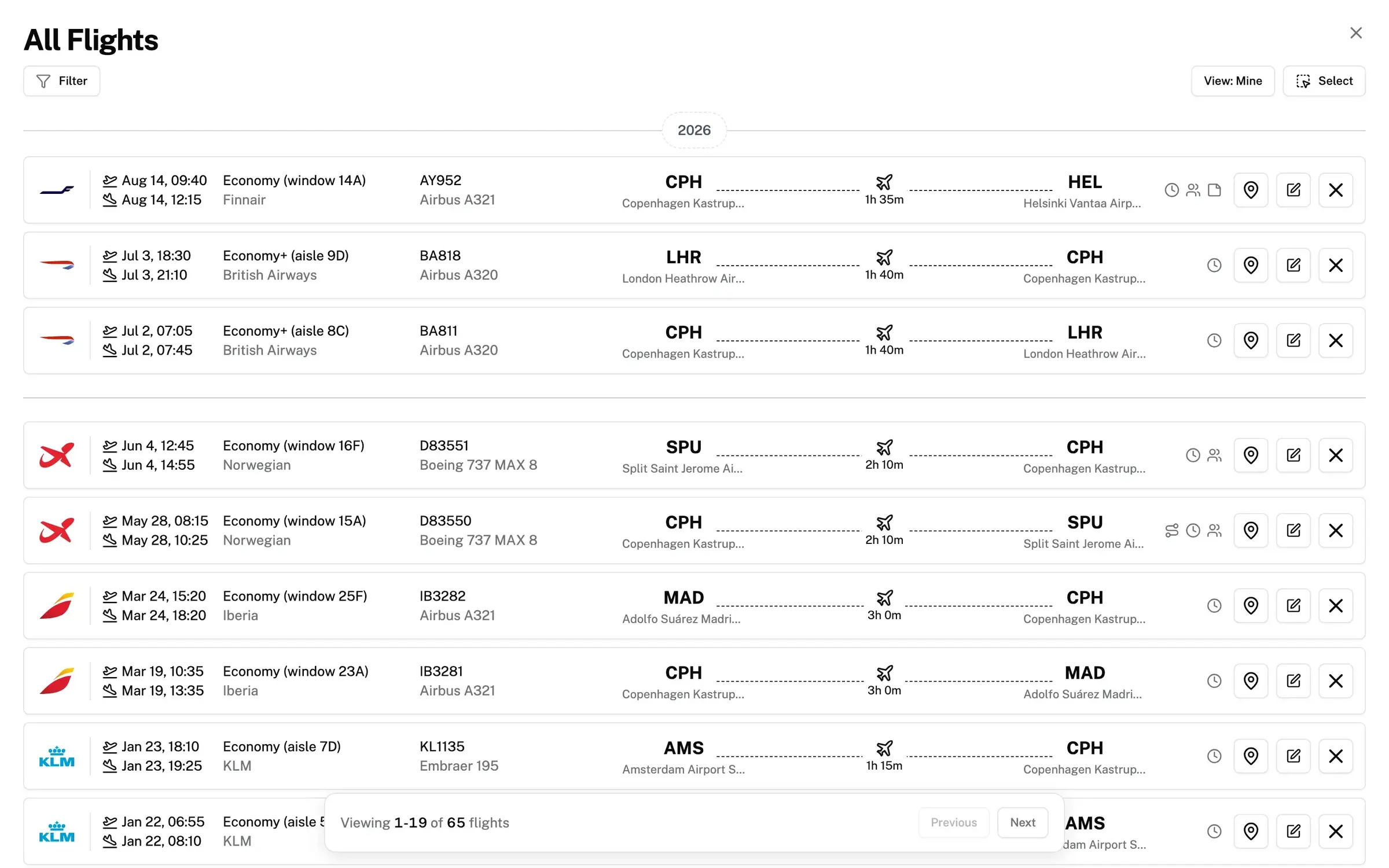
Adding a flight takes a few seconds. Type the flight number and AirTrail fills in the airports, airline and aircraft, or enter just the route and the date. A consultant who flies to clients every month, for example, could log each trip with its seat and reason and see at the end of the year how many flights, kilometres and hours in the air the work took.
You can import your history from Flighty, App in the Air, MyFlightradar24, TripIt, OpenFlights and several other apps, and export it again as a spreadsheet file or a full backup. Each family member gets a private log, and a public link shows friends your map.
Cloudgate installs AirTrail on a server Cloudgate provides or one you connect, together with its database, and gives it a secure web address. The first person to open that address creates the owner account. It works in any browser, on a computer or a phone.
What you can do with AirTrail
- See every flight on a world map Each flight you log is drawn as a line between its airports, so your travels build up on one map.
- Keep a complete flight history A list of every flight with its date, times, airline, aircraft, flight number, seat and class.
- Add a flight in seconds Type a flight number to fill in the details, or enter just the airports and the date, even if you only remember the year.
- Bring your history with you Import flights from Flighty, App in the Air, MyFlightradar24, TripIt, OpenFlights and other apps.
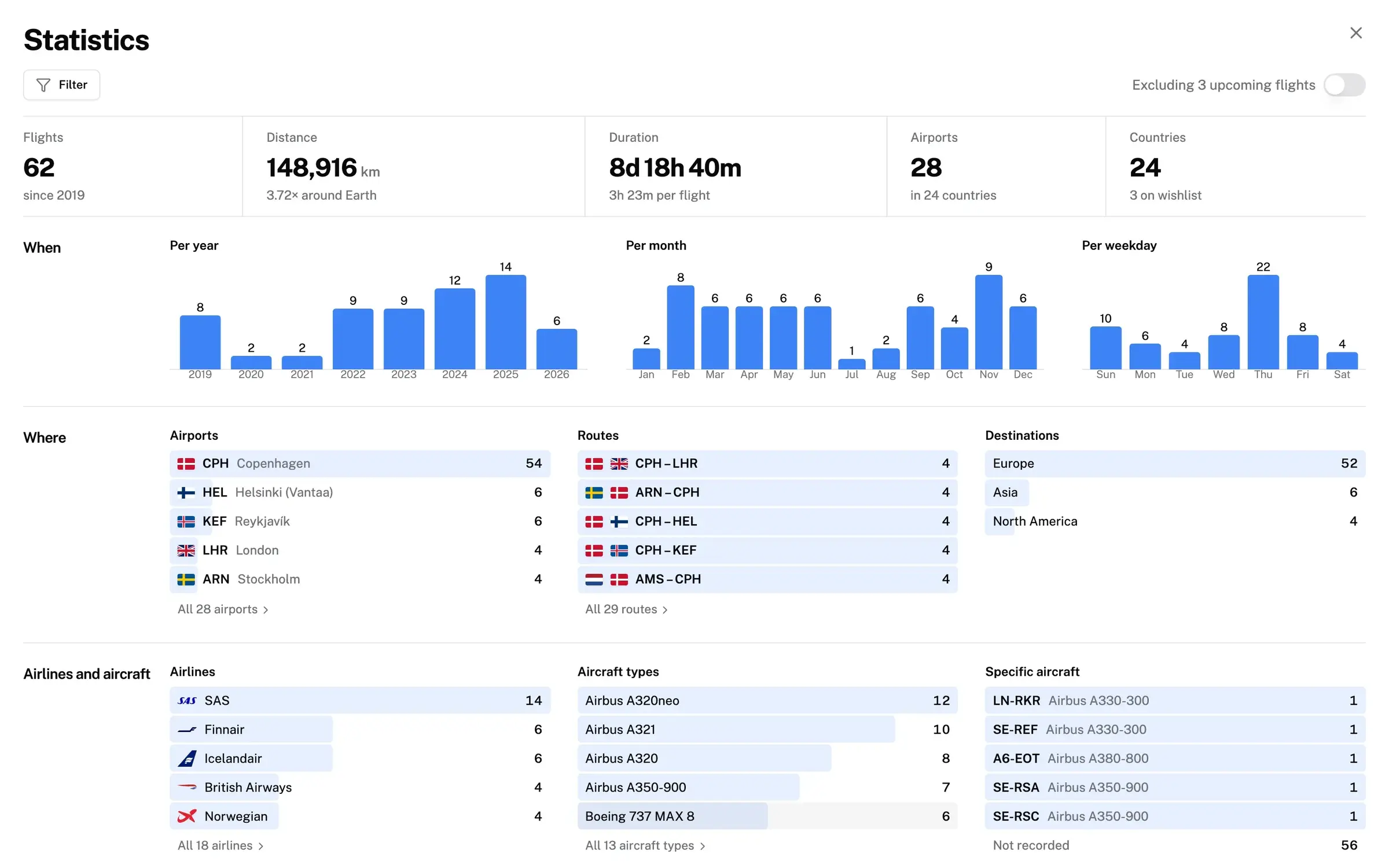
- Count your miles and hours Statistics show your distance, time in the air, airports, countries, routes, airlines and aircraft, year by year.
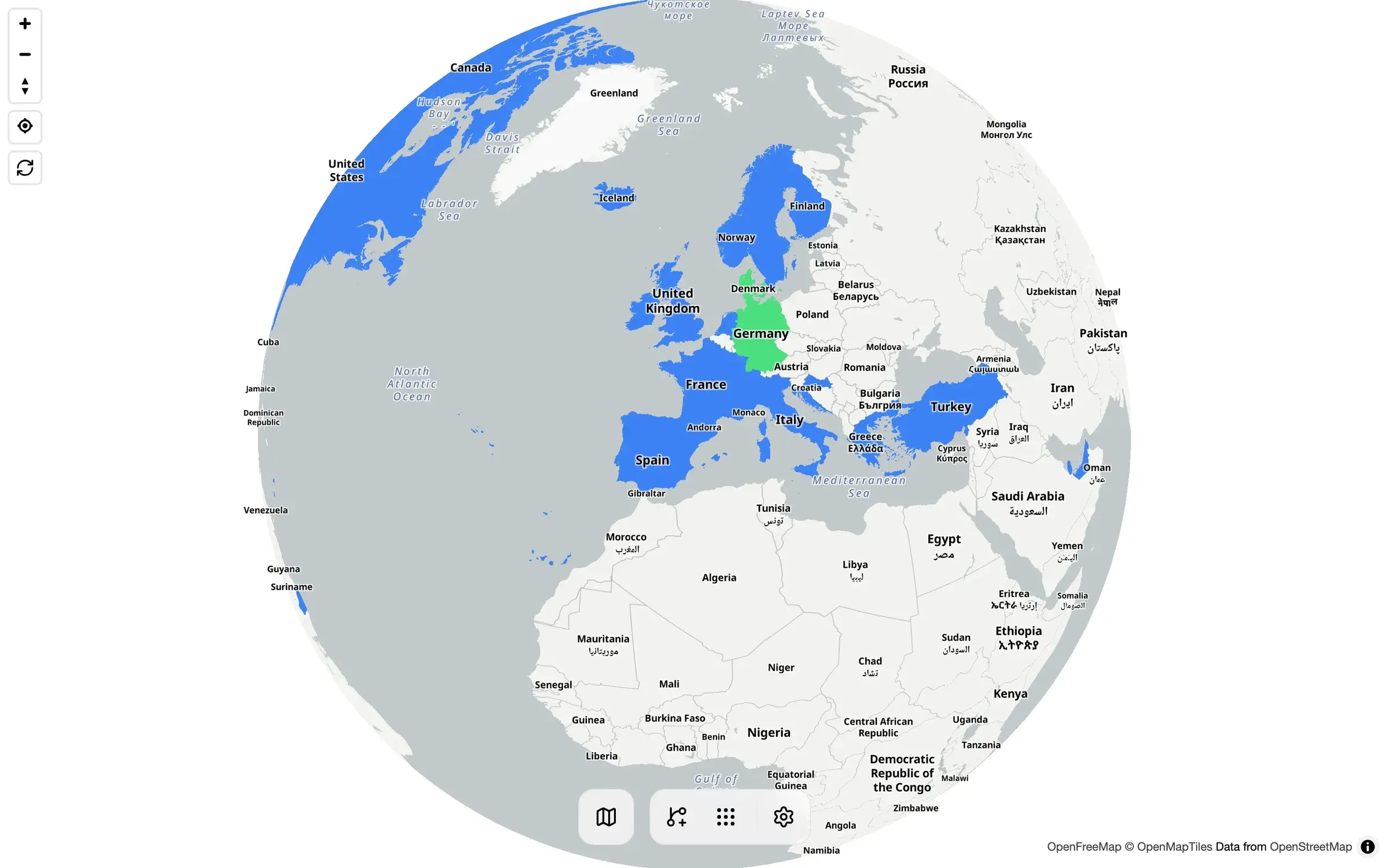
- Colour in the countries you know Mark countries you have lived in, visited, passed through or want to see on a globe.
- Share a read-only map Send a public link to your flight map, and choose whether it shows dates, times or seats.
- One place for the whole family Each person gets a private flight log, and a flight can list several passengers.
Replaces Flighty and App in the Air
AirTrail does the same job as Flighty and App in the Air. Here is what changes when you switch.
- Your flight history stays on your own server, so it cannot vanish when an app shuts down
- Full history and statistics at no cost, with no subscription
- Several people share one AirTrail, each with their own private log
- Export everything as a spreadsheet file or a full backup at any time
- AirTrail is a logbook, not a live tracker, so there are no delay, gate or boarding alerts
- There is no phone app; you use the website in your phone's browser
- Flights are not picked up from your email or calendar; you add or import them yourself
- Looking up a flight by number works best with a free key from an outside flight-data service
What happens when you click Deploy?
You do not need a server or any technical knowledge. Four steps, and AirTrail is running at its own web address.
- Step 1 Click Deploy and create your account
Deploy takes you to Cloudgate. Create an account, or log in if you have one. AirTrail itself is free.
- Step 2 Choose a server
No server? Get one from Cloudgate: pick a size and a country, and Cloudgate gets it ready. Already have one? Connect it instead.
- Step 3 Cloudgate sets up AirTrail
It prepares the server, makes the passwords the app needs and starts it. There is nothing to install and nothing to write down.
- Step 4 Open your app and sign in
Your app gets a free web address to start, without https. Add your own domain, like app.yourshop.com, and Cloudgate secures it with https for you.
New to Cloudgate? See what Cloudgate is
Run Cloudgate yourself? Deploy from your own console
In your Cloudgate console, open Templates and choose AirTrail.
Questions
Is AirTrail free?
Yes, AirTrail is free, open-source software under the GPL-3.0 licence, and every feature is included when you host it yourself. You pay only for your server. There is no paid edition or subscription.
Is AirTrail a good alternative to Flighty?
Yes, if what you want is a record of the flights you have taken. AirTrail keeps your flight history on a world map with detailed statistics, like Flighty's Passport, and imports Flighty's export file. It does not track flights live or send delay and gate alerts, which is Flighty's main job.
Can I import my flights from App in the Air, Flighty or MyFlightradar24?
Yes, AirTrail imports the export files from App in the Air, Flighty and MyFlightradar24, as well as TripIt calendar files, OpenFlights, JetLog, byAir, JetLovers, LogMyTrip and Miles & More. App in the Air shut down in 2024, so you need the export file you saved before its export closed in October 2024.
Does AirTrail track flights live?
No, AirTrail is a personal flight log, not a live flight-status app. It records the flights you take and can fill in a flight's details from its number, but it does not follow a flight in the air or send delay alerts.
Is there an AirTrail phone app?
No, AirTrail has no app in the app stores. Its website is designed to work on phones as well as computers, so you open your AirTrail address in your phone's browser to add or look at flights.
How do I sign in to AirTrail the first time?
The first person to open AirTrail's web address creates the owner account on its welcome screen; there is no default password. Do this right after setup, then add family members or friends under Settings, Users.
What server size do I need for AirTrail?
A small server is enough. AirTrail recommends 2 GB of memory and runs with 1 GB, and a database of 10,000 flights takes only about 25 MB of disk.
Do I need technical skills to run AirTrail?
No. Click Deploy, create your Cloudgate account and choose a server, and Cloudgate sets up AirTrail and gives it a web address. You use it in your browser like any other online tool.
Do I need my own server for AirTrail?
No. When you deploy AirTrail, hosted Cloudgate can provide a server. If you already rent one, you can connect it instead.
Related apps

A self-hosted travel tracker, trip planner and world map in one.

A self-hosted baby tracker the whole family can share.

A self-hosted habit tracker with daily ticks and streaks, no goals.

A private, encrypted diary you keep on your own server.