
Baby Buddy
A self-hosted baby tracker the whole family can share.
No server needed to start: Cloudgate can provide one. What happens when you click Deploy


What is Baby Buddy?
Baby Buddy is a self-hosted baby tracker: parents and caregivers share one log of feedings, sleep, diapers and growth, with charts and timers.
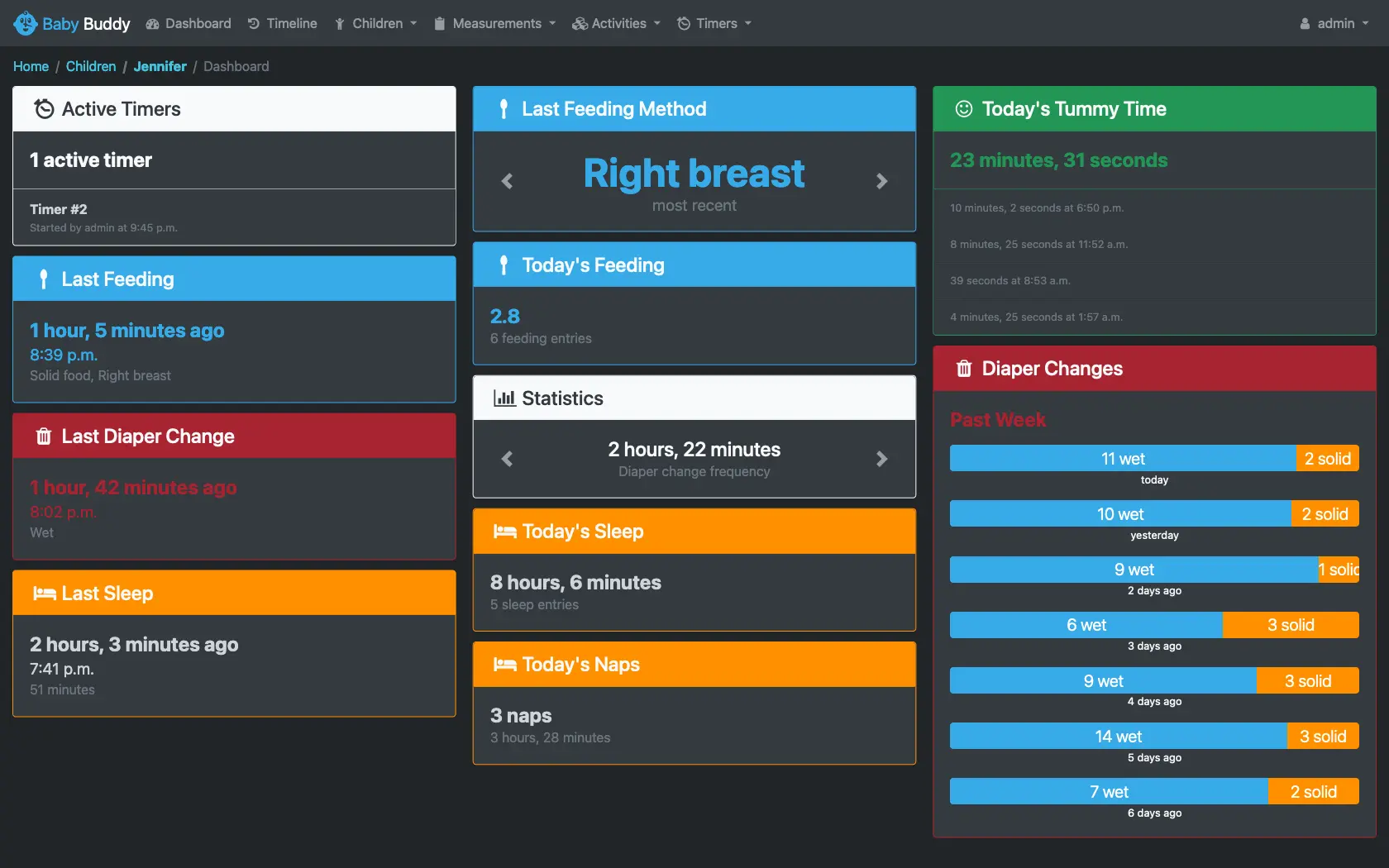
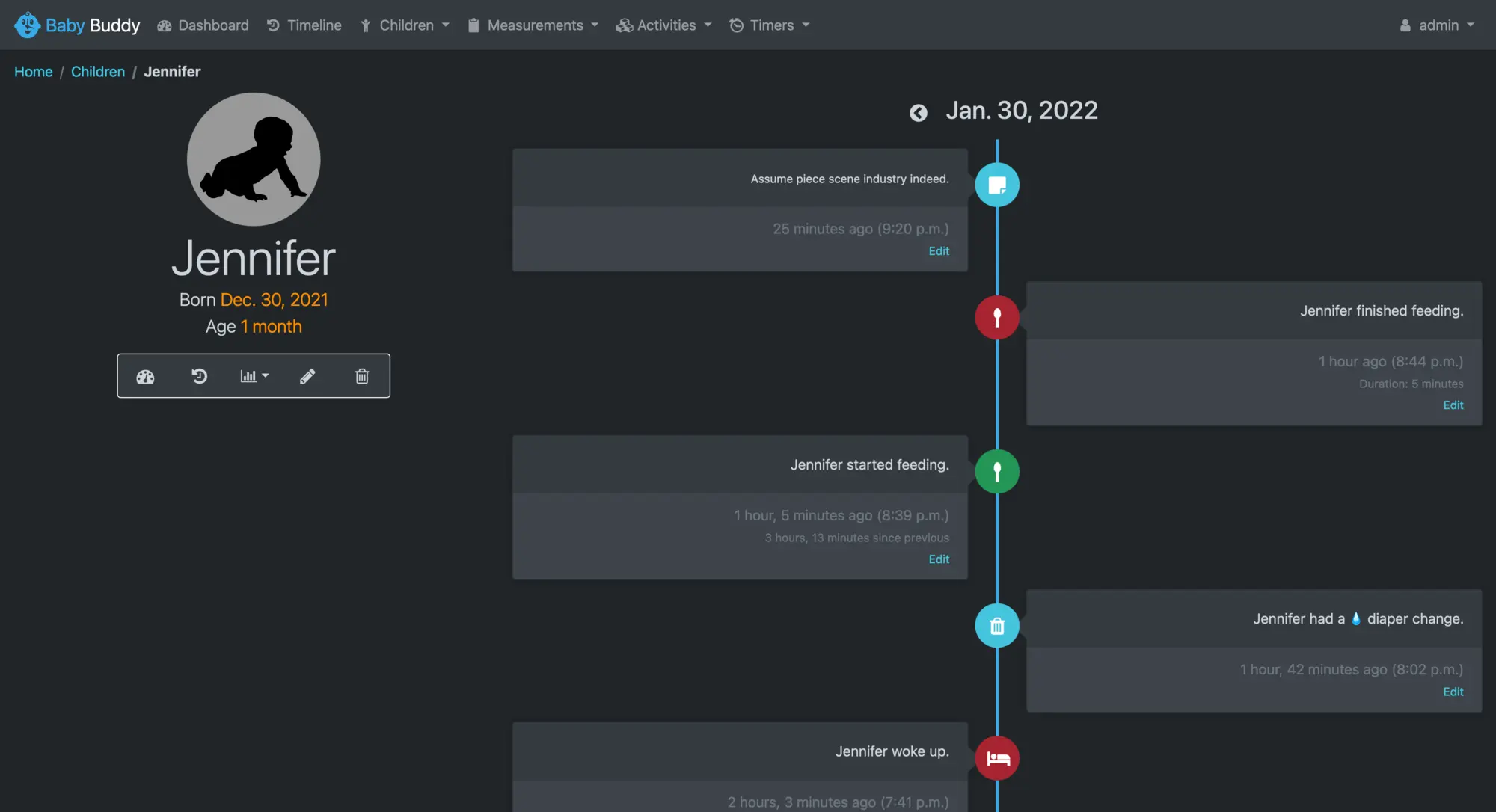
Baby Buddy is a free, open-source, self-hosted baby tracker, a shared alternative to subscription apps like Huckleberry. Parents and caregivers log feedings, sleep, diaper changes, tummy time, pumping, medication and growth, and Baby Buddy turns the entries into a dashboard, a daily timeline and charts, so you can see patterns instead of guessing.
Everyone who helps gets their own sign-in and adds to the same log. Two parents taking turns at night, for example, can check which breast the last feed started on and how long ago it was, and a grandmother looking after the baby on Tuesdays can log naps and diapers from her phone with a caregiver account. Twins or siblings each get their own dashboard.
Baby Buddy works in any browser, on a phone or a computer, in more than 25 languages. There is an Android app, a community-made iPhone companion, and a Home Assistant integration, and you can export your records to a spreadsheet at any time.
Cloudgate installs Baby Buddy on a server Cloudgate provides or one you connect, gives it a secure web address and sets a strong admin password for you, so your child's records stay with your family.
What you can do with Baby Buddy
- Log the day in a few taps Record feedings, sleep and naps, diaper changes, tummy time, pumping, medication and notes, from a phone or a computer.
- Time feeds and naps Start a timer when a feed or nap begins and save it as an entry when it ends, with the length filled in.
- See what matters at a glance Each child's dashboard shows the last feed, which side was used, the last diaper change, today's sleep and naps, and the week's diapers.
- Follow growth and health Keep weight, height, head size, BMI and temperature, and see them on charts over time.
- Spot patterns A timeline of every day and charts for sleep, feeding, diapers and growth help you see routines as they form.
- Share the work Give each parent and carer their own account, and give a babysitter a caregiver account that can add entries but not delete them.
- Track more than one child Add twins or siblings, each with their own dashboard, timeline and charts.
Replaces Huckleberry
Baby Buddy does the same job as Huckleberry. Here is what changes when you switch.
- Every caregiver shares the same log at no extra cost
- No subscription, no ads and no upgrade prompts
- Your child's records stay on your own server
- Export everything to a spreadsheet whenever you like
- No nap-time predictions, sleep plans or parenting advice
- On a phone you mostly use the web page; there is an Android app, and the iPhone app comes from the community
- Moving records over from another app means reshaping a spreadsheet; there is no one-click import
What happens when you click Deploy?
You do not need a server or any technical knowledge. Four steps, and Baby Buddy is running at its own web address.
- Step 1 Click Deploy and create your account
Deploy takes you to Cloudgate. Create an account, or log in if you have one. Baby Buddy itself is free.
- Step 2 Choose a server
No server? Get one from Cloudgate: pick a size and a country, and Cloudgate gets it ready. Already have one? Connect it instead.
- Step 3 Cloudgate sets up Baby Buddy
It prepares the server, makes the passwords the app needs and starts it. There is nothing to install and nothing to write down.
- Step 4 Open your app and sign in
Your app gets a free web address to start, without https. Add your own domain, like app.yourshop.com, and Cloudgate secures it with https for you.
New to Cloudgate? See what Cloudgate is
Run Cloudgate yourself? Deploy from your own console
In your Cloudgate console, open Templates and choose Baby Buddy.
Questions
Is Baby Buddy free?
Yes, Baby Buddy is free and open source under the BSD-2-Clause licence. There is no paid plan or premium tier, so every feature is included and you pay only for your server.
Is Baby Buddy a good alternative to Huckleberry?
Yes, if you mainly want a shared log of feeds, sleep, diapers and growth without a subscription. Huckleberry adds nap-time predictions and sleep advice on its paid plans; Baby Buddy has no predictions, but every caregiver can use it free and the data stays on your server.
Can my partner, a grandparent or a nanny use Baby Buddy too?
Yes. The Baby Buddy admin can give each person their own account, and everyone sees the same log. A caregiver account suits a babysitter, who can add and edit feeds, sleep, diapers and notes but cannot delete entries or change settings.
How do I sign in to Baby Buddy the first time?
Sign in to Baby Buddy with the username admin and the password Cloudgate created for you, which is shown in Cloudgate. Then add your child from the Children menu and create accounts for the other people who help.
Is there a Baby Buddy app for iPhone or Android?
Baby Buddy works in any phone's browser, and there is a Baby Buddy app for Android on Google Play. For iPhone, a separate community-made companion app and iOS Shortcuts are available; the Baby Buddy project itself does not make an iPhone app.
Can I move my data from Huckleberry or another baby tracker app to Baby Buddy?
Partly. Baby Buddy imports CSV and Excel files for each type of entry, such as feedings or diaper changes, but there is no ready-made importer, so an export from Huckleberry or another app has to be rearranged into Baby Buddy's columns first.
What server size do I need for Baby Buddy?
A small server is enough. The Baby Buddy documentation says a server with 1 GB of memory is enough for a couple of parents and any number of children.
Do I need technical skills to run Baby Buddy?
No. Click Deploy, create your Cloudgate account and choose a server, and Cloudgate sets up Baby Buddy and gives it a web address. You use it in your browser like any other online tool.
Do I need my own server for Baby Buddy?
No. When you deploy Baby Buddy, hosted Cloudgate can provide a server. If you already rent one, you can connect it instead.
Related apps

A self-hosted travel tracker, trip planner and world map in one.

A self-hosted flight tracker for every flight you take, on one map.

A self-hosted habit tracker with daily ticks and streaks, no goals.

A private, encrypted diary you keep on your own server.